
【hbase】——HBase 写优化之 BulkLoad 实现数据快速入库
1、为何要 BulkLoad 导入?传统的 HTableOutputFormat 写 HBase 有什么问题?
我们先看下 HBase 的写流程:
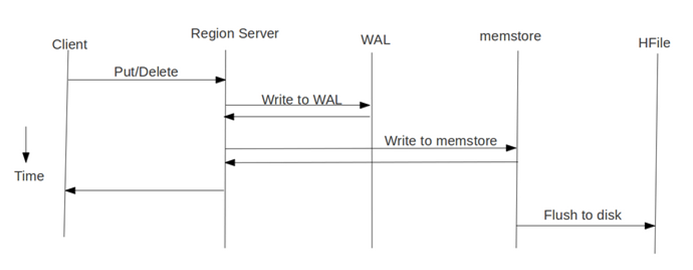
通常 MapReduce 在写HBase时使用的是 TableOutputFormat 方式,在reduce中直接生成put对象写入HBase,该方式在大数据量写入时效率低下(HBase会block写入,频繁进行flush,split,compact等大量IO操作),并对HBase节点的稳定性造成一定的影响(GC时间过长,响应变慢,导致节点超时退出,并引起一系列连锁反应),而HBase支持 bulk load 的入库方式,它是利用hbase的数据信息按照特定格式存储在hdfs内这一原理,直接在HDFS中生成持久化的HFile数据格式文件,然后上传至合适位置,即完成巨量数据快速入库的办法。配合mapreduce完成,高效便捷,而且不占用region资源,增添负载,在大数据量写入时能极大的提高写入效率,并降低对HBase节点的写入压力。
通过使用先生成HFile,然后再BulkLoad到Hbase的方式来替代之前直接调用HTableOutputFormat的方法有如下的好处:
(1)消除了对HBase集群的插入压力
(2)提高了Job的运行速度,降低了Job的执行时间
目前此种方式仅仅适用于只有一个列族的情况,在新版 HBase 中,单列族的限制会消除。
2、bulkload 流程与实践
bulkload 方式需要两个Job配合完成:
(1)第一个Job还是运行原来业务处理逻辑,处理的结果不直接调用HTableOutputFormat写入到HBase,而是先写入到HDFS上的一个中间目录下(如 middata)
(2)第二个Job以第一个Job的输出(middata)做为输入,然后将其格式化HBase的底层存储文件HFile
(3)调用BulkLoad将第二个Job生成的HFile导入到对应的HBase表中
下面给出相应的范例代码:
|
1
2
3
4
5
6
7
8
9
10
11
12
13
14
15
16
17
18
19
20
21
22
23
24
25
26
27
28
29
30
31
32
33
34
35
36
37
38
39
40
41
42
43
44
45
46
47
48
49
50
51
52
53
54
55
56
57
58
59
60
61
62
63
64
65
66
67
68
69
70
71
72
73
74
75
76
77
78
79
80
81
82
83
84
85
86
87
88
89
90
91
92
93
94
95
96
97
98
99
100
101
102
103
104
105
106
107
108
109
110
111
112
113
114
115
116
117
118
119
120
121
122
123
124
125
126
127
128
129
130
131
132
133
134
135
136
137
138
139
140
141
142
143
144
|
import java.io.IOException;import org.apache.hadoop.conf.Configuration;import org.apache.hadoop.fs.Path;import org.apache.hadoop.hbase.HBaseConfiguration;import org.apache.hadoop.hbase.KeyValue;import org.apache.hadoop.hbase.client.HTable;import org.apache.hadoop.hbase.client.Put;import org.apache.hadoop.hbase.io.ImmutableBytesWritable;import org.apache.hadoop.hbase.mapreduce.HFileOutputFormat;import org.apache.hadoop.hbase.mapreduce.KeyValueSortReducer;import org.apache.hadoop.hbase.mapreduce.LoadIncrementalHFiles;import org.apache.hadoop.hbase.util.Bytes;import org.apache.hadoop.io.IntWritable;import org.apache.hadoop.io.LongWritable;import org.apache.hadoop.io.Text;import org.apache.hadoop.mapreduce.Job;import org.apache.hadoop.mapreduce.Mapper;import org.apache.hadoop.mapreduce.Reducer;import org.apache.hadoop.mapreduce.lib.input.FileInputFormat;import org.apache.hadoop.mapreduce.lib.input.TextInputFormat;import org.apache.hadoop.mapreduce.lib.output.FileOutputFormat;import org.apache.hadoop.mapreduce.lib.output.TextOutputFormat;import org.apache.hadoop.util.GenericOptionsParser;public class GeneratePutHFileAndBulkLoadToHBase { public static class WordCountMapper extends Mapper<LongWritable, Text, Text, IntWritable> { private Text wordText=new Text(); private IntWritable one=new IntWritable(1); @Override protected void map(LongWritable key, Text value, Context context) throws IOException, InterruptedException { // TODO Auto-generated method stub String line=value.toString(); String[] wordArray=line.split(" "); for(String word:wordArray) { wordText.set(word); context.write(wordText, one); } } } public static class WordCountReducer extends Reducer<Text, IntWritable, Text, IntWritable> { private IntWritable result=new IntWritable(); protected void reduce(Text key, Iterable<IntWritable> valueList, Context context) throws IOException, InterruptedException { // TODO Auto-generated method stub int sum=0; for(IntWritable value:valueList) { sum+=value.get(); } result.set(sum); context.write(key, result); } } public static class ConvertWordCountOutToHFileMapper extends Mapper<LongWritable, Text, ImmutableBytesWritable, Put> { @Override protected void map(LongWritable key, Text value, Context context) throws IOException, InterruptedException { // TODO Auto-generated method stub String wordCountStr=value.toString(); String[] wordCountArray=wordCountStr.split("\t"); String word=wordCountArray[0]; int count=Integer.valueOf(wordCountArray[1]); //创建HBase中的RowKey byte[] rowKey=Bytes.toBytes(word); ImmutableBytesWritable rowKeyWritable=new ImmutableBytesWritable(rowKey); byte[] family=Bytes.toBytes("cf"); byte[] qualifier=Bytes.toBytes("count"); byte[] hbaseValue=Bytes.toBytes(count); // Put 用于列簇下的多列提交,若只有一个列,则可以使用 KeyValue 格式 // KeyValue keyValue = new KeyValue(rowKey, family, qualifier, hbaseValue); Put put=new Put(rowKey); put.add(family, qualifier, hbaseValue); context.write(rowKeyWritable, put); } } public static void main(String[] args) throws Exception { // TODO Auto-generated method stub Configuration hadoopConfiguration=new Configuration(); String[] dfsArgs = new GenericOptionsParser(hadoopConfiguration, args).getRemainingArgs(); //第一个Job就是普通MR,输出到指定的目录 Job job=new Job(hadoopConfiguration, "wordCountJob"); job.setJarByClass(GeneratePutHFileAndBulkLoadToHBase.class); job.setMapperClass(WordCountMapper.class); job.setReducerClass(WordCountReducer.class); job.setOutputKeyClass(Text.class); job.setOutputValueClass(IntWritable.class); FileInputFormat.setInputPaths(job, new Path(dfsArgs[0])); FileOutputFormat.setOutputPath(job, new Path(dfsArgs[1])); //提交第一个Job int wordCountJobResult=job.waitForCompletion(true)?0:1; //第二个Job以第一个Job的输出做为输入,只需要编写Mapper类,在Mapper类中对一个job的输出进行分析,并转换为HBase需要的KeyValue的方式。 Job convertWordCountJobOutputToHFileJob=new Job(hadoopConfiguration, "wordCount_bulkload"); convertWordCountJobOutputToHFileJob.setJarByClass(GeneratePutHFileAndBulkLoadToHBase.class); convertWordCountJobOutputToHFileJob.setMapperClass(ConvertWordCountOutToHFileMapper.class); //ReducerClass 无需指定,框架会自行根据 MapOutputValueClass 来决定是使用 KeyValueSortReducer 还是 PutSortReducer //convertWordCountJobOutputToHFileJob.setReducerClass(KeyValueSortReducer.class); convertWordCountJobOutputToHFileJob.setMapOutputKeyClass(ImmutableBytesWritable.class); convertWordCountJobOutputToHFileJob.setMapOutputValueClass(Put.class); //以第一个Job的输出做为第二个Job的输入 FileInputFormat.addInputPath(convertWordCountJobOutputToHFileJob, new Path(dfsArgs[1])); FileOutputFormat.setOutputPath(convertWordCountJobOutputToHFileJob, new Path(dfsArgs[2])); //创建HBase的配置对象 Configuration hbaseConfiguration=HBaseConfiguration.create(); //创建目标表对象 HTable wordCountTable =new HTable(hbaseConfiguration, "word_count"); HFileOutputFormat.configureIncrementalLoad(convertWordCountJobOutputToHFileJob,wordCountTable); //提交第二个job int convertWordCountJobOutputToHFileJobResult=convertWordCountJobOutputToHFileJob.waitForCompletion(true)?0:1; //当第二个job结束之后,调用BulkLoad方式来将MR结果批量入库 LoadIncrementalHFiles loader = new LoadIncrementalHFiles(hbaseConfiguration); //第一个参数为第二个Job的输出目录即保存HFile的目录,第二个参数为目标表 loader.doBulkLoad(new Path(dfsArgs[2]), wordCountTable); //最后调用System.exit进行退出 System.exit(convertWordCountJobOutputToHFileJobResult); }} |
比如原始的输入数据的目录为:/rawdata/test/wordcount/20131212
中间结果数据保存的目录为:/middata/test/wordcount/20131212
最终生成的HFile保存的目录为:/resultdata/test/wordcount/20131212
运行上面的Job的方式如下:
hadoop jar test.jar /rawdata/test/wordcount/20131212 /middata/test/wordcount/20131212 /resultdata/test/wordcount/20131212
3、说明与注意事项:
(1)HFile方式在所有的加载方案里面是最快的,不过有个前提——数据是第一次导入,表是空的。如果表中已经有了数据。HFile再导入到hbase的表中会触发split操作。
(2)最终输出结果,无论是map还是reduce,输出部分key和value的类型必须是: < ImmutableBytesWritable, KeyValue>或者< ImmutableBytesWritable, Put>。
否则报这样的错误:
|
1
2
3
|
java.lang.IllegalArgumentException: Can't read partitions file...Caused by: java.io.IOException: wrong key class: org.apache.hadoop.io.*** is not class org.apache.hadoop.hbase.io.ImmutableBytesWritable |
(3)最终输出部分,Value类型是KeyValue 或Put,对应的Sorter分别是KeyValueSortReducer或PutSortReducer,这个 SorterReducer 可以不指定,因为源码中已经做了判断:
|
1
2
3
4
5
6
7
|
if (KeyValue.class.equals(job.getMapOutputValueClass())) { job.setReducerClass(KeyValueSortReducer.class);} else if (Put.class.equals(job.getMapOutputValueClass())) { job.setReducerClass(PutSortReducer.class);} else { LOG.warn("Unknown map output value type:" + job.getMapOutputValueClass());} |
(4) MR例子中job.setOutputFormatClass(HFileOutputFormat.class); HFileOutputFormat只适合一次对单列族组织成HFile文件,多列簇需要起多个 job,不过新版本的 Hbase 已经解决了这个限制。
(5) MR例子中最后生成HFile存储在HDFS上,输出路径下的子目录是各个列族。如果对HFile进行入库HBase,相当于move HFile到HBase的Region中,HFile子目录的列族内容没有了。
(6)最后一个 Reduce 没有 setNumReduceTasks 是因为,该设置由框架根据region个数自动配置的。
(7)下边配置部分,注释掉的其实写不写都无所谓,因为看源码就知道configureIncrementalLoad方法已经把固定的配置全配置完了,不固定的部分才需要手动配置。
|
1
2
3
4
5
6
7
8
9
10
11
12
13
14
15
16
17
18
19
20
21
22
23
24
25
26
27
28
29
30
31
32
33
34
35
36
37
38
39
40
41
42
43
44
45
|
public class HFileOutput { //job 配置 public static Job configureJob(Configuration conf) throws IOException { Job job = new Job(configuration, "countUnite1"); job.setJarByClass(HFileOutput.class); //job.setNumReduceTasks(2); //job.setOutputKeyClass(ImmutableBytesWritable.class); //job.setOutputValueClass(KeyValue.class); //job.setOutputFormatClass(HFileOutputFormat.class); Scan scan = new Scan(); scan.setCaching(10); scan.addFamily(INPUT_FAMILY); TableMapReduceUtil.initTableMapperJob(inputTable, scan, HFileOutputMapper.class, ImmutableBytesWritable.class, LongWritable.class, job); //这里如果不定义reducer部分,会自动识别定义成KeyValueSortReducer.class 和PutSortReducer.class job.setReducerClass(HFileOutputRedcuer.class); //job.setOutputFormatClass(HFileOutputFormat.class); HFileOutputFormat.configureIncrementalLoad(job, new HTable( configuration, outputTable)); HFileOutputFormat.setOutputPath(job, new Path()); //FileOutputFormat.setOutputPath(job, new Path()); //等同上句 return job; } public static class HFileOutputMapper extends TableMapper<ImmutableBytesWritable, LongWritable> { public void map(ImmutableBytesWritable key, Result values, Context context) throws IOException, InterruptedException { //mapper逻辑部分 context.write(new ImmutableBytesWritable(Bytes()), LongWritable()); } } public static class HFileOutputRedcuer extends Reducer<ImmutableBytesWritable, LongWritable, ImmutableBytesWritable, KeyValue> { public void reduce(ImmutableBytesWritable key, Iterable<LongWritable> values, Context context) throws IOException, InterruptedException { //reducer逻辑部分 KeyValue kv = new KeyValue(row, OUTPUT_FAMILY, tmp[1].getBytes(), Bytes.toBytes(count)); context.write(key, kv); } }} |
4、Refer:
1、Hbase几种数据入库(load)方式比较
http://blog.csdn.net/kirayuan/article/details/6371635
2、MapReduce生成HFile入库到HBase及源码分析
http://blog.pureisle.net/archives/1950.html
3、MapReduce生成HFile入库到HBase
http://shitouer.cn/2013/02/hbase-hfile-bulk-load/
【hbase】——HBase 写优化之 BulkLoad 实现数据快速入库的更多相关文章
- HBase 写优化之 BulkLoad 实现数据快速入库
在第一次建立Hbase表的时候,我们可能需要往里面一次性导入大量的初始化数据.我们很自然地想到将数据一条条插入到Hbase中,或者通过MR方式等.但是这些方式不是慢就是在导入的过程的占用Region资 ...
- IDEA中Spark往Hbase中写数据
import org.apache.hadoop.hbase.HBaseConfiguration import org.apache.hadoop.hbase.io.ImmutableBytesWr ...
- 如何降低90%Java垃圾回收时间?以阿里HBase的GC优化实践为例
过去的一年里,我们准备在Ali-HBase上突破这个被普遍认知的痛点,为此进行了深度分析及全面创新的工作,获得了一些比较好的效果.以蚂蚁风控场景为例,HBase的线上young GC时间从120ms减 ...
- 万字长文详解HBase读写性能优化
一.HBase 读优化 1. HBase客户端优化 和大多数系统一样,客户端作为业务读写的入口,姿势使用不正确通常会导致本业务读延迟较高实际上存在一些使用姿势的推荐用法,这里一般需要关注四个问题: 1 ...
- 一个自定义 HBase Filter -“通过RowKeys来高性能获取数据”
摘要: 大家在使用HBase和Solr搭建系统中经常遇到的一个问题就是:“我通过SOLR得到了RowKeys后,该怎样去HBase上取数据”.使用现有的Filter性能差劲,网上也没有现成的自定义Fi ...
- HBase并行写机制(mvcc)
HBase在保证高性能的同时,为用户提供了便于理解的一致性数据模型MVCC (Multiversion Concurrency Control),即多版本并发控制技术,把数据库的行锁与行的多个版本结合 ...
- hbase G1 GC优化
本文借鉴之前HBaseConAsia2017,小米公司对hbase g1 gc的优化分享.此外还可以参考apache官方博客对于hbase g1 gc优化的一篇文章(Tuning G1GC For Y ...
- Hbase实用技巧:全量+增量数据的迁移方法
摘要:本文介绍了一种Hbase迁移的方法,可以在一些特定场景下运用. 背景 在Hbase使用过程中,使用的Hbase集群经常会因为某些原因需要数据迁移.大多数情况下,可以跟用户协商用离线的方式进行迁移 ...
- 使用MapReduce查询Hbase表指定列簇的全部数据输出到HDFS(一)
package com.bank.service; import java.io.IOException; import org.apache.hadoop.conf.Configuration;im ...
随机推荐
- Eclipse设置风格
如果觉得Eclipse的颜色太刺眼,可以修改背景与字体颜色,方法如下: (1)到http://eclipsecolorthemes.org/下载主题文件,可以选择xml文件或者epf文件: (2)Ec ...
- 删除Android包
Android删除包有很多种方法,其中一种通过Intent删除,代码如下: public boolean unload (String n){ boolean res = true; try{ // ...
- java必看书籍
Java核心技术 卷1 基础知识(第9版)Java核心技术 卷II 高级特性(第9版) 数据库系统概念(原书第6版)Oracle 从入门到精通MySQL数据库应用从入门到精通 Java并发编程实战(第 ...
- java入门必备单词
① anchor 锚 锚点 ② administrator 管理员 ③ application 应用程序 ④ align 对齐 ⑤ attribute 属性 ⑥ access 访问 ⑦ break 暂 ...
- Gym 101102D---Rectangles(单调栈)
题目链接 http://codeforces.com/gym/101102/problem/D problem description Given an R×C grid with each cel ...
- 18 个命令&工具帮你定位 Linux 性能问题
1.TopTop命令是一个性能监控程序,它按一定的顺序显示所有正在运行而且处于活动状态的实时进程,而且会定期更新显示结果.这条命令显示了CPU的使用率.内存使用率.交换内存使用大小.高速缓存使用大小. ...
- TestNG官方文档中文版(3)-testng.xml
TestNG的官方文档的中文翻译版第3章,原文请见 http://testng.org/doc/documentation-main.html 3 - testng.xml 调用TestNG由几种不同 ...
- Unsupported configuration attributes: [FILE_UPLOAD]
Caused by: java.lang.IllegalArgumentException: Unsupported configuration attributes: [FILE_UPLOAD] 情 ...
- FancyBox - 经典的 jQuery Lightbox 插件
FancyBox 是一款非常优秀的弹窗插件,能够为图片.HTML 内容和其它任务的多媒体内容提供优雅的弹出缩放效果.作为是最流行的 Lightbox 插件之一,可以通过 fitToView 实现自适应 ...
- 15个最佳的代码评审(Code Review)工具
代码评审可以被看作是计算机源代码的测试,它的目的是查找和修复引入到开发阶段的应用程序的错误,提高软件的整体素质和开发者的技能.代码审查程序以各种形式,如结对编程,代码抽查等.在这个列表中,我们编制了1 ...