
DDD 领域驱动设计-两个实体的碰撞火花
上一篇:《DDD 领域驱动设计-领域模型中的用户设计?》
开源地址:https://github.com/yuezhongxin/CNBlogs.Apply.Sample(代码已更新)
在之前的项目开发中,只有一个 JsPermissionApply 实体(JS 权限申请),所以,CNBlogs.Apply.Domain 设计的有些不全面,或者称之为不完善,因为在一些简单的项目开发中,一般只会存在一个实体,单个实体的设计,我们可能会忽略很多的东西,从而以后会导致一些问题的产生,那如果再增加一个实体,CNBlogs.Apply.Domain 该如何设计呢?
按照实际项目开发需要,CNBlogs.Apply.Domain 需要增加一个 BlogChangeApply 实体(博客地址更改申请)。
在 BlogChangeApply 实体设计之前,我们按照之前 JsPermissionApply 实体设计过程,先大致画一下流程图:
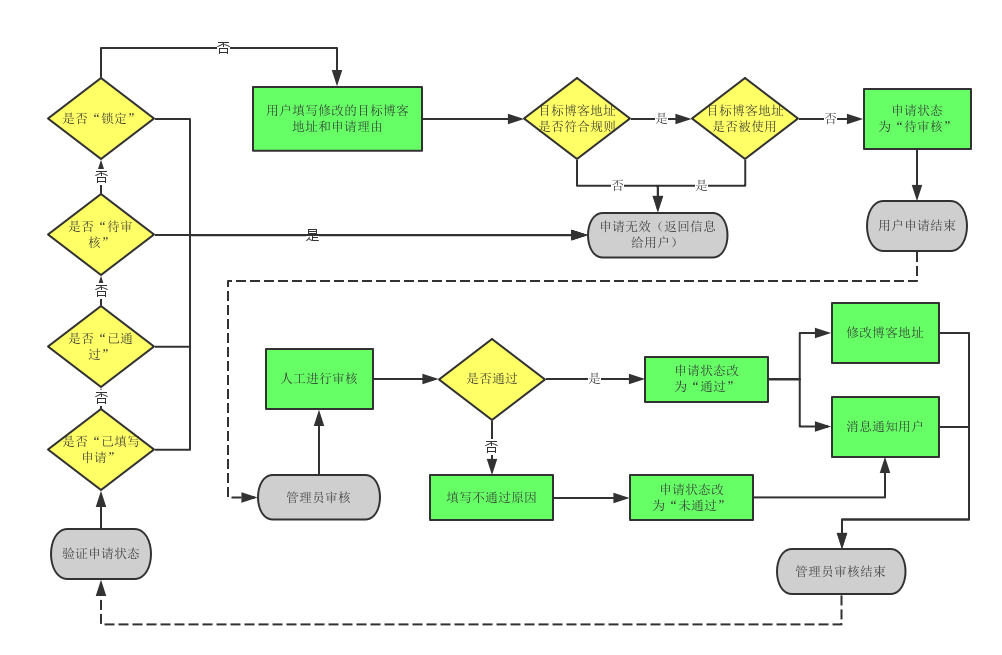
流程图很简单,并且和之前的 JS 权限申请和审核很相似,我们再看一下之前的 JsPermissionApply 实体设计代码:
namespace CNBlogs.Apply.Domain

{

    public class JsPermissionApply : IAggregateRoot

    {

        private IEventBus eventBus;

        public JsPermissionApply()

        { }

        public JsPermissionApply(string reason, User user, string ip)

        {

            if (string.IsNullOrEmpty(reason))

            {

                throw new ArgumentException("申请内容不能为空");

            }

            if (reason.Length > 3000)

            {

                throw new ArgumentException("申请内容超出最大长度");

            }

            if (user == null)

            {

                throw new ArgumentException("用户为null");

            }

            if (user.Id == 0)

            {

                throw new ArgumentException("用户Id为0");

            }

            this.Reason = HttpUtility.HtmlEncode(reason);

            this.User = user;

            this.Ip = ip;

            this.Status = Status.Wait;

        }

        public int Id { get; private set; }

        public string Reason { get; private set; }

        public virtual User User { get; private set; }

        public Status Status { get; private set; } = Status.Wait;

        public string Ip { get; private set; }

        public DateTime ApplyTime { get; private set; } = DateTime.Now;

        public string ReplyContent { get; private set; }

        public DateTime? ApprovedTime { get; private set; }

        public bool IsActive { get; private set; } = true;

        public async Task<Status> GetStatus(string userAlias)

        {

            if (await BlogService.HaveJsPermission(userAlias))

            {

                return Status.Pass;

            }

            else

            {

                if (this.Status == Status.Deny && DateTime.Now > this.ApplyTime.AddDays(3))

                {

                    return Status.None;

                }

                if (this.Status == Status.Pass)

                {

                    return Status.None;

                }

                return this.Status;

            }

        }

        public async Task<bool> Pass()

        {

            if (this.Status != Status.Wait)

            {

                return false;

            }

            this.Status = Status.Pass;

            this.ApprovedTime = DateTime.Now;

            this.ReplyContent = "恭喜您!您的JS权限申请已通过审批。";

            eventBus = IocContainer.Default.Resolve<IEventBus>();

            await eventBus.Publish(new JsPermissionOpenedEvent() { UserAlias = this.User.Alias });

            return true;

        }

        public bool Deny(string replyContent)

        {

            if (this.Status != Status.Wait)

            {

                return false;

            }

            this.Status = Status.Deny;

            this.ApprovedTime = DateTime.Now;

            this.ReplyContent = replyContent;

            return true;

        }

        public bool Lock()

        {

            if (this.Status != Status.Wait)

            {

                return false;

            }

            this.Status = Status.Lock;

            this.ApprovedTime = DateTime.Now;

            this.ReplyContent = "抱歉!您的JS权限申请没有被批准,并且申请已被锁定,具体请联系contact@cnblogs.com。";

            return true;

        }

        public async Task Passed()

        {

            if (this.Status != Status.Pass)

            {

                return;

            }

            eventBus = IocContainer.Default.Resolve<IEventBus>();

            await eventBus.Publish(new MessageSentEvent() { Title = "您的JS权限申请已批准", Content = this.ReplyContent, RecipientId = this.User.Id });

        }

        public async Task Denied()

        {

            if (this.Status != Status.Deny)

            {

                return;

            }

            eventBus = IocContainer.Default.Resolve<IEventBus>();

            await eventBus.Publish(new MessageSentEvent() { Title = "您的JS权限申请未通过审批", Content = this.ReplyContent, RecipientId = this.User.Id });

        }

        public async Task Locked()

        {

            if (this.Status != Status.Lock)

            {

                return;

            }

            eventBus = IocContainer.Default.Resolve<IEventBus>();

            await eventBus.Publish(new MessageSentEvent() { Title = "您的JS权限申请未通过审批", Content = this.ReplyContent, RecipientId = this.User.Id });

        }

    }

}
根据博客地址更改申请和审核的流程图,然后再结合上面 JsPermissionApply 实体代码,我们就可以幻想出 BlogChangeApply 的实体代码,具体是怎样的了,如果你实现一下,会发现和上面的代码简直一摸一样,区别就在于多了一个 TargetBlogApp(目标博客地址),然后后面的 Repository 和 Application.Services 复制粘贴就行了,没有任何的难度,这样设计实现也没什么问题,但是项目中的重复代码简直太多了,领域驱动设计慢慢就变成了一个脚手架,没有任何的一点用处。
该如何解决上面的问题呢?我们需要思考下 CNBlogs.Apply.Domain 所包含的含义,CNBlogs.Apply.Domain 顾名思议是申请领域,并不是 CNBlogs.JsPermissionApply.Domain,也不是 CNBlogs.BlogChangeApply.Domain,实体的产生是根据聚合根的设计,那 CNBlogs.Apply.Domain 的聚合根是什么呢?在之前的设计中只有 IAggregateRoot 和 IEntity,具体代码:
namespace CNBlogs.Apply.Domain

{

    public interface IAggregateRoot : IEntity { }

}

namespace CNBlogs.Apply.Domain

{

    public interface IEntity

    {

        int Id { get; }

    }

}
现在再来看上面这种设计,完全是错误的,聚合根接口怎么能继承实体接口呢,还有一个问题,就是如果有多个实体设计,是继承 IAggregateRoot?还是 IEntity?IEntity 在这样的设计中,没有任何的作用,并且闲的很多余,IAggregateRoot 到最后也只是一个抽象的接口,CNBlogs.Apply.Domain 中并没有具体的实现。
解决上面混乱的问题,就是抽离出 ApplyAggregateRoot(申请聚合根),然后 JsPermissionApply 和 BlogChangeApply 实体都是由它进行产生,在这之前,我们先定义一下 IAggregateRoot:
namespace CNBlogs.Apply.Domain

{

    public interface IAggregateRoot

    {

        int Id { get; }

    }

}
然后根据 JS 权限申请/审核和博客地址更改申请/审核的流程图,抽离出 ApplyAggregateRoot,并且继承自 IAggregateRoot,具体实现代码:
namespace CNBlogs.Apply.Domain

{

    public class ApplyAggregateRoot : IAggregateRoot

    {

        private IEventBus eventBus;

        public ApplyAggregateRoot()

        { }

        public ApplyAggregateRoot(string reason, User user, string ip)

        {

            if (string.IsNullOrEmpty(reason))

            {

                throw new ArgumentException("申请内容不能为空");

            }

            if (reason.Length > 3000)

            {

                throw new ArgumentException("申请内容超出最大长度");

            }

            if (user == null)

            {

                throw new ArgumentException("用户为null");

            }

            if (user.Id == 0)

            {

                throw new ArgumentException("用户Id为0");

            }

            this.Reason = HttpUtility.HtmlEncode(reason);

            this.User = user;

            this.Ip = ip;

            this.Status = Status.Wait;

        }

        public int Id { get; protected set; }

        public string Reason { get; protected set; }

        public virtual User User { get; protected set; }

        public Status Status { get; protected set; } = Status.Wait;

        public string Ip { get; protected set; }

        public DateTime ApplyTime { get; protected set; } = DateTime.Now;

        public string ReplyContent { get; protected set; }

        public DateTime? ApprovedTime { get; protected set; }

        public bool IsActive { get; protected set; } = true;

        protected async Task<bool> Pass<TEvent>(string replyContent, TEvent @event)

            where TEvent : IEvent

        {

            if (this.Status != Status.Wait)

            {

                return false;

            }

            this.Status = Status.Pass;

            this.ApprovedTime = DateTime.Now;

            this.ReplyContent = replyContent;

            eventBus = IocContainer.Default.Resolve<IEventBus>();

            await eventBus.Publish(@event);

            return true;

        }

        public bool Deny(string replyContent)

        {

            if (this.Status != Status.Wait)

            {

                return false;

            }

            this.Status = Status.Deny;

            this.ApprovedTime = DateTime.Now;

            this.ReplyContent = replyContent;

            return true;

        }

        protected bool Lock(string replyContent)

        {

            if (this.Status != Status.Wait)

            {

                return false;

            }

            this.Status = Status.Lock;

            this.ApprovedTime = DateTime.Now;

            this.ReplyContent = replyContent;

            return true;

        }

        protected async Task Passed(string title)

        {

            if (this.Status != Status.Pass)

            {

                return;

            }

            await SendMessage(title);

        }

        protected async Task Denied(string title)

        {

            if (this.Status != Status.Deny)

            {

                return;

            }

            await SendMessage(title);

        }

        protected async Task Locked(string title)

        {

            if (this.Status != Status.Lock)

            {

                return;

            }

            await SendMessage(title);

        }

        private async Task SendMessage(string title)

        {

            eventBus = IocContainer.Default.Resolve<IEventBus>();

            await eventBus.Publish(new MessageSentEvent() { Title = title, Content = this.ReplyContent, RecipientId = this.User.Id });

        }

    }

}
ApplyAggregateRoot 的实现,基本上是抽离出 JsPermissionApply 和 BlogChangeApply 实体产生的重复代码,比如不管什么类型的申请,都包含申请理由、申请人信息、通过或拒绝等操作,这些也就是 ApplyAggregateRoot 所体现的领域含义,我们再来看下 BlogChangeApply 实体的实现代码:
namespace CNBlogs.Apply.Domain

{

    public class BlogChangeApply : ApplyAggregateRoot

    {

        public BlogChangeApply()

        { }

        public BlogChangeApply(string targetBlogApp, string reason, User user, string ip)

            : base(reason, user, ip)

        {

            if (string.IsNullOrEmpty(targetBlogApp))

            {

                throw new ArgumentException("博客地址不能为空");

            }

            targetBlogApp = targetBlogApp.Trim();

            if (targetBlogApp.Length < 4)

            {

                throw new ArgumentException("博客地址至少4个字符!");

            }

            if (!Regex.IsMatch(targetBlogApp, @"^([0-9a-zA-Z_-])+$"))

            {

                throw new ArgumentException("博客地址只能使用英文、数字、-连字符、_下划线!");

            }

            this.TargetBlogApp = targetBlogApp;

        }

        public string TargetBlogApp { get; private set; }

        public Status GetStatus()

        {

            if (this.Status == Status.Deny && DateTime.Now > this.ApplyTime.AddDays(3))

            {

                return Status.None;

            }

            return this.Status;

        }

        public async Task<bool> Pass()

        {

            var replyContent = $"恭喜您!您的博客地址更改申请已通过,新的博客地址:<a href='{this.TargetBlogApp}' target='_blank'>{this.TargetBlogApp}</a>";

            return await base.Pass(replyContent, new BlogChangedEvent() { UserAlias = this.User.Alias, TargetUserAlias = this.TargetBlogApp });

        }

        public bool Lock()

        {

            var replyContent = "抱歉!您的博客地址更改申请没有被批准,并且申请已被锁定,具体请联系contact@cnblogs.com。";

            return base.Lock(replyContent);

        }

        public async Task Passed()

        {

            await base.Passed("您的博客地址更改申请已批准");

        }

        public async Task Denied()

        {

            await base.Passed("您的博客地址更改申请未通过审批");

        }

        public async Task Locked()

        {

            await Denied();

        }

    }

}
BlogChangeApply 继承自 ApplyAggregateRoot,并且单独的 TargetBlogApp 操作,其他一些实现都是基本的参数传递操作,没有具体实现,JsPermissionApply 的实体代码就不贴了,和 BlogChangeApply 比较类似,只不过有一些不同的业务实现。
CNBlogs.Apply.Domain 改造之后,还要对应改造下 Repository,之前的代码大家可以看下 Github,这边我简单说下改造的过程,首先 IRepository 的设计不变:
namespace CNBlogs.Apply.Repository.Interfaces

{

    public interface IRepository<TAggregateRoot>

        where TAggregateRoot : class, IAggregateRoot

    {

        IQueryable<TAggregateRoot> Get(int id);

        IQueryable<TAggregateRoot> GetAll();

    }

}
IRepository 对应 BaseRepository 实现,它的作用就是抽离出所有聚合根的 Repository 操作,并不单独包含 ApplyAggregateRoot,所以,我们还需要一个对 ApplyAggregateRoot 操作的 Repository 实现,定义如下:
namespace CNBlogs.Apply.Repository.Interfaces

{

    public interface IApplyRepository<TApplyAggregateRoot> : IRepository<TApplyAggregateRoot>

        where TApplyAggregateRoot : ApplyAggregateRoot

    {

        IQueryable<TApplyAggregateRoot> GetByUserId(int userId);

        IQueryable<TApplyAggregateRoot> GetWaiting(int userId);

        IQueryable<TApplyAggregateRoot> GetWaiting();

    }

}
大家如果熟悉之前代码的话,会发现 IApplyRepository 的定义和 IJsPermissionApplyRepository 的定义是一摸一样的,设计 IApplyRepository 的好处就是,对于申请实体的相同操作,我们就不需要再写重复代码了,比如 IJsPermissionApplyRepository 和 IBlogChangeApplyRepository 的定义:
namespace CNBlogs.Apply.Repository.Interfaces

{

    public interface IJsPermissionApplyRepository : IApplyRepository<JsPermissionApply>

    { }

}

namespace CNBlogs.Apply.Repository.Interfaces

{

    public interface IBlogChangeApplyRepository : IApplyRepository<BlogChangeApply>

    {

        IQueryable<BlogChangeApply> GetByTargetAliasWithWait(string targetBlogApp);

    }

}
当然,除了上面的代码改造,还有一些其他功能的添加,比如 ApplyAuthenticationService 领域服务增加了 VerfiyForBlogChange 等等,具体的一些改变,大家可以查看提交。
CNBlogs.Apply.Sample 开发进行到这,对于现阶段的我来说,应用领域驱动设计我是比较满意的,虽然还有一些不完善的地方,但至少除了 CNBlogs.Apply.Domain,在其他项目中是看不到业务实现代码的,如果业务需求发生变化,首先更改的是 CNBlogs.Apply.Domain,而不是不是其它项目,这是一个基本点。
先设计 CNBlogs.Apply.Domain 和 CNBlogs.Apply.Domain.Tests,就能完成整个的业务系统设计,其它都是一些技术实现或工作流程实现,这个路子我觉得是正确的,以后边做边完善并学习。
DDD 领域驱动设计-两个实体的碰撞火花的更多相关文章
- DDD 领域驱动设计-“臆想”中的实体和值对象
其他博文: DDD 领域驱动设计-三个问题思考实体和值对象 DDD 领域驱动设计-三个问题思考实体和值对象(续) 以下内容属于博主"臆想",如有不当,请别当真. 扯淡开始: 诺兰的 ...
- DDD 领域驱动设计-三个问题思考实体和值对象(续)
上一篇:DDD 领域驱动设计-三个问题思考实体和值对象 说实话,整理现在这一篇博文的想法,在上一篇发布出来的时候就有了,但到现在才动起笔来,而且写之前又反复读了上一篇博文的内容及评论,然后去收集资料, ...
- DDD 领域驱动设计-三个问题思考实体和值对象
消息场景:用户 A 发送一个消息给用户 B,用户 B 回复一个消息给用户 A... 现有设计:消息设计为实体并为聚合根,发件人.收件人设计为值对象. 三个问题: 实体最重要的特性是什么? Messag ...
- DDD领域驱动设计之聚合、实体、值对象
关于具体需求,请看前面的博文:DDD领域驱动设计实践篇之如何提取模型,下面是具体的实体.聚合.值对象的代码,不想多说什么是实体.聚合等概念,相信理论的东西大家已经知晓了.本人对DDD表示好奇,没有在真 ...
- 浅谈我对DDD领域驱动设计的理解
从遇到问题开始 当人们要做一个软件系统时,一般总是因为遇到了什么问题,然后希望通过一个软件系统来解决. 比如,我是一家企业,然后我觉得我现在线下销售自己的产品还不够,我希望能够在线上也能销售自己的产品 ...
- DDD 领域驱动设计-商品建模之路
最近在做电商业务中,有关商品业务改版的一些东西,后端的架构设计采用现在很流行的微服务,有关微服务的简单概念: 微服务是一种架构风格,一个大型复杂软件应用由一个或多个微服务组成.系统中的各个微服务可被独 ...
- DDD 领域驱动设计-谈谈 Repository、IUnitOfWork 和 IDbContext 的实践(3)
上一篇:<DDD 领域驱动设计-谈谈 Repository.IUnitOfWork 和 IDbContext 的实践(2)> 这篇文章主要是对 DDD.Sample 框架增加 Transa ...
- DDD 领域驱动设计-领域模型中的用户设计
上一篇:<DDD 领域驱动设计-如何控制业务流程?> 开源地址:https://github.com/yuezhongxin/CNBlogs.Apply.Sample(代码已更新,并增加了 ...
- DDD 领域驱动设计-如何完善 Domain Model(领域模型)?
上一篇:<DDD 领域驱动设计-如何 DDD?> 开源地址:https://github.com/yuezhongxin/CNBlogs.Apply.Sample(代码已更新) 阅读目录: ...
随机推荐
- 先说IEnumerable,我们每天用的foreach你真的懂它吗?
我们先思考几个问题: 为什么在foreach中不能修改item的值? 要实现foreach需要满足什么条件? 为什么Linq to Object中要返回IEnumerable? 接下来,先开始我们的正 ...
- 在传统.NET Framework 上运行ASP.NET Core项目
新的项目我们想用ASP.NET Core来开发,但是苦于我们历史的遗产很多,比如<使用 JavaScriptService 在.NET Core 里实现DES加密算法>,我们要估计等到.N ...
- .NET Core RC2/RTM 明确了时间表
.NET Core 经过了将近2年的开发,去年12月份发布的RC1版本,明确来说那只是一个beta版本,自从RC1发布以来,看到github里的RC2分支,整个工具链都发生了很大的变化,大家都在焦急的 ...
- WCF学习之旅—第三个示例之四(三十)
上接WCF学习之旅—第三个示例之一(二十七) WCF学习之旅—第三个示例之二(二十八) WCF学习之旅—第三个示例之三(二十九) ...
- 【C#代码实战】群蚁算法理论与实践全攻略——旅行商等路径优化问题的新方法
若干年前读研的时候,学院有一个教授,专门做群蚁算法的,很厉害,偶尔了解了一点点.感觉也是生物智能的一个体现,和遗传算法.神经网络有异曲同工之妙.只不过当时没有实际需求学习,所以没去研究.最近有一个这样 ...
- [原][Docker]特性与原理解析
Docker特性与原理解析 文章假设你已经熟悉了Docker的基本命令和基本知识 首先看看Docker提供了哪些特性: 交互式Shell:Docker可以分配一个虚拟终端并关联到任何容器的标准输入上, ...
- 我大中华微软MVP中国区人才库
刘海峰:国内知名微软开源技术网站51Aspx 创始人,十年以上的Asp.net从业经验,微软MSDN特约讲师.Teched讲师.ImagineCup大赛评委.人大出版社研修班特约讲师,曾多次受邀访问美 ...
- ResponsibleChain(责任链模式)
/** * 责任链模式 * @author TMAC-J * 老板讲任务交给CTO,CTO自然不会亲自去做,又把人物分配给项目经理,项目经理再把任务分配给组长,组长再分配给个人 * 如果中途哪个环节出 ...
- 面向对象相关知识点xmind
- SSH免手动输入密码和设置代理
通过使用sshpass将密码写入命令里,直接执行,免去手动密码输入的步骤命令如下: sshpass -p password_abc ssh user_abc@ssh_host -p ssh_port ...