
winform 自定义控件:半透明Loading控件
winform 自定义控件:半透明Loading控件
by wgscd
date:2015-05-05
效果:
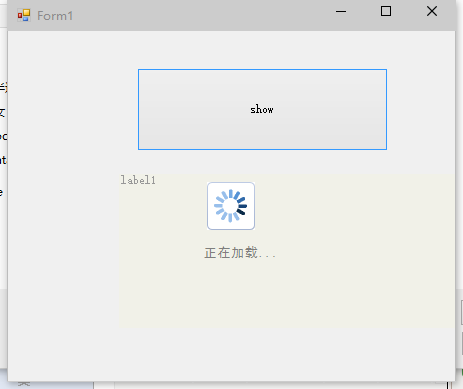
using System;
using System.Drawing;
using System.Windows.Forms;
using System.ComponentModel;
using System.Threading;
namespace wgscd
{
/// <summary>
/// 自定义控件:半透明控件
/// </summary>
[ToolboxBitmap(typeof(MyLoadingCtl))]
public class MyLoadingCtl : System.Windows.Forms.Control
{
private bool _transparentBG = true;//是否使用透明
private int _alpha = 125;//设置透明度
private SolidBrush fontBrush= new SolidBrush(Color.FromArgb(206,94,94,94));
private System.ComponentModel.Container components = new System.ComponentModel.Container();
public MyLoadingCtl()
: this(125, true)
{
}
/// <summary>
/// 显示遮罩层
/// </summary>
/// <param name="form">要显示的父窗体</param>
public void ShowLoading(Form form)
{
try
{
// SetStyle(System.Windows.Forms.ControlStyles.Opaque, true);
base.CreateControl();
form.Controls.Add(this);
// this._alpha = Alpha;
// if (isShowLoadingImage)
//{
// PictureBox pictureBox_Loading = new PictureBox();
// pictureBox_Loading.BackColor = System.Drawing.Color.White;
// pictureBox_Loading.Image = 加载中.Properties.Resources.loading;
// pictureBox_Loading.Name = "pictureBox_Loading";
// pictureBox_Loading.Size = new System.Drawing.Size(48, 48);
// pictureBox_Loading.SizeMode = System.Windows.Forms.PictureBoxSizeMode.AutoSize;
// Point Location = new Point(this.Location.X + (this.Width - pictureBox_Loading.Width) / 2, this.Location.Y + (this.Height - pictureBox_Loading.Height) / 2);//居中
// pictureBox_Loading.Location = Location;
// pictureBox_Loading.Anchor = AnchorStyles.None;
// this.Controls.Add(pictureBox_Loading);
//}
this.Dock = DockStyle.Fill;
this.BringToFront();
this.Enabled = true;
this.Visible = true;
Refresh();
Invalidate();
}
catch { }
}
public MyLoadingCtl(int Alpha, bool IsShowLoadingImage)
{
SetStyle(System.Windows.Forms.ControlStyles.Opaque, true);
base.CreateControl();
this._alpha = Alpha;
if (IsShowLoadingImage)
{
PictureBox pictureBox_Loading = new PictureBox();
pictureBox_Loading.BackColor = System.Drawing.Color.White;
pictureBox_Loading.Image = 加载中.Properties.Resources.loading;
pictureBox_Loading.Name = "pictureBox_Loading";
pictureBox_Loading.Size = new System.Drawing.Size(48, 48);
pictureBox_Loading.SizeMode = System.Windows.Forms.PictureBoxSizeMode.AutoSize;
Point Location = new Point(this.Location.X + (this.Width - pictureBox_Loading.Width) / 2, this.Location.Y + (this.Height - pictureBox_Loading.Height) / 2);//居中
pictureBox_Loading.Location = Location;
pictureBox_Loading.Anchor = AnchorStyles.None;
this.Controls.Add(pictureBox_Loading);
Invalidate();
}
}
protected override void Dispose(bool disposing)
{
if (disposing)
{
if (!((components == null)))
{
components.Dispose();
}
}
base.Dispose(disposing);
}
/// <summary>
/// 自定义绘制窗体
/// </summary>
/// <param name="e"></param>
protected override void OnPaint(System.Windows.Forms.PaintEventArgs e)
{
float vlblControlWidth;
float vlblControlHeight;
Pen labelBorderPen;
SolidBrush labelBackColorBrush;
if (_transparentBG)
{
Color drawColor = Color.FromArgb(this._alpha, this.BackColor);
labelBorderPen = new Pen(drawColor, 0);
labelBackColorBrush = new SolidBrush(drawColor);
}
else
{
labelBorderPen = new Pen(this.BackColor, 0);
labelBackColorBrush = new SolidBrush(this.BackColor);
}
base.OnPaint(e);
vlblControlWidth = this.Size.Width;
vlblControlHeight = this.Size.Height;
e.Graphics.DrawRectangle(labelBorderPen, 0, 0, vlblControlWidth, vlblControlHeight);
e.Graphics.FillRectangle(labelBackColorBrush, 0, 0, vlblControlWidth, vlblControlHeight);
e.Graphics.DrawString("正在加载...",new Font("黑体",10), fontBrush, vlblControlWidth/2-30, vlblControlHeight/2+40);
}
protected override CreateParams CreateParams//v1.10
{
get
{
CreateParams cp = base.CreateParams;
cp.ExStyle |= 0x00000020; //0x20; // 开启 WS_EX_TRANSPARENT,使控件支持透明
return cp;
}
}
/*
* [Category("MyLoadingCtl"), Description("是否使用透明,默认为True")]
* 一般用于说明你自定义控件的属性(Property)。
* Category用于说明该属性属于哪个分类,Description自然就是该属性的含义解释。
*/
[Category("MyLoadingCtl"), Description("是否使用透明,默认为True")]
public bool TransparentBG
{
get
{
return _transparentBG;
}
set
{
_transparentBG = value;
this.Invalidate();
}
}
[Category("MyLoadingCtl"), Description("设置透明度")]
public int Alpha
{
get
{
return _alpha;
}
set
{
_alpha = value;
this.Invalidate();
}
}
}
}
/*
外部窗体调用:
public Form1()
{
InitializeComponent();
bgWorker.DoWork += BgWorker_DoWork;
bgWorker.RunWorkerCompleted += BgWorker_RunWorkerCompleted;
}
BackgroundWorker bgWorker = new BackgroundWorker();
wgscd.MyLoadingCtl loadingCtl = new wgscd.MyLoadingCtl(162,true);//定义加载控件
private void BgWorker_DoWork(object sender, DoWorkEventArgs e)
{
System.Threading.Thread.Sleep(3333);
}
private void BgWorker_RunWorkerCompleted(object sender, RunWorkerCompletedEventArgs e)
{
loadingCtl.Hide();
}
private void btnShow_Click(object sender, EventArgs e)
{
//显示加载动画
loadingCtl.ShowLoading(this);
Application.DoEvents();
bgWorker.RunWorkerAsync();
}
*/
用到是loading GIF图片:

再来些


winform 自定义控件:半透明Loading控件的更多相关文章
- (一)c#Winform自定义控件-基类控件
前提 入行已经7,8年了,一直想做一套漂亮点的自定义控件,于是就有了本系列文章. 开源地址:https://gitee.com/kwwwvagaa/net_winform_custom_control ...
- C# 自定义控件VS用户控件
1 自定义控件与用户控件区别 WinForm中, 用户控件(User Control):继承自 UserControl,主要用于开发 Container 控件,Container控件可以添加其他Con ...
- WPF实现炫酷Loading控件
Win8系统的Loading效果还是很不错的,网上也有人用CSS3等技术实现,研究了一下,并打算用WPF自定义一个Loading控件实现类似的效果,并可以让用户对Loading的颗粒(Particle ...
- 自定义控件VS用户控件
自定义控件VS用户控件 2015-06-16 1 自定义控件与用户控件区别 WinForm中, 用户控件(User Control):继承自 UserControl,主要用于开发 Container ...
- 富客户端 wpf, Winform 多线程更新UI控件
前言 在富客户端的app中,如果在主线程中运行一些长时间的任务,那么应用程序的UI就不能正常相应.因为主线程要负责消息循环,相应鼠标等事件还有展现UI. 因此我们可以开启一个线程来格外处理需要长时间的 ...
- [转] WinForm实现移除控件某个事件的方法
原文 WinForm实现移除控件某个事件的方法 本文实例讲述了WinForm实现移除控件某个事件的方法,供大家参考借鉴一下.具体功能代码如下: 主要功能部分代码如下: /// <summary& ...
- Winform中修改WebBrowser控件User-Agent的方法(已经测试成功)
using System; using System.Collections.Generic; using System.Linq; using System.Text; using System.W ...
- WPF中嵌入WinForm中的webbrowser控件
原文:WPF中嵌入WinForm中的webbrowser控件 使用VS2008创建WPF应用程序,需使用webbrowser.从工具箱中添加WPF组件中的webbrowser发现其中有很多属性事件不能 ...
- C# winform项目中ListView控件使用CheckBoxes属性实现单选功能
C# winform项目中ListView控件使用CheckBoxes属性实现单选功能 在做项目时需要使用ListView控件的CheckBoxes属性显示,还要在点击行时自动选中CheckBoxes ...
随机推荐
- Vue-学习。
---恢复内容开始--- Vue.js 与 Angular.js 非常相似,只要学过了Angular.js然后在学Vue.js就非常的简单. 什么是Vue? 相比Angularjs和ReactJS,V ...
- Orcal数据库,使用EF的自增处理
1.定义EF拦截器,截获执行命令前的操作.修改执行sql.还需要定义orcal序列,供自增使用 using System; using System.Collections.Generic; usin ...
- jQuery 中bind(),live(),delegate(),on() 区别
on()来改写通过 .bind(), .live(), .delegate()所注册的事件 /* The jQuery .bind(), .live(), and .delegate() method ...
- mysql-5.7 持久化统计信息详解
一.持久化统计信息的意义: 统计信息用于指导mysql生成执行计划,执行计划的准确与否直接影响到SQL的执行效率:如果mysql一重启 之前的统计信息就没有了,那么当SQL语句来临时,那么mysql就 ...
- C 转义字符说明
%a(%A) 浮点数.十六进制数字和p-(P-)记数法(C99)%c 字符%d 有符号十进制整数%f 浮点数(包括float和doulbe)%e(%E) 浮点数指数输出[e-(E-)记数法]%g(%G ...
- Redis常用指令
1.使用指令存储数据 不同数据类型的使用 1.String > 在以上指令中我们使用set指令向redis存进了一个数据类型为string,名为str1,值为123456.(如果你要问为什么,那 ...
- 连接Mysql错误 error 1042 can't get hostname for your address
背景: 1.etc下的hosts文件有: 127.0.0.1 localhost 2.MySQL的my.ini配置文件: [mysqld] 节点下已经加入以下两行代码 skip-n ...
- Windows下使用Git Bash上传项目到GitHub
http://blog.csdn.net/qq_28304687/article/details/69959238?locationNum=8&fps=1
- zabbix日常监控项mysql(七)
参考文档: percona官方文档:https://www.percona.com/doc/percona-monitoring-plugins/LATEST/zabbix/index.html za ...
- 安全预警-防范新型勒索软件“BlackRouter”
近期,出现一种新型勒索软件“BlackRouter”,开发者将其与正常软件恶意捆绑在一起,借助正常软件的下载和安装实现病毒传播,并以此躲避安全软件的查杀.目前,已知的被利用软件有AnyDesk工具(一 ...