
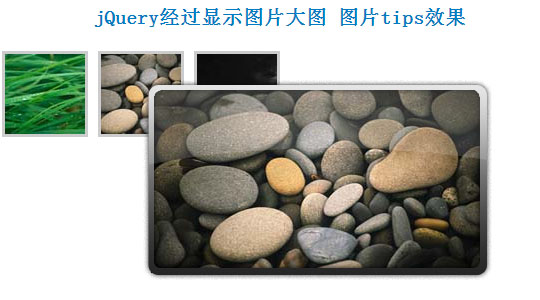
jQuery制作鼠标经过显示图片大图,生成图片tips效果
一般tips都是文字,这个可以支持图片,很漂亮:
<script type="text/javascript">

    // Load this script once the document is ready

    $(document).ready(function () {

        // Get all the thumbnail

        $('div.thumbnail-item').mouseenter(function(e) {

            // Calculate the position of the image tooltip

            x = e.pageX - $(this).offset().left;

            y = e.pageY - $(this).offset().top;

            // Set the z-index of the current item,

            // make sure it's greater than the rest of thumbnail items

            // Set the position and display the image tooltip

            $(this).css('z-index','15')

            .children("div.tooltip")

            .css({'top': y + 10,'left': x + 20,'display':'block'});

        }).mousemove(function(e) {

            // Calculate the position of the image tooltip

            x = e.pageX - $(this).offset().left;

            y = e.pageY - $(this).offset().top;

            // This line causes the tooltip will follow the mouse pointer

            $(this).children("div.tooltip").css({'top': y + 10,'left': x + 20});

        }).mouseleave(function() {

            // Reset the z-index and hide the image tooltip

            $(this).css('z-index','1')

            .children("div.tooltip")

            .animate({"opacity": "hide"}, "fast");

        });

    });

    </script>
CSS文件如下:
<style>

.thumbnail-item {

    /* position relative so that we can use position absolute for the tooltip */

    position: relative;

    float: left;

    margin: 0px 5px;

}

.thumbnail-item a {

    display: block;

}

.thumbnail-item img.thumbnail {

    border:3px solid #ccc;

}

.tooltip {

    /* by default, hide it */

    display: none;

    /* allow us to move the tooltip */

    position: absolute;

    /* align the image properly */

    padding: 8px 0 0 8px;

}

    .tooltip span.overlay {

        /* the png image, need ie6 hack though */

        background: url(images/overlay.png) no-repeat;

        /* put this overlay on the top of the tooltip image */

        position: absolute;

        top: 0px;

        left: 0px;

        display: block;

        width: 350px;

        height: 200px;

    }

    </style>
HTML代码:
<div class="thumbnail-item">

        <a href="#"><img src="data:images/small1.jpg" class="thumbnail"/></a>

        <div class="tooltip">

            <img src="data:images/big1.jpg" alt="" width="330" height="185" />

            <span class="overlay"></span>

        </div>

    </div>

    <div class="thumbnail-item">

        <a href="#"><img src="data:images/small2.jpg" class="thumbnail"/></a>

        <div class="tooltip">

            <img src="data:images/big2.jpg" alt="" width="330" height="185" />

            <span class="overlay"></span>

        </div>

    </div>

    <div class="thumbnail-item">

        <a href="#"><img src="data:images/small3.jpg" class="thumbnail"/></a>

        <div class="tooltip">

            <img src="data:images/big3.jpg" alt="" width="330" height="185" />

            <span class="overlay"></span>

        </div>

    </div>
jQuery制作鼠标经过显示图片大图,生成图片tips效果的更多相关文章
- 杠杠做的全屏随鼠标滚动显示图片,类似于PPT效果
图片有22张,是一张张加载的,耐心点,鼠标一直尝试向下滚就行了. 图片来自<天空之境:乌尤尼盐沼>,一个好美好美的地方 引个流,欢迎去我的博客看看:http://blog.cxycs.co ...
- jQuery实现鼠标划过展示大图的方法
这篇文章主要介绍了jQuery实现鼠标划过展示大图的方法,实例分析了jQuery操作鼠标事件及图片处理的技巧,具有一定参考借鉴价值,需要的朋友可以参考下 本文实例讲述了jQuery实现鼠标划过展示大图 ...
- jQuery实现鼠标悬停显示提示信息窗口的方法
<!DOCTYPE html PUBLIC "-//W3C//DTD XHTML 1.0 Transitional//EN" "http://www.w3.org/ ...
- jQuery - 制作点击显示二级菜单效果
<!DOCTYPE html> <html> <head lang="en"> <meta charset="UTF-8&quo ...
- JS实现 鼠标放上去 图片自动放大的效果
前段时间做项目,要实现,一张图片,鼠标放上去图片自动变大的效果,虽然难度不大,但当时也想了一段时间,当时没时间记录一下,现在有时间了,写篇博客把代码给记录一下: 效果如下: 代码如下: <!DO ...
- wpf image控件循环显示图片 以达到动画效果 问题及解决方案
1>最初方案: 用wpf的image控件循环显示图片,达到动画效果,其实就是在后台代码动态改变Image.Source的值,关键代码: ; i < ; i++)//六百张图片 { Bitm ...
- jQuery实现鼠标移入切换图片
初始效果: 鼠标移入效果: 首先添加jQuery库,我这边直接引用百度CDN地址 <script src="https://apps.bdimg.com/libs/jquery/2.1 ...
- jquery easyui鼠标右击显示自定义的菜单
1.datagrid表格中,对某一行鼠标右击,显示出如下的自定义的菜单: 在html页面中写: <div id="menu" class="easyui-menu& ...
- Qt5制作鼠标悬停显示Hint的ToolTip
在日常生活中的使用的软件中,我们经常会遇到这样的情况. 我们在网页上,有些网页链接的文字(比如文章标题,知乎问题标题,百度的词条等)因为太长了,而显示不出来,但是鼠标悬停在上面的时候就可以显示出来. ...
随机推荐
- systemct管理服务命令
systemctl管理服务的启动,重启,停止,重载,查看状态的命令 Systcinit命令(红帽RHEL6系统) Systemctl命令(红帽RHEL7系统) 作用 service foo star ...
- poi读取Excel文件和图片
首先得说一下,Excel文件是有03版和07版的区别的,也就是.xls和.xlsx,这两个文件需要分开读取. 其它的废话就不说了,直接贴代码: package util; import java.io ...
- 项目复审—Alpha阶段
项目复审-Alpha阶段 小组的名字和链接 优 点 缺 点 排名 [别看了你没救队]http://www.cnblogs.com/liaoyujun233/p/9016362.html 此队优点很多, ...
- Beta阶段 敏捷冲刺day1
一.提供当天站立式会议照片一张: 二. 每个人的工作 (有work item 的ID) (1) 昨天已完成的工作: (2) 今天计划完成的工作: 今天大家一起讨论了一下之后几天的任务,以及如何对网页进 ...
- [转帖]CentOS基础命令大全
https://www.toutiao.com/i6601298434651587085/ 1.关机 (系统的关机.重启以及登出 ) 的命令 shutdown -h now 关闭系统(1) init ...
- PHP面试经常被提到的问题
1. Include 与 require的区别,require和require_once的效率哪个高? PHP在遇到include时就解释一次,如果页面中出现10次include,php就解释10次, ...
- log4j2分析总结(一)
现在公司用log4j2 进行日志记录,我也看了相关的资料,现在进行记录学习总结下 整体结构 Appenders里设置日志的输出方式.级别和格式 Loggers里设置全局的级别和绑定appenders里 ...
- 关于#pragma comment
#pragma comment(lib,"ws2_32.lib") #pragma comment(lib,"ws2_32.lib")表示连接Ws2_32.li ...
- 【JavaScript】table里面点击某td获取同一行tr的其他td值
某td的input(保存按钮)上绑定方法,点击按钮保存该行所有数据 function locationedit(num){ var ordernumber = $("#"+num) ...
- 【BZOJ4991】我也不知道题目名字是什么(线段树)
[BZOJ4991]我也不知道题目名字是什么(线段树) 题面 BZOJ 题解 对于线段树维护的区间维护以下东西: 区间左(右)端开始(结束)的最长(短)子串的长度 左端右端的值,以及当前区间内的答案 ...