
Flutter:Slivers大家族,让滑动视图的组合变得很简单!
今天呢,我小拉面主要想给大家讲一讲Flutter中的Slivers大家族的使用场景和方法。开发过列表布局的同学们应该对Slivers系列的控件不陌生,或多或少都用过这个库中的控件,来解决复杂的滑动嵌套布局。
比如之前讲Hero的时候提到的下面这个界面,使用普通的GridView的话是没法实现的,我们选择使用CustomScrollView,然后在slivers属性中添加子控件,在这个例子里,我们可以用SliverToBoxAdapter来做HeaderView,GridView来做主体布局,整体为一个CustomScrollView,完全不会出现任何滑动冲突的问题。
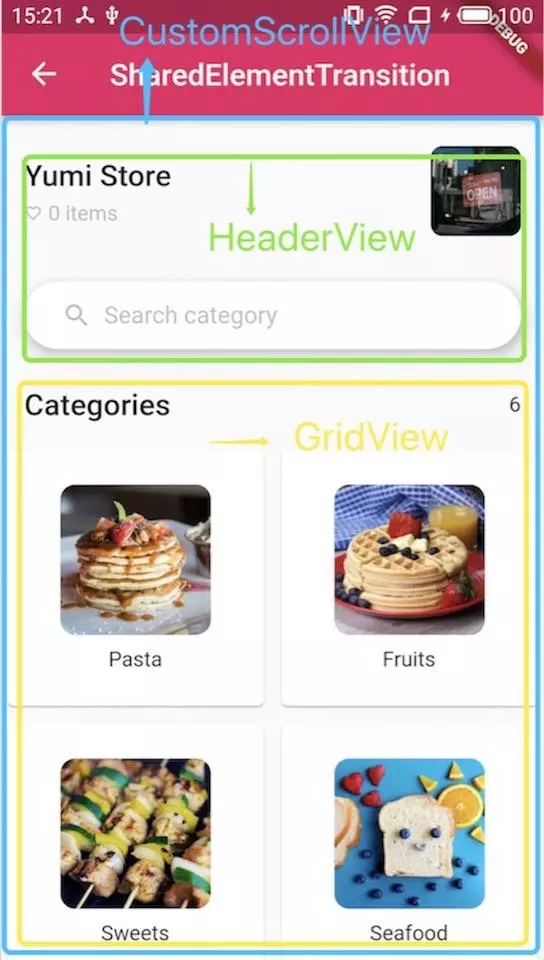
Flutter中的Slivers大家族基本都是配合CustomScrollView来实现的,除了上面提到的滑动布局嵌套,你还可以使用Slivers来实现页面头部展开/收起、
AppBar随手势变换等等功能。官方的Sliver库里面的控件很多,可以去Flutter API网站搜一下,这篇文章我只讲一些常用的控件。
OK, Let's start !!
SliverAppBar
如果你是一名Android开发者,一定使用过CollapsingToolbarLayout这个布局来实现AppBar展开/收起的功能,在Flutter里面则对应SliverAppBar控件。给SliverAppBar设置flexibleSpace和expandedHeight属性,就可以轻松完成AppBar展开/收起的功能:
CustomScrollView(

        slivers: <Widget>[

          SliverAppBar(

            actions: <Widget>[

              _buildAction(),

            ],

            title: Text('SliverAppBar'),

            backgroundColor: Theme.of(context).accentColor,

            expandedHeight: 200.0,

            flexibleSpace: FlexibleSpaceBar(

              background: Image.asset('images/food01.jpeg', fit: BoxFit.cover),

            ),

            // floating: floating,

            // snap: snap,

            // pinned: pinned,

          ),

          SliverFixedExtentList(

            itemExtent: 120.0,

            delegate: SliverChildListDelegate(

              products.map((product) {

                return _buildItem(product);

              }).toList(),

            ),

          ),

        ],

      );
sliver_app_bar_01.gif

如果设置floating属性为true,那么AppBar会在你做出下拉手势时就立即展开(即使ListView并没有到达顶部),该展开状态不显示flexibleSpace:
sliver_app_bar_02.gif

如果同时设置floating和snap属性为true,那么AppBar会在你做出下拉手势时就立即全部展开(即使ListView并没有到达顶部),该展开状态显示flexibleSpace:
sliver_app_bar_03.gif

如果不想AppBar消失,则设置pinned属性为true即可:
SliverList
SliverList的使用非常简单,只需设置delegate属性即可,我们一般使用SliverChildBuilderDelegate,注意记得设置childCount,否则Flutter没法知道怎么绘制:
CustomScrollView(

        slivers: <Widget>[

          SliverList(

            delegate: SliverChildBuilderDelegate(

                  (BuildContext context, int index) {

                return _buildItem(context, products[index]);

              },

              childCount: ,

            ),

          )

        ],

      );

sliver_list.png
你也可以通过下面的方式来设置childCount,如果不设置childCount,Flutter一旦发现delegate的某个index返回了null,就会认为childCount就是这个index。
delegate: SliverChildBuilderDelegate(

                  (BuildContext context, int index) {

                    if(index>products.length){

                      return null;

                    }

                return _buildItem(context, products[index]);

              },
你也可以使用SliverChildListDelegate来构建delegate:
delegate: SliverChildListDelegate([

              _buildItem(),

              _buildItem(),

              _buildItem(),

            ]),
SliverChildListDelegate和SliverChildBuilderDelegate的区别:
SliverChildListDelegate一般用来构item建数量明确的列表,会提前build好所有的子item,所以在效率上会有问题,适合item数量不多的情况(不超过一屏)。
SliverChildBuilderDelegate构建的列表理论上是可以无限长的,因为使用来lazily construct优化。
(两者的区别有些类似于ListView和ListView.builder()的区别。)
SliverGrid
SliverGrid有三个构造函数:SliverGrid.count()、SliverGrid.extent和SliverGrid()。
SliverGrid.count()指定了一行展示多少个item,下面的例子表示一行展示4个:
SliverGrid.count(children: scrollItems, crossAxisCount: )
SliverGrid.extent可以指定item的最大宽度,然后让Flutter自己决定一行展示多少个item:
SliverGrid.extent(children: scrollItems, maxCrossAxisExtent: 90.0)
SliverGrid()则是需要指定一个gridDelegate,它提供给了程序员一个自定义Delegate的入口,你可以自己决定每一个item怎么排列:
SliverGrid(

  gridDelegate: SliverGridDelegateWithFixedCrossAxisCount(

    crossAxisCount: products.length,

  ),

  delegate: SliverChildBuilderDelegate(

    (BuildContext context, int index) {

      return _buildItem(products[index]);;

    }

);

SliverPersistentHeader
SliverPersistentHeader顾名思义,就是给一个可滑动的视图添加一个头(实际上,在CustomScrollView的slivers列表中,header可以出现在视图的任意位置,不一定要是在顶部)。这个Header会随着滑动而展开/收起,使用pinned和floating属性来控制收起时Header是否展示(pinned和floating属性不可以同时为true),pinned和floating属性的具体意义和SliverAppBar中相同,这里就不再次解释了。
sliver_persistent_header.gif
SliverPersistentHeader(

      pinned: pinned,

      floating: floating,

      delegate: _SliverAppBarDelegate(

        minHeight: 60.0,

        maxHeight: 180.0,

        child: Container(),

      ),

    );
构建一个SliverPersistentHeader需要传入一个delegate,这个delegate是SliverPersistentHeaderDelegate类型的,而SliverPersistentHeaderDelegate是一个abstract类,我们不能直接new一个SliverPersistentHeaderDelegate出来,因此,我们需要自定义一个delegate来实现SliverPersistentHeaderDelegate类:
class _SliverAppBarDelegate extends SliverPersistentHeaderDelegate {

  _SliverAppBarDelegate({

    @required this.minHeight,

    @required this.maxHeight,

    @required this.child,

  });

  final double minHeight;

  final double maxHeight;

  final Widget child;

  @override

  double get minExtent => minHeight;

  @override

  double get maxExtent => math.max(maxHeight, minHeight);

  @override

  Widget build(

      BuildContext context, double shrinkOffset, bool overlapsContent) {

    return new SizedBox.expand(child: child);

  }

  @override

  bool shouldRebuild(_SliverAppBarDelegate oldDelegate) {

    return maxHeight != oldDelegate.maxHeight ||

        minHeight != oldDelegate.minHeight ||

        child != oldDelegate.child;

  }

}
写一个自定义SliverPersistentHeaderDelegate很简单,只需重写build()、get maxExtent、get minExtent和shouldRebuild()这四个方法,上面就是一个最简单的SliverPersistentHeaderDelegate的实现。其中,maxExtent表示header完全展开时的高度,minExtent表示header在收起时的最小高度。因此,对于我们上面的那个自定义Delegate,如果将minHeight和maxHeight的值设置为相同时,header就不会收缩了,这样的Header跟我们平常理解的Header更像。
之前也提到了,实际使用时,header不一定要放在slivers列表的最前面,可以随意混搭,当然,一般来说不会有这种视觉需求的:
CustomScrollView(

        slivers: <Widget>[

          _buildHeader(),

          SliverGrid.count(

            crossAxisCount: ,

            children: _products.map((product) {

              return _buildItemGrid(product);

            }).toList(),

          ),

          _buildHeader(),

          SliverFixedExtentList(

            itemExtent: 100.0,

            delegate: SliverChildListDelegate(

              products.map((product) {

                return _buildItemList(product);

              }).toList(),

            ),

          ),

          _buildHeader(),

          SliverGrid(

            gridDelegate: new SliverGridDelegateWithMaxCrossAxisExtent(

              maxCrossAxisExtent: 200.0,

              mainAxisSpacing: 10.0,

              crossAxisSpacing: 10.0,

              childAspectRatio: 3.0,

            ),

            delegate: new SliverChildBuilderDelegate(

              (BuildContext context, int index) {

                return _buildItemGrid2(_products2[index]);

              },

              childCount: _products2.length,

            ),

          ),

        ],

      );
SliverToBoxAdapter
SliverPersistentHeader一般来说都是会展开/收起的(除非minExtent和maxExtent值相同),那么如果想要在滚动视图中添加一个普通的控件,那么就可以使用SliverToBoxAdapter来将各种视图组合在一起,放在CustomListView中。
sliver_adapter.png
上图中框起来的部分全部都是SliverToBoxAdapter,结合SliverToBoxAdapter,滚动视图可以任意组合:
CustomScrollView(

        physics: ScrollPhysics(),

        slivers: <Widget>[

          SliverToBoxAdapter(

            child: _buildHeader(),

          ),

          SliverGrid.count(

            crossAxisCount: ,

            children: products.map((product) {

              return _buildItemGrid(product);

            }).toList(),

          ),

          SliverToBoxAdapter(

            child: _buildSearch(),

          ),

          SliverFixedExtentList(

            itemExtent: 100.0,

            delegate: SliverChildListDelegate(

              products.map((product) {

                return _buildItemList(product);

              }).toList(),

            ),

          ),

          SliverToBoxAdapter(

            child: _buildFooter(),

          ),

        ],

      );
Flutter:Slivers大家族,让滑动视图的组合变得很简单!的更多相关文章
- 【Android进阶】使用Andbase快速开发框架实现常见侧滑栏和滑动标签页组合效果
最近闲来无事,在网上寻找源代码看,突然发现了一个国内技术牛人开发的快速开发框架Andbase,花了一天时间研究了下源码和怎么使用,现将开发常见的侧滑栏和滑动标签页组合效果的使用介绍个大家,希望可以减少 ...
- 31.qt quick-使用SwipeView添加滑动视图-高仿微信V2版本
在上章我们学习了ListView,然后实现了: 28.qt quick-ListView高仿微信好友列表和聊天列表,本章我们来学习SwipeView滑动视图,并出高仿微信V2版本: 1.Contain ...
- ASP.NET Core Razor 布局视图 - ASP.NET Core 基础教程 - 简单教程,简单编程
原文:ASP.NET Core Razor 布局视图 - ASP.NET Core 基础教程 - 简单教程,简单编程 ASP.NET Core Razor 布局视图 上一章节中我们学习了如何使用 EF ...
- ASP.NET Core 视图 - ASP.NET Core 基础教程 - 简单教程,简单编程
原文:ASP.NET Core 视图 - ASP.NET Core 基础教程 - 简单教程,简单编程 ASP.NET Core 视图 花了几章节,终于把 ASP.NET Core MVC 中的 C 控 ...
- flutter Sliver滑动视图组件
import 'package:flutter/material.dart'; import './model/post.dart'; class SliverDemo extends Statele ...
- Cocos2d—X游戏开发之CCScrollView(滑动视图)(十二)
CCScrollView在Cocos2d-X引擎中主要使用在图片尺寸远大于屏幕尺寸的时候使用. 总体来说,使用起来比较简单. 一个是CCScrollView控件本身,一个是CCScrollViewDe ...
- Drawer_layout 关闭滑动视图
在android抽屉Drawer_layout开发中,我需要关闭滑动的试图 找到了这个方法 mDrawer_layout.setDrawerLockMode(DrawerLayout.LOCK_MOD ...
- ViewPage和ActionBar打造滑动视图
滑动效果非常流畅,可以将页签放置到ActionBar上,点击页签可以切换ViewPage,滑动ViewPage会同步更显Tabs. main.xml <?xml version="1. ...
- 微信小程序-滑动视图注意事项
真的得吐槽下微信的开发文档,一点点都不详细的好吗. <!--垂直滚动,这里必须设置高度--> <scroll-view scroll-y="true" style ...
随机推荐
- OS之进程管理---孤儿进程和僵尸进程
僵尸进程 当一个进程终止时,操作系统会释放其资源,不过它位于进程表中的条目还是在的,直到它的父进程调用wait():这是因为进程表中包含了进程的退出状态.当进程已经终止,但是其父进尚未调用wait() ...
- Java的简单计算运用
上课的时候写的博客,哈哈哈哈没事情做了,明天就要放假了所以有点点按捺不住自己所以想到来写写程序,今天我发的是我们Java上课老师讲的代码,好像是Java的计算运用,但是这个代码有缺点,只能够输入的打出 ...
- C++ 定时器Timer在项目中的使用
目录 1.情况说明 2.空循环实现 3.定时器实现 1.情况说明 由于最近要在项目里做弹出弹幕,要求是弹出1秒后消失,一开始我使用空循环进行计时,发现执行到这段代码CPU占用率上升十几个百分点,后来改 ...
- 八、Linux上常用网络操作
1. 主机名配置 hostname 查看主机名 hostname xxx 修改主机名 重启后无效 如果想要永久生效,可以修改/etc/sysconfig/network文件 2. IP地址配置 set ...
- Visual Studio 2015中使用gdb远程调试linux程序
VS的debug功能非常强大,相比而言linux上的图形化调试一直不是很好用. 如果可以使用VS来调试linux程序,应该是一件比较愉快的事情. 这在2015中变得可能,因为从2015开始VS支持An ...
- AAAI2019 | 基于区域分解集成的目标检测 论文解读
Object Detection based on Region Decomposition and Assembly AAAI2019 | 基于区域分解集成的目标检测 论文解读 作者 | 文永亮 学 ...
- filebeat+ELK日志系统
架构图 filebat logstash elasticsearch 基于elasticsearch6.3.2 elasticsearch(一) 之 elasticsearch初识 elasticse ...
- ANTLR4权威指南 - 第6章 尝试一些实际中的语法
第6章 尝试一些实际中的语法 在前一章,我们学习了通用词法结构和语法结构,并学习了如何用ANTLR的语法来表述这些结构.现在,是时候把我们学到的这些用来构建一些现实世界中的语法了.我们的主要目标是,怎 ...
- spring boot 2.0 源码分析(四)
在上一章的源码分析里,我们知道了spring boot 2.0中的环境是如何区分普通环境和web环境的,以及如何准备运行时环境和应用上下文的,今天我们继续分析一下run函数接下来又做了那些事情.先把r ...
- i.mx6 Android5.1.1 build解析
参考资料:理解 Android Build 系统 把总结放前面: 1. 常用编译命令 make clean 执行清理,等同于:rm -rf out/. make sdk 编译出 Android 的 S ...