
正则表达式和grep
本章主要通过一些应用实例,来对正则表达式进行说明。
1、正则表达式
正则表达式就是字符串的表达式。它能通过具有意义的特殊符号表示一列或多列字符串。
grep是linux系统下常用的正则表达式工具,可以使用grep来检索文本等输入流的字符串。
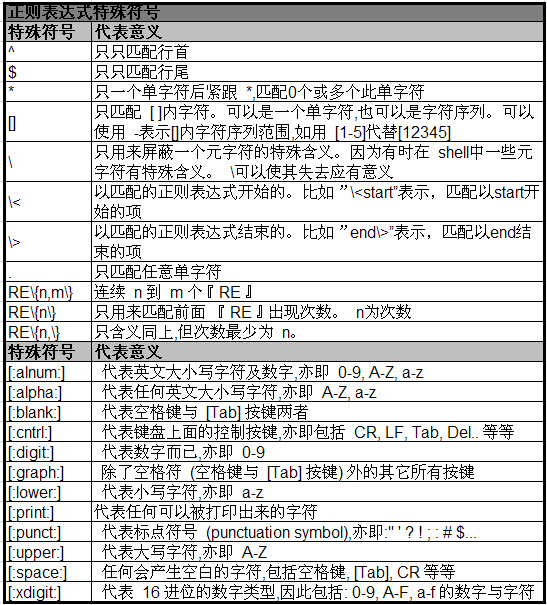
2、正则表达式特殊符号
参考下面表格
3、grep表达式
用法: grep [选项]... PATTERN [FILE]...
[root@winner ~]# grep --help

用法: grep [选项]... PATTERN [FILE]...

在每个 FILE 或是标准输入中查找 PATTERN。

默认的 PATTERN 是一个基本正则表达式(缩写为 BRE)。

例如: grep -i 'hello world' menu.h main.c

正则表达式选择与解释:

  -E, --extended-regexp     PATTERN 是一个可扩展的正则表达式(缩写为 ERE)

  -F, --fixed-strings       PATTERN 是一组由断行符分隔的定长字符串。

  -G, --basic-regexp        PATTERN 是一个基本正则表达式(缩写为 BRE)

  -P, --perl-regexp         PATTERN 是一个 Perl 正则表达式

  -e, --regexp=PATTERN      用 PATTERN 来进行匹配操作

  -f, --file=FILE           从 FILE 中取得 PATTERN

  -i, --ignore-case         忽略大小写

  -w, --word-regexp         强制 PATTERN 仅完全匹配字词

  -x, --line-regexp         强制 PATTERN 仅完全匹配一行

  -z, --null-data           一个 0 字节的数据行,但不是空行

Miscellaneous:

  -s, --no-messages         suppress error messages

  -v, --invert-match        select non-matching lines

  -V, --version             print version information and exit

      --help                display this help and exit

      --mmap                ignored for backwards compatibility

Output control:

  -m, --max-count=NUM       stop after NUM matches

  -b, --byte-offset         print the byte offset with output lines

  -n, --line-number         print line number with output lines

      --line-buffered       flush output on every line

  -H, --with-filename       print the filename for each match

  -h, --no-filename         suppress the prefixing filename on output

      --label=LABEL         print LABEL as filename for standard input

  -o, --only-matching       show only the part of a line matching PATTERN

  -q, --quiet, --silent     suppress all normal output

      --binary-files=TYPE   assume that binary files are TYPE;

                            TYPE is `binary', `text', or `without-match'

  -a, --text                equivalent to --binary-files=text

  -I                        equivalent to --binary-files=without-match

  -d, --directories=ACTION  how to handle directories;

                            ACTION is `read', `recurse', or `skip'

  -D, --devices=ACTION      how to handle devices, FIFOs and sockets;

                            ACTION is `read' or `skip'

  -R, -r, --recursive       equivalent to --directories=recurse

      --include=FILE_PATTERN  search only files that match FILE_PATTERN

      --exclude=FILE_PATTERN  skip files and directories matching FILE_PATTERN

      --exclude-from=FILE   skip files matching any file pattern from FILE

      --exclude-dir=PATTERN  directories that match PATTERN will be skipped.

  -L, --files-without-match  print only names of FILEs containing no match

  -l, --files-with-matches  print only names of FILEs containing matches

  -c, --count               print only a count of matching lines per FILE

  -T, --initial-tab         make tabs line up (if needed)

  -Z, --null                print 0 byte after FILE name

Context control:

  -B, --before-context=NUM  print NUM lines of leading context

  -A, --after-context=NUM   print NUM lines of trailing context

  -C, --context=NUM         print NUM lines of output context

  -NUM                      same as --context=NUM

      --color[=WHEN],

      --colour[=WHEN]       use markers to highlight the matching strings;

                            WHEN is `always', `never', or `auto'

  -U, --binary              do not strip CR characters at EOL (MSDOS)

  -u, --unix-byte-offsets   report offsets as if CRs were not there (MSDOS)

‘egrep’即‘grep -E’。‘fgrep’即‘grep -F’。

直接使用‘egrep’或是‘fgrep’均已不可行了。

不带 FILE 参数,或是 FILE 为 -,将读取标准输入。如果少于两个 FILE 参数

就要默认使用 -h 参数。如果选中任意一行,那退出状态为 0,否则为 1;

如果有错误产生,且未指定 -q 参数,那退出状态为 2。

Report bugs to: bug-grep@gnu.org

GNU Grep 主页: <http://www.gnu.org/software/grep/>

GNU 软件的通用帮助: <http://www.gnu.org/gethelp/>
4、应用实例
下面以input.txt为例,对grep进行说明。input.txt的文本内容如下:

"Open Source" is a good mechanism to develop programs.

apple is my favorite food.

Football game is not use feet only.

this dress doesn't fit me.

However, this dress is about $ 3183 dollars.^M

GNU is free air not free beer.^M

Her hair is very beauty.^M

I can't finish the test.^M

Oh! The soup taste good.^M

motorcycle is cheap than car.

This window is clear.

the symbol '*' is represented as start.

Oh!

My god!

The gd software is a library for drafting programs.^M

You are the best is mean you are the no. 1.

The world <Happy> is the same with "glad".

I like dog.

google is the best tools for search keyword.

goooooogle yes!

go! go! Let's go
(01), 查找包含"the"的行,并显示行号。
$ grep -n "the" input.txt
说明:-n表示显示"行号"
(02), 不区分大小写,查找包括"the"的行,并显示行号。
$ grep -in "the" input.txt
说明:-n表示显示"行号";-i表示不区分大小写,即ignore大小写。
(03), 查找不包括"the"的行,统计行数。
$ grep -cv "the" input.txt
说明:-c表示统计(count);-v表示不匹配的项。
(04), 查找"当前目录"及其"所有子目录"中包含"the"的文件,并显示"the"在其中的行号。
$ grep -rn "the" .
说明:-r表示递归查找;-n表示显示行号。
(05), 查找匹配"t?st"的项,其中?为任意字符。
$ grep -n "t.st" input.txt
说明:.表示匹配任意字符
(06), 查找包含数字的行
$ grep -n "[0-9]" input.txt

或

$ grep -n "[[:digit:]]" input.txt
说明:[0-9]表示0-9之间的一个数字;[[:digit:]]也表示0-9之间的一个数字
(07), 查找以the开头的行
$ grep -n "^the" input.txt
说明:"^the"表示以the开头
(08), 查找以小写字母结尾的行。
$ grep -n "[a-z]$" input.txt
说明:[a-z]表示一个小写字母,$表示结束符;[a-z]$表示以小写字母结束的项。
(09), 查找空白行。
$ grep -n "^$" input.txt
说明:^表示开头,如^t表示以字母t开头;$表示结尾,如e$表示以e结尾。^$表示空白行。
(10), 查找以字母g开头的单词
$ grep -n "\<g" input.txt
说明:\<表示单词的开始,\<g表示以g开始的单词。
(11), 查找字符串为go的单词。注意:不能包括goo,good等字符串
$ grep -n "\<go\>" input.txt
说明:\<表示单词的开始,\>表示单词结尾。\<go\>表示以字母g开头,以字母o结尾。
(12), 查找包括2-5个字母o的行。
$ grep -n "o\{2,5\}" input.txt
说明:pattern\{n,m\}表示n到m个pattern。o\{2,5\}表示2-5个字母o。
(13), 查找包括2个以上字母o(包括2个)的行。
$ grep -n "ooo*" input.txt

或

$ grep -n "oo\+" input.txt

或

$ grep -n "o\{2,\}" input.txt
说明:
ooo*: 前面两个oo表示匹配2个字母o,后面的o*表示匹配0到多个字母o。
oo\+: 第一个字母o表示匹配单个字母o;最后的"o\+"一起发挥作用,其中,\+是转义后的+,表示1到多个;而o\+表示1到多个字母o。
pattern\{n,\}表示多于n个pattern。o\{2,\}表示多于2个字母o。
4 egrep
4.1 egrep说明
egrep是扩展的grep,即它的功能比grep更多一些。"egrep"等价于"grep -e"。
egrep相比与grep,支持括号"()"以及操作符"|"(表示或)。
4.2 egrep应用实例
仍然以上面的input.txt为输入文本进行说明
(01), 查找包含the或者this的行
$ egrep -n "the|this" input.txt
说明:-n表示输出匹配项的行号,"the|this"表示包括the或者包括this的项。
(02), 查找包含the或者this的行
$ egrep -vn "(the|this)" input.txt
说明:-n表示输出匹配项的行号,"the|this"表示包括the或者包括this的项;-v表示匹配的对立面。即 -v "the|this"表示既不包括the又不包括this的项。
正则表达式和grep的更多相关文章
- 正则表达式与grep和sed
正则表达式与grep和sed 目录 1.正则表达式 2.grep 3.sed grep和sed需要正则表达式,我们需要注意的正则表达式与通配符用法的区分. 1.正则表达式 REGEXP,正则表达式:由 ...
- [Linux]正则表达式和grep使用【转载】
[Linux]正则表达式和grep使用 2018年12月05日 23:45:54 祥知道 阅读数 78 标签: 正则表达式grepLinuxegrep 更多 个人分类: Linux 所属专栏: Li ...
- 正则表达式(grep,awk,sed)和通配符
1. 正则表达式 1. 什么是正则表达式? 正则表达式就是为了处理大量的字符串而定义的一套规则和方法. 通过定义的这些特殊符号的辅助,系统管理员就可以快速过滤,替换或输出需要的字符串. Linux正则 ...
- Linux正则表达式与grep
bash是什么 bash是一个命令处理器,运行在文本窗口中,并能执行用户直接输入的命令 bash还能从文件中读取linxu命令,称之为脚本 bash支持通配符.管道.命令替换.条件判断等逻辑控制语句 ...
- 正则表达式2——grep命令
grep是Global search Regular Expression and Print out the line的简称. 1. grep命令基本用法 命令格式: grep [选项][模式][文 ...
- Linux运维正则表达式之grep
一.什么是正则表达式?简单的说,正则表达式就是一套处理大量的字符串而定义的规则和方法.例如:假设 @代表12345通过正则表达式这些特殊符号,我们可以快速过滤.替换需要的内容.linux正则表达式一般 ...
- 正则表达式与grep
一.回溯引用 1.将页面中合法的标题找出来,使用回溯引用匹配 (需要使用 -E 或 -P 来扩展grep语法支持) 2.查找连续出现的单词 二.前后查找 (grep 只能使用 -P 选项) 1. 向前 ...
- 正则表达式,grep,sed,
答案详见:http://www.cnblogs.com/linhaifeng/p/6596660.html 作业一:整理正则表达式博客 ^ # 行首定位 $ # 行尾定位 . # 匹配除换行符以外的任 ...
- Linux - 结合正则表达式使用grep命令
Grep with Regular Expression grep命令基本用法 grep [-acinv] [--color=auto] [-A n] [-B n] '搜寻字符串' 文件名参数说明: ...
- 终于明白vim 和 grep 中 的正则表达式的用法, vim 正则表达式 和grep基本正则表达式 几乎一样
要搞清楚 vim中的正则和普通的Perl正则表达式的区别: 因为在perl中所有的元字符 都可以直接使用, 不需要在 元字符的前面加 反斜杠. 但是在vim, 包括grep中就有所区别, 同样是元字符 ...
随机推荐
- dubbo-demo的运行
在学习dubbo时,最主要的是将dubbo运行起来. 现在先搭建起来简单的demo. 一:安装zookeeper(在wondows下安装,且是单机模式) 1.下载zookeeper 2.下载的版本 3 ...
- Xcode的快捷键及代码格式化
1. 文件CMD + N: 新文件 CMD + SHIFT + N: 新项目CMD + O: 打开 CMD + S: 保存 CMD+OPt+S:保存所有文件 CMD + SHIFT + S: 另存为 ...
- python3.6 利用requests和正则表达式爬取猫眼电影TOP100
import requests from requests.exceptions import RequestException from multiprocessing import Pool im ...
- 在ASP.NET Core 2.x中获取客户端IP地址
一.前言 大家也知道服务端请求时我们获取的IP地址是包含在请求头中,因此这也大大便利了IP的获取. 在ASP.NET中,可以通过以下方式获取客户端的IP地址. HttpContext.Current. ...
- c#/asp.net实现炫酷仿调色板/颜色选择器功能
asp.net 之颜色选择器,仿调色板功能 1. 插件非常容易使用,只需引用相应的js文件和css样式文件即可,见代码示例,插件精小,炫酷 2. 只需要初始化即可使用,并且选择的颜色会在文本框中以16 ...
- Collection模块
一.nametuple--factory function for creating tuple subclasses with named fields 创建类似于元祖的数据类型,除了能够用索引来访 ...
- 2018haoi总结
AM T1 写了40分,有50分的暴力分,只看到n=1能用费马小定理,没看到还有一个mod质数也能用费马小定理的10分. AM T2 写了10分,60分异或方程求自由元. AM T3 现在还没搞清楚题 ...
- 20162325 金立清 S2 W11 C20
20162325 2017-2018-2 <程序设计与数据结构>第11周学习总结 教材关键概念摘要 在哈希方法中,元素保存在哈希表中,其在表中的位置由哈希函数确定. 两个元素或关键字映射到 ...
- Loj10167 HDU2089 不要62
题目描述 杭州人称那些傻乎乎粘嗒嗒的人为 626262(音:laoer). 杭州交通管理局经常会扩充一些的士车牌照,新近出来一个好消息,以后上牌照,不再含有不吉利的数字了,这样一来,就可以消除个别的士 ...
- tyvj 1044 数字三角形 记忆化搜索
数字三角形 Time Limit: 1 Sec Memory Limit: 162 MB 题目连接 http://www.tyvj.cn/p/1044 Description 示出了一个数字三角形. ...