
Sysmon + NXlog构建简单的windows安全监控
工具:
Sysmon (sysmon 5.0) ,NXlog(nxlog-ce-2.9.1716.msi) .
Sysmon监控系统并生成windows event log, NXlog将windows event log传输到syslog服务器。
Sysmon可以监控Process create, Process terminate, Driver loaded, File creation time changed, RawAccessRead, CreateRemoteThread, Sysmon service state changed。
配置:
NXlog配置:
## This is a sample configuration file. See the nxlog reference manual about the

## configuration options. It should be installed locally and is also available

## online at http://nxlog.org/docs/

## Please set the ROOT to the folder your nxlog was installed into,

## otherwise it will not start.

#define ROOT C:\Program Files\nxlog

define ROOT C:\Program Files (x86)\nxlog

Moduledir %ROOT%\modules

CacheDir %ROOT%\data

Pidfile %ROOT%\data\nxlog.pid

SpoolDir %ROOT%\data

LogFile %ROOT%\data\nxlog.log

<Extension _syslog>

    Module      xm_syslog

</Extension>

<Input in>

    Module im_msvistalog

    Query <QueryList> <Query Id="0"> <Select Path="Microsoft-Windows-Sysmon/Operational">*</Select> </Query></QueryList>

</Input>

<Output out>

    Module      om_udp

    Host        security-log.syslogserver.com

    Port        639

    Exec        to_syslog_snare();

</Output>

<Route 1>

    Path        in => out

</Route>
Sysmon配置:
<Sysmon schemaversion="3.20">

  <!-- Capture all hashes -->

  <HashAlgorithms>*</HashAlgorithms>

  <EventFiltering>

    <!-- Log all drivers except if the signature -->

    <!-- contains Microsoft or Windows -->

    <DriverLoad onmatch="exclude">

      <Signature condition="contains">Microsoft</Signature>

      <Signature condition="contains">Windows</Signature>

    </DriverLoad>

    <ProcessTerminate onmatch="include" >

      <Image condition="end with">MsMpEng.exe</Image>

    </ProcessTerminate>

    <!-- Log network connection if the destination port equal 443 -->

    <!-- or 80, and process isn't InternetExplorer -->

    <!--NetworkConnect onmatch="include">

      <DestinationPort>443</DestinationPort>

      <DestinationPort>80</DestinationPort >

    </NetworkConnect -->

    <FileCreateTime onmatch="exclude" >

      <Image condition="end with">chrome.exe</Image>

    </FileCreateTime>

    <ImageLoad onmatch="include">

      <Signed condition="is">false</Signed>

    </ImageLoad>

    <!-- Log access rights for lsass.exe or winlogon.exe is not PROCESS_QUERY_INFORMATION -->

    <ProcessAccess onmatch="exclude">

      <GrantedAccess condition="is">0x1400</GrantedAccess>

    </ProcessAccess>

    <ProcessAccess onmatch="include">

      <TargetImage condition="end with">lsass.exe</TargetImage>

      <TargetImage condition="end with">winlogon.exe</TargetImage>

    </ProcessAccess>

    <NetworkConnect onmatch="exclude">

      <Image condition="end with">chrome.exe</Image>

      <SourcePort condition="is">137</SourcePort>

      <SourcePortName condition="is">llmnr</SourcePortName>

      <DestinationPortName condition="is">llmnr</DestinationPortName>

    </NetworkConnect>

    <CreateRemoteThread onmatch="include">

      <TargetImage condition="end with">explorer.exe</TargetImage>

      <TargetImage condition="end with">svchost.exe</TargetImage>

      <TargetImage condition="end with">winlogon.exe</TargetImage>

      <SourceImage condition="end with">powershell.exe</SourceImage>

    </CreateRemoteThread>

  </EventFiltering>

</Sysmon>
测试案例:
安装:
- sysmon -i config.conf 。
- nxlog双击运行,记得启动服务。(NXlog可命令行安装 msiexec /i nxlog-ce-2.9.1716.msi AGREETOLIECENSE="yes" ACCEPT=YES /qr+)
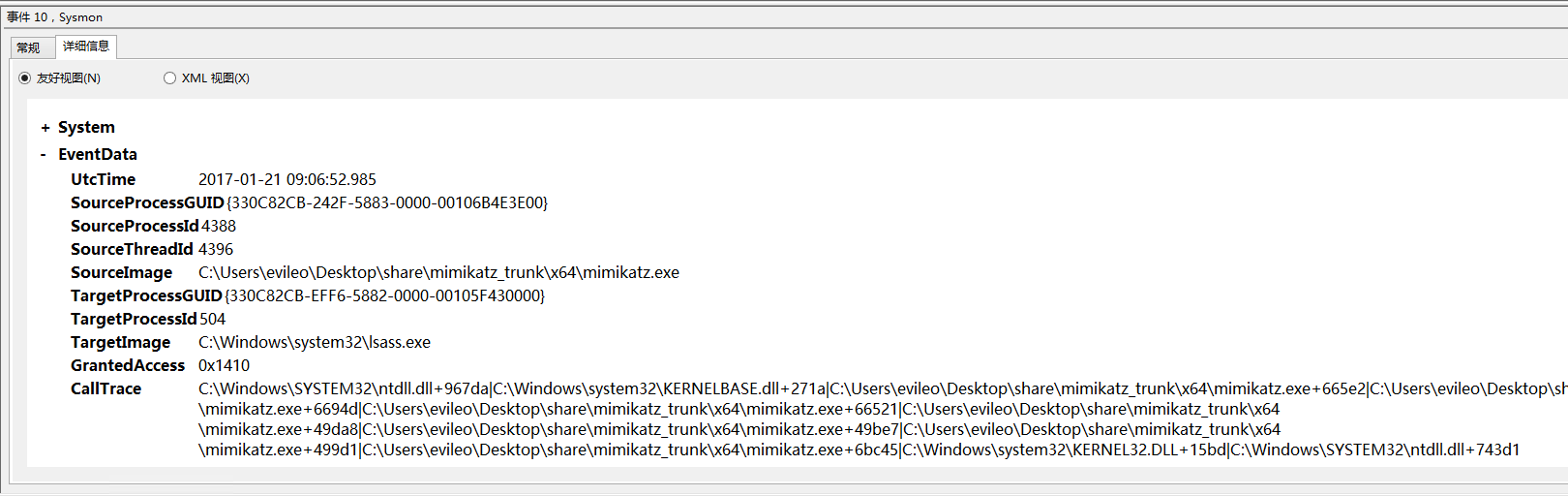
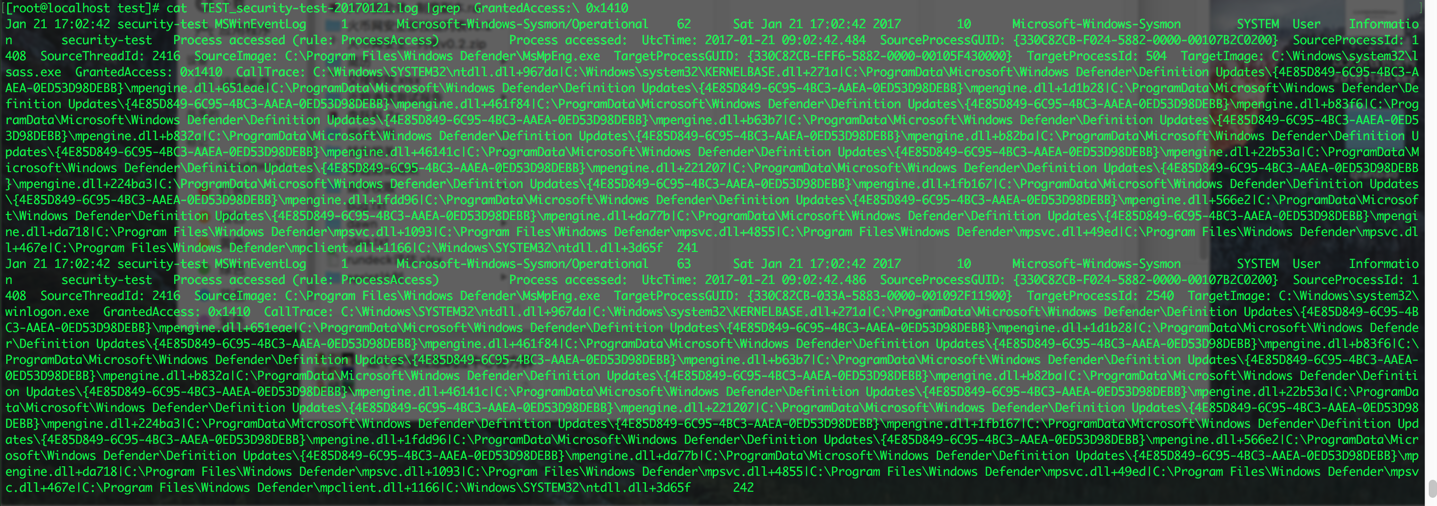
使用mimikatz抓取hash:
附NXlog完整配置样例:
## This is a basic configuration file for Windows Server 2008 * 2012

## to GrayLog2 with GELF support and filtering.

## See the nxlog reference manual about the configuration options.

## It should be installed locally and is also available

## online at http://nxlog.org/nxlog-docs/en/nxlog-reference-manual.html

## Please set the ROOT to the folder your nxlog was installed into,

## otherwise it will not start.

define ROOT C:\Program Files (x86)\nxlog

# define ROOT C:\Program Files\nxlog

Moduledir %ROOT%\modules

CacheDir %ROOT%\data

Pidfile %ROOT%\data\nxlog.pid

SpoolDir %ROOT%\data

LogFile %ROOT%\data\nxlog.log

<Extension gelf>

    Module xm_gelf

</Extension>

<Input pr_mseventlog>

    Module      im_msvistalog

    ReadFromLast    True

    # http://msdn.microsoft.com/en-us/library/aa385231.aspx

    # http://msdn.microsoft.com/en-us/library/ff604025(v=office.14).aspx

    # Level 1 (ID=30  Critical)     severity level events

    # Level 2 (ID=40  Error)        severity level events

    # Level 3 (ID=50  Warning)      severity level events

    # Level 4 (ID=80  Information)  severity level events

    # Level 5 (ID=100 Verbose)      severity level events

    # All channels are included by default which are listed in the registry under these:

    # HKEY_LOCAL_MACHINE\SOFTWARE\Microsoft\Windows\CurrentVersion\WINEVT\Channels

    # HKEY_LOCAL_MACHINE\SYSTEM\CurrentControlSet\services\eventlog\System

    #

    # <Select Path='Key Management Service'>*</Select></Query>\

    # <Select Path='Internet Explorer'>*</Select></Query>\

    # <Select Path='HardwareEvents'>*</Select></Query>\

    #

    Query   <QueryList>\

        <Query Id="0">\

            <Select Path="Security">*</Select>\

            <Select Path="System">*[System/Level=4]</Select>\

            <Select Path="Application">*[Application/Level=2]</Select>\

            <Select Path="Setup">*[System/Level=3]</Select>\

            <Select Path='Windows PowerShell'>*</Select>\

        </Query>\

    </QueryList>

    # REGEX EXAMPLES:

    # "\s" equals one white space character, and ".*" equals any one char

    # Line Contains both "bubble" and "gum"

    #   Search pattern: ^(?=.*?\bbubble\b)(?=.*?\bgum\b).*

    # Line does Not Contain "boy"

    #   Search pattern: ^(?!.*boy).*

    # Line Contains "bubble" but Neither "gum" Nor "bath"

    #   Search pattern: ^(?=.*bubble)(?!.*gum)(?!.*bath).*

    # Uncomment next line to view all logs, we can view output to help

    # create the regex, next line shows my $raw_event data to parse:

    # 2013-11-18 15:23:02 INFO 2013-12-18 15:23:01 ahost.adomain.local INFO 62464 UVD Information

    # Exec   log_info($raw_event) ;

    Exec if ($raw_event =~ /INFO\s+62464/) drop();

</Input>

<Output out>

    Module      om_udp

    Host        10.247.x.x

    Port        12201

    OutputType  GELF

</Output>

<Route 1>

    Path    pr_mseventlog  => out

</Route>
参考:
http://www.freebuf.com/sectool/122779.html
https://technet.microsoft.com/en-us/sysinternals/dn798348
https://nxlog.co/docs/sysmon/audit-logging-on-windows-with-sysmon-and-nxlog.html
http://www.ilanni.com/?p=595
Sysmon + NXlog构建简单的windows安全监控的更多相关文章
- 使用Topshelf组件构建简单的Windows服务
很多时候都在讨论是否需要了解一个组件或者一个语言的底层原理这个问题,其实我个人觉得,对于这个问题,每个人都有自己的看法,个人情况不同,选择的方式也就会不同了.我个人觉得无论学习什么,都应该尝试着去了解 ...
- 使用webstorm+webpack构建简单入门级“HelloWorld”的应用&&引用jquery来实现alert
使用webstorm+webpack构建简单入门级"HelloWorld"的应用&&构建使用jquery来实现 1.首先你自己把webstorm安装完成. 请参考这 ...
- 构建简单的Maven工程,使用测试驱动的方式开发项目
构建简单的Maven工程很简单,这里写这篇随笔的原因是希望自己能记住几个小点. 一.安装Maven 1.下载maven:https://maven.apache.org/download.cgi 2. ...
- 【译】用boosting构建简单的目标分类器
用boosting构建简单的目标分类器 原文 boosting提供了一个简单的框架,用来构建鲁棒性的目标检测算法.这里提供了必要的函数来实现它:100% MATLAB实现,作为教学工具希望让它简单易得 ...
- 刚查了,Z3795不支持EPT,即WP8开发必须的SLAT,看来只能作为简单的WINDOWS备机了
刚查了,Z3795不支持EPT,即WP8开发必须的SLAT,看来只能作为简单的WINDOWS备机了,也就只能做做文档编辑,脚本编写之类的. 数据来源 http://ark.intel.com/zh-C ...
- 三、使用Maven构建简单的java项目
前边,我刚搭建了Maven环境,还有给大家推荐了学习资源,这个小节,我们来就来,,简单的玩玩maven. 1.所需工具: 1.Eclipse 2.apache-maven-3.3.9 3. ...
- 构建简单的 C++ 服务组件,第 1 部分: 服务组件体系结构 C++ API 简介
构建简单的 C++ 服务组件,第 1 部分: 服务组件体系结构 C++ API 简介 熟悉将用于 Apache Tuscany SCA for C++ 的 API.您将通过本文了解该 API 的主要组 ...
- Directx11学习笔记【一】 最简单的windows程序HelloWin
声明:本系列教程代码有部分来自dx11龙书及dx11游戏编程入门两本书,后面不再说明 首先,在vs2013中创建一个空的解决方案Dx11Demo,以后的工程都会放在这个解决方案下面.然后创建一个win ...
- Android 第三课 构建简单的用户界面
构建简单的用户界面 上一课下一课 该课程教你 创建线性布局 添加文本框 添加字符串资源 添加按钮 使输入框宽度充满整个屏幕 你也应该阅读 布局 Android的图形用户界面通过 View 和 View ...
随机推荐
- 动态生成lookup字段
var i: Integer;begin //ADOQuery已打开 //在数据集打开的情况下新增加一个字段 with Self.ADOQuery1 do begin TDataSe ...
- zabbix自定义监控阿里云RDS服务
zabbix自定义监控rds zabbix通过阿里云api 自动发现.监控阿里云RDS-Mysql数据库 注意事项 脚本会收集RDS别名, 不要默认别名 不要使用中文别名(zabbix不识别) ...
- NewSQL 介绍
1.CAP: CAP原理:• Consistency(一致性): 数据一致更新,所有数据变动都是同步的• Availability(可用性): 好的响应性能• Partition tolerance( ...
- Candies CodeForces - 991C(二分水题)
就是二分暴力就好了 为什么要记下来 呵呵....emm你说为什么... 行吧 好吧 我一直以为我的二分出问题了 原来不是 依旧很帅 统计的时候求的减了多少次 然后用次数乘了mid 这样做会使那个人获 ...
- AND Graph CodeForces - 987F(思维二进制dfs)
题意:给出n(0≤n≤22)和m,和m个数ai,1 ≤ m ≤ 2n ,0≤ai<2n ,把ai & aj == 0 的连边,求最后有几个连通块 解析:一个一个去找肯定爆,那么就要转换一 ...
- C++ STL 常用遍历算法
C++ STL 常用遍历算法 STL的容器算法迭代器的设计理念 1) STL的容器通过类模板技术,实现数据类型和容器模型的分离 2) STL的迭代器技术实现了遍历容器的统一方法:也为STL的算法提供了 ...
- 获取远程图片的Blob资源
原文地址:http://www.cnblogs.com/JimmyBright/p/7681092.html 思路:js获取远程资源的blob会涉及到跨域的问题,所以需要中转一下,具体是使用php的c ...
- 【XSY1759】Alice and Bob
Description XSY1759 Solution 肯定是离线对每个子树求答案. 考虑对每个子树建出所包含的值的Trie树,这点用启发式算法实现即可,即每个元素会被插入\(\mathcal O( ...
- 解题:USACO14MAR Sabotage
题面 题外话:我的实数二分有什么问题=.= 仍然(我为什么要这么说)是二分答案,如何检查呢?将所有的数减去二分出来的$mid$后求和得到和$sum$,然后如果在减出来的数列中能找出一段大于$sum$的 ...
- cloudera manager安装hive注意事项,提示连不上数据库,没有user目录权限
1.提示连不上数据库,password:null 解决方法:拷贝数据库驱动到hive的lib目录,数据库要使用安装hive机器的本地数据库,远程的可能连不上 2.没有/user目录权限 解决方法:因为 ...