
IDEA创建maven项目jar更新缓慢问题
转自:http://www.cnblogs.com/ae6623/p/4416256.html
国内连接maven官方的仓库更新依赖库,网速一般很慢,收集一些国内快速的maven仓库镜像以备用。
最新更新:2016年11月11日 18:05:40 阿里云提供Maven私服,我把配置文件贴一下,自己放在maven的conf下就行,setting.xml
https://github.com/ae6623/Zebra/blob/master/maven-repo-settings-ali.xml
IDEA中maven设置:
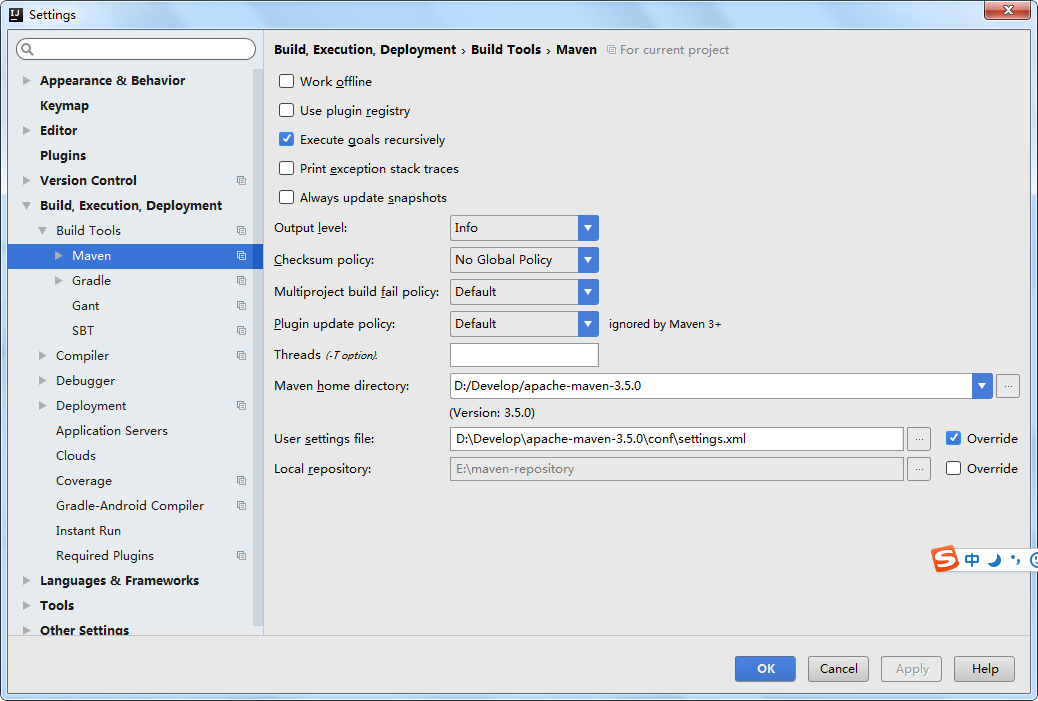
<?xml version="1.0" encoding="UTF-8"?>

<!--

Licensed to the Apache Software Foundation (ASF) under one

or more contributor license agreements.  See the NOTICE file

distributed with this work for additional information

regarding copyright ownership.  The ASF licenses this file

to you under the Apache License, Version 2.0 (the

"License"); you may not use this file except in compliance

with the License.  You may obtain a copy of the License at

    http://www.apache.org/licenses/LICENSE-2.0

Unless required by applicable law or agreed to in writing,

software distributed under the License is distributed on an

"AS IS" BASIS, WITHOUT WARRANTIES OR CONDITIONS OF ANY

KIND, either express or implied.  See the License for the

specific language governing permissions and limitations

under the License.

-->

<!--

 | This is the configuration file for Maven. It can be specified at two levels:

 |

 |  1. User Level. This settings.xml file provides configuration for a single user,

 |                 and is normally provided in ${user.home}/.m2/settings.xml.

 |

 |                 NOTE: This location can be overridden with the CLI option:

 |

 |                 -s /path/to/user/settings.xml

 |

 |  2. Global Level. This settings.xml file provides configuration for all Maven

 |                 users on a machine (assuming they're all using the same Maven

 |                 installation). It's normally provided in

 |                 ${maven.home}/conf/settings.xml.

 |

 |                 NOTE: This location can be overridden with the CLI option:

 |

 |                 -gs /path/to/global/settings.xml

 |

 | The sections in this sample file are intended to give you a running start at

 | getting the most out of your Maven installation. Where appropriate, the default

 | values (values used when the setting is not specified) are provided.

 |

 |-->

<settings xmlns="http://maven.apache.org/SETTINGS/1.0.0"

          xmlns:xsi="http://www.w3.org/2001/XMLSchema-instance"

          xsi:schemaLocation="http://maven.apache.org/SETTINGS/1.0.0 http://maven.apache.org/xsd/settings-1.0.0.xsd">

  <!-- localRepository

   | The path to the local repository maven will use to store artifacts.

   |

   | Default: ${user.home}/.m2/repository

  <localRepository>/path/to/local/repo</localRepository>

  -->

  <localRepository>D:\Repositories\Maven</localRepository>

  <!-- interactiveMode

   | This will determine whether maven prompts you when it needs input. If set to false,

   | maven will use a sensible default value, perhaps based on some other setting, for

   | the parameter in question.

   |

   | Default: true

  <interactiveMode>true</interactiveMode>

  -->

  <!-- offline

   | Determines whether maven should attempt to connect to the network when executing a build.

   | This will have an effect on artifact downloads, artifact deployment, and others.

   |

   | Default: false

  <offline>false</offline>

  -->

  <!-- pluginGroups

   | This is a list of additional group identifiers that will be searched when resolving plugins by their prefix, i.e.

   | when invoking a command line like "mvn prefix:goal". Maven will automatically add the group identifiers

   | "org.apache.maven.plugins" and "org.codehaus.mojo" if these are not already contained in the list.

   |-->

  <pluginGroups>

    <!-- pluginGroup

     | Specifies a further group identifier to use for plugin lookup.

    <pluginGroup>com.your.plugins</pluginGroup>

    -->

    <pluginGroup>org.mortbay.jetty</pluginGroup>

  </pluginGroups>

  <!-- proxies

   | This is a list of proxies which can be used on this machine to connect to the network.

   | Unless otherwise specified (by system property or command-line switch), the first proxy

   | specification in this list marked as active will be used.

   |-->

  <proxies>

    <!-- proxy

     | Specification for one proxy, to be used in connecting to the network.

     |

    <proxy>

      <id>optional</id>

      <active>true</active>

      <protocol>http</protocol>

      <username>proxyuser</username>

      <password>proxypass</password>

      <host>proxy.host.net</host>

      <port>80</port>

      <nonProxyHosts>local.net|some.host.com</nonProxyHosts>

    </proxy>

    -->

  </proxies>

  <!-- servers

   | This is a list of authentication profiles, keyed by the server-id used within the system.

   | Authentication profiles can be used whenever maven must make a connection to a remote server.

   |-->

  <servers>

    <!-- server

     | Specifies the authentication information to use when connecting to a particular server, identified by

     | a unique name within the system (referred to by the 'id' attribute below).

     |

     | NOTE: You should either specify username/password OR privateKey/passphrase, since these pairings are

     |       used together.

     |

    <server>

      <id>deploymentRepo</id>

      <username>repouser</username>

      <password>repopwd</password>

    </server>

    -->

    <!-- Another sample, using keys to authenticate.

    <server>

      <id>siteServer</id>

      <privateKey>/path/to/private/key</privateKey>

      <passphrase>optional; leave empty if not used.</passphrase>

    </server>

    -->

    <server>

        <id>releases</id>

        <username>ali</username>

        <password>ali</password>

      </server>

      <server>

        <id>Snapshots</id>

        <username>ali</username>

        <password>ali</password>

      </server>

  </servers>

  <!-- mirrors

   | This is a list of mirrors to be used in downloading artifacts from remote repositories.

   |

   | It works like this: a POM may declare a repository to use in resolving certain artifacts.

   | However, this repository may have problems with heavy traffic at times, so people have mirrored

   | it to several places.

   |

   | That repository definition will have a unique id, so we can create a mirror reference for that

   | repository, to be used as an alternate download site. The mirror site will be the preferred

   | server for that repository.

   |-->

  <mirrors>

    <!-- mirror

     | Specifies a repository mirror site to use instead of a given repository. The repository that

     | this mirror serves has an ID that matches the mirrorOf element of this mirror. IDs are used

     | for inheritance and direct lookup purposes, and must be unique across the set of mirrors.

     |

    <mirror>

      <id>mirrorId</id>

      <mirrorOf>repositoryId</mirrorOf>

      <name>Human Readable Name for this Mirror.</name>

      <url>http://my.repository.com/repo/path</url>

    </mirror>

     -->

    <mirror>

      <!--This sends everything else to /public -->

      <id>nexus</id>

      <mirrorOf>*</mirrorOf>

      <url>http://maven.aliyun.com/nexus/content/groups/public/</url>

    </mirror>

    <mirror>

      <!--This is used to direct the public snapshots repo in the

          profile below over to a different nexus group -->

      <id>nexus-public-snapshots</id>

      <mirrorOf>public-snapshots</mirrorOf>

      <url>http://maven.aliyun.com/nexus/content/repositories/snapshots/</url>

    </mirror>

  </mirrors>

  <!-- profiles

   | This is a list of profiles which can be activated in a variety of ways, and which can modify

   | the build process. Profiles provided in the settings.xml are intended to provide local machine-

   | specific paths and repository locations which allow the build to work in the local environment.

   |

   | For example, if you have an integration testing plugin - like cactus - that needs to know where

   | your Tomcat instance is installed, you can provide a variable here such that the variable is

   | dereferenced during the build process to configure the cactus plugin.

   |

   | As noted above, profiles can be activated in a variety of ways. One way - the activeProfiles

   | section of this document (settings.xml) - will be discussed later. Another way essentially

   | relies on the detection of a system property, either matching a particular value for the property,

   | or merely testing its existence. Profiles can also be activated by JDK version prefix, where a

   | value of '1.4' might activate a profile when the build is executed on a JDK version of '1.4.2_07'.

   | Finally, the list of active profiles can be specified directly from the command line.

   |

   | NOTE: For profiles defined in the settings.xml, you are restricted to specifying only artifact

   |       repositories, plugin repositories, and free-form properties to be used as configuration

   |       variables for plugins in the POM.

   |

   |-->

  <profiles>

    <profile>

      <id>development</id>

      <repositories>

        <repository>

          <id>central</id>

          <url>http://central</url>

          <releases><enabled>true</enabled><updatePolicy>always</updatePolicy></releases>

          <snapshots><enabled>true</enabled><updatePolicy>always</updatePolicy></snapshots>

        </repository>

      </repositories>

     <pluginRepositories>

        <pluginRepository>

          <id>central</id>

          <url>http://central</url>

          <releases><enabled>true</enabled><updatePolicy>always</updatePolicy></releases>

          <snapshots><enabled>true</enabled><updatePolicy>always</updatePolicy></snapshots>

        </pluginRepository>

      </pluginRepositories>

    </profile>

    <profile>

      <!--this profile will allow snapshots to be searched when activated-->

      <id>public-snapshots</id>

      <repositories>

        <repository>

          <id>public-snapshots</id>

          <url>http://public-snapshots</url>

          <releases><enabled>false</enabled></releases>

          <snapshots><enabled>true</enabled><updatePolicy>always</updatePolicy></snapshots>

        </repository>

      </repositories>

     <pluginRepositories>

        <pluginRepository>

          <id>public-snapshots</id>

          <url>http://public-snapshots</url>

          <releases><enabled>false</enabled></releases>

          <snapshots><enabled>true</enabled><updatePolicy>always</updatePolicy></snapshots>

        </pluginRepository>

      </pluginRepositories>

    </profile>

  </profiles>

   <activeProfiles>

    <activeProfile>development</activeProfile>

    <activeProfile>public-snapshots</activeProfile>

   </activeProfiles>

</settings>
IDEA创建maven项目jar更新缓慢问题的更多相关文章
- 解决Intellij IDEA 通过archetype创建Maven项目缓慢的问题
1.由于默认情况下,根据archetype创建maven项目会从网络下载catalog文件,导致创建maven项目缓慢 Searching for remote catalog: http://rep ...
- (3)Maven快速入门_3在Eclipse中创建Maven项目打包成jar
Eclipse中创建Maven项目 new ---> maven project ----> next 如下 普通java项目 选择 如下 quickstart 创建项目 : 输入 G ...
- eclipse配置maven + 创建maven项目
登录|注册 努力+坚持,而且还很年轻 目录(?)[+] 在现实的企业中,以低成本.高效率.高质量的完成项目,不仅仅需要技术大牛,企业更加需要管理大牛,管理者只懂技术是远远不够的.当 ...
- eclipse 创建maven 项目 动态web工程完整示例 maven 整合springmvc整合mybatis
接上一篇: eclipse 创建maven 项目 动态web工程完整示例 eclipse maven工程自动添加依赖设置 maven工程可以在线搜索依赖的jar包,还是非常方便的 但是有的时候可能还需 ...
- 1.搭建maven,eclipse创建maven项目
1.下载maven包,下载地址为:http://maven.apache.org/download.cgi 2.解压zip包 3.eclipse 引入maven: window-Preferences ...
- IEAD工具教你创建maven项目
之前一直用的是其他的开发工具,maven到目前为止也就用了3个月,今天又时间整理一些初期的使用方法,仅供参照. 为什么要用maven 原因很简单,因为使用maven,会使得项目非常容易管理. 举个例子 ...
- 如何在Eclipse中搭建MyBatis基本开发环境?(使用Eclipse创建Maven项目)
实现要求: 在Eclipse中搭建MyBatis基本开发环境. 实现步骤: 1.使用Eclipse创建Maven项目.File >> New >> Maven Project ...
- 创建maven项目(cmd 命令)
2016五月 22 原 创建maven项目(cmd 命令) 分类:maven (994) (0) 1.普通方式创建 1)进入cmd窗口执行 mvn archetype:generate 2) 光标停止 ...
- Storm系列(三):创建Maven项目打包提交wordcount到Storm集群
在上一篇博客中,我们通过Storm.Net.Adapter创建了一个使用Csharp编写的Storm Topology - wordcount.本文将介绍如何编写Java端的程序以及如何发布到测试的S ...
随机推荐
- Oracle中Instr用法
在项目中用到了Oracle中 Instr 这个函数,顺便仔细的再次学习了一下这个知识. Oracle中,可以使用 Instr 函数对某个字符串进行判断,判断其是否含有指定的字符. 其语法为:Instr ...
- iOS: 音效和音乐的播放,封装的工具类
在iOS中音频播放从形式上可以分为音效播放和音乐播放.前者主要指的是一些短音频播放,通常作为点缀音频,对于这类音频不需要进行进度.循环等控制.后者指的是一些较长的音频,通常是主音频,对于这些音频的播放 ...
- Informatica 常用组件Lookup之九 配置未连接的查找转换
在映射中,未连接的查找转换与管道是分开的.您可以使用 :LKP 引用限定符编写表达式以调用其它转换中的查找.未连接查找的常用用法包括: 测试表达式中某个查找的结果 基于查找结果过滤行 基于查找的结果将 ...
- go语言之进阶篇面向对象编程
1.面向对象编程 对于面向对象编程的支持Go 语言设计得非常简洁而优雅.因为, Go语言并没有沿袭传统面向对象编程中的诸多概念,比如继承(不支持继承,尽管匿名字段的内存布局和行为类似继承,但它并不是继 ...
- ubuntu14.04开启root用户 设置root密码 配置国内镜像源 设置分辨率
一.Ubuntu 默认是不允许 root 通过 ssh 直接登录的,可以修改 /etc/ssh/sshd_config,设置 1 PermitRootLogin yes 然后重启 ssh 服务即可 1 ...
- 中国大学MOOC-陈越、何钦铭-数据结构-笔记
中国大学MOOC-陈越.何钦铭-数据结构-2017春 跟着<中国大学MOOC-陈越.何钦铭-数据结构-2017春>学习,平时练习一下pat上的作业外:在这里记录一下:平时学习视屏的收获. ...
- 关于opacity的思考
今天在封装图片轮播的插件的时候,产生了这个opacity的小小思考. 我这个轮播的思路不是以前baidu输入法官网的设置外层容器overflow为hidden,position为relative用se ...
- 获取定位,苹果IOS10以上不支持h5的geolocation获取不到地理位置信息解决办法
今天开发应用,获取地理位置,最先采用H5的Geolocation的方法来获取地理位置,经过测试发现安卓的机子可以,但是IOS的就是不行,一查资料才知道:10.0苹果版本需要协议为https的才可以获取 ...
- JS操作JSON常用方法
一.JSON字符串的替换 工作经常遇到这样的字符串,如下: 需要经过替换后,才能从字符串转化成JSON对象.这里我们需要用JS实现replaceAll的功能, 将所有的 ' \\" ' 替换 ...
- scala 学习笔记五 foreach, map, reduce
例子 val v = Vector(,,,) ) println(s) //输出:Vector(2, 4, 6, 8) val v2 = Vector(,,,) var v3 = v2.reduce( ...