
bootstrap datetimepicker 在 angular 项目中的运用
datetimepocker 是一个日期时间选择器,bootstrap datetimepicker 是 bootstrap 日期时间表单组件。访问 bootstrap-datetimepicker 。
这次在项目中用到日期时间选择器,分享其用法和总结。
一、截图
功能完成后的项目截图
1. 时间起止输入框

2. 十年视图

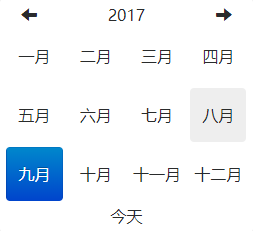
3. 年视图
4. 月视图
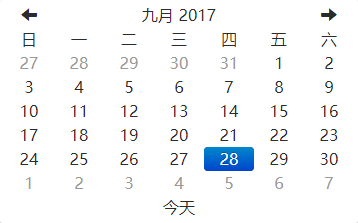
5. 日视图
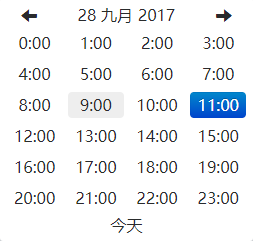
6. 时视图

二、依赖
1. 需要 bootstrap 的下拉菜单组件 (dropdowns.less) 的某些样式,还有 bootstrap 的 sprites (sprites.less and associated images) 中的箭头图标。
先安装 less
- 安装淘宝镜像(可能由于网络慢或被墙的原因,npm可能无法访问到) npm install -g cnpm --registry=https://registry.npm.taobao.org
- 安装 less cnpm install -g less (lessc -v返回了版本号说明安装成功)
然后编译 build/build_standalone.less lessc build/build_standalone.less datetimepicker.css
三、选择器需求
1. 初始化时,开始时间为当前时间减去一年,结束时间为当前时间。
2. 时间格式为 "2018-09-28 00:00:00 "。
3. 开始时间不能大于结束时间。
4. 开始时间不能大于当前时间。
5. 结束时间不能大于当前时间。
四、引入依赖
在 .angular-cli.json 文件中引入 bootstrap-datetimepicker.min.css(刚刚编译成的 datetimepicker.css 的压缩版),bootstrap-datetimepicker.min.js, bootstrap-datetimepicker.zh-CN.js(简体中文格式)。
五、实现
选择器模板,由于该模板不是表单,所以使用双向数据绑定模板语法,将选择的时间流向组件处理,在显示到视图。
当错误提示为空时,将其隐藏。
<div class="start-end-time-search search-item">

    <label for="startTime" class="search-label start-time-label">起止时间</label>

    <input type="text" [(ngModel)]="startTime" placeholder="请选择开始时间" readonly id="startTime" class="search-input start-time-input">

    <label for="endTime" class="search-label end-time-label">至</label>

    <input type="text" [(ngModel)]="endTime" placeholder="请选择结束时间" readonly id="endTime" class="search-input end-time-input">

</div>

<button type="button" class="bg-btn search-btn" (click)="searchByKeyword()"

        [title]="isEnabledSearchBtn ? '查询离线记录' : '不可用(时间选择不正确)'"

        [class.isDisabled]="!isEnabledSearchBtn">

  <i class="iconfont icon-search"></i> 查询

</button>

<span class="error-tip" [hidden]="!startTimeErrorTip">{{startTimeErrorTip}}</span>

<span class="error-tip" [hidden]="!endTimeErrorTip">{{endTimeErrorTip}}</span>
选择器组件
定义公有属性并赋值,将开始时间和结束时间赋值为空字符串。
/*定义公有属性*/

public startTime: string = "";

public endTime: string = "";

public isEnabledSearchBtn: boolean = true;  // 查询按钮是可用的

public startTimeErrorTip: string = ""; // 开始时间选择错误提示

public endTimeErrorTip: string = ""; // 结束时间选择错误提示
将日期时间格式化,当出现一位数的格式时将其前面加 "0"。并返回两种日期时间格式,一种对象,便于拆分,设置开始时间为当前时间减一年。一种字符串,拼接好的格式。
/*

* 日期时间格式化

* 日期时间格式 "2018-09-28 00:00:00"

* */

dateTimeFormat(dateTime) {

  let dateTimeObj = {

      "year": dateTime.getFullYear(),

      "month": dateTime.getMonth() + 1,

      "day": dateTime.getDate(),

      "hours": dateTime.getHours(),

      "minutes": dateTime.getMinutes(),

      "seconds": dateTime.getSeconds()

    };

  for (let k in dateTimeObj) {

    if (dateTimeObj[k] < 10) {

      dateTimeObj[k] = "0" + dateTimeObj[k];

    }

  }

  let dateTimeString = dateTimeObj.year + "-" + dateTimeObj.month + "-" + dateTimeObj.day + " "

    + dateTimeObj.hours + ":" + dateTimeObj.minutes + ":" + dateTimeObj.seconds;

  return {"obj": dateTimeObj, "string": dateTimeString};

}
这里的当前时间有两种,初始化时和选中时间的时候, 选中时间的当前时间要写在日期被改变时的方法中。
/*页面初始化时,填充时间*/

ngOnInit() {

  this.isEnabledSearchBtn = true;  // 初始化默认选择按钮可用

  let initNowTime = this.dateTimeFormat(new Date());

  // 开始时间用当前时间减去一年,结束时间使用当前时间。

  this.startTime = initNowTime.obj.year - 1 + "-" + initNowTime.obj.month + "-" + initNowTime.obj.day + " "

                   + initNowTime.obj.hours + ":" + initNowTime.obj.minutes + ":" + initNowTime.obj.seconds;

  this.endTime = initNowTime.string;

  /*下面处理选择的时间*/

  let jQuery: any = $;

  let that = this;

  jQuery("#startTime").datetimepicker({

    autoclose: true,  // 选择完成自动关闭时间选择器

    format: "yyyy-mm-dd hh:ii:ss",  // 时间格式

    language: "zh-CN",  // 使用简体中文

    todayBtn: "linked",  // 选择器底部显示今天,快速选择当前时间

    todayHighlight: true,  // 高亮显示今天,或已被选择的时间

    zIndexOffset: 1000  // UI,避免被其他设置了 z-index 样式的元素覆盖

  }).on("changeDate", function(startTime){ // 日期被改变时触发

    /*选中时间的时候的当前时间格式化*/

    let nowTimeString = that.dateTimeFormat(new Date()).string;

    that.startTime = that.dateTimeFormat(startTime.date).string;

    if (that.startTime > nowTimeString) {

      that.startTimeErrorTip = "开始时间不能大于当前时间";

      that.isEnabledSearchBtn = false;

    } else if (that.startTime > that.endTime) {

      that.startTimeErrorTip = "开始时间不能大于结束时间";

      that.isEnabledSearchBtn = false;

    } else {

      that.startTimeErrorTip = "";

      that.endTimeErrorTip = "";

      that.isEnabledSearchBtn = true;

    }

  }).data('datetimepicker');

  jQuery("#endTime").datetimepicker({

    autoclose: true,

    format: "yyyy-mm-dd hh:ii:ss",

    language: "zh-CN",

    todayBtn: "linked",

    todayHighlight: true,

    zIndexOffset: 1000

  }).on("changeDate", function(endTime) {

    /*选中时间的时候的当前时间格式化*/

    let nowTimeString = that.dateTimeFormat(new Date()).string;

    that.endTime = that.dateTimeFormat(endTime.date).string;

    if (that.endTime > nowTimeString) {

      that.endTimeErrorTip = "结束时间不能大于当前时间";

      that.isEnabledSearchBtn = false;

    } else if (that.startTime > that.endTime) {

      that.endTimeErrorTip = "结束时间不能小于开始时间";

      that.isEnabledSearchBtn = false;

    } else {

      that.startTimeErrorTip = "";

      that.endTimeErrorTip = "";

      that.isEnabledSearchBtn = true;

    }

  }).data('datetimepicker');

}
六、错误提示演示


时间选择错误时,给出提示,并且查询按钮不可用(提示选择正确的时间)。
bootstrap datetimepicker 在 angular 项目中的运用的更多相关文章
- gulp 在 angular 项目中的使用
gulp 在 angular 项目中的使用 keyword:gulp,angularjs,ng,ngAnnotate,jshint,gulpfile 最后附完整简洁的ng项目gulpfile.js 准 ...
- angular项目中各个文件的作用
原文地址 https://www.jianshu.com/p/176ea79a7101 大纲 1.对angular项目中的一些文件的概述 2.对其中一些文件的详细描述 2.1.package.json ...
- Angular 项目中如何使用 ECharts
在有些使用 ECharts 库的 Angular 项目中,通常除了安装 npm 包之外,还会在 angular.json 中配置 “build.options.scripts”,将 “node_mod ...
- angular项目中遇到的问题
一.angular项目中如何实现路由缓存 需要实现的效果,对请求的数据进行缓存,比如进入文章详情页之后点击返回,不会再调用后台数据接口:而是加载缓存中的数据,如何数据变动的情况下,可使用下拉刷新刷新页 ...
- 在angular项目中使用bootstrap的tooltip插件时,报错Property 'tooltip' does no t exist on type 'JQuery<HTMLElement>的解决方法和过程
在angular4的项目中需要使用bootstrap的tooltip插件. 1. 使用命令安装jQuery和bootstrap npm install bootstrap jquery --save ...
- angular项目中使用Primeng
1.第一步把依赖添加到项目中 npm install primeng --save npm install @angular/animations --save npm install font-aw ...
- Angular项目中引入jQuery
npm install --save jquery npm install @types/jquery --save 在对应的组件中引入 import * as $ from "jquery ...
- angular项目中使用jquery的问题
1.使用npm命令往项目中添加jQuery. npm install jquery --save 2.在你想要用jQuery的组件中添加. import * as $ from "jquer ...
- Angular项目中共享模块的实现
创建share Modele:ng g m share import进来所有需要共享的模块都export出去, 一.共享CommonModule 暂时只有CommonModule,以后会有一些需要共享 ...
随机推荐
- Java基于ssm框架的restful应用开发
Java基于ssm框架的restful应用开发 好几年都没写过java的应用了,这里记录下使用java ssm框架.jwt如何进行rest应用开发,文中会涉及到全局异常拦截处理.jwt校验.token ...
- 350-两个阵列的交叉点II
给定两个数组,编写一个函数来计算它们的交集. 例1: 输入: nums1 = [1,2,2,1],nums2 = [2,2] 输出:[2,2] 例2: 输入: nums1 = [4,9,5],,nu ...
- java并发编程的艺术(一)---锁的基本属性
本文来源于翁舒航的博客,点击即可跳转原文观看!!!(被转载或者拷贝走的内容可能缺失图片.视频等原文的内容) 若网站将链接屏蔽,可直接拷贝原文链接到地址栏跳转观看,原文链接:https://www.cn ...
- graphviz 的绘图布局
graphviz是贝尔实验室开发的一个开源的工具包,它使用一个特定的DSL(领域特定语言):dot作为脚本语言,然后使用布局引擎来解析此脚本,并完成自动布局. graphviz中包含了众多 ...
- SQLite的Integer类型
SQLite 中的 INTEGER:带符号的整型,具体取决有存入数字的范围大小,根据大小可以使用1,2,3,4,6,8字节来存储. 在SQLite中,存储分类和数据类型也有一定的差别,如INTEGER ...
- Linux安装jdk,编写helloworld程序
今天学习了Linux安装jdk,做个笔记记录一下. 第一步,确定Linux是32位的还是64位的,然后到oracle官网上下载对应版本的jdk,一般下载.tar.gz文件.查看Linux的版本的命令是 ...
- JAVA中的泛型(Generic)
Java泛型(Generic)简介 泛型是jdk1.5版本以后推出来的,表示类型参数化,让java能更具有动态性一些,让类型能变成参数传递. 要我自己感觉的话,泛型本身没啥用,跟反射在一起用,就体现出 ...
- django 数据库 ORM创建表单是出错
WARNINGS: ?: (mysql.W002) MySQL Strict Mode is not set for database connection 'default' HINT: MySQL ...
- problem-solving-with-algorithms-and-data-structure-usingpython(使用python解决算法和数据结构) -- 基本数据结构 -- 队列
1. 什么是队列? 队列是项的有序结合,其中添加新项的一端称为队尾,移除项的一端称为队首. FIFO:先进先出 2. 队列抽象数据类型 队列操作如下: Queue() 创建一个空的新队列. 它不需要参 ...
- 第二十三天- 模块 re
# 1. 正则表达式 # 元字符# . 除了换行符外任意字符# \w 数字 字母 下划线# \s 空白符# \b 单词的末尾# \d 数字# \W 除了数字 字母 下划线# \D 除了数字# \S 除 ...