
.NET Core 类库中读取appsettings.json
{

  "Logging": {

    "IncludeScopes": false,

    "LogLevel": {

      "Default": "Warning"

    }

  },

  "AppSettings": {

    "SqlServerConnection": "Server=127.0.0.1;Database=demo;User ID=sa;Password=sa;",

    "RedisCaching": {

      "Enabled": true,

      "ConnectionString": "127.0.0.1:6379"

    }

  }

}
1、初始化注入方式
Startup.cs下ConfigureServices方法:
services.AddOptions();

services.Configure<AppSettings>(Configuration.GetSection("AppSettings"));
public class AppSettings

{

      public RedisCaching RedisCaching { get; set; }

}

public class RedisCaching

{

     /// <summary>

     /// 是否启用

     /// </summary>

     public bool Enabled { get; set; }

     /// <summary>

     /// 链接信息

     /// </summary>

     public string ConnectionString { get; set; }

}
然后在控制器中调用:
public readonly IOptions<AppSettings> Setting;

public HomeController(IOptions<AppSettings> setting)

{

    Setting = setting;

}

public IActionResult Index()

{

    var s = Setting.Value.RedisCaching.ConnectionString;

    ViewData["abc"] = s;

    return View();

}
2、读取appsettings.json方式
(此方法如在单独的类库中需引用Microsoft.Extensions.Options.ConfigurationExtensions、Microsoft.Extensions.Configuration.FileExtensions、Microsoft.Extensions.Configuration.Json)
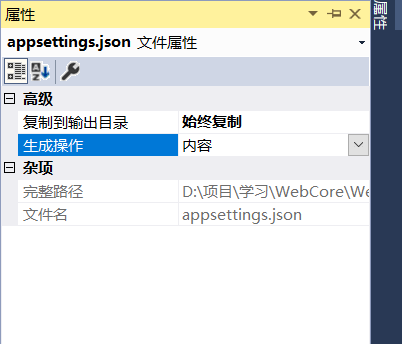
1)先设置appsettings.json文件复制到根目录.右键appsettings.json 高级 复制到输出目录中选“始终复制”.
2)
     public T Get<T>(string key)

        {

            IConfiguration config = new ConfigurationBuilder().SetBasePath(Directory.GetCurrentDirectory())

                .AddJsonFile("appsettings.json", true, true).Build();

           return config.GetSection(key).Get<T>();

        }
     public IActionResult Index()

        {

            var s = new GetAppSetting().Get<string>("AppSettings:SqlServerConnection");

            ViewData["abc"] = s;

            return View();

        }
第一种方法在别的类库中也可调用,比较方便,刚做core项目,用第一种方法时类库中不好调用,查了半天用第二种就可以了。
.NET Core 类库中读取appsettings.json的更多相关文章
- .NET Core类库中读取配置文件
最近在开发基于.NET Core的NuGet包,遇到一个问题:.NET Core中已经没有ConfigurationManager类,在类库中无法像.NET Framework那样读取App.conf ...
- .NET Core 中读取appsettings.json配置文件的方法
appsettings.json配置文件结构如下: { "WeChatPay": { "WeChatApp_ID": "wx9999998999&qu ...
- 如何在.Net Core 2.0 App中读取appsettings.json
This is something that strangely doesn’t seem to be that well documented and took me a while to figu ...
- .Net Core 2.0 App中读取appsettings.json
引用: Microsoft.Extensions.ConfigurationMicrosoft.Extensions.Configuration.FileExtensionsMicrosoft.Ext ...
- Asp.Net Core 进阶(一) —— 读取appsettings.json
我们以前在Asp.Net MVC中使用 System.Configuration.ConfigurationManager 来读取web.config文件.但是Asp.Net Core MVC已经没有 ...
- .NET Core在类库中读取配置文件appsettings.json
在.NET Framework框架时代我们的应用配置内容一般都是写在Web.config或者App.config文件中,读取这两个配置文件只需要引用System.Configuration程序集,分别 ...
- .NET Core类库项目中如何读取appsettings.json中的配置
这是一位朋友问我的问题,写篇随笔回答一下.有2种方法,一种叫丑陋的方法 —— IConfiguration ,一种叫优雅的方法 —— IOptions . 1)先看丑陋的方法 比如在 RedisCli ...
- Asp .Net Core 读取appsettings.json配置文件
Asp .Net Core 如何读取appsettings.json配置文件?最近也有学习到如何读取配置文件的,主要是通过 IConfiguration,以及在Program中初始化完成的. ...
- asp.net core读取appsettings.json,如何读取多环境开发配置
摘要 在读取appsettings.json文件中配置的时候,觉得最简单的方式就是使用asp.net core注入的方式进行读取了. 步骤 首先根据配置项的结构定义一个配置类,比如叫AppSettin ...
随机推荐
- 正向工程configuration配置连接
在执行正向工程的时候需要用到这个关键词里面的configure();方法, 这个方法有好几个重构, 都是参数不一样的, 也可以空着不写, 不写的话就会默认去找hibernate.cfg.xml这个文件 ...
- 第五章 二叉树(e1)先序遍历
- Time range (447392) for take 'Take 001' is larger than maximum allowed(100000).
http://www.cnblogs.com/lopezycj/archive/2012/05/16/unity3d_tuchao.html https://forum.unity3d.com/thr ...
- Java的三种多线程
项目结构 继承Thread类 /* * Thread类实现了Runnable接口 */ public class MyThread extends Thread { @Override public ...
- phpStudy4——前端页面使用Ajax请求并解析php返回的json数据
项目需求: 在html页面显示所有用户列表信息. 需求分析: 1. html页面使用ajax向后端php请求用户数据 2. php脚本查询数据库,并将查询后的结果以json格式返回前端html页面 3 ...
- c语言指针数组和结构体的指针
指向数组的指针,先初始化一个数组,使用传统方式遍历 void main() { ] = { ,,,, }; ; i < ; i++) { printf("%d,%x\n", ...
- 修改mysql数据库 允许远程访问
首先使用root身份进入MySQL mysql>use mysql; //进入mysql表 mysql> selecthost,user from user; //查看结果是不是root ...
- requestFullscreen()事件全屏不好使怎么解决
标明:我在360和火狐中全屏requestFullscreen()事件不好使: 解释:我后来发现我的页面是在iframe框架中使用的并且没有设置allowfullscreen="true&q ...
- <Linux多线程服务端编程>学习记录
使用智能指针解决多线程下 类的解析冲突问题 有这样一个场景 使用StockFactory记录Stock的信息 容器是map<string,smart_ptr>; 代码如下: #inclu ...
- Myeclipse如何更新maven
选中项目-->右键-->Maven4MyEclipse-->Update Project-->勾选Force update of.....就ok了