
Linux xargs命令详解
find命令把匹配到的文件传递给xargs命令,而xargs命令每次只获取一部分文件而不是全部
xargs要处理的文件如果不是在结尾,需要加上 -i这个参数
xargs常见命令参数
args:xargs的默认命令是echo,空格是默认定界符。 默认替换符号是{}
 -I {}批定了替换字符串,表示文件内容,能循环按要求替换相应的参数  使用-I指定一个替换字符串{},这个字符串在xargs扩展时会被替换掉,

     当-I与xargs结合使用,每一个参数命令都会被执行一次:

         -n num 后面加次数,表示命令在执行的时候一次用的argument的个数,默认是用所有的

   -d 自定义定界符
常用的命令展示
多行内容的单输出且每行3个
[root@localhost ftl]# cat /home/omc/ftl/logs.txt |xargs -n3

查找系统中的每一个普通文件,然后使用xargs命令来测试它们分别属于哪类文件
[root@localhost log]# find /home/omc/ -maxdepth 1 -user root -type f | xargs file {}

在/var/log/下查找log文件,复制文件到/home/omc/ftl且把结果保存到/home/omc/ftl/logs.txt文件中
[root@localhost log]# find /var/log/*.log -type f | xargs -i cp {} /home/omc/ftl

[root@localhost log]# ll -ltr /home/omc/ftl

[root@localhost log]# find /var/log/*.log -type f > /home/omc/ftl/logs.txt

[root@localhost log]# ll /home/omc/ftl/logs.txt

删除 /home/omc/ftl/下的log文件
[root@localhost ftl]# ll *.log |xargs rm -rf {}     【错误】

[root@localhost ftl]# ls *.log |xargs rm -rf {}     【正确】

在当前目录下查找所有用户权限644的文件,并更改权限600
[root@localhost ftl]# ll *.txt

[root@localhost ftl]# find /home/omc/ftl -perm 644 | xargs chmod 600

[root@localhost ftl]# ll *.txt

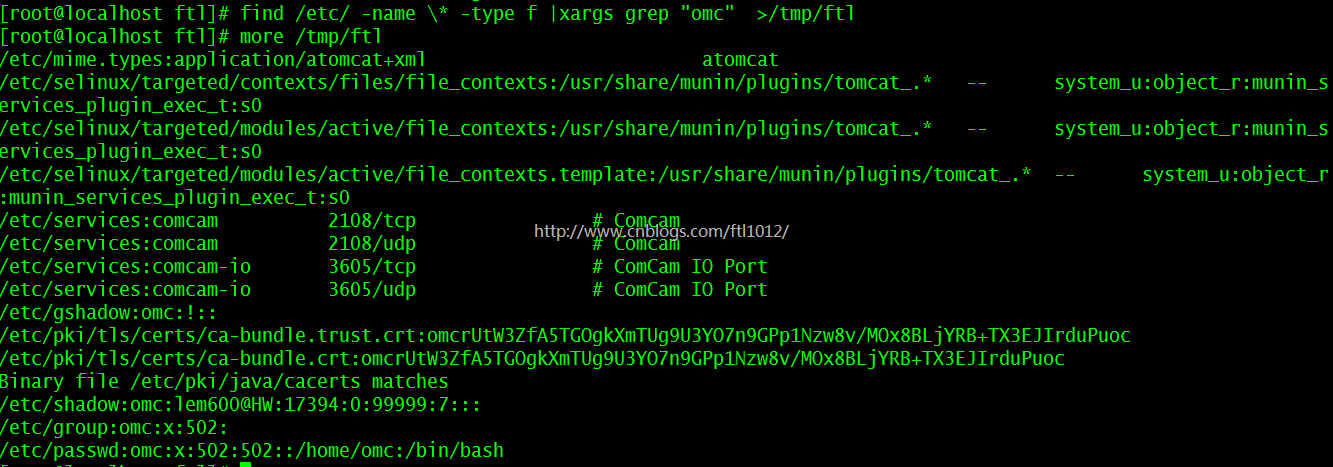
用grep命令在当前目录下的所有普通文件中搜索omc这个词
find /etc/ -name \* -type f |xargs grep "omc"  >/tmp/ftl

    ==>find /etc/ -name "*" -type f |xargs grep "omc"  >/tmp/ftl
使用-i参数默认的前面输出用{}代替,-I参数可以指定其他代替字符,如例子中的[]
find /var/ -name "*.log" |xargs -I [] cp [] /tmp/ 【xargs 默认用是i表示{},用I可以替换符号】
ll -ltr /tmp/ | more 5

xargs的-p参数的使用
find . -name "*.log" |xargs -p -i cp {} ../ltesig/
【-p参数会提示让你确认是否执行后面的命令,y执行,n不执行】

利用for循环实现和xargs同样的效果
find /home/omc/ -name *.txt | xargs    -i cp {} /home/omc/h

cat logs.txt |while read line;do echo $line >> logs_bak.txt; done;

利用xargs关闭不常用的系统启动软件
chkconfig | awk '{print $1}' | grep -Ev "sshd|network|crond|sysstat|rsyslog" | xargs -I{} chkconfig {} off

xargs总结示范:
find . -name "*.log" |xargs -p -i cp {} ../ltesig/ 【正确】

find . -name "*.log" |xargs -p cp {} ../ltesig/    【错误】

find . -type f -print | xargs file                 【正确】

find . -type f -print | xargs rm {}                【错误】

总结一下:如果命令后面可以跟内容,且没有目的路径的时候,可以省略-i,否则得加上
Linux xargs命令详解的更多相关文章
- linux xargs 命令详解
xargs是给命令传递参数的一个过滤器,也是组合多个命令的一个工具.它把一个数据流分割为一些足够小的块,以方便过滤器和命令进行处理.通常情况下,xargs从管道或者stdin中读取数据,但是它也能够从 ...
- 【转帖】linux sort,uniq,cut,wc,tr,xargs命令详解
linux sort,uniq,cut,wc,tr,xargs命令详解 http://embeddedlinux.org.cn/emb-linux/entry-level/201607/21-5550 ...
- 【转发】linux yum命令详解
linux yum命令详解 yum(全 称为 Yellow dog Updater, Modified)是一个在Fedora和RedHat以及SUSE中的Shell前端软件包管理器.基於RPM包管理, ...
- linux yum 命令 详解
linux yum命令详解 yum(全称为 Yellow dog Updater, Modified)是一个在Fedora和RedHat以及SUSE中的Shell前端软件包管理器.基於RPM包管理,能 ...
- [转帖]xargs命令详解,xargs与管道的区别
xargs命令详解,xargs与管道的区别 https://www.cnblogs.com/wangqiguo/p/6464234.html 之前一直说要学习一下 xargs 到现在为止也没学习.. ...
- linux awk命令详解
linux awk命令详解 简介 awk是一个强大的文本分析工具,相对于grep的查找,sed的编辑,awk在其对数据分析并生成报告时,显得尤为强大.简单来说awk就是把文件逐行的读入,以空格为默认分 ...
- linux cat 命令详解
linux cat 命令详解 http://linux.chinaunix.net/techdoc/system/2007/11/16/972467.shtml adb shell su //这个不一 ...
- 【初级】linux rm 命令详解及使用方法实战
rm:删除命令 前言: windows中的删除命令大家都不陌生,linux中的删除命令和windows中有一个共同特点,那就是危险,前两篇linux mkdir 命令详解及使用方法实战[初级]中我们就 ...
- Linux netstat命令详解
Linux netstat命令详解 一 简介 Netstat 命令用于显示各种网络相关信息,如网络连接,路由表,接口状态 (Interface Statistics),masquerade 连接,多 ...
随机推荐
- ASP.NET Core 中的实时框架 SingalR
目录 SignalR 是什么? 在 ASP.NET Core 中使用 SignalR 权限验证 横向扩展 源代码 参考 SignalR 是什么? ASP.NET Core SignalR 是一个开源的 ...
- java面试①整体流程
http://www.toutiao.com/i6463396763549041166/ 1.1 简单的自我介绍 我是xxx工作了xx年,在xx公司,做过xx项目, 1.2你简单介绍一下xxx项目 为 ...
- 使用 Selenium 实现基于 Web 的自动化测试
(转自http://www.ibm.com/developerworks/cn/web/1209_caimin_seleniumweb/index.html) Selenium 是一个用于 Web 应 ...
- 2019.2.1 现有vue-cli项目引入ESLint
ESLint 不管是多人合作还是个人项目,代码规范是很重要的.这样做不仅可以很大程度地避免基本语法错误,也保证了代码的可读性. 可能在早期建立项目的时候,因为一些原因没有引入eslint.单元测试等, ...
- Windows2012开机启动项设置
最简单方式 开始->运行->输入shell:startup 在打开的启动文件夹中,将需要启动程序的快捷方式复制进去,完工 重启试试吧 https://blog.csdn.net/tmton ...
- C# 小软件部分(一)
自己在空闲时分整合.编写了一款小软件程序,命名为魔法兔子,希望大家可以提出意见和指导,此篇文章主要为软件的部分截图和介绍. 软件详情: 1.首先是登录,注册界面. 可以注册自己的账号,后台是腾讯云服务 ...
- dubbo的重试机制
对dubbo熟悉的人对下面的配置一定不会陌生: <dubbo:reference id="xxxx" interface="xx" check=" ...
- CSS属性之attr()
attr()准确的说,不应该是一个属性,而是一个CSS的函数,我们先看看MDN上的介绍吧: Summary The attr() CSS function is used to retrieve th ...
- DOM节点树和元素树--深度遍历
我们在阅读JS高级程序设计的时候,提到了节点树的概念.比如说: elem.parentNode---找elem的父节点: elem.childNodes---找elem的所有的直接子节点: elem. ...
- 浏览器根对象document之字符串属性
1.1 停止使用的属性 fgColor.linkColor.vlinkColor.alinkColor.bgColor. 1.2 文档地址 document.URL 与documentURI属性返回同 ...