
dubbo源码分析- 集群容错之Cluster(一)
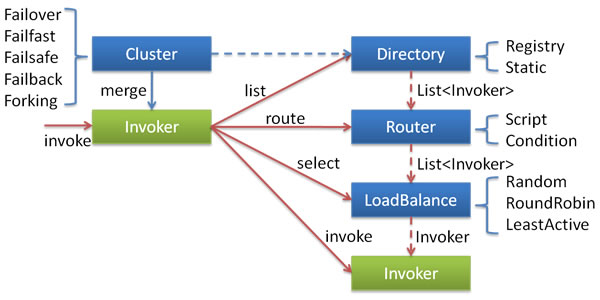
1、集群容错的配置项
- failover - 失败自动切换,当出现失败,重试其他服务器(缺省),通常用于读操作,但重试会带来更长的延时。
- failfast - 快速失效,只发起一次调用,失败立即报错。通常用于非幂等性写操作,比如说新增记录
- failsafe - 失败安全,出现异常时,直接忽略,通常用于写入审计日志等操作
- failback - 失败自动恢复,后台记录失败请求,定时重发,通常用于消息通知操作
- forking - 并行调用多个服务器,只要一个成功即返回。通常用于实时性要求较高的读操作,但需要浪费更多的服务器资源。
如果没有设置集群的cluster,则默认值为:failover;在cluster默认为failover时如果没有设置retries的值,则默认使用default.retries+1 = 0+1,即重试1次,如果设置了retries的值,则使用配置的值(比如:retries=2则重试2次)。
如果dubbo的provider所提供的服务中涉及到数据库操作,最好使用failfast,避免幂等操作抛出异常,或者使用默认cluster时可能导致的数据重试插入多条等情况。
    @SuppressWarnings({"unchecked", "rawtypes"})

    public Result doInvoke(Invocation invocation, final List<Invoker<T>> invokers, LoadBalance loadbalance) throws RpcException {

        List<Invoker<T>> copyinvokers = invokers;

        checkInvokers(copyinvokers, invocation);

        int len = getUrl().getMethodParameter(invocation.getMethodName(), Constants.RETRIES_KEY, Constants.DEFAULT_RETRIES) + 1;

        if (len <= 0) {

            len = 1;

        }

        // retry loop.

        RpcException le = null; // last exception.

        List<Invoker<T>> invoked = new ArrayList<Invoker<T>>(copyinvokers.size()); // invoked invokers.

        Set<String> providers = new HashSet<String>(len);

        for (int i = 0; i < len; i++) {

            //Reselect before retry to avoid a change of candidate `invokers`.

            //NOTE: if `invokers` changed, then `invoked` also lose accuracy.

            if (i > 0) {

                checkWhetherDestroyed();

                copyinvokers = list(invocation);

                // check again

                checkInvokers(copyinvokers, invocation);

            }

            Invoker<T> invoker = select(loadbalance, invocation, copyinvokers, invoked);

            invoked.add(invoker);

            RpcContext.getContext().setInvokers((List) invoked);

            try {

                Result result = invoker.invoke(invocation);

                if (le != null && logger.isWarnEnabled()) {

                    logger.warn("Although retry the method " + invocation.getMethodName()

                            + " in the service " + getInterface().getName()

                            + " was successful by the provider " + invoker.getUrl().getAddress()

                            + ", but there have been failed providers " + providers

                            + " (" + providers.size() + "/" + copyinvokers.size()

                            + ") from the registry " + directory.getUrl().getAddress()

                            + " on the consumer " + NetUtils.getLocalHost()

                            + " using the dubbo version " + Version.getVersion() + ". Last error is: "

                            + le.getMessage(), le);

                }

                return result;

            } catch (RpcException e) {

                if (e.isBiz()) { // biz exception.

                    throw e;

                }

                le = e;

            } catch (Throwable e) {

                le = new RpcException(e.getMessage(), e);

            } finally {

                providers.add(invoker.getUrl().getAddress());

            }

        }

        throw new RpcException(le != null ? le.getCode() : 0, "Failed to invoke the method "

                + invocation.getMethodName() + " in the service " + getInterface().getName()

                + ". Tried " + len + " times of the providers " + providers

                + " (" + providers.size() + "/" + copyinvokers.size()

                + ") from the registry " + directory.getUrl().getAddress()

                + " on the consumer " + NetUtils.getLocalHost() + " using the dubbo version "

                + Version.getVersion() + ". Last error is: "

                + (le != null ? le.getMessage() : ""), le != null && le.getCause() != null ? le.getCause() : le);

    }
2、集群容错的配置
- failover
<!-- Provider side -->

<dubbo:service retries="2" />

<!-- Consumer side -->

<dubbo:reference retries="2" />

<!-- Consumer side,Method -->

<dubbo:reference>

    <dubbo:method name="findFoo" retries="2" />

</dubbo:reference>
- failfast
<!-- Provider side -->

<dubbo:service cluster="failfast"/>

<!-- Consumer side -->

<dubbo:reference cluster="failfast"/>
- failsafe
<!-- Provider side -->

<dubbo:service cluster="failsafe"/>

<!-- Consumer side -->

<dubbo:reference cluster="failsafe"/>
- failback
<!-- Provider side -->

<dubbo:service cluster="failback"/>

<!-- Consumer side -->

<dubbo:reference cluster="failback"/>
- forking
<!-- Provider side -->

<dubbo:service cluster="forking"/>

<!-- Consumer side -->

<dubbo:reference cluster="forking"/>
dubbo源码分析- 集群容错之Cluster(一)的更多相关文章
- Dubbo 源码分析 - 集群容错之 Cluster
1.简介 为了避免单点故障,现在的应用至少会部署在两台服务器上.对于一些负载比较高的服务,会部署更多台服务器.这样,同一环境下的服务提供者数量会大于1.对于服务消费者来说,同一环境下出现了多个服务提供 ...
- Dubbo 源码分析 - 集群容错之 LoadBalance
1.简介 LoadBalance 中文意思为负载均衡,它的职责是将网络请求,或者其他形式的负载"均摊"到不同的机器上.避免集群中部分服务器压力过大,而另一些服务器比较空闲的情况.通 ...
- Dubbo 源码分析 - 集群容错之 Router
1. 简介 上一篇文章分析了集群容错的第一部分 -- 服务目录 Directory.服务目录在刷新 Invoker 列表的过程中,会通过 Router 进行服务路由.上一篇文章关于服务路由相关逻辑没有 ...
- Dubbo 源码分析 - 集群容错之 Directory
1. 简介 前面文章分析了服务的导出与引用过程,从本篇文章开始,我将开始分析 Dubbo 集群容错方面的源码.这部分源码包含四个部分,分别是服务目录 Directory.服务路由 Router.集群 ...
- Dubbo源码(七) - 集群
前言 本文基于Dubbo2.6.x版本,中文注释版源码已上传github:xiaoguyu/dubbo 集群(cluster)就是一组计算机,它们作为一个总体向用户提供一组网络资源.这些单个的计算机系 ...
- Dubbo源码学习--集群负载均衡算法的实现
相关文章: Dubbo源码学习文章目录 前言 Dubbo 的定位是分布式服务框架,为了避免单点压力过大,服务的提供者通常部署多台,如何从服务提供者集群中选取一个进行调用, 就依赖Dubbo的负载均衡策 ...
- Dubbo 源码分析 - 服务调用过程
注: 本系列文章已捐赠给 Dubbo 社区,你也可以在 Dubbo 官方文档中阅读本系列文章. 1. 简介 在前面的文章中,我们分析了 Dubbo SPI.服务导出与引入.以及集群容错方面的代码.经过 ...
- dubbo服务引用与集群容错
服务引用无非就是做了两件事 将spring的schemas标签信息转换bean,然后通过这个bean的信息,连接.订阅zookeeper节点信息创建一个invoker 将invoker的信息创建一个动 ...
- Dubbo 源码分析 - 服务导出
1.服务导出过程 本篇文章,我们来研究一下 Dubbo 导出服务的过程.Dubbo 服务导出过程始于 Spring 容器发布刷新事件,Dubbo 在接收到事件后,会立即执行服务导出逻辑.整个逻辑大致可 ...
随机推荐
- jvm学习笔记之class文件的加载、初始化
编写的java文件在要真正运行时,会首先被编译成 “.class"结尾的二进制文件,然后被虚拟机加载.那么在虚拟机中一个class文件要成为java实例,需要经历好几个步骤: 1.装载:装载 ...
- Android Handler类 发送消息-post()和postDelay(), Looper讲解
https://blog.csdn.net/weixin_41101173/article/details/79701832 首先,post和postDelay都是Handler的方法,用以在子线程中 ...
- java web的转发与重定向
java web的转发与重定向 原创 2012年12月15日 11:51:39 19312 转发和重定向的区别 一.使用方法 转发:request.getRequestDispatcher(" ...
- windows自动化-脚本案例
; Script Start - Add your code below here Run("D:\Navicat Premium\navicat.exe") Sleep(1000 ...
- anaconda更新tensorflow
在anaconda prompt中,输入: pip install --upgrade --ignore-installed tensorflow gpu版本输入: pip install --upg ...
- zabbix3.4中报错解:telnet service is down on决方法
当新添加的监控主机报telnet service is down on的时候,大家不要惊慌,这个是属于模板中添加了一项监控参数,监控被监控机的telnet服务,有两种解决办法,第一呢就是找到对应的监控 ...
- Python 短路机制
And / Or A B A and B A or B Not A True True True True False True False False True False False True F ...
- jenkiins 配置邮件发送(四)
一.默认邮件配置的方法 Jenkins默认的插件只能发送执行失败的job 系统管理-->系统设置-->邮件通知 需要注意的是系统管理员邮箱地址必须要邮箱通知的邮箱一致,否则不会发送成功 在 ...
- Pycharm中设置默认头注释
在编写Python项目时,我们可能需要添加一些默认的信息,比如添加文件创建的时间,比如添加文件作者,等等,这些信息可以自己在python脚本中添加,但是也可以在Pycharm中配置模板,每次创建文件的 ...
- 如何显示隐藏的文件在win7系统中
点左下角“开始”菜单,再点击“计算机”. 点击窗口顶部靠左位置的“组织”菜单,选择其中的“文件夹和搜索选项”. 在弹出的窗口里点击切换到“查看”选项卡. 在窗口中部位置下拉滚动条,找到“显示隐藏的 ...