
es数据二次开发统计展示
案例1
在es查询中按照多列分组的时候 分组列的count值会越来越少 es默认隐藏了没有被分组匹配到的记录数 需要在查询的时候开启
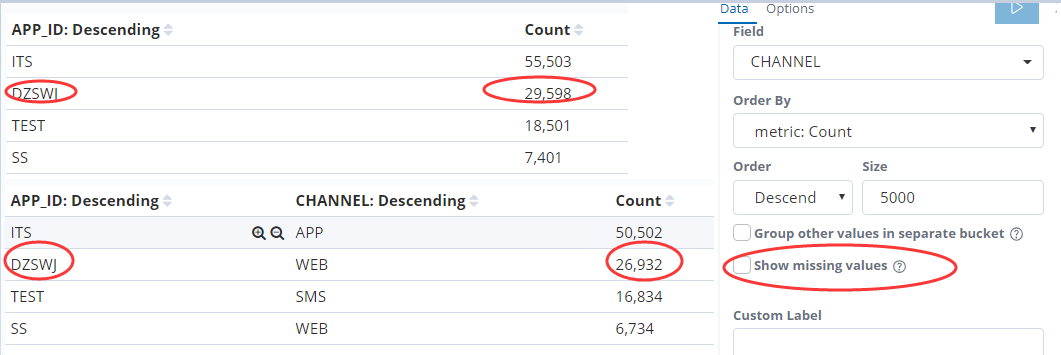
2.开启显示没有被分组成功的记录
分组成功的记录加上分组missing的记录数就等于总的记录数 26932+2666=29598
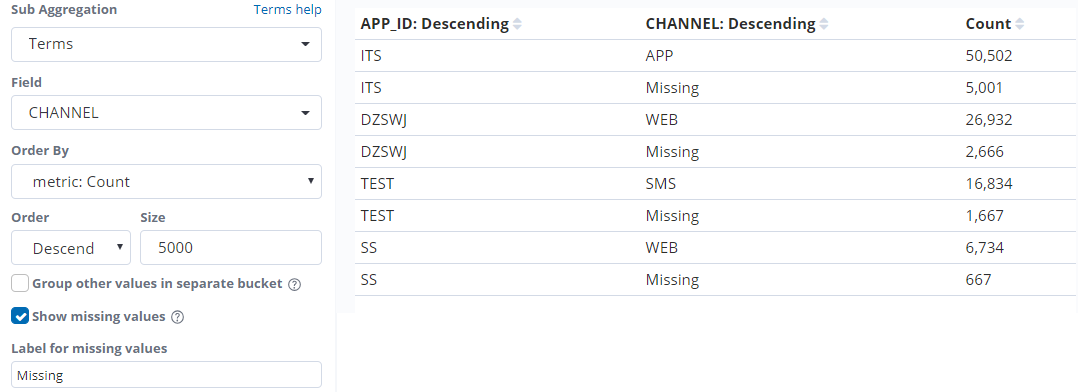
3.当实际的总数和es分组统计的条数对不上的时候 需要考虑是不是分组列的值有可能被丢失了 这个时候可以开启显示丢失
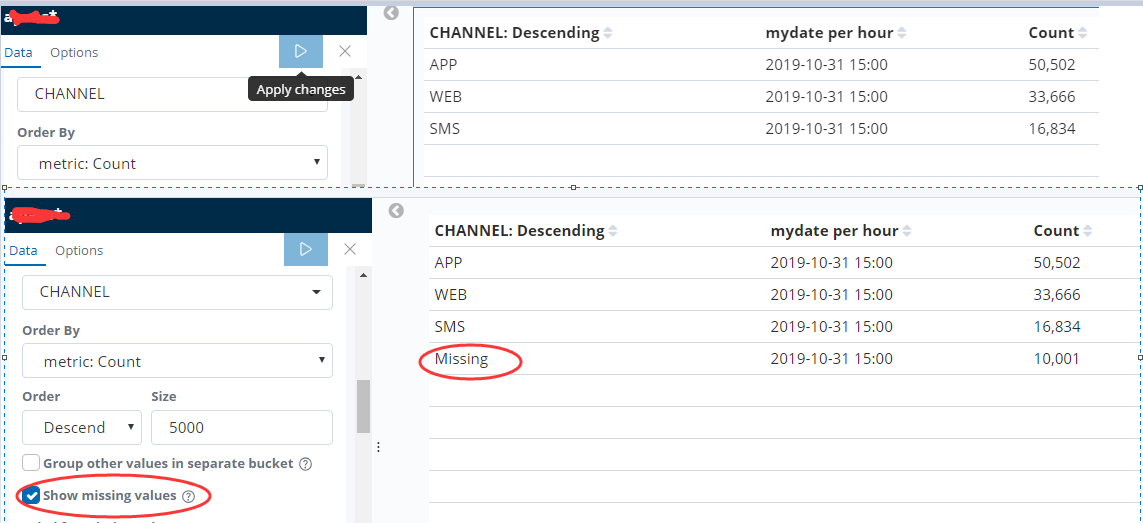
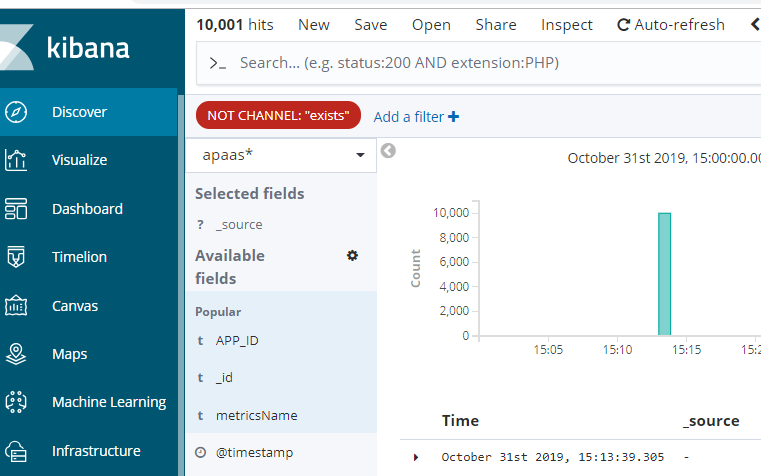
4.查看es的原始日志内容确实有10001条记录不存在CHANNEL字段
实例统计
#!/usr/bin/env python

# -*- coding: utf-8 -*-

from elasticsearch6 import Elasticsearch

import datetime

import time

import re

es = Elasticsearch("http://10.000.142.88:9200")

#每小时定时执行统计前一个小时的数据

def formartTime(startTime):

    try:

        startTime = datetime.datetime.strptime(startTime, '%Y-%m-%dT%H:%M:%S.%f')

    except Exception as e:

        startTime = datetime.datetime.strptime(startTime, '%Y-%m-%d %H:%M:%S')

    startTime = startTime.strftime('%Y-%m-%d %H:%M:%S.%f')[:-13]

    return startTime+":00:00"

def strtime_to_datetime(timestr):

    """将字符串格式的时间 (含毫秒) 转为 datetime 格式

    :param timestr: {str}'2016-02-25 20:21:04.242'

    :return: {datetime}2016-02-25 20:21:04.242000

    """

    local_datetime = datetime.datetime.strptime(timestr, "%Y-%m-%d %H:%M:%S.%f")

    return local_datetime

def datetime_to_timestamp(datetime_obj):

    """将本地(local) datetime 格式的时间 (含毫秒) 转为毫秒时间戳

    :param datetime_obj: {datetime}2016-02-25 20:21:04.242000

    :return: 13 位的毫秒时间戳  1456402864242

    """

    local_timestamp = int(time.mktime(datetime_obj.timetuple()) * 1000.0 + datetime_obj.microsecond / 1000.0)

    return local_timestamp

def strtime_to_timestamp(local_timestr):

    """将本地时间 (字符串格式,含毫秒) 转为 13 位整数的毫秒时间戳

    :param local_timestr: {str}'2016-02-25 20:21:04.242'

    :return: 1456402864242

    """

    local_datetime = strtime_to_datetime(local_timestr)

    timestamp = datetime_to_timestamp(local_datetime)

    return timestamp

today=datetime.date.today()

tnow=datetime.datetime.now()

startTime=(datetime.datetime.now()+datetime.timedelta(hours=-3)).replace(minute=0,second=0).strftime('%Y-%m-%d %H:%M:%S.%f')[:-3]

endTime=(datetime.datetime.now()+datetime.timedelta(hours=-3)).replace(minute=59,second=59).strftime("%Y-%m-%d %H:%M:%S.%f")[:-3]

stime=str(strtime_to_timestamp(startTime))[:-3]+""

etime=str(strtime_to_timestamp(endTime))[:-3]+""

def getindex():

  if tnow.hour>2:

    indexname=today.strftime("%Y-%m-%d")

  else:

    indexname=(tnow+datetime.timedelta(days=-1)).strftime("%Y-%m-%d")

  return indexname

indexname="sage-send-"+str(today)

findexname="as*"+getindex()

body={"aggs":{"":{"terms":{"field":"APP_ID","size":5000,"order":{"_count":"desc"}},"aggs":{"":{"terms":{"field":"CHANNEL","size":5000,"order":{"_count":"desc"}},"aggs":{"":{"terms":{"field":"CHANNEL_ID","size":5000,"order":{"_count":"desc"}},"aggs":{"":{"terms":{"field":"SWJG_DM","size":5000,"order":{"_count":"desc"}},"aggs":{"":{"terms":{"field":"MESSAGE_TYPE","size":5000,"order":{"_count":"desc"}},"aggs":{"":{"date_histogram":{"field":"mydate","interval":"1h","time_zone":"Asia/Shanghai","min_doc_count":1}}}}}}}}}}}}},"size":0,"_source":{"excludes":[]},"stored_fields":["*"],"script_fields":{},"docvalue_fields":[{"field":"@timestamp","format":"date_time"},{"field":"mydate","format":"date_time"}],"query":{"bool":{"must":[{"match_phrase":{"metricsName":{"query":"消息发送量统计"}}},{"match_all":{}},{"range":{"mydate":{"gte":stime,"lte":etime,"format":"epoch_millis"}}}],"filter":[],"should":[],"must_not":[]}},"timeout":"30000ms"}

if es.indices.exists(index=findexname):

    res = es.search(body=body,index=findexname)

    outlist=[]

    dnow=datetime.datetime.now().strftime('%Y-%m-%d %H')+":00:00"

    for i2 in res["aggregations"][""]["buckets"]:

        for i3 in i2[""]["buckets"]:

          for i4 in i3[""]["buckets"]:

            for i5 in i4[""]["buckets"]:

              for i6 in i5[""]["buckets"]:

                for i7 in i6[""]["buckets"]:

                  timestr = i7["key_as_string"][:-6]

                  newtime = formartTime(timestr)

                  outlist.append({"appId":i2["key"],"count":i7["doc_count"],"channel":i3["key"],"channelId":i4["key"],"swjgDm":i5["key"],"messageType":i6["key"],"creatTime":newtime,"statisticalTime":dnow})

    if es.indices.exists(index=indexname):

        pass

    else:

        es.indices.create(index=indexname)

    for data in outlist:

        res = es.index(index=indexname, doc_type="doc", body=data)
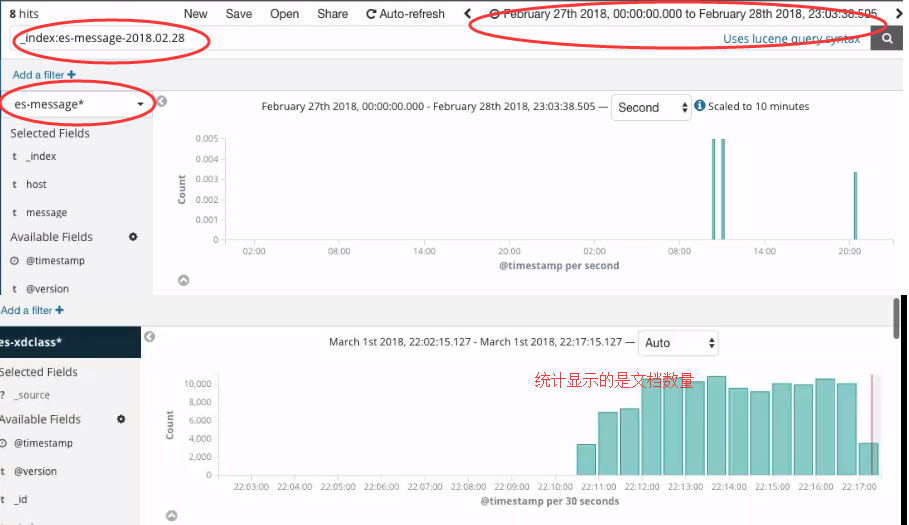
discover面板
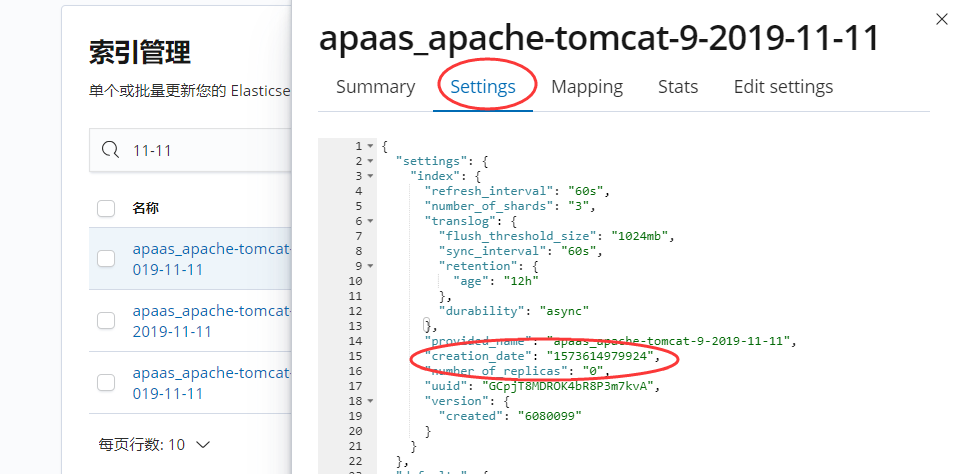
如何查看指定索引名称的创建时间
1.命令行查询
curl -XGET http://192.168.80.10:9200/zhouls/_settings?pretty
{
"zhouls" : {
"settings" : {
"index" : {
"creation_date" : "1488203759467", //表示索引的创建时间
"uuid" : "Sppm-db_Qm-OHptOC7vznw",
"number_of_replicas" : "1",
"number_of_shards" : "5",
"version" : {
"created" : "2040399"
}
}
2.通过kibana查看索引的创建时间
es数据二次开发统计展示的更多相关文章
- 分享泛微公司OA系统用于二次开发的sql脚本
本单位用的oa系统就是泛微公司的oa协同办公平台,下面是我对他进行二次开发统计用到的写数据库脚本,只做开发参考使用,对于该系统的二次开发技术交流可以加我q:2050372586 [仪表盘]格式sql编 ...
- TFS二次开发系列:七、TFS二次开发的数据统计以PBI、Bug、Sprint等为例(一)
在TFS二次开发中,我们可能会根据某一些情况对各个项目的PBI.BUG等工作项进行统计.在本文中将大略讲解如果进行这些数据统计. 一:连接TFS服务器,并且得到之后需要使用到的类方法. /// < ...
- TFS二次开发的数据统计以PBI、Bug、Sprint等为例(一)
TFS二次开发的数据统计以PBI.Bug.Sprint等为例(一) 在TFS二次开发中,我们可能会根据某一些情况对各个项目的PBI.BUG等工作项进行统计.在本文中将大略讲解如果进行这些数据统计. 一 ...
- (5)微信二次开发 之 XML格式数据解析
1.首先理解一下html html的全名是:HyperText Transfer markup language 超级文本标记语言,html本质上是一门标记(符合)语言,在html里,这些标记是事先定 ...
- spss C# 二次开发 学习笔记(六)——Spss统计结果的输出
Spss的二次开发可以很简单,实例化一个对象,然后启用服务,接着提交命令,最后停止服务. 其中重点为提交命令,针对各种统计功能需求,以及被统计分析的数据内容等,命令的内容可以很复杂,但也可以简单的为一 ...
- PHP+Mysql+jQuery实现地图区域数据统计-展示数据
我们要在地图上有限的区块内展示更多的信息,更好的办法是通过地图交互来实现.本文将给大家讲解通过鼠标滑动到地图指定省份区域,在弹出的提示框中显示对应省份的数据信息.适用于数据统计和地图区块展示等场景. ...
- 数据层交换和高性能并发处理(开源ETL大数据治理工具--KETTLE使用及二次开发 )
ETL是什么?为什么要使用ETL?KETTLE是什么?为什么要学KETTLE? ETL是数据的抽取清洗转换加载的过程,是数据进入数据仓库进行大数据分析的载入过程,目前流行的数据进入仓库的 ...
- Qt+QGis二次开发:打开S-57格式(*.000)电子海图数据,并设置多边形要素的显示风格
不过多的废话了,直接上源码: addChartlayers()方法时“打开海图”按钮的triggered()信号所绑定的槽函数. //添加海图数据小按钮槽函数 void MainWindow::add ...
- [大数据可视化]-saiku的源码打包运行/二次开发构建
Saiku构建好之后,会将项目的各个模块达成jar包,整个项目也会打成war包 saiku目录结构: 我们选中saiku-server/target/ 下面的zip压缩包.这是个打包后的文件,进行 ...
随机推荐
- CLR Exception 0xE0434F4D和0xE0434352的区别
<根据<CLR Exception---E0434352>和<CLR Exception---E0434F4D>这两篇随笔,我们会发现,这两个异常太相似了,除了代码值不一 ...
- 第二章python中的一切皆对象
1.函数和类也是对象,属于python的一等公民 赋值给一个变量 可以添加到集合对象之中 可以作为参数传递给函数 可以当作函数的返回值 def ask(name="ask_wzh" ...
- Jupyter-notebook安装问题及解决
两种方式: 1.pip install jupyter notebook 2.安装Anaconda 1.pip安装 通过命令行pip,要注意是在哪个虚拟环境,安装好后jupyter notebook所 ...
- bzoj3589 动态树 求链并 容斥
bzoj3589 动态树 链接 bzoj 思路 求链并. 发现只有最多5条链子,可以容斥. 链交求法:链顶是两条链顶深度大的那个,链底是两个链底的\(lca\) 如果链底深度小于链顶,就说明两条链没有 ...
- Windows_pycharm下安装numpy
https://blog.csdn.net/haishu_zheng/article/details/77489309 一.下载在网站https://pypi.python.org/pypi/nump ...
- HttpClient爬取网站及图片
1.什么是HttpClient? HttpClient 是 Apache Jakarta Common 下的子项目,用来提供高效的.最新的.功能丰富的支持 HTTP 协议的客户端编程工具包,并且它支持 ...
- 福州大学软件工程1916|W班 第10、11次作业成绩排名
作业链接 项目Alpha冲刺(团队) 事后诸葛亮(团队) 评分细则 博客评分标准 本次作业包括现场Alpha答辩评分(映射总分为100分)+博客分(总分130分)+贡献度得分,其中博客分由以下部分组成 ...
- centos配置chrome+selenium
参考资料 https://blog.csdn.net/wkb342814892/article/details/81591394 1. 安装chrome-browser wget https://dl ...
- python 关于celery的异步任务队列的基本使用(celery+redis)【采用配置文件设置】
工程结构说明:源文件下载请访问https://i.cnblogs.com/Files.aspx __init__.py:实例化celery,并加载配置模块 celeryconfig.py:配置模块 t ...
- WPF 营销管理平台
利用空闲时间计划开发一款开源的营销商城平台,项目写的不够规范,有需要可以看看 项目介绍: 前端使用 WPF,采用MVVM模式 后端数据库采用的sqlite 依靠本地化运行 后期可能会采用WebA ...