
xcode11新项目删除main.storyboard 两种方法
方法一
心急的童鞋按照老操作完成后再按照如下操作即可
/**

 弃用storboard

 1、info.plist去除

 <key>UIApplicationSceneManifest</key>

 <dict>

     <key>UIApplicationSupportsMultipleScenes</key>

     <false/>

     <key>UISceneConfigurations</key>

     <dict>

         <key>UIWindowSceneSessionRoleApplication</key>

         <array>

             <dict>

                 <key>UISceneConfigurationName</key>

                 <string>Default Configuration</string>

                 <key>UISceneDelegateClassName</key>

                 <string>SceneDelegate</string>

                 <key>UISceneStoryboardFile</key>

                 <string>Main</string>

             </dict>

         </array>

     </dict>

 </dict>

 2、启动页注释

- (UISceneConfiguration *)application:(UIApplication *)application configurationForConnectingSceneSession:(UISceneSession *)connectingSceneSession options:(UISceneConnectionOptions *)options {

    // Called when a new scene session is being created.

    // Use this method to select a configuration to create the new scene with.

    return [[UISceneConfiguration alloc] initWithName:@"Default Configuration" sessionRole:connectingSceneSession.role];

}

- (void)application:(UIApplication *)application didDiscardSceneSessions:(NSSet<UISceneSession *> *)sceneSessions {

    // Called when the user discards a scene session.

    // If any sessions were discarded while the application was not running, this will be called shortly after application:didFinishLaunchingWithOptions.

    // Use this method to release any resources that were specific to the discarded scenes, as they will not return.

}

 */
具体如下:
用xcode11新建iOS项目后,想要删除默认的main.storyboard,使用自定义的window和controller的坑。
具有一定经验的人想必都知道Xcode11之前,想要达到上面的目的步骤吧。首先就是选中工程文件选项,之后删除Main Interface选项里的Main,如下图:

之后在Appdelegate的didFinishLaunchingWithOptions方法中自定义window并设置为keyWindow和让它显示,如下图:
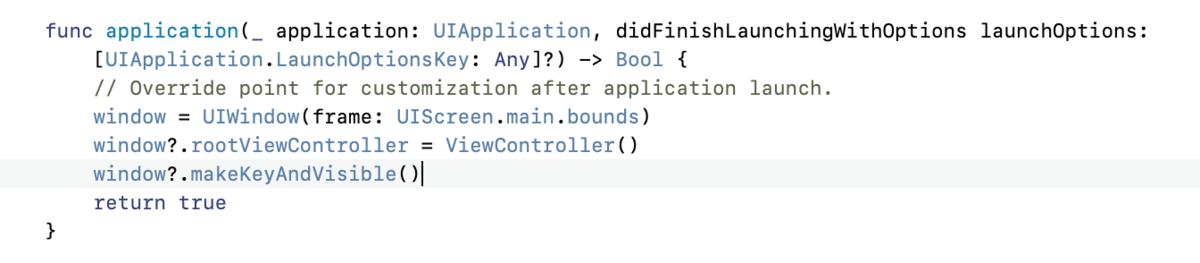
就这么简单的实现了。
然鹅随着iOS13的推出,在之前AppDelegate的基础上多出了一个SceneDelegate,会将AppDelegate里的lifecycle的那些代理方法转交给SceneDelegate,就是通过AppDelegate里以下两个方法实现的
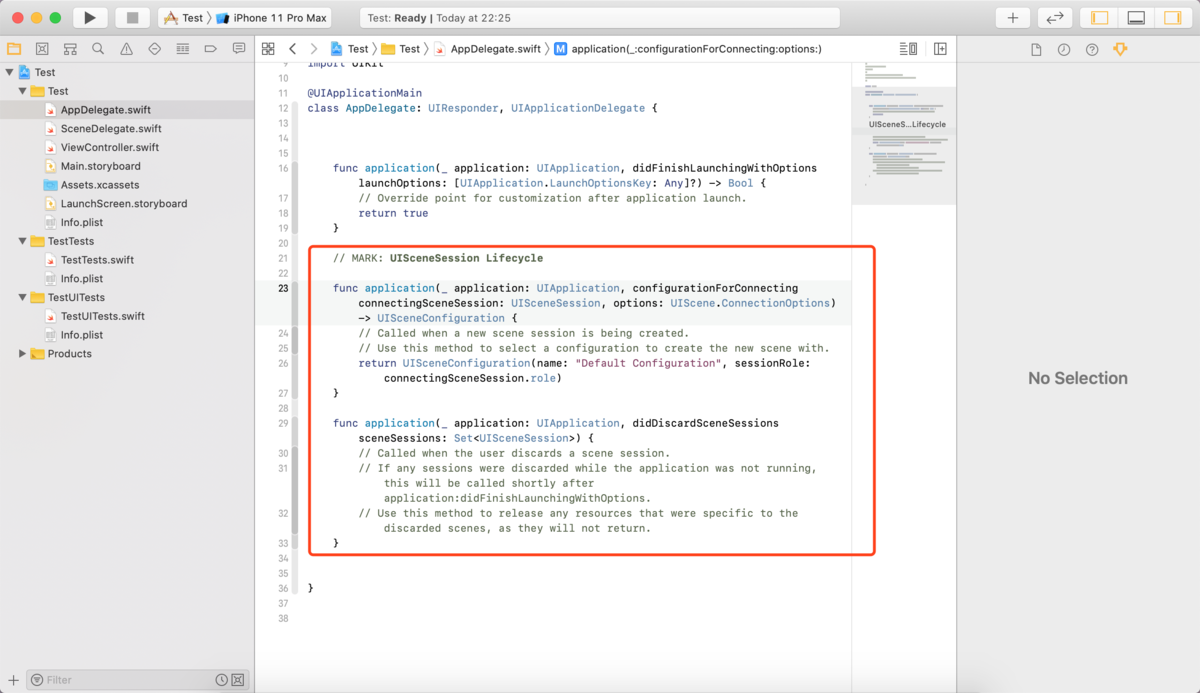
以下的内容是摘自苹果官方文档:
Overview
A UISceneSession object manages a unique runtime instance of your scene. When the user adds a new scene to your app, or when you request one programmatically, the system creates a session object to track that scene. The session contains a unique identifier and the configuration details of the scene. UIKit maintains the session information for the lifetime of the scene itself, destroying the session in response to the user closing the scene in the app switcher.
You do not create session objects directly. UIKit creates sessions in response to user interactions with your app. You can also ask UIKit to create a new scene and session programmatically by calling the requestSceneSessionActivation:userActivity:options:errorHandler: method of UIApplication. UIKit initializes the session with default configuration data based on the contents of your app's Info.plist file.
大概意思就是,一个UISceneSession不用你直接去创建对象,你可以用UIApplication里的requestSceneSessionActivation:userActivity:options:errorHandler:方法,这个方法会帮你初始化一个基于info.plist文件里的默认configuration的session对象。
因此xcode11中要实现自己的没有默认main.storyboard的项目,就得将SceneDelegate里的lifecycle转交给AppDelegate,按照上面所说,这一步操作就是,删除或注释一下截图里的两个方法
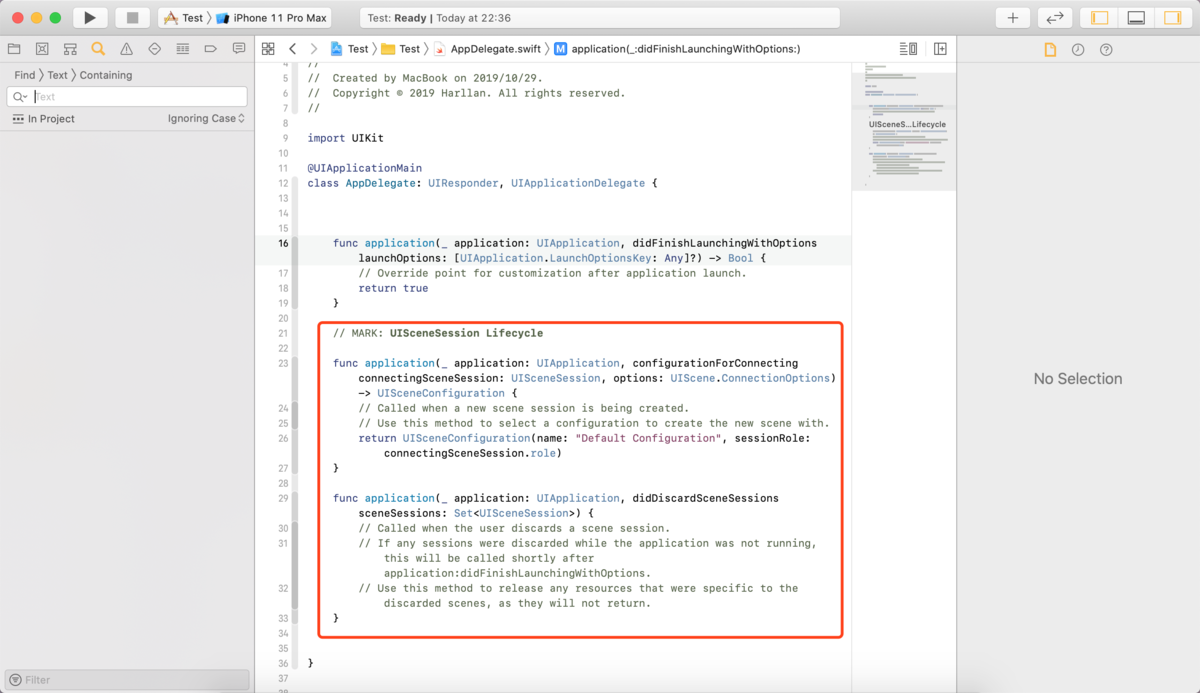
接近着删除在info.plist里的Application Scene Manifest条目
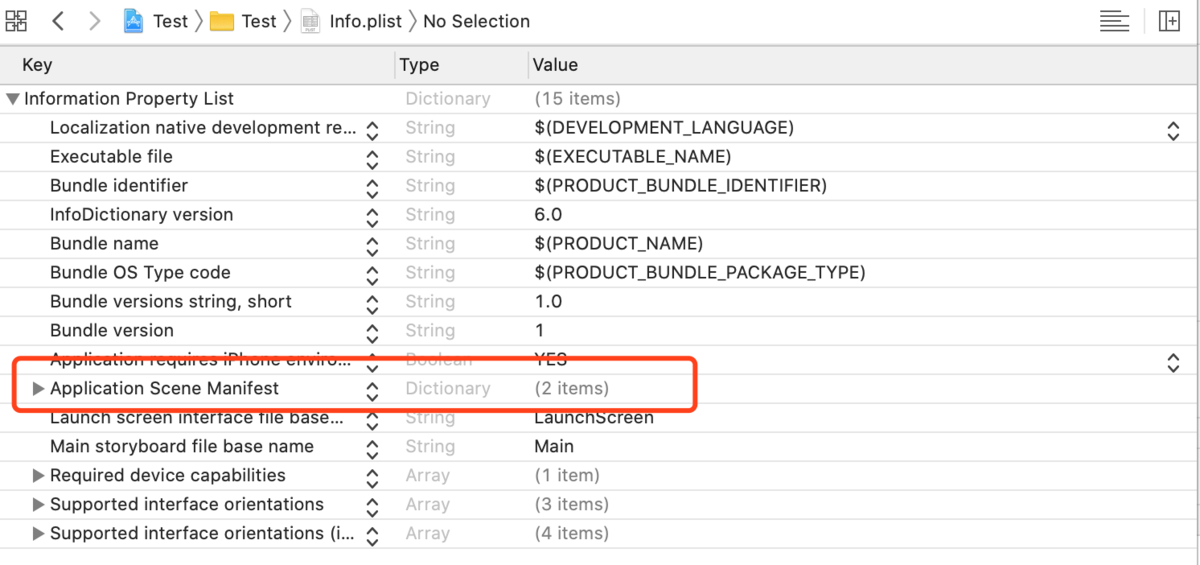
之后就是xcode11以前的常规操作了,首先,删除info.plist里的Main storyboard file base name条目

之后在AppDelegate.swift里添加window属性,因为xcode默认删除了这个属性,现在你需要将它重新添加回来才行,如果是OC写的话,就在AppDelegate.h里添加这个window属性。
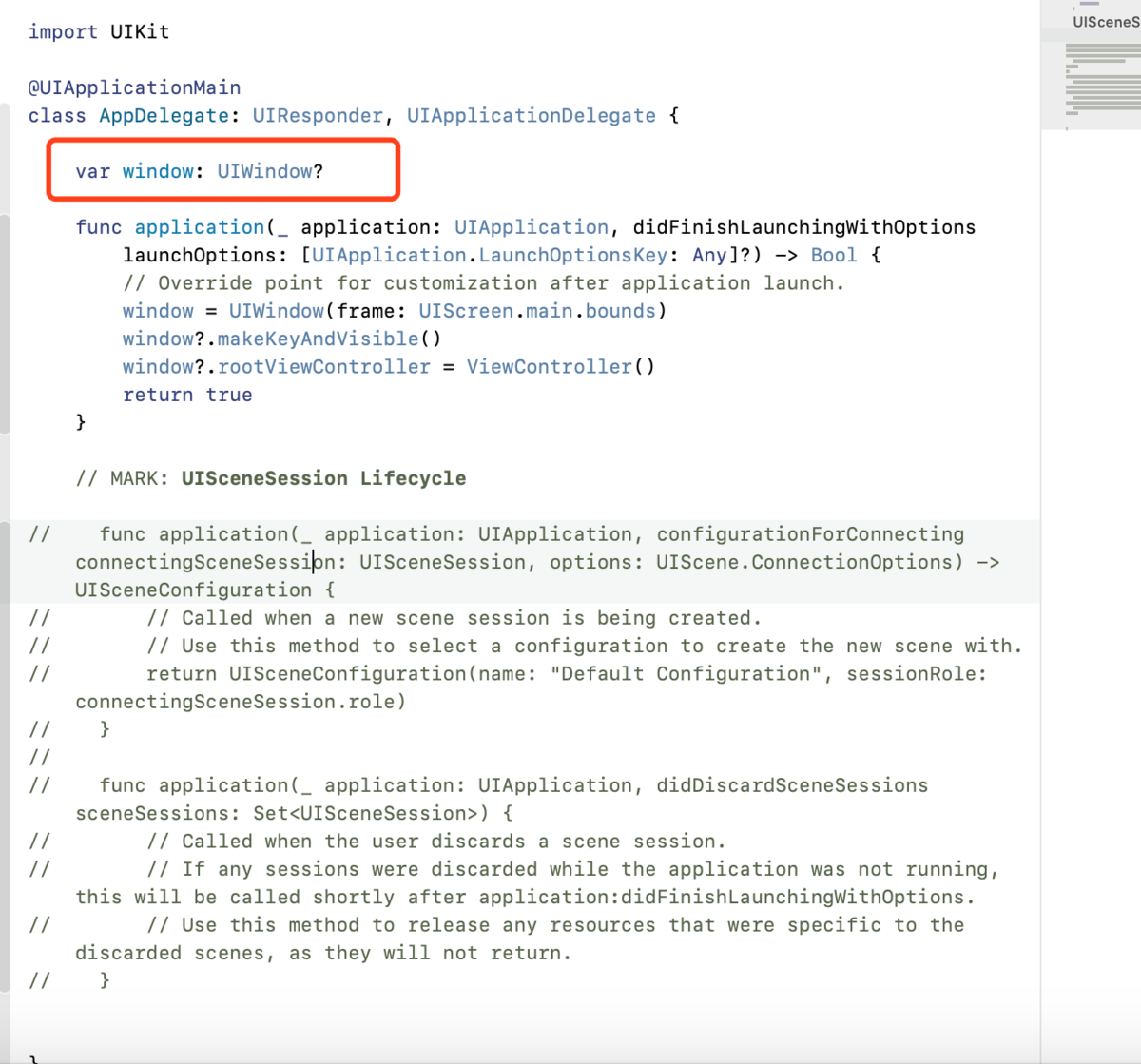
之后就在didFinishLaunch方法里初始化self.window,并设置为keywindow和让它显示,并初始化默认控制器即可。
首先, UI相关的已经不能只放在Appdelegate中, 而是区分系统放在SceneDelegate中处理.
其次, 要在Info.plist中删除对应的路径.

最后, 在SceneDelegate.m中添加根控制器
- (void)scene:(UIScene *)scene willConnectToSession:(UISceneSession *)session options:(UISceneConnectionOptions *)connectionOptions {

    // Use this method to optionally configure and attach the UIWindow `window` to the provided UIWindowScene `scene`.

    // If using a storyboard, the `window` property will automatically be initialized and attached to the scene.

    // This delegate does not imply the connecting scene or session are new (see `application:configurationForConnectingSceneSession` instead).

    self.window = [[UIWindow alloc] initWithWindowScene:(UIWindowScene *)scene];

    self.window = [[UIWindow alloc] initWithFrame:[UIScreen mainScreen].bounds];

    UIViewController *rootVc = [[UIViewController alloc]init];

    rootVc.view.backgroundColor = [UIColor purpleColor];

    UINavigationController *rootNav = [[UINavigationController alloc]initWithRootViewController:rootVc];

    [self.window setRootViewController:rootNav];

    [self.window makeKeyAndVisible];

}
xcode11新项目删除main.storyboard 两种方法的更多相关文章
- web项目docker化的两种方法
标题所讲的两种方法其实就是创建docker镜像的两种方法 第一种:启动镜像后进入容器中操作,将需要的软件或者项目移动到容器中,安装或者部署,然后退出即可 第二种:编写dockerfile,将需要的镜像 ...
- MySQL中删除数据的两种方法
转自:http://blog.csdn.net/apache6/article/details/2778878 1. 在MySQL中有两种方法可以删除数据: 一种是delete语句,另一种是trunc ...
- ASP.NET中GridView控件删除数据的两种方法
今天在用GridView控件时,发现了一个问题,就是使用GridView控件在删除数据时的问题.接下来我们通过模板列方式和CommandField方式删除某条数据讲解下两者之间的区别. 方式一:通 ...
- MySQL 删除数据库的两种方法
使用 mysqladmin 删除数据库 使用普通用户登陆mysql服务器,你可能需要特定的权限来创建或者删除 MySQL 数据库. 所以我们这边使用root用户登录,root用户拥有最高权限,可以使用 ...
- create-react-app创建项目修改配置项的两种方法
方法一:eject 打开 package.json ,可以看到eject.运行 npm run eject 可以让由create-react-app创建的项目的配置项暴露出来. { ... " ...
- 解决vue项目eslint校验 Do not use 'new' for side effects 的两种方法
import Vue from 'vue' import App from './App.vue' import router from './router' new Vue({ el: '#app' ...
- js中如何删除某个元素下面的所有子元素?(两种方法)
js中如何删除某个元素下面的所有子元素?(两种方法) 一.总结 方法一:通过元素的innerHTML属性 元素element.innerHTML=""; 方法二:通过元素的remo ...
- 关于vector的erase删除操作的两种不同方法,在linux与visual studio的实现讨论
关于vector的erase删除操作的两种不同方法,在linux与visual studio的实现讨论 1.前言: 最近在做某一个题时,用到了vector的删除操作,利用的是erase()函数删除符合 ...
- Response.Redirect 打开新窗体的两种方法
普通情况下,Response.Redirect 方法是在server端进行转向,因此,除非使用 Response.Write("<script>window.location=' ...
随机推荐
- udp,select超时和recvfrom收不到数据原因
wirshark抓包,发现有数据.但是select超时,直接recvfrom又失败. 代码中需要改进:select超时后,会移除fd_set集合中超时的那个句柄,所以每次要重新进行FD_SET,然后再 ...
- socket套接字及粘包问题
socket套接字 1.什么是socket socket是一个模块,又称套接字,用来封装互联网协议(应用层以下的层) 2.为什么要有socket 实现应用层以下的层的工作,提高开发效率 3.怎么使用s ...
- Educational Codeforces Round 78 (Rated for Div. 2) B. A and B
链接: https://codeforces.com/contest/1278/problem/B 题意: You are given two integers a and b. You can pe ...
- ABP 报错 System.InvalidOperationException: 实例失败。
错误:System.InvalidOperationException: 实例失败. 解决:数据库链接写错了,斜杠的问题 core:两根斜杠 .net framework:一根斜杠 core的写法: ...
- 解决栏登 F~~~秋~~~之后只有火狐能上网的问题
我发现F~~~完秋~~~只有火狐可以上网,惊了,后来发现是没有关代理服雾气 1.打开Chrome->设置 2.翻到最后点击显示高级设置 3.找到网络标签,点击更改代理服务器按钮 4.点击连接标签 ...
- redis 键值对 有效期设置
redis 键值对 有效期设置redis中可以使用expire命令设置一个键的生存时间, 到时间后redis会自动删除它<-----> 类比于javaweb系统临时数据 过期删除功能 ex ...
- 安装-supervisor
centos 7.xx 1.#yum install python-setuptools 2.#easy_install supervisor 3.# vim /etc/supervisord.con ...
- 【Gamma】“北航社团帮”测试报告——小程序v3.0
目录 测试计划.过程和结果 后端测试--单元测试与覆盖率 后端测试--压力测试 展示部分数据 平均数据 前端测试--小程序v3.0 新功能 各页面均可正常打开,跳转,回退 授权登录与权限检查 页面数据 ...
- cad.net 图层隐藏 IsHidden 用法 eDuplicateRecordName 报错
提要:影响图层显示的主要有:关闭 isOff冻结 IsFrozen 图层隐藏 isHidden视口冻结 FreezeLayersInViewport 今天小博发现了一件事情 ...
- SyntaxError: Non-ASCII character ‘\xe5’ in file 的解决办法
在Python脚本中包含中文的时候,会遇到编码错误.例如: 出现SyntaxError: Non-ASCII character ‘\xe5’ in file 的错误. 解决办法:是因为编码有问题,所 ...