
一个 Github 上使用 HttpClient 的 Sample
地址:https://github.com/MikeWasson/HttpClientSample
截图:
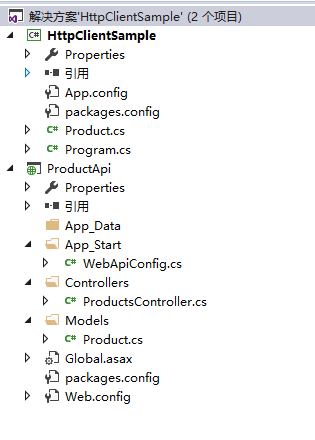
直接贴代码了:
服务端:
    [RoutePrefix("api/products")]

    public class ProductsController : ApiController

    {

        private static ConcurrentDictionary<string, Product> _products = new ConcurrentDictionary<string, Product>();

        [Route("{id}", Name = "GetById")]

        public IHttpActionResult Get(string id)

        {

            Product product = null;

            if (_products.TryGetValue(id, out product))

            {

                return Ok(product);

            }

            else

            {

                return NotFound();

            }

        }

        [HttpPost]

        [Route("")]

        public IHttpActionResult Post(Product product)

        {

            if (product == null)

            {

                return BadRequest("Product cannot be null");

            }

            if (!ModelState.IsValid)

            {

                return BadRequest(ModelState);

            }

            product.Id = Guid.NewGuid().ToString();

            _products[product.Id] = product;

            return CreatedAtRoute("GetById", new { id = product.Id }, product);

        }

        [HttpPut]

        [Route("{id}")]

        public IHttpActionResult Put(string id, Product product)

        {

            if (product == null)

            {

                return BadRequest("Product cannot be null");

            }

            if (!ModelState.IsValid)

            {

                return BadRequest(ModelState);

            }

            if (product.Id != id)

            {

                return BadRequest("product.id does not match id parameter");

            }

            if (!_products.Keys.Contains(id))

            {

                return NotFound();

            }

            _products[id] = product;

            return new StatusCodeResult(HttpStatusCode.NoContent, this);

        }

        [HttpDelete]

        [Route("{id}")]

        public IHttpActionResult Delete(string id)

        {

            Product product = null;

            _products.TryRemove(id, out product);

            return new StatusCodeResult(HttpStatusCode.NoContent, this);

        }

    }
完毕!
客户端
    class Program

    {

        static HttpClient client = new HttpClient();

        static void ShowProduct(Product product)

        {

            Console.WriteLine($"Name: {product.Name}\tPrice: {product.Price}\tCategory: {product.Category}");

        }

        static async Task<Uri> CreateProductAsync(Product product)

        {

            HttpResponseMessage response = await client.PostAsJsonAsync("api/products", product);

            response.EnsureSuccessStatusCode();

            // return URI of the created resource.

            return response.Headers.Location;

        }

        static async Task<Product> GetProductAsync(string path)

        {

            Product product = null;

            HttpResponseMessage response = await client.GetAsync(path);

            if (response.IsSuccessStatusCode)

            {

                product = await response.Content.ReadAsAsync<Product>();

            }

            return product;

        }

        static async Task<Product> UpdateProductAsync(Product product)

        {

            HttpResponseMessage response = await client.PutAsJsonAsync($"api/products/{product.Id}", product);

            response.EnsureSuccessStatusCode();

            // Deserialize the updated product from the response body.

            product = await response.Content.ReadAsAsync<Product>();

            return product;

        }

        static async Task<HttpStatusCode> DeleteProductAsync(string id)

        {

            HttpResponseMessage response = await client.DeleteAsync($"api/products/{id}");

            return response.StatusCode;

        }

        static void Main()

        {

            RunAsync().Wait();

        }

        static async Task RunAsync()

        {

            client.BaseAddress = new Uri("http://localhost:55268/");

            client.DefaultRequestHeaders.Accept.Clear();

            client.DefaultRequestHeaders.Accept.Add(new MediaTypeWithQualityHeaderValue("application/json"));

            try

            {

                // Create a new product

                Product product = new Product { Name = "Gizmo", Price = , Category = "Widgets" };

                var url = await CreateProductAsync(product);

                Console.WriteLine($"Created at {url}");

                // Get the product

                product = await GetProductAsync(url.PathAndQuery);

                ShowProduct(product);

                // Update the product

                Console.WriteLine("Updating price...");

                product.Price = ;

                await UpdateProductAsync(product);

                // Get the updated product

                product = await GetProductAsync(url.PathAndQuery);

                ShowProduct(product);

                // Delete the product

                var statusCode = await DeleteProductAsync(product.Id);

                Console.WriteLine($"Deleted (HTTP Status = {(int)statusCode})");

            }

            catch (Exception e)

            {

                Console.WriteLine(e.Message);

            }

            Console.ReadLine();

        }

    }
谢谢浏览!
一个 Github 上使用 HttpClient 的 Sample的更多相关文章
- 安利一个github上面的一个神级库thefuck,Linux命令敲错了,没关系,自动纠正你的命令
没错就是这么神奇,名字相当噶性,thefuck.当你命令输入错误不要怕,直接来一句fuck,自动纠正你输入的命令. 在你输入错误的命令的时候,忍俊不禁的想来一句fuck,没错你不仅可以嘴上说,命令里面 ...
- 跑github上的Symfony项目遇到的问题
Loading composer repositories with package information Installing dependencies (including require-de ...
- 用Jekyll在github上写博客——《搭建一个免费的,无限流量的Blog》的注脚
本来打算买域名,买空间,用wordpress写博客的.后来问了一个师兄,他说他是用github的空间,用Jekyll写博客,说很多人都这么做.于是我就研究了一下. 比较有价值的文章有这么几篇: htt ...
- 如何在github上创建一个Repository (Windows)
一种方式是利用Github for windows工具 来操作github,这个是我推荐的方式 1 请先下载一个工具Github for windows,下载地址为:https://windows.g ...
- https://github.com/coolnameismy/BabyBluetooth github上的一个ios 蓝牙4.0的库并带文档和教程
The easiest way to use Bluetooth (BLE )in ios,even bady can use. 简单易用的蓝牙库,基于CoreBluetooth的封装,并兼容ios和 ...
- 在github上搭建一个静态的个人网站
说一下大概步骤 1.创建一个新仓库 仓库名必须是你的用户名+github.io后缀 例:用户名:tom 仓库名就要是:tom.github.io (这里具体步骤可以自己百度一下) 2.创建好仓库我们该 ...
- git操作+一个本地项目推到github上+注意
git init 创建新文件夹,打开,然后执行以创建新的 git 仓库. git config --global user.name "xxx" git config --glob ...
- 在Android上山寨了一个Ios9的LivePhotos,放Github上了
9月10号的凌晨上演了一场IT界的春晚,相信很多果粉(恩,如果你指坚果,那我也没办法了,是在下输了)都熬夜看了吧,看完打算去医院割肾了吧.在发布会上发布了游戏机 Apple TV,更大的砧板 Ipad ...
- 将本地的一个新项目上传到GitHub上新建的仓库中去
转载: 如何将本地的一个新项目上传到GitHub上新建的仓库中去 踩过的坑: 1.在git push时报错 error: RPC failed; curl 56 SSL read: error:000 ...
随机推荐
- Docker制作dotnet core控制台程序镜像
(1)首先我们到某个目录下,然后在此目录下打开visual studio code. 2.编辑docker file文件如下: 3.使用dotnet new console创建控制台程序; 4.使用d ...
- npm install 报错 -4048
方法1: 删除npmrc文件. 强调:不是nodejs安装目录npm模块下的那个npmrc文件,而是在C:\Users\{账户}\下的.npmrc文件. 方法2: https://www.jiansh ...
- 解决Ubuntu在虚拟机窗口不能自适应
试了很多办法这个好用 相信很多人在装虚拟机的时候,遇到了窗口过小不能自适应的问题.我也是查了好多资料,都说安装Vmware Tools即可解决,还有说修改分辨率也可以.两种方法亲测无效. Vmware ...
- python中优雅的杀死线程
上一篇博客中,杀死线程采用的方法是在线程中抛出异常 https://www.cnblogs.com/lucky-heng/p/11986091.html, 这种方法是强制杀死线程,但是如果线程中涉 ...
- springcloud学习之路: (五) springcloud集成SpringCloudConfig分布式配置中心
SpringCloud全家桶中的分布式配置中心SpringCloudConfig, 它使用git来管理配置文件, 在修改配置文件后只需要调用一个接口就可以让新配置生效, 非常方便. SpringClo ...
- vue中webpack的配置理解
当我们需要和后台分离部署的时候,必须配置config/index.js: 用vue-cli 自动构建的目录里面 (环境变量及其基本变量的配置) var path = require('path') ...
- VS调试
1.调试输出变量值 F9先设置断点,开始调试后,依次选择调试——>窗口——>局部变量和监视——>监视1. 点击“全部中断”——>之后局部变量会显示相关变量值,监视1可以查看变量 ...
- seq命令的使用
标题:seq命令的使用 作用:seq命令用于以指定增量从首数开始打印数字到尾数,即产生从某个数到另外一个数之间的所有整数,并且可以对整数的格式.宽度.分割符号进行控制 语法: [1] seq [选项] ...
- 每天一道Rust-LeetCode(2019-06-11)
每天一道Rust-LeetCode(2019-06-02) Z 字形变换 坚持每天一道题,刷题学习Rust. 题目描述 全排列 II 给定一个可包含重复数字的序列,返回所有不重复的全排列. 示例: 输 ...
- 重拾算法之复杂度分析(大O表示法)
.katex { display: block; text-align: center; white-space: nowrap; } .katex-display > .katex > ...