
深入剖析tomcat之一个简单的web服务器
这个简单的web服务器包含三个类
- HttpServer
- Request
- Response
在应用程序的入口点,也就是静态main函数中,创建一个HttpServer实例,然后调用其await()方法。顾名思义,await方法会在制定的端口上等待http请求,并对其进行处理,然后发送相应的消息回客户端。在接收到命令之前,它会一直保持等待的状态。
- HttpServer类
package simpleHttpServer;

import java.io.File;
import java.io.IOException;
import java.io.InputStream;
import java.io.OutputStream;
import java.net.InetAddress;
import java.net.ServerSocket;
import java.net.Socket;

public class HttpServer {

    public static final String WEB_ROOT = System.getProperty("user.dir") + File.separator
            + "webroot";

    private static final String SHUTDOWN_COMMAND = "/SHUTDOWN";

    private boolean shudown = false;

    public static void main(String[] args){
        HttpServer server = new HttpServer();
        server.await();
    }

    public void await(){
        ServerSocket serverSocket = null;
        int port = 8080;

        try{
            serverSocket = new ServerSocket(port,1,InetAddress.getByName("127.0.0.1"));
        }
        catch (IOException e){
            e.printStackTrace();
            System.exit(1);
        }

        while(!this.shudown){
            Socket socket = null;
            InputStream input = null;
            OutputStream output = null;

            try{

                socket = serverSocket.accept();
                input = socket.getInputStream();
                output = socket.getOutputStream();

                Request request = new Request(input);
                request.parse();

                Response response = new Response(output);
                response.setRequest(request);
                response.sendStaticResource();

                socket.close();

                this.shudown = request.getUri().equals(SHUTDOWN_COMMAND);

            }
            catch (Exception e){
                e.printStackTrace();
                continue;
            }
        }

    }

}
这个简单的web服务器,可以处理指定目录中的静态资源请求;用WEB_ROOT表示制定的目录
public static final String WEB_ROOT = System.getProperty("user.dir") + File.separator + "webroot";这里是指当前目录下的webroot文件夹下面的资源。
我们通过在游览器中输入这样的内容,进行资源的请求:
http://127.0.0.1:8080/index.html
- Request类
Request类表示一个Http请求,可以传递InputStream对象来创建Request对象,调用InputStream对象的read进行Http请求数据的读取。
package simpleHttpServer;

import java.io.InputStream;

public class Request {
    private InputStream input;
    private String uri;

    public Request(InputStream input){
        this.input = input;
    }

    public void parse(){
        StringBuffer request = new StringBuffer(2048);

        int i;
        byte[] buffer = new byte[2048];
        try{
            i = input.read(buffer);
        }
        catch (Exception e){
            e.printStackTrace();
            i = -1;
        }

        for(int j=0;j<i;j++){
            request.append((char)buffer[j]);
        }

        System.out.print(request.toString());
        this.uri = this.parseUri(request.toString());

    }

    private String parseUri(String requestString){
        int index1,index2;
        index1 = requestString.indexOf(' ');
        if(index1 != -1){
            index2 = requestString.indexOf(' ', index1 + 1);
            if(index2 > index1){
                return requestString.substring(index1 + 1,index2 );
            }
        }
        return null;
    }

    public String getUri(){
        return this.uri;
    }

}
Request类最重要的两个函数是parse和ParseUri;parse()方法会调用私有方法parseUri来解析HTTP请求的uri,初次之外,并没有做太多的工作。parseuri会将解析的URI存储在变量uri中。
我们以 http://127.0.0.1:8080/index.html 请求为例,HTTP请求的请求行为
GET /index.html HTTP/1.1
parse()方法从传入的Request对象的InputStream对象中读取整个字节流,并且将字节数组存入缓冲区。然后用缓存区的数组初始化StringBuffer对象request。 这样再解析StringBuffer就可以解析到Uri。
*Response类
Response类表示Http相应。其定义如下
package simpleHttpServer;

import java.io.File;
import java.io.FileInputStream;
import java.io.IOException;
import java.io.OutputStream;

public class Response {

    private static final int BUFFER_SIZE = 1024;
    private Request request;
    private OutputStream output;

    public Response(OutputStream output){
        this.output = output;
    }

    public void setRequest(Request request){
        this.request = request;
    }

    public void sendStaticResource()throws IOException{

        byte[] bytes = new byte[BUFFER_SIZE];
        FileInputStream fis = null;

        try{

            File file = new File(HttpServer.WEB_ROOT,request.getUri());
            if(file.exists()){
                fis = new FileInputStream(file);
                int ch = fis.read(bytes, 0, BUFFER_SIZE);
                while(ch != -1){
                    output.write(bytes, 0, ch);
                    ch = fis.read(bytes, 0, BUFFER_SIZE);
                }
            }
            else{
                String errorMessage = "HTTP/1.1 404 File Not Found\r\n" +
                            "Content-Type: text/html\r\n" +
                            "Content-Length:23\r\n" +
                            "\r\n" +
                            "<h1>File Not Found</h1>";
                output.write(errorMessage.getBytes());
            }

        }
        catch (Exception e){
            e.printStackTrace();
        }
        finally{
            if(fis != null){
                fis.close();
            }
        }

    }

}
使用OutputStream和Request来初始化Reponse,Response比较简单,得到Request的Uri,然后读取对应的file,如果file存在,则将file中的数据读取到缓存中,并且发送给游览器;如果file不存在,那么就发送
"HTTP/1.1 404 File Not Found\r\n" +
                            "Content-Type: text/html\r\n" +
                            "Content-Length:23\r\n" +
                            "\r\n" +
                            "<h1>File Not Found</h1>";
错误信息给游览器。
我们在eclipse中将代码跑起来,在游览器中输入
http://127.0.0.1:8080/index.html

http://127.0.0.1:8080/index.php
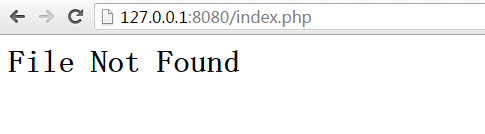
一个简单的额web服务器就跑起来了!
深入剖析tomcat之一个简单的web服务器的更多相关文章
- Tomcat剖析(一):一个简单的Web服务器
Tomcat剖析(一):一个简单的Web服务器 1. Tomcat剖析(一):一个简单的Web服务器 2. Tomcat剖析(二):一个简单的Servlet服务器 3. Tomcat剖析(三):连接器 ...
- Tomcat学习笔记(一)一个简单的Web服务器
内容为<深入剖析Tomcat>第一章重点,以及自己的总结,如有描述不清的,可查看原书. 一.HTTP协议: 1.定义:用于服务器与客户端的通讯的协议,允许web服务器和浏览器通过互联网进行 ...
- 《深度解析Tomcat》 第一章 一个简单的Web服务器
本章介绍Java Web服务器是如何运行的.从中可以知道Tomcat是如何工作的. 基于Java的Web服务器会使用java.net.Socket类和java.net.ServerSocket类这两个 ...
- Tomcat源码学习记录--web服务器初步认识
Tomcat作为开源的轻量级WEB服务器,虽然不是很适合某些大型项目,但是它开源,读其源代码可以很好的提高我们的编程功底和设计思维.Tomcat中用到了很多比较好的设计模式,其中代码风格也很值得我们去 ...
- 自己模拟的一个简单的web服务器
首先我为大家推荐一本书:How Tomcat Works.这本书讲的很详细的,虽然实际开发中我们并不会自己去写一个tomcat,但是对于了解Tomcat是如何工作的还是很有必要的. Servlet容器 ...
- 一个简单的Web服务器-支持Servlet请求
上接 一个简单的Web服务器-支持静态资源请求,这个服务器可以处理静态资源的请求,那么如何处理Servlet请求的呢? 判断是否是Servlet请求 首先Web服务器需要判断当前请求是否是Servle ...
- 一个简单的Web服务器-支持静态资源请求
目标 实现一个简单的Web服务器,能够根据HTTP请求的URL响应对应的静态资源,如果静态资源不存在则响应404. HttpServer 使用ServerSocket实现的一个服务器,request根 ...
- 使用 Nodejs 搭建简单的Web服务器
使用Nodejs搭建Web服务器是学习Node.js比较全面的入门教程,因为要完成一个简单的Web服务器,你需要学习Nodejs中几个比较重要的模块,比如:http协议模块.文件系统.url解析模块. ...
- 20145216 20145330 《信息安全系统设计基础》 实验五 简单嵌入式WEB 服务器实验
20145216 20145330 <信息安全系统设计基础> 实验五 简单嵌入式WEB 服务器实验 实验报告封面 实验步骤 1.阅读理解源码 进入/arm2410cl/exp/basic/ ...
随机推荐
- POS与EPOS区别
本文分文三个部分来介绍,第一部分是两个概念(POS与EPOS),第三部分是 POS与EPOS的区别. 一.epos ( electronic point of sale ) 俗称电话pos机: .EP ...
- ASP.NET Core 数据保护(Data Protection)【中】
前言 上篇主要是对 ASP.NET Core 的 Data Protection 做了一个简单的介绍,本篇主要是介绍一下API及使用方法. API 接口 ASP.NET Core Data Prote ...
- ASP.NET Core 源码阅读笔记(1) ---Microsoft.Extensions.DependencyInjection
这篇随笔主要记录一下ASP.NET Core团队实现默认的依赖注入容器的过程,我的理解可能并不是正确的. DependencyInjection这个项目不大,但却是整个ASP.NET Core的基础, ...
- NEsper Nuget包
Esper是专门进行复杂事件处理(CEP)的流处理平台,Java版本为Esper,.Net版本为NEsper.Esper & NEsper可以方便开发者快速开发部署处理大容量消息和事件的应用系 ...
- Net作业调度(三) — Quartz.Net进阶
介绍 前面介绍Quartz.Net的基本用法,但在实际应用中,往往有更多的特性需求,比如记录job执行的执行历史,发邮件等. 阅读目录 Quartz.Net插件 TriggerListener,Job ...
- Thread.Sleep引发ThreadAbortException异常
短信平台记录日志模块,是通过异步方式来记录的,即日志工具类里初始化一个Queue对象,公共的写日志方法的处理逻辑是把日志消息放到Queue里.构造器里设定一个死循环,不停的读队,然后把日志消息持久化到 ...
- Birt报表存储过程多选参数的设置
Birt对存储过程的操作是很简单的一行语句,只需要在Data Set中写上类似这样 {call CAMPAIGN_REAL_TIME_MONITOR(?,?)} 如下图 本报表是存在两个参数,一个允许 ...
- JS原生基础终结篇 (帅哥)
闭包 基础 面向对象基础 1.1 闭包 在程序语言中,所谓闭包,是指语法域位于某个特定的区域,具有持续参照(读写)位于该区域内自身范围之外的执行域上的非持久型变量值能力的段落.这些外部执行域的非 ...
- MVC:The name 'Scripts' does not exist in the current context
汇总:http://www.cnblogs.com/dunitian/p/4523006.html#efmvc 解决:在View下面的Web.Config的namespaces添加 <add n ...
- 深入理解DOM事件机制系列第一篇——事件流
× 目录 [1]历史 [2]事件冒泡 [3]事件捕获[4]事件流 前面的话 javascript操作CSS称为脚本化CSS,而javascript与HTML的交互是通过事件实现的.事件就是文档或浏览器 ...