
React ToDolist增加功能
补充知识点
1==》npm install prop-types 先安装参数校验包

在B C页面引入

import PropTypes from 'prop-types' //参数限制
    // 验证 参数必要性  B页面

    static propTypes = {

        len: PropTypes.number.isRequired,

        addtod: PropTypes.func.isRequired

    }
// 验证 参数必要性C页面
 static propTypes = { todolist: PropTypes.array.isRequired }
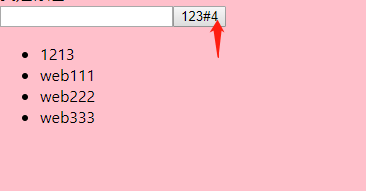
关于todelist的总结

1==》将数据放在父组件中

    constructor(props){

          super(props);

          this.state={

              todolist:[

                  { id: 1, text: "web111" },

                  { id: 2, text: "web222" },

                  { id: 3, text: "web333" }

              ]

          }

    }

2==》将父组件中的数据  传递给子组件(父传子)

 let { todolist}=this.state; //结构

 <C todolist={todolist}></C>

3==》子组件进行渲染

 render() {

        let { todolist } = this.props;

        console.log("值传递过来",todolist)

        return (

         <ul>

               {todolist.map((item,index)=>{

                 return  <li key={index}>{item.text}</li>

               })}

         </ul>

        )

    }

4==》将父组件的长度  传递给子组件

 <B len={todolist.length} addtod={this.addtod}></B>  父

5==》 子组件进行渲染

   render() {

        let { len}=this.props

        return (

            <div>

                <input type="text" ref="conn" /><button onClick={this.add} >123#{len}</button>

            </div>

        )

    }

6==》点击按钮获取到值

    render() {

        let { len}=this.props

        return (

            <div>

                <input type="text" ref="conn" /><button onClick={this.add} >123#{len}</button>

            </div>

        )

    }

    add=()=>{

        console.log(this.refs.conn.value)

        let uservalu = this.refs.conn.value; //获取值

        let {addtod}=this.props;//父组件想子组件传递了一个方法

        addtod(uservalu)  //调用这个方法

        this.refs.conn.value=""; //清空

    }

7==》父组件给子组件传递方法

8==》子组件调用父组件的方法 并且返回表单中的内容

9==》父组件接受子组件中返回来的数据  更改state
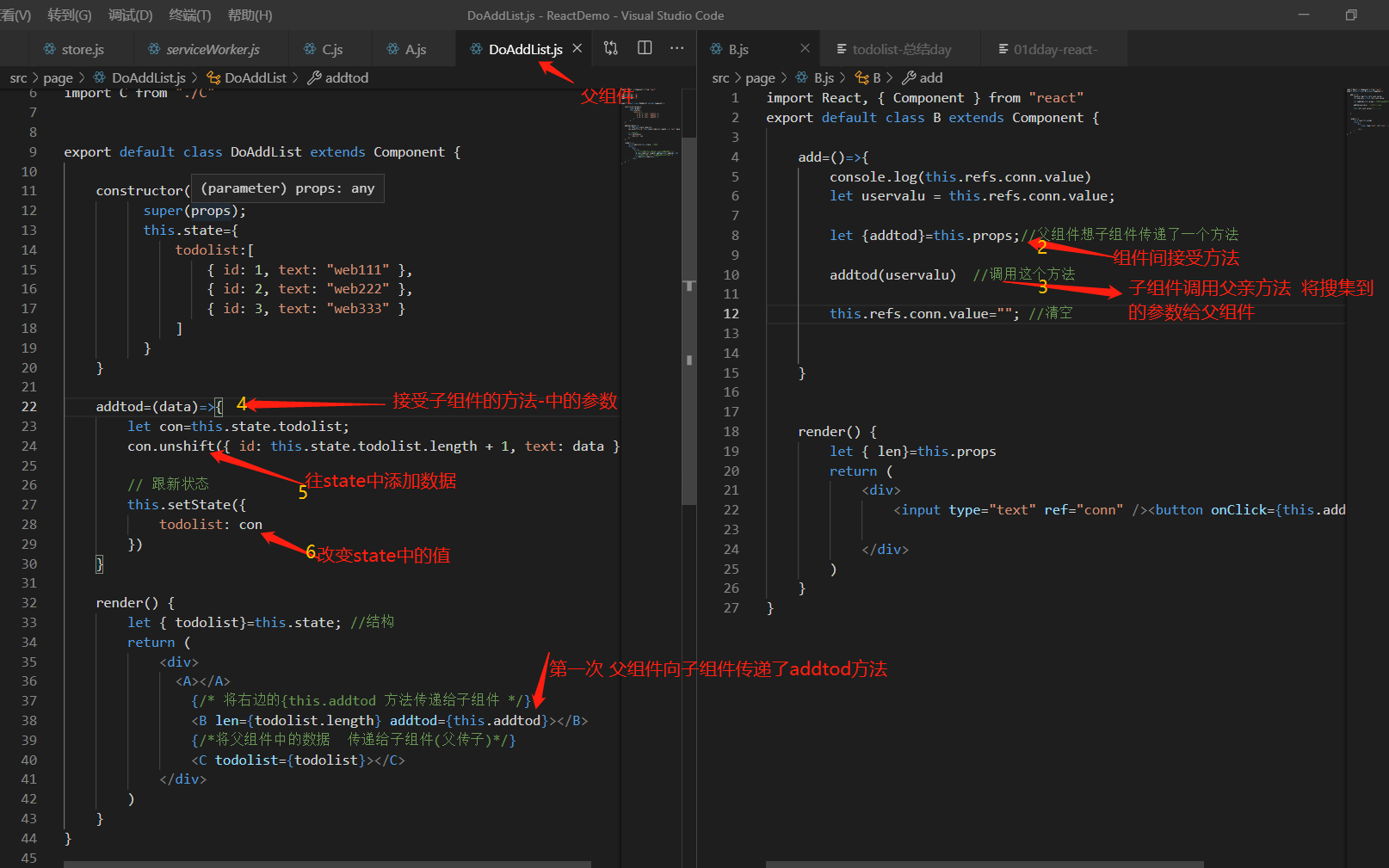
以下是完整代码
A.js 标题
import React, { Component } from "react"

export default class A extends Component {

    render() {

        return (

            <div>我是标题  todo list</div>

        )

    }

}
B.js 表单和按钮
import React, { Component } from "react"

export default class B extends Component {

    add=()=>{

        console.log(this.refs.conn.value)

        let uservalu = this.refs.conn.value; //获取值

        let {addtod}=this.props;//父组件想子组件传递了一个方法

        addtod(uservalu)  //调用这个方法

        this.refs.conn.value=""; //清空

    }

    render() {

        let { len}=this.props

        return (

            <div>

                <input type="text" ref="conn" /><button onClick={this.add} >123#{len}</button>

            </div>

        )

    }

}
C.js 渲染
import React, { Component } from "react"

export default class C extends Component {

//    constructor(props){

//        super(props);

//        let { todolist}=this.props;

//    }

    render() {

        let { todolist } = this.props; //它等价于上面的哪一个内容

        console.log("值传递过来",todolist)

        return (

         <ul>

               {todolist.map((item,index)=>{

                 return  <li key={index}>{item.text}</li>

               })}

         </ul>

        )

    }

}
最大父组件DoAddList.js
import React, { Component } from "react"

// 引入组件

import A from "./A"

import B from "./B"

import C from "./C"

export default class DoAddList extends Component {

    constructor(props){

          super(props);

          this.state={

              todolist:[

                  { id: 1, text: "web111" },

                  { id: 2, text: "web222" },

                  { id: 3, text: "web333" }

              ]

          }

    }

    addtod=(data)=>{

        let con=this.state.todolist;

        con.unshift({ id: this.state.todolist.length + 1, text: data })

        // 跟新状态

        this.setState({

            todolist: con

        })

    }

    render() {

        let { todolist}=this.state; //结构

        return (

            <div>

              <A></A>

                {/* 将右边的{this.addtod 方法传递给子组件 */}

                <B len={todolist.length} addtod={this.addtod}></B>

                {/*将父组件中的数据  传递给子组件(父传子)*/}

                <C todolist={todolist}></C>

            </div>

        )

    }

}
React ToDolist增加功能的更多相关文章
- Android程序ToDoList增加配置项页面
本文要做的事情就是在前面做的简单的ToDoList程序上增加一个配置项页面(Reference).这个Reference页面也非常简单: 这个ToDoList现在有两个页面,主页面能填写待办事项,然后 ...
- Cordova webapp实战开发:(7)如何通过简单的方法做到,不重新发布APP来修复bug、增加功能、或者躲开苹果的一些严格审核?
到<Cordova webapp实战开发:(6)如何写一个iOS下获取APP版本号的插件?>为止,我们已经大体学会了如何使用Cordova了,那些都是使用Cordova的开发者必备的技能. ...
- React 环境增加Redux ,React-Redux
引入 Redux 的目的, 状态管理! React-Redux 就是完成一些粘合剂的作用. 简而化之的理解就是将数据放在store 中维护, 操作逻辑放在reducer中去写. 更功利的表达就是: ...
- todolist增加markdown模块
markdown编辑器 利用`markdown_js`开源库实现todolist小项目的markdown日记本功能 todolist小项目地址 之前的介绍随笔todoList markdown-js仓 ...
- react todolist
import React, {Component} from 'react'; class AddItem extends React.Component { constructor(props) { ...
- react native 增加react-native-camera
前提:已经正常运行的项目 第一步:使用命令加入react-native-camera,并且关联react-native-camera, yarn add react-native-camera rea ...
- react todolist代码优化
Todolist.js import React, { Component,Fragment } from 'react'; import TodoItem from './TodoItem'; im ...
- 修改struts2自定义标签的源代码,在原有基础上增加功能(用于OA项目权限判断,是否显示某个权限)
OA项目在做权限判断时 原始方式: 现在完成的功能 :通过改变struts2自定标签源代码 在原有的基础上 增加判断权限的功能 而页面上使用标签的方式 还是下图 步骤: 打开文件 搜索< ...
- Vue学习之todolist删除功能
<!DOCTYPE html> <html lang="en"> <head> <meta charset="UTF-8&quo ...
随机推荐
- 攻防世界pwn-Mary_Morton
题目连接 https://adworld.xctf.org.cn/media/task/attachments/532c53dce1ce4f5d88461e4c2a336468 友情连接 https: ...
- 如何下载安装MySQL 解压版和安装版以及2个版本的区别
参考链接:https://blog.csdn.net/qq_33800083/article/details/80722829
- 剑指Offer-15.反转链表(C++/Java)
题目: 输入一个链表,反转链表后,输出新链表的表头. 分析: 可以利用栈将链表元素依次压入栈中,再从栈中弹出元素重新建立链表,返回头节点. 也可以在原有的链表上来翻转,先保存当前节点的下一个节点,然后 ...
- ESP8266 LUA脚本语言开发: 外设篇-串口
https://nodemcu.readthedocs.io/en/master/modules/uart/ 串口发送数据 发送一个16进制到串口 uart.write(0, 0xaa) 注: 之所以 ...
- 【2019.8.11上午 慈溪模拟赛 T2】十七公斤重的文明(seventeen)(奇偶性讨论+动态规划)
题意转化 考虑我们对于集合中每一个\(i\),若\(i-2,i+k\)存在,就向其连边. 那么,一个合法的集合就需要满足,不会存在环. 这样问题转化到了图上,就变得具体了许多,也就更容易考虑.求解了. ...
- powersploit使用实例
一.AntivirusBypass(绕过杀毒) Find-AVSignature 发现杀软的签名 1.先在靶机(windows 2008)上远程加载位于win7的Invoke-Shellcode.p ...
- QAxBase: Error calling IDispatch member LineStyle: Unknown error
word/Excel版本2007.2010. wps也适用. //borders->dynamicCall("SetLineStyle(int,int,int)", 0, ...
- windows xp 安装后不能能ping,浏览器不能上网
windows xp MSDN版本 下载地址: ed2k://|file|zh-hans_windows_xp_home_with_service_pack_3_x86_cd_x14-92408.is ...
- 《一起学mysql》3
索引和查询优化 为什么要索引? 想想我们上小学的时候是怎么查字典的,比方查 理想的 “理”,首先在索引里找到声母 “l”,再找到 “li” 找到 “li”所在的页数, 我们之前建的所有mysq ...
- STS 重写父类方法的操作
本来这种东西真的没什么好写的,但是很多时候真的是要用到的,不知道的话自己手动敲,会累死人的.所以记录在这里,自己的笔记,有需要的赶紧拿去,省的手动录入那么辛苦. 在代码窗口点击右键,依次选择“Sour ...