
RedisTemplate在项目中的应用
如下主要通去年无聊做的 "涂涂影院后台管理系统" 一个 demo,看 RedisTemplate 的使用。
体验地址:http://video.71xun.com:8080 账户:niceyoo 密码:123456
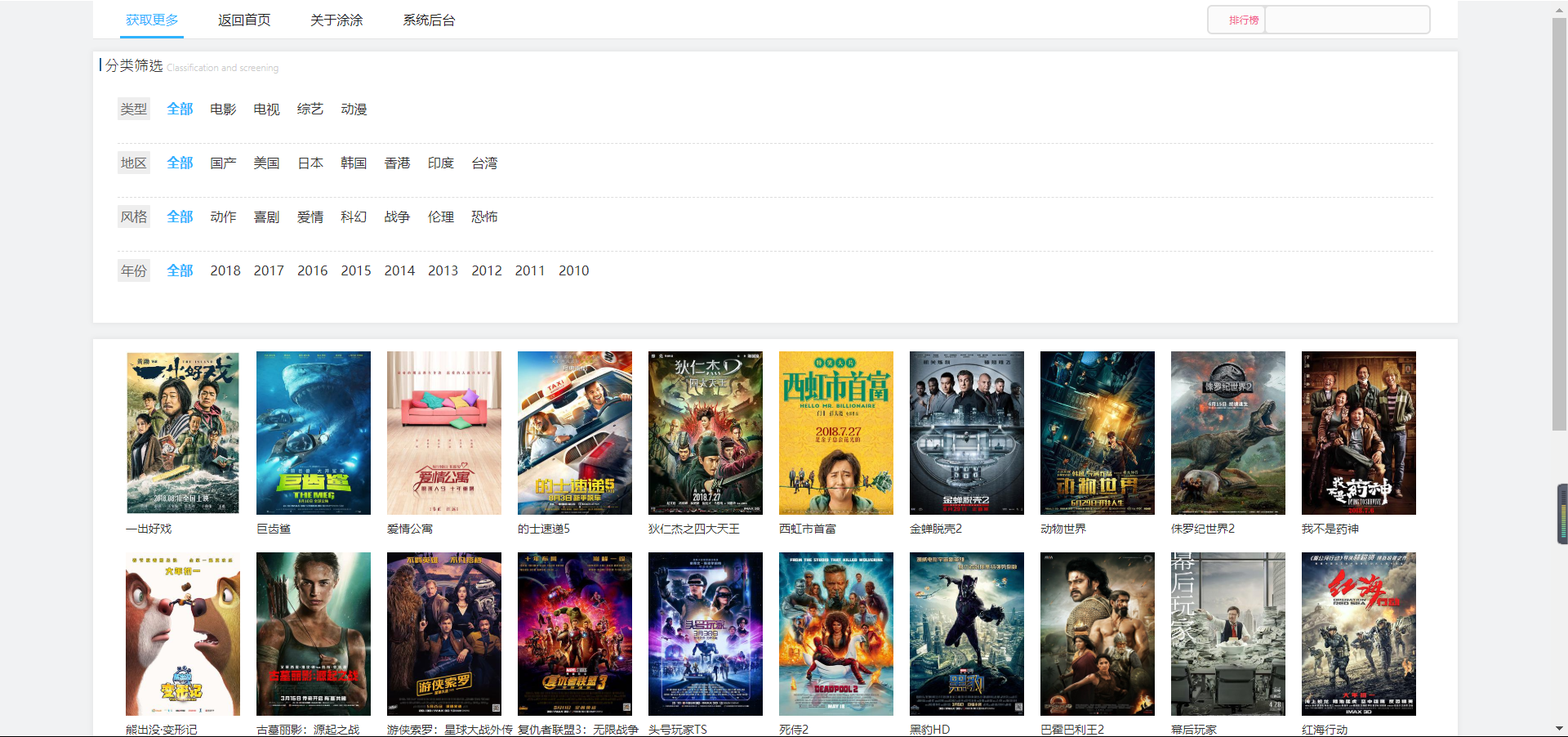
主要用到地方:视频首页轮播图的获取,以及搜索检索界面,如下图所示:

由于是非maven非springboot项目,故配置有所繁琐,但正所谓有繁才有简,在下面会带大家看一下springboot中配置redis是怎样简单。
好了,先回到 "涂涂影院" 来吧。
本项目环境
√开发工具:Eclipse
√JDK:1.8
√Redis;
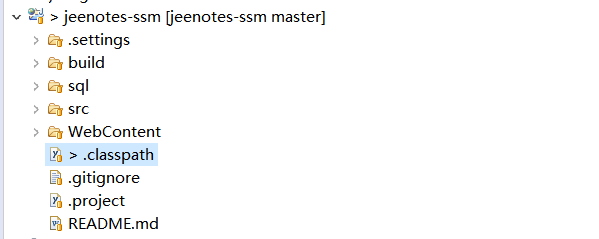 eclipse中截图
相信非springboot项目里的配置大家都应该很熟悉吧,主要就是配置繁琐的 xml,搭建一个 ssm 项目可参考之前的例子:SSM(Spring+SpringMVC+Mybatis)框架环境搭建
1、spring-redis.xml
<?xml version="1.0" encoding="UTF-8"?>
<beans xmlns="http://www.springframework.org/schema/beans"
       xmlns:xsi="http://www.w3.org/2001/XMLSchema-instance"
       xmlns:context="http://www.springframework.org/schema/context"
       xsi:schemaLocation="http://www.springframework.org/schema/beans
        http://www.springframework.org/schema/beans/spring-beans.xsd
        http://www.springframework.org/schema/context
        http://www.springframework.org/schema/context/spring-context.xsd">

    <!-- 缓存的层级-->
     <context:component-scan base-package="com.jeenotes.common.cache" />

     <!-- 配置 读取properties文件 jeenotes.properties -->
    <context:property-placeholder location="classpath:resources/jeenotes.properties"  ignore-unresolvable="true"/>

    <!-- Redis 配置 -->
    <bean id="jedisPoolConfig" class="redis.clients.jedis.JedisPoolConfig">
        <!-- 控制一个pool可分配多少个jedis实例 -->
        <property name="maxTotal" value="${redis.pool.maxTotal}" /><!--  -->
        <!-- 连接池中最多可空闲maxIdle个连接 ,这里取值为20,表示即使没有数据库连接时依然可以保持20空闲的连接,
               而不被清除,随时处于待命状态。 -->
        <property name="maxIdle" value="${redis.pool.maxIdle}" /><!--  -->
        <!-- 最大等待时间:当没有可用连接时,连接池等待连接被归还的最大时间(以毫秒计数),超过时间则抛出异常 -->
        <property name="maxWaitMillis" value="${redis.pool.maxWaitMillis}" /><!--  -->
        <!-- 在获取连接的时候检查有效性 -->
        <property name="testOnBorrow" value="${redis.pool.testOnBorrow}" /><!--  -->
    </bean>

    <!-- redis单节点数据库连接配置 -->
    <!-- Spring-redis连接池管理工厂 -->
    <bean id="jedisConnectionFactory" class="org.springframework.data.redis.connection.jedis.JedisConnectionFactory">
        <property name="hostName" value="${redis.ip}" /><!--  -->
        <property name="port" value="${redis.port}" /><!--  -->
        <property name="password" value="${redis.pass}" /><!--  -->
        <property name="poolConfig" ref="jedisPoolConfig" />
    </bean>

    <!-- redisTemplate配置,redisTemplate是对Jedis的对redis操作的扩展,有更多的操作,
           封装使操作更便捷 -->
    <!-- SDR默认采用的序列化策略有两种,一种是String的序列化策略,一种是JDK的序列化策略。
        StringRedisTemplate默认采用的是String的序列化策略,保存的key和value都是采用此策略序列化保存的。
        RedisTemplate默认采用的是JDK的序列化策略,保存的key和value都是采用此策略序列化保存的。
                    就是因为序列化策略的不同,即使是同一个key用不同的Template去序列化,结果是不同的。
                    所以根据key去删除数据的时候就出现了删除失败的问题。
     -->
    <!-- redis 序列化策略 ,通常情况下key值采用String序列化策略, -->
    <!-- 如果不指定序列化策略,StringRedisTemplate的key和value都将采用String序列化策略; -->
    <!-- 但是RedisTemplate的key和value都将采用JDK序列化 这样就会出现采用不同template保存的数据不能用同一个template删除的问题 -->
    <bean id="redisTemplate" class="org.springframework.data.redis.core.StringRedisTemplate">
        <property name="connectionFactory" ref="jedisConnectionFactory" />
        <!-- 我们通常所用的序列化操作:
                JDK的序列化——类上implements Serializable接口
                XML和Json
                protocol buffer(简称protobuf)Google的、 本项目采用中-->
        <!-- <property name="keySerializer" ref="stringRedisSerializer" />
        <property name="hashKeySerializer" ref="stringRedisSerializer" />
        <property name="valueSerializer" ref="stringRedisSerializer"/> -->

    </bean>

</beans>
注释比较详细,简要概述,jedisPoolConfig 用来配置 redis 连接池的一些配置,JedisConnectionFactory 则作为连接池的工厂类;还记得上文中提到的 redis 序列化问题吗?上边配置中(StringRedisTemplate)正是用到了 String 序列化策略。
2、RedisCache.java
/**
 * redis缓存
 *
 * @author niceyoo
 *
 */
@Component
public class RedisCache {

    public final static String CAHCENAME="cache";//缓存名
    public final static int CAHCETIME=300;//默认缓存时间   以秒计算的

    @Autowired
    private RedisTemplate<String, String> redisTemplate;

    public <T> boolean putCache(String key, T obj) {
        final byte[] bkey = key.getBytes();
        final byte[] bvalue = ProtoStuffSerializerUtil.serialize(obj);
        boolean result = redisTemplate.execute(new RedisCallback<Boolean>() {
            @Override
            public Boolean doInRedis(RedisConnection connection) throws DataAccessException {
                return connection.setNX(bkey, bvalue);
            }
        });
        return result;
    }

    public <T> void putCacheWithExpireTime(String key, T obj, final long expireTime) {
        final byte[] bkey = key.getBytes();
        final byte[] bvalue = ProtoStuffSerializerUtil.serialize(obj);
        redisTemplate.execute(new RedisCallback<Boolean>() {
            @Override
            public Boolean doInRedis(RedisConnection connection) throws DataAccessException {
                connection.setEx(bkey, expireTime, bvalue);
                return true;
            }
        });
    }

    public <T> boolean putListCache(String key, List<T> objList) {
        final byte[] bkey = key.getBytes();
        final byte[] bvalue = ProtoStuffSerializerUtil.serializeList(objList);
        boolean result = redisTemplate.execute(new RedisCallback<Boolean>() {
            @Override
            public Boolean doInRedis(RedisConnection connection) throws DataAccessException {
                return connection.setNX(bkey, bvalue);
            }
        });
        return result;
    }

    public <T> boolean putListCacheWithExpireTime(String key, List<T> objList, final long expireTime) {
        final byte[] bkey = key.getBytes();
        final byte[] bvalue = ProtoStuffSerializerUtil.serializeList(objList);
        boolean result = redisTemplate.execute(new RedisCallback<Boolean>() {
            @Override
            public Boolean doInRedis(RedisConnection connection) throws DataAccessException {
                connection.setEx(bkey, expireTime, bvalue);
                return true;
            }
        });
        return result;
    }

    public <T> T getCache(final String key, Class<T> targetClass) {
        byte[] result = redisTemplate.execute(new RedisCallback<byte[]>() {
            @Override
            public byte[] doInRedis(RedisConnection connection) throws DataAccessException {
                return connection.get(key.getBytes());
            }
        });
        if (result == null) {
            return null;
        }
        return ProtoStuffSerializerUtil.deserialize(result, targetClass);
    }

    public <T> List<T> getListCache(final String key, Class<T> targetClass) {
        byte[] result = redisTemplate.execute(new RedisCallback<byte[]>() {
            @Override
            public byte[] doInRedis(RedisConnection connection) throws DataAccessException {
                return connection.get(key.getBytes());
            }
        });
        if (result == null) {
            return null;
        }
        return ProtoStuffSerializerUtil.deserializeList(result, targetClass);
    }

    /**
     * 精确删除key
     *
     * @param key
     */
    public void deleteCache(String key) {
        redisTemplate.delete(key);
    }

    /**
     * 模糊删除key
     *
     * @param pattern
     */
    public void deleteCacheWithPattern(String pattern) {
        Set<String> keys = redisTemplate.keys(pattern);
        redisTemplate.delete(keys);
    }

    /**
     * 清空所有缓存
     */
    public void clearCache() {
        deleteCacheWithPattern(RedisCache.CAHCENAME+"|*");
    }
}
RedisCache.java 实现了对对数据增删改查的几种方法,如何使用呢?
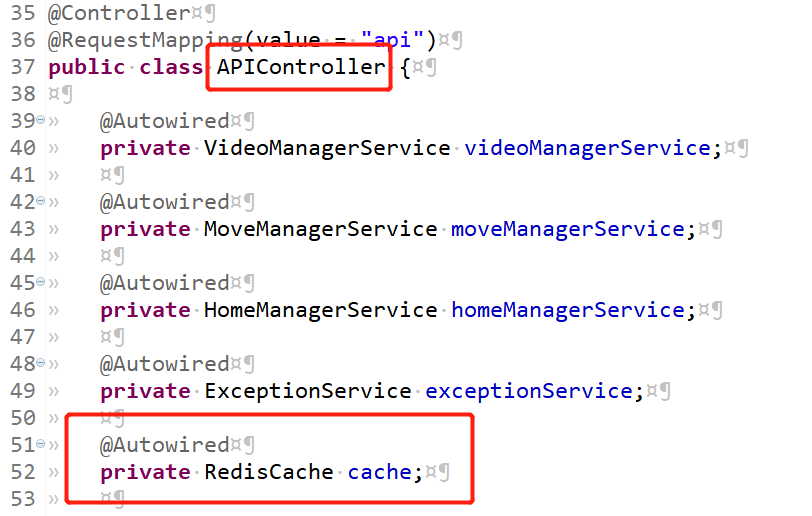
我们以首页的轮播图为例:
在需要使用的类中注入该组件:
看一下如下方法:
@ResponseBody
@RequestMapping("huandeng")
public ResultMobileBannerBean huandeng(Model model) {

    String cache_key = RedisCache.CAHCENAME + "|getPcHomeHuanDengList";
    ResultMobileBannerBean result_cache = cache.getCache(cache_key, ResultMobileBannerBean.class);

    if(result_cache != null){
        return result_cache;
    }

    ResultMobileBannerBean bannerBean = new ResultMobileBannerBean();
    bannerBean.setCode("000000");
    List<HomeBanner> homeBannerList = homeManagerService.findMobileHomeBannerList();
    bannerBean.setBannerList(homeBannerList);
    cache.putCacheWithExpireTime(cache_key, bannerBean, RedisCache.CAHCETIME);

    return bannerBean;
}
主要是 ResultMobileBannerBean result_cache = cache.getCache(cache_key, ResultMobileBannerBean.class); 在去数据库请求数据之前,先去 redis 中读取缓存信息,如果返回的数据非空的话,则返回该数据,否则去数据库查询数据,查询后在存放在 redis 中。
项目源码:https://gitee.com/niceyoo/jeenotes-ssm.git
springboot 中是如何引用 redis 的呢?
1、maven依赖
<!-- Redis-->
<dependency>
    <groupId>org.springframework.boot</groupId>
    <artifactId>spring-boot-starter-redis</artifactId>
    <version>1.4.7.RELEASE</version>
</dependency>
<!-- Gson 可暂时忽略-->
<dependency>
    <groupId>com.google.code.gson</groupId>
    <artifactId>gson</artifactId>
    <version>2.8.5</version>
</dependency>
2、yml配置信息
spring:
  # Redis
  redis:
    host: 127.0.0.1
    password:
    # 数据库索引 默认0
    database: 0
    port: 6379
    # 超时时间 Duration类型 3秒
    timeout: 3S
3、项目中引用
@Autowired
private StringRedisTemplate redisTemplate;

@RequestMapping(value = "/getByParentId/{parentId}", method = RequestMethod.GET)
@ApiOperation(value = "通过parentId获取")
public Result<List<Department>> getByParentId(@PathVariable String parentId,
                                              @ApiParam("是否开始数据权限过滤") @RequestParam(required = false, defaultValue = "true") Boolean openDataFilter){

    List<Department> list = new ArrayList<>();
    User u = securityUtil.getCurrUser();
    String key = "department::"+parentId+":"+u.getId()+"_"+openDataFilter;
    String v = redisTemplate.opsForValue().get(key);
    if(StrUtil.isNotBlank(v)){
        list = new Gson().fromJson(v, new TypeToken<List<Department>>(){}.getType());
        return new ResultUtil<List<Department>>().setData(list);
    }
    list = departmentService.findByParentIdOrderBySortOrder(parentId, openDataFilter);
    list = setInfo(list);
    redisTemplate.opsForValue().set(key,
            new GsonBuilder().registerTypeAdapterFactory(HibernateProxyTypeAdapter.FACTORY).create().toJson(list));
    return new ResultUtil<List<Department>>().setData(list);
}
RedisTemplate 定义了 5 种数据结构操作:
- redisTemplate.opsForValue();//操作字符串
- redisTemplate.opsForHash();//操作hash
- redisTemplate.opsForList();//操作list
- redisTemplate.opsForSet();//操作set
- redisTemplate.opsForZSet();//操作有序set
最优补充
从上文可看出 RedisTemplate 在 springboot 中应用尤为简单,所以赶快切到 springboot 中吧~
如果文章有错的地方欢迎指正,大家互相留言交流。习惯在微信看技术文章,想要获取更多的Java资源的同学,可以关注微信公众号:niceyoo

RedisTemplate在项目中的应用的更多相关文章
- spring3.0结合Redis在项目中的运用
推荐一个程序员的论坛网站:http://ourcoders.com/home/ 以下内容使用到的技术有:Redis缓存.SpringMVC.Maven.项目中使用了redis缓存,目的是在业务场景中, ...
- Spring + SpringMVC + Mybatis项目中redis的配置及使用
maven文件 <!-- redis --> <dependency> <groupId>redis.clients</groupId> <art ...
- Spring-Boot项目中配置redis注解缓存
Spring-Boot项目中配置redis注解缓存 在pom中添加redis缓存支持依赖 <dependency> <groupId>org.springframework.b ...
- VS项目中使用Nuget还原包后编译生产还一直报错?
Nuget官网下载Nuget项目包的命令地址:https://www.nuget.org/packages 今天就遇到一个比较奇葩的问题,折腾了很久终于搞定了: 问题是这样的:我的解决方案原本是好好的 ...
- ABP项目中使用Swagger生成动态WebAPI
本文是根据角落的白板报的<使用ABP实现SwaggerUI,生成动态webapi>一文的学习总结,感谢原文作者角落的白板报. 1 安装Swashbuckle.core 1.1 选择WebA ...
- iOS 之项目中遇到的问题总结
昨天去一家公司面试,面试官问了我在项目开发中遇到过哪些问题,是什么引起的,怎样解决的? 当时由于有点小紧张只说出了一两点,现在就来好好总结一下. 问题: 1.两表联动 所谓的两表联动就是有左右两个表格 ...
- My97DatePicker时间控件在项目中的应用
一.下载My97DatePicker的压缩包My97DatePicker.rar,解压. 注:My97DatePicker最新版本有开发包,项目中使用时删掉,以便节省空间,提高程序的运行效率. 二.在 ...
- 在项目中同时使用Objective-C和Swift
苹果发布的Swift语言可以和之前的Objective-C语言同时存在于一个项目中. 可能有人会认为是同一个类文件中既可以有Objective-C也可以有Swift,这是不对的.同一个类文件或同一个代 ...
- 在数据库访问项目中使用微软企业库Enterprise Library,实现多种数据库的支持
在我们开发很多项目中,数据访问都是必不可少的,有的需要访问Oracle.SQLServer.Mysql这些常规的数据库,也有可能访问SQLite.Access,或者一些我们可能不常用的PostgreS ...
随机推荐
- centos设置IP
centos设置IP 原由:虚拟机里安装了很多软件,每天要使用,原来使用的动态IP,而且很长时间也没变,一直使用的很好,忽然一天访问不了了,找了几次才发现动态IP地址变了,这些后决定将虚拟机的IP地址 ...
- 前端框架之Bootstrap框架
下载地址:https://v3.bootcss.com/,下载Bootstrap3版本 下载之后把文件中不需要的文件都删掉 需要获取的样式代码,可以直接从这些地方找到,然后复制 一.HTML页面导入文 ...
- linux redis 安装和密码设置
1.下载redis wget http://download.redis.io/releases/redis-4.0.8.tar.gz 2.解压 tar xzvf redis-4.0.8.tar.gz ...
- java之mybatis之使用mybatis实现crud操作
目录结构: 1.封装 mybatis 的工具类: MybatisUtil.java public class MybatisUtil { private static SqlSessionFactor ...
- CephFS 使用
原文:https://www.jianshu.com/p/c22ff79c4452 之前介绍了 RBD 的使用方法,有了 RBD,远程磁盘挂载的问题就解决了,但 RBD 的问题是不能多个主机共享一个磁 ...
- Tensorflow在python3.7版本的运行
安装tensorflow pip install tensorflow==1.13.1 -i https://pypi.tuna.tsinghua.edu.cn/simple 可以在命令行 或者在py ...
- 题解 POJ 2559-SP1805 【HISTOGRA - Largest Rectangle in a Histogram】
题目链接: https://www.luogu.org/problemnew/show/SP1805 http://poj.org/problem?id=2559 思路: ## 单调栈 首先如果所有矩 ...
- 2019 用友网络java面试笔试题 (含面试题解析)
本人3年开发经验.18年年底开始跑路找工作,在互联网寒冬下成功拿到阿里巴巴.今日头条. 用友网络等公司offer,岗位是Java后端开发,最终选择去了 用友网络. 面试了很多家公司,感觉大部分公司考察 ...
- Java自学-控制流程 结束外部循环
Java中结束外部循环 Java中如何结束外部for循环? 示例 1 : 结束当前循环 break; 只能结束当前循环 public class HelloWorld { public static ...
- 【转载】C#中float.TryParse方法和float.Parse方法的异同之处
在C#编程过程中,float.TryParse方法和float.Parse方法都可以将字符串string转换为单精度浮点类型float,但两者还是有区别,最重要的区别在于float.TryParse方 ...