
OLED液晶屏幕(4)串口读取文字并分割,液晶屏幕显示
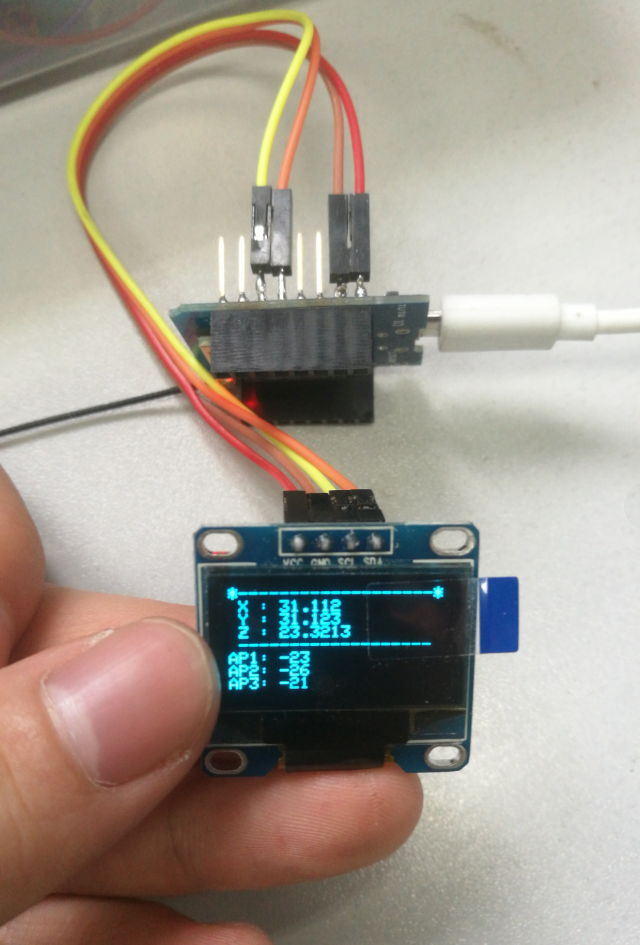
ESP8266-07
0.93存 液晶屏 128*64 驱动芯片 ssd1306
接线
VCC-5v
GND-GND
SCL-D1(SCL)
SDA-D2(SDA)
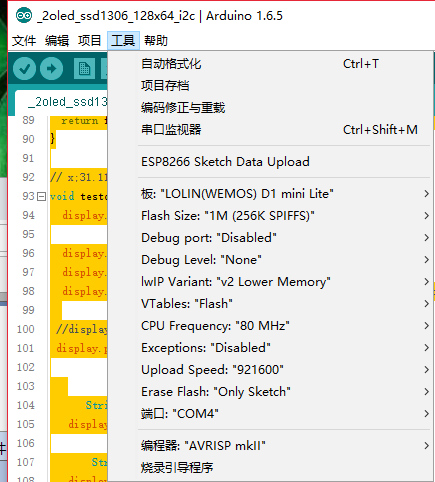
安装两个库
#include <Adafruit_GFX.h>
#include <Adafruit_SSD1306.h>
串口输入一句话
液晶屏幕显示出来
#include <SPI.h>

#include <Wire.h>

#include <Adafruit_GFX.h>

#include <Adafruit_SSD1306.h>

#define SCREEN_WIDTH 128 // OLED display width, in pixels

#define SCREEN_HEIGHT 64 // OLED display height, in pixels

// Declaration for an SSD1306 display connected to I2C (SDA, SCL pins)

#define OLED_RESET    -1 //4  Reset pin # (or -1 if sharing Arduino reset pin)

Adafruit_SSD1306 display(SCREEN_WIDTH, SCREEN_HEIGHT, &Wire, OLED_RESET);

#define NUMFLAKES     10 // Number of snowflakes in the animation example

#define LOGO_HEIGHT   16

#define LOGO_WIDTH    16

String comdata = "";

void oledint(){

  // SSD1306_SWITCHCAPVCC = generate display voltage from 3.3V internally

  if(!display.begin(SSD1306_SWITCHCAPVCC, 0x3C)) { // Address 0x3D for 128x64

    Serial.println("SSD1306 allocation failed");

    for(;;); // Don't proceed, loop forever

  }

  Serial.println("success");

  // Show initial display buffer contents on the screen --

  // the library initializes this with an Adafruit splash screen.

  display.display();

  delay(2000); // Pause for 2 seconds

  // Clear the buffer

  display.clearDisplay();

  // Draw a single pixel in white

  display.drawPixel(10, 10, WHITE);

  // Show the display buffer on the screen. You MUST call display() after

  // drawing commands to make them visible on screen!

  display.display();

  delay(2000);

  // Invert and restore display, pausing in-between

  display.invertDisplay(true);

  delay(1000);

  display.invertDisplay(false);

  delay(1000);

  }

void setup() {

  Serial.begin(9600);

  while(Serial.read()>= 0){} //clear serialbuffer

  oledint();

}

void loop() {

   if(Serial.available()>0){

      delay(100);

      comdata = Serial.readString();

    //  Serial.print("Serial.readString:");

    //  Serial.println(comdata);

      testdrawstyles(comdata);

    }

    comdata = "";

}

String getValue(String data, char separator, int index)

{

  int found = 0;

  int strIndex[] = {0, -1};

  int maxIndex = data.length()-1;

  for(int i=0; i<=maxIndex && found<=index; i++){

    if(data.charAt(i)==separator || i==maxIndex){

        found++;

        strIndex[0] = strIndex[1]+1;

        strIndex[1] = (i == maxIndex) ? i+1 : i;

    }

  }

  return found>index ? data.substring(strIndex[0], strIndex[1]) : "";

}

// x;31.112;y;31.123;z;23.3213;AP1;-23;AP2;-26;AP3;-21

void testdrawstyles(String msg) {

  display.clearDisplay();

  display.setTextSize(1);             // Normal 1:1 pixel scale

  display.setTextColor(WHITE);        // Draw white text

  display.setCursor(0,0);             // Start at top-left corner

 //display.println(msg);

 display.println(  "*-------------------*");

      String part01 = getValue(msg,';',1);

   display.print(F(" X : "));   display.println(part01);

       String part02 = getValue(msg,';',3);

   display.print(F(" Y : "));   display.println(part02);

       String part03 = getValue(msg,';',5);

    display.print(F(" Z : "));   display.println(part03);

 display.println(  " ------------------- ");

      String part04 = getValue(msg,';',7);

   display.print(F("AP1: "));   display.println(part04);

       String part05 = getValue(msg,';',9);

   display.print(F("AP2: "));   display.println(part05);

       String part06 = getValue(msg,';',11);

    display.print(F("AP3: "));   display.println(part06);

  display.display();

  delay(2000);

}
OLED液晶屏幕(4)串口读取文字并分割,液晶屏幕显示的更多相关文章
- OLED液晶屏幕(3)串口读取文字并分割
https://blog.csdn.net/iracer/article/details/50334041 String comdata = ""; void setup() { ...
- [Arduino] 在串口读取多个字符串,并且转换为数字数组
功能如题目.在串口收到逗号分割的6串数字比如100,200,45,4,87,99然后在6个PWM端口3, 5, 6, 9, 10, 11输出对应PWM值代码注释很详细了,就不再说明了. //定义一个c ...
- Arduino学习笔记A6(补充) - 在串口读取多个字符串,并且转换为数字数组
功能如题目. 在串口收到逗号分割的6串数字比如 100,200,45,4,87,99 然后在6个PWM端口3, 5, 6, 9, 10, 11输出对应PWM值 代码注释很详细了,就不再说明了. ARD ...
- VS编程,C#串口通讯,通过串口读取数据的一种方法
一.可能需要的软件:1.虚拟串口vspd(Virtual Serial Port Driver,用来在电脑上虚拟出一对串口,模拟通讯. 2.友善串口调试助手,用来发送.读取数据. 二.思路1.查询本机 ...
- 一篇提及如何通过串口读取并提取GPS信号的论文
一篇提及如何通过串口读取并提取GPS信号的论文 作者:崔杰 梁计春 王国军 目前,在用计算机进行数据传输时,常用的是串行通信方式.在Visual C++的编程中,既可以用Windows API函数进行 ...
- C# 从串口读取数据
最近要做系统集成,需要从串口读取数据,随学习一下相关知识: 以下是从串口读取数据 public static void Main() { SerialPort mySerialPort = new S ...
- labview初始学习过程中遇到串口读取框红蓝色交替闪烁的处理
labview工程的程序框图VISA串口读取框红蓝交替闪烁,前面板接收数据错乱,或者是接受不了,这是你不小心设置了断点.
- SPLIT(文字列の分割)
概要 SPLIT命令は特定の文字で値を分割する命令だ.タブ区切りや.カンマ区切り等のファイルからデータを取得し値を各項目に振り分けたい時に使用する事が多いだろう.また.XMLファイル等を使用してインタ ...
- Python + opencv 实现图片文字的分割
实现步骤: 1.通过水平投影对图形进行水平分割,获取每一行的图像: 2.通过垂直投影对分割的每一行图像进行垂直分割,最终确定每一个字符的坐标位置,分割出每一个字符: 先简单介绍一下投影法:分别在水平和 ...
随机推荐
- redis源码分析(六)--cluster集群同步
Redis集群消息 作为支持集群模式的缓存系统,Redis集群中的各个节点需要定期地进行通信,以维持各个节点关于其它节点信息的实时性与一致性.如前一篇文章介绍的,Redis在专用的端口监听集群其它节点 ...
- 解决html 图片缓存问题
<!--问题:上传一张图片,通过js更新src属性刷新图片使其即时显示时, 当img的src当前的url与上次地址无变化时(只更改图片,名称不变,不同图片名称相同)图片不变化(仍显示原来的图片) ...
- 24H玩转 Grafana 被工程师称相当专业,如何做到?
国庆假期发生了两件小事,其一是我默默度过 35 周岁生日,其二是玩了下grafana `并在节后第一天被工程师 M 称赞:相当专业. 1.我为什么要玩 grafana 呢? 数月前我提交了一份数据后台 ...
- C# 获取某个时间的0点0分和23点59分59秒
C#获取当月第一天和最后一天 当月第一天0时0分0秒: DateTime.Now.AddDays( - DateTime.Now.Day).Date 当月最后一天23时59分59秒: DateTime ...
- 浅谈有趣的 //go: 指令
前言 如果你平时有翻看源码的习惯,你肯定会发现.咦,怎么有的方法上面总是写着 //go: 这类指令呢.他们到底是干嘛用的? 今天我们一同揭开他们的面纱,我将简单给你介绍一下,它们都负责些什么 go:l ...
- Tomcat组件梳理--Catalina
Tomcat组件梳理--Catalina 1.定义和功能 Catalina是Tomcat的核心组件,是Servlet容器,Catalina包含了所有的容器组件,其他模块均为Catalina提供支撑.通 ...
- 1.Tomcat组件梳理—Bootstrap启动器
Tomcat组件梳理-Bootstrap启动器 一开始是直接从Server开始做梳理的,但是发现有很多东西是从Catalina传输过来的,Catalina又是从Bootstrap启动的,所以还是回过头 ...
- 【转载】C#中List集合使用IndexOf判断元素第一次出现的索引位置
在C#的List集合操作中,有时候需要判断元素对象在List集合中第一次出现的索引位置信息,此时需要使用到List集合的IndexOf方法来判断,如果元素存在List集合中,则IndexOf方法返回所 ...
- Navicat连接腾讯云服务器上的数据库
下面介绍Navicat连接腾讯云服务器上的数据库的两种方法: 方法一:[不需要修改相关远程客户端连接权限] 点击安装好的桌面navicat图标,进入后如下图: 连接方法:ssh中输入自己服务器的外网i ...
- Position定位相关知识了解
一.定位 position属性 1.默认定位: position:static; 元素框正常生成.块级元素生成一个矩形框,作为文档流的一部分,行内元素则会创建一个或多个行框,置于其 ...