
ansible自动化运维04
ansible playbook
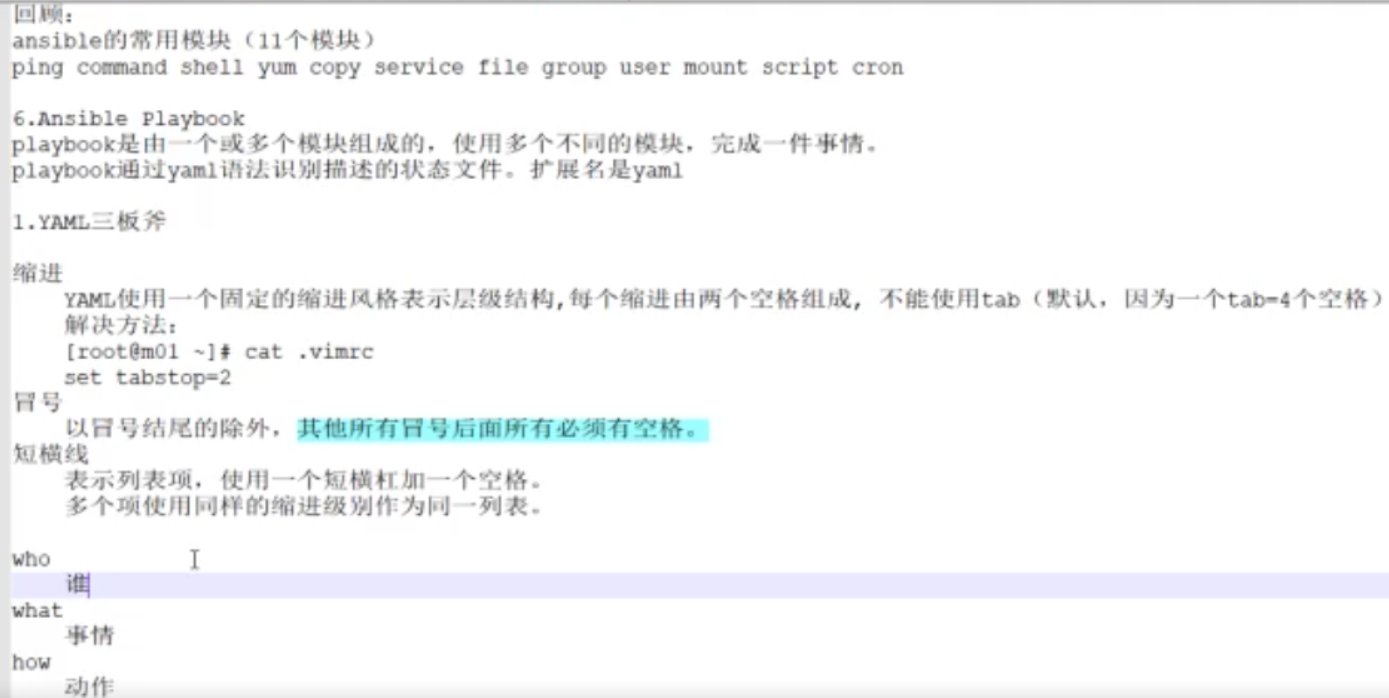

ansible-playbook命令格式:
ansible-playbook [option] filename(剧本名字)
ansible-playbook 命令的常用选项:
-C: 模拟运行
--list-hosts: 列出剧本主机清单
--list-tags : 列出剧本标记
--list-tasks: 列出剧本任务
--syntax-check: 检测语法
安装并且启动apache服务的剧本简单举例:
[root@host1 ansible]# mkdir ansible_playbook
[root@host1 ansible]# ll
total 24
-rw-r--r-- 1 root root 19980 Sep 14 04:00 ansible.cfg
drwxr-xr-x 2 root root 6 Oct 24 08:28 ansible_playbook
-rw-r--r-- 1 root root 40 Oct 9 15:04 hosts
drwxr-xr-x 2 root root 6 Sep 14 04:00 roles
[root@host1 ansible_playbook]# pwd
/etc/ansible/ansible_playbook
[root@host1 ansible_playbook]# ll
total 4
-rw-r--r-- 1 root root 210 Oct 24 08:48 apache.yaml
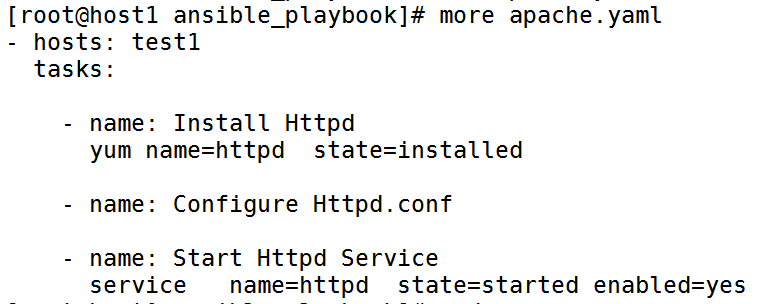
[root@host1 ansible_playbook]# more apache.yaml
- hosts: test1
tasks:
- name: Install Httpd
yum name=httpd state=installed
- name: Configure Httpd.conf
- name: Start Httpd Service
service name=httpd state=started enabled=yes
检测语法举例:
[root@host1 ansible_playbook]# ansible-playbook --syntax-check apache.yaml
playbook: apache.yaml
查看剧本主机清单:
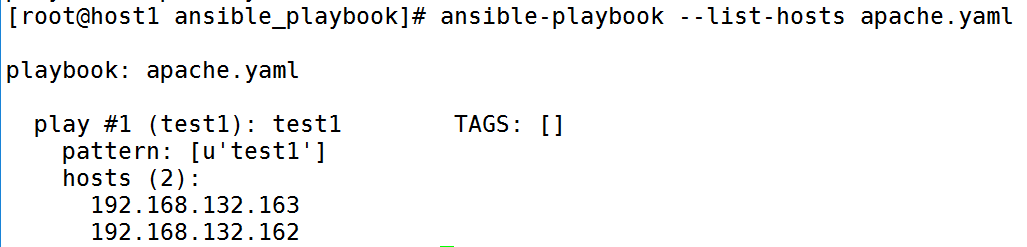
[root@host1 ansible_playbook]# ansible-playbook --list-hosts apache.yaml
playbook: apache.yaml
play #1 (test1): test1 TAGS: []
pattern: [u'test1']
hosts (2):
192.168.132.163
192.168.132.162
查看剧本任务:

[root@host1 ansible_playbook]# ansible-playbook --list-tasks apache.yaml
playbook: apache.yaml
play #1 (test1): test1 TAGS: []
tasks:
Install Httpd TAGS: []
Start Httpd Service TAGS: []
模拟运行剧本:
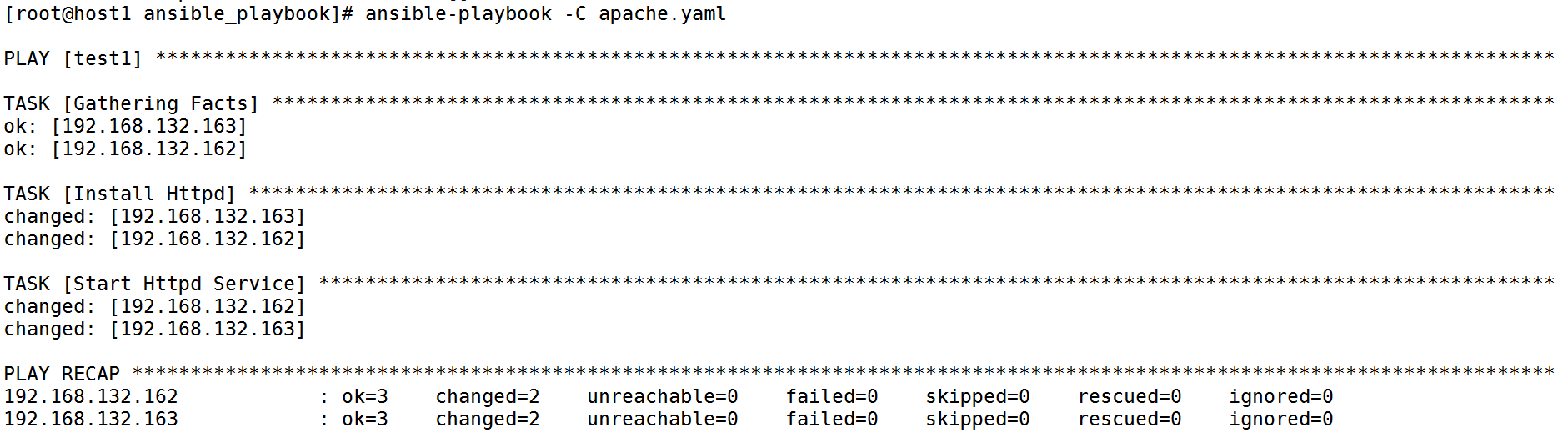
[root@host1 ansible_playbook]# ansible-playbook -C apache.yaml
PLAY [test1] ************************************************************************************************************************
TASK [Gathering Facts] **************************************************************************************************************
ok: [192.168.132.163]
ok: [192.168.132.162]
TASK [Install Httpd] ****************************************************************************************************************
changed: [192.168.132.163]
changed: [192.168.132.162]
TASK [Start Httpd Service] **********************************************************************************************************
changed: [192.168.132.162]
changed: [192.168.132.163]
PLAY RECAP **************************************************************************************************************************
192.168.132.162 : ok=3 changed=2 unreachable=0 failed=0 skipped=0 rescued=0 ignored=0
192.168.132.163 : ok=3 changed=2 unreachable=0 failed=0 skipped=0 rescued=0 ignored=0
出现如上情况说明剧本模拟运行正常,可以去直接执行剧本了!!
下面是批量修改httpd的配置文件后重启httpd服务的ansible 剧本(文件):
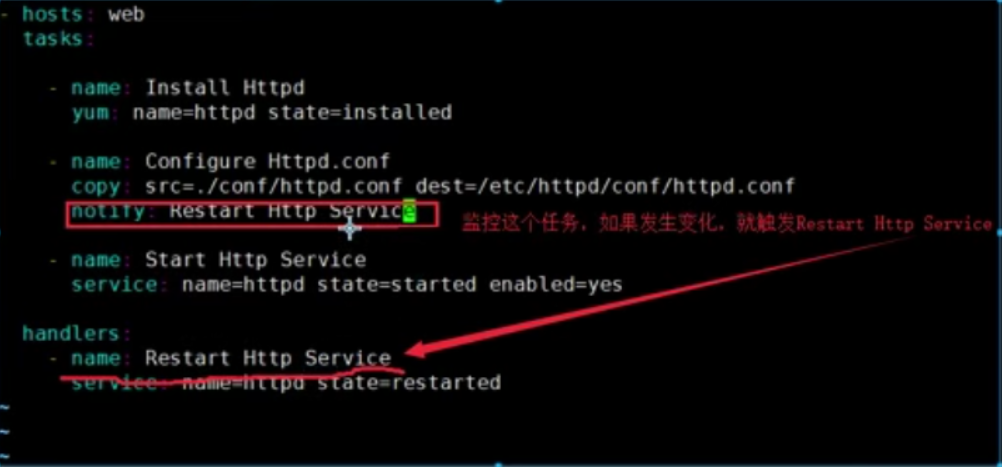
注意: playbook核心元素常用的是hosts,tasks,handlers,其他两个有兴趣可以自己去研究!
ansible自动化运维04的更多相关文章
- Ansible自动化运维工具及其常用模块
Ansible自动化运维工具及其常用模块 目录 Ansible自动化运维工具及其常用模块 一.Ansible简介 1. Ansible概述 2. Ansible作用 3. Ansible的工作模块 4 ...
- Ansible自动化运维工具-上
[Ansible特点] 1)Ansible与saltstack均是基于Python语言开发的 2)安装使用简单,基于不同插件和模块实现各种软件,平台,版本的管理以及支持虚拟容器多层级的部署 3)不需要 ...
- ansible 自动化运维
Ansible 自动化运维 ansible安装epel #yum list all *ansible*#yum install *ansible*#yum info ansible#rpm -ql a ...
- Ansible 自动化运维工具
Ansible 自动化运维工具 Ansible是什么? Ansible是一个"配置管理工具"也是一个"自动化运维工具" Ansible 作用: Ansible是 ...
- ansible自动化运维03
ansible自动化运维常用模块 常用模块实现的功能:安装软件包:修改配置文件:创建程序用户组:创建目录,并修改所属和权限:挂载:启动服务:测试. command模块: shell模块: 注意:com ...
- 简单聊一聊Ansible自动化运维
一.Ansible概述 Ansible是今年来越来越火的一款开源运维自动化工具,通过Ansible可以实现运维自动化,提高运维工程师的工作效率,减少人为失误.Ansible通过本身集成的非常丰富的模块 ...
- Ansible自动化运维工具的使用
Ansible自动化运维工具的使用 host lnventory 管理主机 ip root账号密码 ssh端口 core mod ...
- Ansible 自动化运维——剧本(playbook)
Ansible 自动化运维--剧本(playbook) 1.playbook介绍: playbook是ansible用于配置,部署,和管理被控节点的剧本.通过playbook的详细描述,执行其中的ta ...
- 一文详解 Ansible 自动化运维
开源Linux 一个执着于技术的公众号 一.Ansible 概述 Ansible 是近年来越来越火的一款开源运维自动化工具,通过Ansible可以实现运维自动化,提高运维工程师的工作效率,减少人为失误 ...
随机推荐
- Session技术
Session 学习: 问题: Request 对象解决了一次请求内的不同 Servlet 的数据共享问 题,那么一个用户的不同请求的处理需要使用相同的数据怎么办呢? 解决: 使用 session 技 ...
- CF888G XOR-MST 最小异或生成树
CF888G XOR-MST 链接 CF888G 思路 trie上贪心,先左右两边连边,再用一条边的代价连起左右两颗树.因为内部的边一定比跨两棵树的边权笑,显然是对的. 代码自己瞎yy的.启发式合并 ...
- 3.Python配套习题
这里会持续更新Python每个部分知识点的配套练习题的目录...
- mysql的varchar和oracle的varchar2、nvarchar2
mysql的varchar长度表示字符长度,一个汉字和一个英文字母的长度都是1 实例:下面name字段定义为varchar(10),可存10个汉字和10个字母 oracle的varchar2长度表示的 ...
- 一篇了解大数据架构及Hadoop生态圈
一篇了解大数据架构及Hadoop生态圈 阅读建议,有一定基础的阅读顺序为1,2,3,4节,没有基础的阅读顺序为2,3,4,1节. 第一节 集群规划 大数据集群规划(以CDH集群为例),参考链接: ht ...
- Python文件读写机制
Python提供了必要的函数和方法进行默认情况下的文件基本操作 文件打开方式: open(name[,mode[buf]]) name:文件路径 mode:打开方式 buf:缓冲buffering大小 ...
- ros:init()
ros::init()是ROS程序调用的第一个函数,用于对ROS程序的初始化. ros::init()函数的声明在ROS代码中的./src/ros_comm/roscpp/include/ros/in ...
- 【C++】Debug模式和Release模式的区别
VS中的程序有两种编译模式:Debug模式和Release模式. Debug通常称为调试版本,通过一系列编译选项的配合,编译结果通常包含调试信息,而且不做任何优化,以为开发人员提供强大的应用程序调试能 ...
- 关于source insight 置顶窗口或者处于前台挡住窗口解决办法
两个办法,分别如下: 1.重启source insight: 2.按两次F11:
- 【01】Python:故事从这里开始
写在前面的话 最近在 Github 上面看到一个 100 天学习 Python 项目: https://github.com/jackfrued/Python-100-Days 于是便想着抽时间将自己 ...