
AutoTile 自动拼接(四) 学习与实践
今天主要来说下,数据绑定。
之前第一章,我说到 把 资源图 画成格子,你们应该还有印象吧。
那么,当我 知道 格子数据,能否拿到 资源对应的图片呢?
大家先复习一下 第一章,发现很多格子数据 是相同的,有好多个1,好多个2 等等。
所以这里必须要定义一个方向,比如 左上角的1 ,右上角的1,左下角的1,右下角的1.
好,先把资源加载类,继续优化下
using UnityEngine;

using System.Collections;

public class ResourcesSprite : MonoBehaviour

{

    void Start()

    {

        OnAutoTileSave("", "sea", , );

        OnAutoTileSave("", "sea", , );

        OnAutoTileSave("", "sea", , );

        OnSortAutoTile("sea", );

    }

    void Update()

    {

    }

    //对资源图 排序

    void OnSortAutoTile(string key, int total = )

    {

        Sprite[, ,] dict = GameModel.getInstance().dictSprite[key];

        for (int j = ; j < ; j++)

        {

            Sprite[] sp = new Sprite[total];

            for (int i = ; i < total; i++)

            {

                sp[i] = dict[i, j / , j % ];

            }

            int x1 = j / ;

            int y1 = j % ;

            GameModel.getInstance().autoTileSprite.Add(x1 + "," + y1 + "," + key, sp);

        }

    }

    //根据 图片名字,键值名字,当前帧 和 总共帧 保存单例中

    void OnAutoTileSave(string pathName, string key, int current, int total)

    {

        object[] objs = Resources.LoadAll(pathName);

        Sprite[, ,] dict;

        //是否存在 键值

        if (GameModel.getInstance().dictSprite.ContainsKey(key))

        {

            dict = GameModel.getInstance().dictSprite[key];

        }

        else

        {

            dict = new Sprite[total, , ];

            GameModel.getInstance().dictSprite.Add(key, dict);

        }

        int i = ;

        foreach (object obj in objs)

        {

            Sprite sp = obj as Sprite;

            if (sp != null)

            {

                dict[current, i / , i % ] = sp;

                i++;

            }

        }

        GameModel.getInstance().dictSprite[key] = dict;

    }

}
大家可以看到,我增加了一个 资源排序的方法,因为 资源图 是 固定的 6*4 格子,应该不可能变,所以我也就写死了。
好,下面看看如何调用这个类。
同样,在昨天 那四个 sprite脚本中增加
using UnityEngine;

using System.Collections;

public class AutoTileShow : MonoBehaviour

{

    public int directions;

    int i = ;

    private Sprite m_Image;

    bool open = true;

    Sprite[] sp;

    void Start()

    {

        if (!gameObject.GetComponent<SpriteRenderer>())

        {

            m_Image = gameObject.AddComponent<SpriteRenderer>().sprite;

        }

        sp = new Sprite[];//图片数据临时存放

    }

    float timebattle;

    void Update()

    {

        timebattle -= Time.deltaTime;

        if (timebattle <= )

        {

            timebattle = .2f;//闪烁频率

            if (i == )

            {

                i = ;

            }

            if (open)

            {

                sp = OnGetAutoTile(directions, );

                open = false;

            }

            m_Image = sp[i];

            gameObject.GetComponent<SpriteRenderer>().sprite = m_Image;

            i++;

        }

    }

    //通过 方向 权值 获取 对应图像

    public Sprite[] OnGetAutoTile(int direction, int weightNumber, string key = "sea")

    {

        Sprite[] map = { };

        ArrayList arr = new ArrayList();

        switch (weightNumber)

        {

            case :

                arr.Add( + "," +  + "," + "sea");

                arr.Add( + "," +  + "," + "sea");

                arr.Add( + "," +  + "," + "sea");

                arr.Add( + "," +  + "," + "sea");

                map = OnDirectionAutoTile(direction, key, arr);

                break;

            case :

                arr.Add( + "," +  + "," + "sea");

                arr.Add( + "," +  + "," + "sea");

                arr.Add( + "," +  + "," + "sea");

                arr.Add( + "," +  + "," + "sea");

                map = OnDirectionAutoTile(direction, key, arr);

                break;

            case :

                arr.Add( + "," +  + "," + "sea");

                arr.Add( + "," +  + "," + "sea");

                arr.Add( + "," +  + "," + "sea");

                arr.Add( + "," +  + "," + "sea");

                map = OnDirectionAutoTile(direction, key, arr);

                break;

            case :

                arr.Add( + "," +  + "," + "sea");

                arr.Add( + "," +  + "," + "sea");

                arr.Add( + "," +  + "," + "sea");

                arr.Add( + "," +  + "," + "sea");

                map = OnDirectionAutoTile(direction, key, arr);

                break;

            case :

                arr.Add( + "," +  + "," + "sea");

                arr.Add( + "," +  + "," + "sea");

                arr.Add( + "," +  + "," + "sea");

                arr.Add( + "," +  + "," + "sea");

                map = OnDirectionAutoTile(direction, key, arr);

                break;

            case :

                arr.Add( + "," +  + "," + "sea");

                arr.Add( + "," +  + "," + "sea");

                arr.Add( + "," +  + "," + "sea");

                arr.Add( + "," +  + "," + "sea");

                map = OnDirectionAutoTile(direction, key, arr);

                break;

            case :

                arr.Add( + "," +  + "," + "sea");

                arr.Add( + "," +  + "," + "sea");

                arr.Add( + "," +  + "," + "sea");

                arr.Add( + "," +  + "," + "sea");

                map = OnDirectionAutoTile(direction, key, arr);

                break;

            default: break;

        }

        return map;

    }

    public Sprite[] OnDirectionAutoTile(int direction, string key, ArrayList arr)

    {

        Sprite[] mapTile = new Sprite[];

        mapTile = GameModel.getInstance().autoTileSprite[arr[direction - ].ToString()];

        return mapTile;

        /***

        switch (direction)

        {

            case 1://左上

                mapTile = GameModel.getInstance().autoTileSprite[arr[0].ToString()];

                break;

            case 2://左下

                mapTile = GameModel.getInstance().autoTileSprite[1 + "," + 0 + "," + key];

                break;

            case 3://右上

                mapTile = GameModel.getInstance().autoTileSprite[0 + "," + 1 + "," + key];

                break;

            case 4://右下

                mapTile = GameModel.getInstance().autoTileSprite[1 + "," + 1 + "," + key];

                break;

            default: break;

        }

         * **/

    }

}
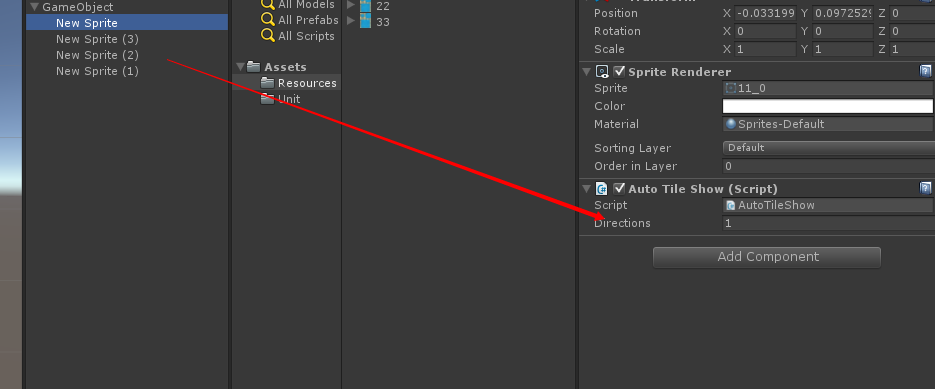
增加后,我们在u3d界面中,看到一个方向变量。
我们把 四个图,按照左上左下右上右下 1234,对应起来,大家也可以看看这个脚本,有部分注释的,也是这么定义的。
在
void Update() 中,我们运行 sp = OnGetAutoTile(directions, 1);
注意,这个1 就是 权值,也就是 绑定格子的数据值。
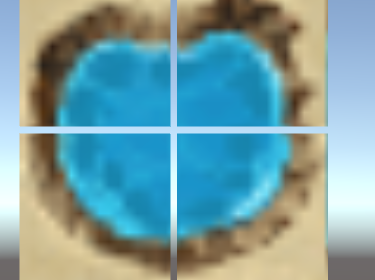
我们可以看到 动画状态的 图,如下。因为 是1 的格子,要求四个方向。
链接:http://pan.baidu.com/s/1c1dOojm 密码:esis
注:OnGetAutoTile方法 写的不是很好,因为我还没找到 规律来优化它,不过反正 只有1-7 这几种,先讲究下吧。
好了,今天先说道这里,下一节是 权值检测,很重要的一章哦
AutoTile 自动拼接(四) 学习与实践的更多相关文章
- AutoTile 自动拼接(一) 学习与实践
恩,大家好,这两天江苏冷空气袭击,下了今年 第一场第二场雪. 不过今天我要说的 ,和 上面的 屁关系都没有. 今天要说的是 2d无缝自动拼接.大家有没有玩过 RPG Maker VX Ace. 类似 ...
- AutoTile 自动拼接(五) 学习与实践
今天不讲 权值检索,考虑到后期 自动拼接 做出来 更好玩,操作更方便.所以 今天我 补充一节, 网格计算与操作. 具体就是这么个效果,和地图编辑器一样,不过图块还是没有自然的拼接,这个一定一定是 下一 ...
- AutoTile 自动拼接(六 大结局) 学习与实践
昨天在网上找了一些资源图片,这回就不用担心 背景资源不多的问题了,现在我一边 制作,一边发布文章. 各种各样,500多个,这里还是特别感谢 ,万恶的资本主义,不设密码就给我分享. 在制作前,大家看下这 ...
- AutoTile 自动拼接(三) 学习与实践
今天把 图像数据保存完善了一下.天冷,没打多少字,见谅. 接着昨天说的,首先我们打开u3d,做一个空物体gameobject,然后做几个sprite,如下图所示 上面的sprite 排成四个 正方形. ...
- AutoTile 自动拼接(二) 学习与实践
开始代码前,我们要做点准备工作. 下面 跟着我做. 首先我 扣了一个 图. 这个是 做 水的资源,所以是动态的,我把其余两张也扣了出来. 看起来一样,不是,这样看肯定 看不出所以然,你们先放到u3d中 ...
- AutoTile 自动拼接 番外篇(自动融合技术)
http://pan.baidu.com/s/1dDQyfSl 密码:ttud 先睹为快吧. 之后 还差一个 智能替换 技术.
- RabbitMQ学习系列四-EasyNetQ文档跟进式学习与实践
EasyNetQ文档跟进式学习与实践 https://www.cnblogs.com/DjlNet/p/7603554.html 这里可能有人要问了,为什么不使用官方的nuget包呐:RabbitMQ ...
- hadoop2.5.2学习及实践笔记(四)—— namenode启动过程源码概览
对namenode启动时的相关操作及相关类有一个大体了解,后续深入研究时,再对本文进行补充 >实现类 HDFS启动脚本为$HADOOP_HOME/sbin/start-dfs.sh,查看star ...
- NLP+词法系列(二)︱中文分词技术简述、深度学习分词实践(CIPS2016、超多案例)
摘录自:CIPS2016 中文信息处理报告<第一章 词法和句法分析研究进展.现状及趋势>P4 CIPS2016 中文信息处理报告下载链接:http://cips-upload.bj.bce ...
随机推荐
- jquery.cookie.js 的配置
一个轻量级的cookie 插件,可以读取.写入.删除 cookie. jquery.cookie.js 的配置 首先包含jQuery的库文件,在后面包含 jquery.cookie.js 的库文件. ...
- (转载)app ico图标字体制作
图标字体化浅谈 在做手机端Web App项目中,经常会遇到小图标在手机上显示比较模糊的问题,经过实践发现了一种比较好的解决方案,图标字体化.在微社区项目中,有很多小的Icon(图标),如分享.回复 ...
- perl 简单后门程序
#!/usr/bin/env perl use warnings; use strict; use Socket; my $HOST='localhost'; ; socket(S,PF_INET,S ...
- GDB: advanced usages
Sometimes running program in Unix will fail without any debugging info or warnings because of the la ...
- bootstraptable表格基本
function tableint(){ $("#tableFromData").bootstrapTable({ url:BASE_URL+"/do/fron ...
- Copy Constructor的构造操作
Copy Constructor的构造操作 有三种情况,会以一个object的内容作为另一个class object的初值: 1. 对一个object做显式的初始化操作 class X{…}; X ...
- mybatis------xml的一些规范等
转与拼接: MyBatis 是支持普通 SQL查询,存储过程和高级映射的优秀持久层框架.MyBatis 消除了几乎所有的JDBC代码和参数的手工设置以及结果集的检索.MyBatis 使用简单的 XML ...
- redis----查询keys(模糊匹配)
keys * 返回所有的key keys h?llo 类似数据库的匹配使用 keys h*lleo 类似数据库的匹配使用 keys h[ae]llo 只能是a或e的匹配 一次设置多个keys ms ...
- scanf函数与scanf_s函数
ANSI C中没有scanf_s(),只有scanf(),scanf()在读取时不检查边界,所以可能会造成内存泄露.所以vc++2005/2008中提供了scanf_s(),在最新的VS2013中也提 ...
- Code Blocks 多文件联合编译
code::blocks是一款据说灰常强大的IDE,以前虽然也经常使用,但一没用过高度功能,二来没用它写过工程性的东西,简单点说就是一个以上的源文件并且加入其他非标准的头文件,今天想做一个多文 ...