
SorlNet
Solr学习
上一篇已经讲到了Solr 查询的相关的参数。这里在讲讲C#是如何通过客户端请求和接受solr服务器的数据, 这里推荐使用SolrNet,主要是:SolrNet使用非常方便,而且用户众多,一直都在更新,感兴趣的可以加入他们的邮件群组,方便迅速了解SolrNet的最新动态。
SorlNet源码地址:https://github.com/mausch/SolrNet
SolrNet使用说明文档:https://github.com/mausch/SolrNet/tree/master/Documentation
一、创建一个项目控制台程序,并引用SolrNet.dll。Demo下载
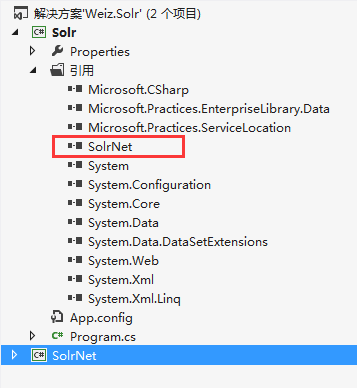
注意:SolrNet 依赖HttpWebAdapters.dll和Microsoft.Practices.ServiceLocation.dll 这两个dll 文件,所以,如果编译或者测试有问题,引用这两个dll 文件应该就ok了。
二、在solr 的schema.xml 增加相关的Filed 字段,同时创建一个实体类,与schema.xml中的Filed 字段映射。

   public class Product

    {

        [SolrUniqueKey("id")]

        public int id { get; set; }

        [SolrField("name")]

        public string name { get; set; }

        [SolrField("title")]

        public string title { get; set; }

        [SolrField("category")]

        public string category { get; set; }

        [SolrField("content")]

        public string content { get; set; }

        [SolrField("price")]

        public double price { get; set; }

        [SolrField("color")]

        public string color { get; set; }

        [SolrField("updatetime")]

        public DateTime updatetime { get; set; }

        [SolrField("orderBy")]

        public int orderBy { get; set; }

    }
同时,schema.xml中也要加上相应的Filed 字段,打开solr_home\mycore1\conf 下的schema.xml文件,增加如下Field 配置,如果不知道如何操作,请参考前一篇文章,《Solr学习总结(二)Solr的安装与配置》
   <field name="id" type="int" indexed="true" stored="true" required="true" multiValued="false" />

   <field name="name" type="string" indexed="true" stored="true" required="true" multiValued="false" />

   <field name="title" type="string" indexed="true" stored="true" required="true" multiValued="false" />

   <field name="category" type="string" indexed="true" stored="true" required="true" multiValued="false" />

   <field name="content" type="string" indexed="true" stored="true" required="true" multiValued="false" />

   <field name="price" type="double" indexed="true" stored="true" required="true" multiValued="false" />

   <field name="color" type="string" indexed="true" stored="true" required="true" multiValued="false" />

   <field name="orderBy" type="int" indexed="true" stored="true" required="true" multiValued="false" />

   <field name="updatetime" type="date" indexed="true" stored="true" required="true" multiValued="false" />
三、开始调用solrnet:
1.初始化
Startup.Init<Product>("http://localhost:8080/solr/mycore1");
2.增加和修改索引(document)
Solr 索引的增加和修改,都是Add() 方法,solr 会自动判断是否存在此所以,有就修改,没有就新增。
     ISolrOperations<Product> solr = ServiceLocator.Current.GetInstance<ISolrOperations<Product>>();

         var p = new Product()

             {

                 id = 201,

                 name = "product 201",

                 title = "title 201",

                 category = "201",

                 content = "title 201 green",

                 color = "green",

                 price = 67.92,

                 updatetime = DateTime.Now.AddDays(-101),

                 orderBy = 101

             };

        solr.Add(p);

        solr.Commit();
3. 删除索引
solrnet 重写了多个 delete()方法。这里只介绍一个,其他的自己研究吧。
     ISolrOperations<Product> solr = ServiceLocator.Current.GetInstance<ISolrOperations<Product>>();

        var p = new Product()

        {

             id = 201,

        };

        solr.Delete(p);

        solr.Commit();
注意:调用 Add() 或是 Delete()方法,必须在他们之后加上 Commit(),否是请求是不会被处理的。
4.查询
            ISolrOperations<Product> solr = ServiceLocator.Current.GetInstance<ISolrOperations<Product>>();

            SolrQueryResults<Product> phoneTaggedArticles = solr.Query(new SolrQuery("id:1"));

            foreach (Product p in phoneTaggedArticles)

            {

                Console.WriteLine(string.Format("{0}: {1}", p.id, p.title));

            }

            Console.WriteLine();
到这里,Solrnet的基本用法已经说完了,下一篇,将聊聊Solr的一些高级用法,solr 的复杂查询,高亮,Facet分组查询等。
SorlNet的更多相关文章
- Solr学习总结(五)SolrNet的基本用法及CURD
上一篇已经讲到了Solr 查询的相关的参数.这里在讲讲C#是如何通过客户端请求和接受solr服务器的数据, 这里推荐使用SolrNet,主要是:SolrNet使用非常方便,而且用户众多,一直都在更新, ...
- Open Source
资源来源于http://www.cnblogs.com/Leo_wl/category/246424.html RabbitMQ 安装与使用 摘要: RabbitMQ 安装与使用 前言 吃多了拉就是队 ...
随机推荐
- cocos2d-x游戏开发 跑酷(四) 关联与物理世界
原创.转载注明出处http://blog.csdn.net/dawn_moon/article/details/21451077 前面一节尽管实现了一个跑动的人物,可是他只不过一个精灵在运行一个跑动的 ...
- Android Studio Gradle 添加.so 支持文件
近期发展Android Wear 关注商品.官员Demo所有gradle 工程. 当然,我也用eclipse配置一个可行的环境. 问题来了,eclipse,android studio 开发 andr ...
- loj1370(欧拉函数+线段树)
传送门:Bi-shoe and Phi-shoe 题意:给出多个n(1<=n<=1e6),求满足phi(x)>=n的最小的x之和. 分析:先预处理出1~1e6的欧拉函数,然后建立一颗 ...
- Docker 用法总结之:管理工具 shipyard 的具体使用指南
Docker 的命令行就已经非常好用了,假设非要加上基于 Web 的管理界面的话也有一些选择,如 DockerUI (Angular.js), Dockland (Ruby), Shipyard (P ...
- zoj3329(概率dp)
题目连接:http://acm.zju.edu.cn/onlinejudge/showProblem.do?problemId=3754 题意:有三个骰子,分别有k1,k2,k3个面. 每次掷骰子,如 ...
- 在maven仓库中查找jar
findmaven.net是一个查找Jar和查找Maven的Maven仓库搜索引擎,它能够依据Java开发人员提供的Class名或者Jar名找到包括它的Jar.同一时候提供Jar的Maven仓库链接. ...
- Kdd Cup 2013 总结2
- Android横屏竖屏设置
Android横竖屏设置: 方法一:onCreate()中 setRequestedOrientation(ActivityInfo.SCREEN_ORIENTATION_LANDSCAPE); // ...
- ipconfig /flushdns 清除系统DNS缓存
1.ipconfig /flushdns的作用 ipconfig /flushdns 这是清除DNS缓存用的. 当訪问一个站点时系统将从DNS缓存中读取该域名所相应的IP地址,当查找不到时就会到系统中 ...
- JDBC与反射
什么是JDBC Java定义了一套关于连接使用数据库的规范(接口)叫做JDBC,许多数据库厂商实现了这个规范,所以我们可以通过Java提供的接口编程,使得我们更换数据库的时候不用修改原来的代码,只需要 ...