
Java 的swing.GroupLayout布局管理器的使用方法和实例(转)
The following builds a panel consisting of two labels in one column, followed by two textfields in the next column:
   JComponent panel = ...;

   GroupLayout layout = new GroupLayout(panel);

   panel.setLayout(layout);

   // Turn on automatically adding gaps between components

   layout.setAutoCreateGaps(true);

   // Turn on automatically creating gaps between components that touch

   // the edge of the container and the container.

   layout.setAutoCreateContainerGaps(true);

   // Create a sequential group for the horizontal axis.

   GroupLayout.SequentialGroup hGroup = layout.createSequentialGroup();

   // The sequential group in turn contains two parallel groups.

   // One parallel group contains the labels, the other the text fields.

   // Putting the labels in a parallel group along the horizontal axis

   // positions them at the same x location.

   //

   // Variable indentation is used to reinforce the level of grouping.

   hGroup.addGroup(layout.createParallelGroup().

            addComponent(label1).addComponent(label2));

   hGroup.addGroup(layout.createParallelGroup().

            addComponent(tf1).addComponent(tf2));

   layout.setHorizontalGroup(hGroup);

   // Create a sequential group for the vertical axis.

   GroupLayout.SequentialGroup vGroup = layout.createSequentialGroup();

   // The sequential group contains two parallel groups that align

   // the contents along the baseline. The first parallel group contains

   // the first label and text field, and the second parallel group contains

   // the second label and text field. By using a sequential group

   // the labels and text fields are positioned vertically after one another.

   vGroup.addGroup(layout.createParallelGroup(Alignment.BASELINE).

            addComponent(label1).addComponent(tf1));

   vGroup.addGroup(layout.createParallelGroup(Alignment.BASELINE).

            addComponent(label2).addComponent(tf2));

   layout.setVerticalGroup(vGroup);
GroupLayout 是一个 LayoutManager,它将组件按层次分组,以决定它们在 Container 中的位置。GroupLayout 主要供生成器使用,但也可以手工编码。分组由 Group 类的实例来完成。GroupLayout 支持两种组。串行组 (sequential group) 按顺序一个接一个地放置其子元素。并行组 (parallel group) 能够以四种方式对齐其子元素。
每个组可以包含任意数量的元素,其中元素有 Group、Component 或间隙 (gap)。间隙可被视为一个具有最小大小、首选大小和最大大小的不可见组件。此外,GroupLayout 还支持其值取自 LayoutStyle 的首选间隙。
GroupLayout是一个很重要的是额布局管理器,在jdk 1.6才加入,配合其它的管理器可以实现很好的界面。
GroupLayout必须要设置它的GroupLayout.setHorizontalGroup和GroupLayout.setVerticalGroup。
GroupLayout.setHorizontalGroup是指按照水平来确定,下面例子“账号”和“密码”是一个级别的,其它的组件也是一个级别的。详情请看代码
GroupLayout.setVerticalGroup。是按照垂直来确定的。他们的级别是按照Group去设置组件的优先级别,级别越高就显示越上面。
GroupLayout.setHorizontalGroup(SequentialGroup(ParallelGroup(component)));
大概就是按照这个顺序去添加,当然不是就这么简单设置,多个component添加到ParallelGroup,然后多个ParallelGroup添加到SequentialGroup里面,
然后就设置到GroupLayout
下面的实例,设置GroupLayout.setHorizontalGroup,就是把2和4添加到一个ParallelGroup.addComponent(component),其它1,3,5,6,7,8添加到另一个ParallelGroup,然后把这两个ParallelGroup按照顺序添加到SequentialGroup.addGrou(ParallelGroup);
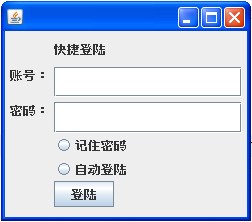

import javax.swing.GroupLayout;

import javax.swing.GroupLayout.Alignment;

import javax.swing.JButton;

import javax.swing.JLabel;

import javax.swing.JPasswordField;

import javax.swing.JRadioButton;

import javax.swing.JTextField;

public class MyFrame extends javax.swing.JFrame {

    public static void main(String[] args) {

        MyFrame f = new MyFrame();

    }

    JLabel label1;

    JLabel label2;

    JLabel label3;

    JTextField tf;

    JPasswordField psf;

    JRadioButton rb1;

    JRadioButton rb2;

    JButton bt1;

    JButton bt2;

    public MyFrame() {

        this.setVisible(true);

        this.setSize(250, 220);

        this.setVisible(true);

        this.setLocation(400, 200);

        label1 = new JLabel("快捷登陆");

        label2 = new JLabel("账号:");

        label3 = new JLabel("密码:");

        tf = new JTextField();

        psf = new JPasswordField();

        rb1 = new JRadioButton("记住密码");

        rb2 = new JRadioButton("自动登陆");

        bt1 = new JButton("登陆");

        // 为指定的 Container 创建 GroupLayout

        GroupLayout layout = new GroupLayout(this.getContentPane());

        this.getContentPane().setLayout(layout);

        //创建GroupLayout的水平连续组,,越先加入的ParallelGroup,优先级级别越高。

        GroupLayout.SequentialGroup hGroup = layout.createSequentialGroup();

        hGroup.addGap(5);//添加间隔

        hGroup.addGroup(layout.createParallelGroup().addComponent(label2)

                .addComponent(label3));

        hGroup.addGap(5);

        hGroup.addGroup(layout.createParallelGroup().addComponent(label1)

                .addComponent(psf).addComponent(rb1).addComponent(rb2)

                .addComponent(tf).addComponent(bt1));

        hGroup.addGap(5);

        layout.setHorizontalGroup(hGroup);

        //创建GroupLayout的垂直连续组,,越先加入的ParallelGroup,优先级级别越高。

        GroupLayout.SequentialGroup vGroup = layout.createSequentialGroup();

        vGroup.addGap(10);

        vGroup.addGroup(layout.createParallelGroup().addComponent(label1));

        vGroup.addGap(10);

        vGroup.addGroup(layout.createParallelGroup().addComponent(label2)

                .addComponent(tf));

        vGroup.addGap(5);

        vGroup.addGroup(layout.createParallelGroup().addComponent(label3)

                .addComponent(psf));

        vGroup.addGroup(layout.createParallelGroup().addComponent(rb1));

        vGroup.addGroup(layout.createParallelGroup().addComponent(rb2));

        vGroup.addGroup(layout.createParallelGroup(Alignment.TRAILING)

                .addComponent(bt1));

        vGroup.addGap(10);

        //设置垂直组

        layout.setVerticalGroup(vGroup);

    }

}
http://www.cnblogs.com/taoweiji/archive/2012/12/10/2812221.html
Exception in thread "main" java.lang.IllegalStateException: javax.swing.JButton
    [..]
    is not attached to a vertical group
Add a vertical group and add the components to it.
From the JavaDocs:
GroupLayouttreats each axis independently. That is, there is a group representing the horizontal axis, and a group representing the vertical axis. The horizontal group is responsible for determining the minimum, preferred and maximum size along the horizontal axis as well as setting the x and width of the components contained in it. The vertical group is responsible for determining the minimum, preferred and maximum size along the vertical axis as well as setting the y and height of the components contained in it. EachComponentmust exist in both a horizontal and vertical group, otherwise anIllegalStateExceptionis thrown during layout, or when the minimum, preferred or maximum size is requested.
http://stackoverflow.com/questions/10472044/regarding-group-layout
GroupLayout gl_composite = new GroupLayout(composite);

91.        gl_composite.setHorizontalGroup(gl_composite.createParallelGroup(

92.                GroupLayout.LEADING).add(canvas, GroupLayout.DEFAULT_SIZE, 468,

93.                Short.MAX_VALUE).add(

94.                GroupLayout.TRAILING,

95.                gl_composite.createSequentialGroup().addContainerGap(125,

96.                        Short.MAX_VALUE).add(button_1).add(68).add(btnbutton)

97.                        .add(131)));

98.        gl_composite.setVerticalGroup(gl_composite.createParallelGroup(

99.                GroupLayout.LEADING).add(

100.                gl_composite.createSequentialGroup().add(canvas,

101.                        GroupLayout.DEFAULT_SIZE, 479, Short.MAX_VALUE).add(48)

102.                        .add(

103.                                gl_composite.createParallelGroup(

104.                                        GroupLayout.BASELINE).add(btnbutton)

105.                                        .add(button_1)).add(81)));
http://blog.csdn.net/captaingan/article/details/7086760
Java 的swing.GroupLayout布局管理器的使用方法和实例(转)的更多相关文章
- (转)Java 的swing.GroupLayout布局管理器的使用方法和实例
摘自http://www.cnblogs.com/lionden/archive/2012/12/11/grouplayout.html (转)Java 的swing.GroupLayout布局管理器 ...
- Java Swing 盒布局管理器
Swing 盒布局管理器 因为项目的原因,重新看看swing的东西,在想要将两个横向的容器纵向表示的时候,发现用盒布局 话不多说,直接代码 package ui; import javax.swing ...
- JAVA学习Swing章节流布局管理器简单学习
package com.swing; import java.awt.Container; import java.awt.FlowLayout; import javax.swing.JButton ...
- JAVA简单的网格布局管理器--JAVA基础
网格布局管理器: GridLayoutDemo.java: import java.awt.GridLayout;import javax.swing.JButton;import javax.swi ...
- 【java】浅析java组件中的布局管理器
这篇博文笔者介绍一下java组件中,常用的布局管理器.java组件中的布局方式有好几十种,所有的这些布局管理器都实现了java.awt.LayoutManager接口.接下来笔者介绍一下常用的5种布局 ...
- java图形用户界面边界布局管理器
总结:不同方向的组件,所用的板是不同的: package com.moc; //用布局写一个界面 ///运用边界布局 //2个按钮在北,2个按钮在南 //中央一个大按钮 //将同一方向的组件封装后布局 ...
- java 图形化界面 布局管理器
package Layout; import java.awt.*; import javax.swing.*; public class MyBorderLayout extends JFrame{ ...
- Java可视化编程,基于布局管理器的UI设计
在<事件驱动模型>讲述了如何将用户与功能实现代码联系到一起.怎么样便于用户理解和符合用户的使用习惯? 本篇还是就此问题作分析,站在用户角度上分析UI各组件倒底该如何设计呈现. 优秀的UI会 ...
- Swing——布局管理器
前言 在编写图形界面时,总是需要考虑的就是组件放在哪里,组件怎么大才合适.在Swing中就有现成的布局管理器帮我们做这些事情,我们不必写代码去一一安排.下面将介绍什么是布局管理器.Swing中常用布局 ...
随机推荐
- JavaScript 中的事件类型5(读书笔记思维导图)
Web 浏览器中可能发生的事件有很多类型.如前所述,不同的事件类型具有不同的信息,而“ DOM3级事件”规定了以下几类事件. UI(User Interface,用户界面)事件:当用户与页面上的元素交 ...
- .idata数据的解析
每类Section代表不同的数据,不同的数据存储组织方式一定是有非常大区别的.代码段与资源段一定区别巨大,这意味着我需要一个一个的学习每个段的解析. idata段解析 这个段主要存储的是导入符号信息. ...
- Oracle Cursor的使用
When Oracle Database executes a SQL statement, it stores the result set and processing information i ...
- C语言实现通讯录
<span style="font-size:18px;">#include<stdio.h> #include<string.h> #incl ...
- hdu3062(two-sat)
传送门:Party 题意:有n对夫妻被邀请参加一个聚会,因为场地的问题,每对夫妻中只有1人可以列席.在2n 个人中,某些人之间有着很大的矛盾(当然夫妻之间是没有矛盾的),有矛盾的2个人是不会同时出现在 ...
- 阿里巴巴2015研究project普通笔试题,与答案
欢迎您对这篇文章的其他建议.我可以留言在以下平台. 个人博客网站:www.anycodex.com/blog/ Csdn博客网站:http://my.csdn.net/?ref=toolbar 微博: ...
- Android getTopActivity的方法
使用例如以下方法能够获得top activity 的name public String getTopActivityPackageName(Context context) { String top ...
- Linux IO 调度器
Linux IO Scheduler(Linux IO 调度器) 每个块设备或者块设备的分区,都对应有自身的请求队列(request_queue),而每个请求队列都可以选择一个I/O调度器来协调所递交 ...
- asp.net操作word的表格
近日开发中用户要求实现导出数据为Word,本来想使用html保存为word的实现,但因用户要求样式很高,使用html不好控制,并且导出中包括图片,使用页面导出时图片还是一个路径,不能把图片包括在wor ...
- 怎样使用docker不加sudo
有时候发现docker有的指令必须加sudo才干运行,通过下面三步设置便可不加sudo直接运行docker指令: 1. 假设还没有docker group就加入一个: sudo groupadd do ...