
仿腾讯微博的一个弹出框 v0.1 beta
仿腾讯微博的一个弹出框 v0.1 beta
代码写的不太好,新手请大家海涵,只为博君一笑,勿放在心上。
写在这里留作纪念,也许以后用的到。
效果
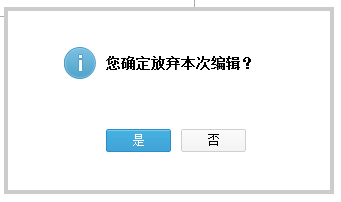
CSS

.prompt{

    position: absolute;

    background: white;

    width: 330px;

    height: 187px;

    display: none;

}

.prompt i{

    background: url(../images/ui_i_pic_.png) no-repeat;

    width: 32px;

    height: 32px;

    display: block;

    float: left;

    margin-right: 10px;

}

.prompt span{

    font-size: 14px;

    font-weight: bold;

    line-height: 32px;

}

.prompt .ok{

    background: url(../images/button_03.gif) no-repeat;

    color: white;

    clear: left;

}

.prompt .cancel{

    background: url(../images/button_05.gif) no-repeat;

    color: black;

    margin-left: 10px;

}

.prompt a{

    float: left;

    font-size: 12px;

    width: 65px;

    height: 23px;

    display: block;

    line-height: 23px;

    text-decoration: none;

    text-align: center;

}

.prompt .buttons{

    margin: 50px 0 0 42px;

}

.prompt b{

    position: absolute;

    background: black;

    opacity: 0.2;

}

.prompt .left{

    left: 0;

    top: 4px;

    height: 179px;

    width: 4px;

}

.prompt .top{

    top: 0;

    height: 4px;

    width: 330px;

}

.prompt .right{

    right: 0;

    top: 4px;

    height: 179px;

    width: 4px;

}

.prompt .bottom{

    bottom: 0;

    height: 4px;

    width: 330px;

}

.prompt .warning{

    background-position: -34px 0;

}

.prompt .success{

    background-position: 0 0;

}

.prompt .information{

    background-position: -68px 0;

}

.prompt .inner{

    margin: 40px 60px 40px;

}
JS
(function ($) {

    $.extend({

        prompt: function (text, type, ok, cancel) {

            var prompt = $('<div class="prompt"><b class="left"></b><b class="right"></b><b class="top"></b><b class="bottom"></b><div class="inner"><i class=" + type + "></i><span>' + text + '</span><div class="buttons"><a class="ok" href="#">是</a><a class="cancel" href="#">否</a></div></div></div>').appendTo('body');

            prompt.css({

                left: ($(window).width() - prompt.width()) / 2,

                top: ($(window).height() - prompt.height()) / 2

            }).show();

            prompt.find('.ok').bind('click', ok);

            prompt.find('.cancel').bind('click', cancel);

            return prompt;

        }

    });

})(jQuery);
HTML和使用方法
<!DOCTYPE html>

<html lang="en">

    <head>

        <meta charset="utf-8" />

        <title></title>

        <script type="text/javascript" src="http://code.jquery.com/jquery-2.0.3.min.js"></script>

        <script type="text/javascript" src="js/prompt.t.qq.com.min.js"></script>

        <link rel="stylesheet" type="text/css" href="css/prompt.t.qq.com.min.css" />

        <style type="text/css">

            body{

                margin: 0;

                padding: 0;

            }

            .content{

                width: 960px;

                margin: 0 auto;

                margin-top: 200px;

            }

        </style>

        <script type="text/javascript">

            $(function () {

                $('a').click(function () {

                    var prompt = $.prompt('您确定放弃本次编辑?', 'information', function () {

                        alert('您点击了确定按钮');

                    }, function () {

                        prompt.fadeOut(function () {

                            prompt.remove();

                        });

                    });

                });

            });

        </script>

    </head>

    <body>

        <div class="content">

            <textarea style="width: 500px;height: 200px;"></textarea>

            <a href="#" style="display: block;">点击我出现窗口</a>

        </div>

    </body>

</html>
参数1 显示内容
参数2 图标类型 information success warning
参数3 点击[是]的事件
参数4 点击[否]的事件
代码在此,供上,希望能帮助大家.
IE的透明度使用filter:alpha(opacity=xx),我没写IE的直接用了chrome的opacity,有空我再加上,希望您使用的时候要注意兼容IE。
仿腾讯微博的一个弹出框 v0.1 beta的更多相关文章
- Bootstrap方法为页面添加一个弹出框
<!DOCTYPE html> <html> <head> <meta charset="utf-8"> <title> ...
- vue.js 利用组件之间通讯,写一个弹出框例子
<!DOCTYPE html> <html lang="en"> <head> <meta charset="UTF-8&quo ...
- android中怎么把自己须要的app启动图标集中到一个弹出框中
先看效果图 这个是我们自己的apk点击之后的效果 下边是布局文件 activity_main.xml主布局文件 <LinearLayout xmlns:android="http:// ...
- 移动web:Tips消息弹出框
在web开发中经常会用到像alert这样的弹出消息,每个浏览器自带的消息弹出框都不相同.为了统一外观,实现自定义的功能,动手写一个弹出框插件. 对弹出框的实现要求如下: 1. 仿照IOS系统弹出外观 ...
- 弹出框优化实例(alert和confirm)
在项目过程中会遇到需要使用自己定义的弹出框的情况.以前用过ymprompt,但是它太复杂而且不好自己操控.所以自己写了一个弹出框实例. 主要有两类弹出框alert和confirm.基于jQuery a ...
- Bootstrap 弹出框和警告框插件
一.弹出框 弹出框即点击一个元素弹出一个包含标题和内容的容器. //基本用法 <button class="btn btn-lg btn-danger" type=" ...
- Android 学习笔记之AndBase框架学习(二) 使用封装好的进度框,Toast框,弹出框,确认框...
PS:渐渐明白,在实验室呆三年都不如在企业呆一年... 学习内容: 1.使用AbActivity内部封装的方法实现进度框,Toast框,弹出框,确认框... AndBase中AbActivity封 ...
- android自定义弹出框样式实现
前言: 做项目时,感觉Android自带的弹出框样式比较丑,很多应用都是自己做的弹出框,这里也试着自己做了一个. 废话不说先上图片: 实现机制 1.先自定义一个弹出框的样式 2.自己实现CustomD ...
- 练习PopupWindow弹出框之实现界面加载的时候显示弹出框到指定的view下面--两种延迟方法
今天在练习PopupWindow弹出框的时候,打算在界面加载的时候将弹出框展现出来并显示在指定的view下面. 初步方法是直接在OnResume方法里面直接执行showPopupWindows方法. ...
随机推荐
- ZOJ3640之简单慨率DP
Help Me Escape Time Limit: 2 Seconds Memory Limit: 32768 KB Background If thou doest well, ...
- Asp.net MVC + EF + Spring.Net 项目实践(一)
准备用几篇文章来做一个MVC的例子,为了给新同事做参考,也为自己做个知识储备. 首先,用VS2013创建一个空白解决方案StudentManageSystem,然后添加一个MVC应用程序(可参考ASP ...
- 基于webrtc技术session border controler (SBC)
由于原来的文章 http://blog.csdn.net/voipmaker 转载注明出处. 我建了一个通信学习 交流群. 45211986, 欢迎增加. WebRTC技术致力于在浏览器端实现实时音 ...
- C# 获取磁盘容量
原文:C# 获取磁盘容量 /// 获取指定驱动器的空间总大小(单位为B) /// </summary> /// <param name="str_HardDiskName& ...
- jQuery UI dialog 參数说明
前段时间碰到个问题 jquery UI dialog弹出层 弹出多个层是 比方弹出两个层A和B B层假设显示的数据表格太大,伸到了A层的外面,那伸到A层之外的部分就看不到了,由于B层是在A层上弹出的 ...
- 《C语言及程序设计初步》网络课程主页
题记 CSDN要开在线教育频道,向我发出邀请,看能否开些课程. 我近日一直在关注着翻转课堂,试图在传统课堂中引入新的元素,这须要资源建设的积累.没有时间表的工作,非常难把握. 为CSDN做在线课程,为 ...
- atitit.ajax bp dwr 3.该票据安排使用的流量汇总 VO9o.....
atitit.ajax bp dwr 3.该票据安排使用的流量汇总 VO9o..... 1. 安装配置 1 1.1. 下载 dwr.jar 1M 1 1.2. 配置注解方式..web.xml 1 2 ...
- ASP.NET中XML转JSON的方法
原文:ASP.NET中XML转JSON的方法 许多应用程序都将数据存储为XML的格式,而且会将数据以JSON的格式发送到客户端以做进一步处理.要实现这一点,它们必须将XML格式转换为JSON格式. X ...
- GDI+ 摘要: 保存图像文件
要保存图像文件,必须先获得图像的编码格式信息.可是GDI+没有直接提供这个函数:GetEncoderClsid(const WCHAR* format, CLSID* pClsid) 因此须要我们自己 ...
- Best jQuery Plugins of the Month – May 2014
1. jQuery referenceSection jQuery referenceSection by Scott Mascio ensures to help users in adding a ...