
dva-counter
dva实例Counter。
import dva, { connect } from 'dva';

import { Router, Route } from 'dva/router';

import styles from './index.less';

const app = dva();

function XX() {

  this.events = {};

}

XX.prototype.addListener = function(event, listener) {

  if(!this.events.hasOwnProperty(event)) {

    this.events[event] = listener;

  }

}

XX.prototype.trigger = function(event) {

  if(this.events.hasOwnProperty(event)) {

    (this.events[event])()

  }

}

const xx = new XX();

app.model({

  namespace: 'count',

  state: {

    record: 0,

    current: 0,

  },

  reducers: {

    add(state) {

      const newCurrent = state.current + 1;

      return {

        ...state,

        record: newCurrent > state.record ? newCurrent : state.record,

        current: newCurrent

      }

    },

    minus(state) {

      return {

        ...state,

        current: state.current - 1

      };

    },

  },

  subscriptions: {

    clickWatcher({dispatch}) {

      xx.addListener('click', () => {dispatch({type: 'minus'})})

    }

  },

  effects: {

    *add(action, {call, put}) {

      yield call(delay, 1000);

      yield put({type: 'minus'});

    }

  }

});

const SubButton = () => {

  return (

    <button onClick={() => xx.trigger('click')}>subButton</button>

  )

}

const CountApp = ({count, dispatch}) => {

  return (

    <div className={styles.normal}>

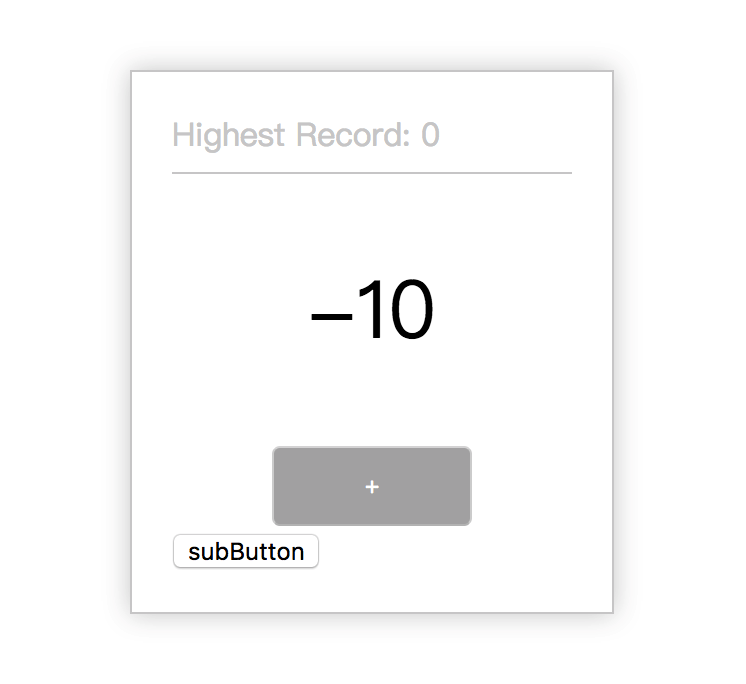
      <div className={styles.record}>Highest Record: {count.record}</div>

      <div className={styles.current}>{count.current}</div>

      <div className={styles.button}>

        <button onClick={() => { dispatch({type: 'count/add'}); }}>+</button>

      </div>

      <SubButton />

    </div>

  )

}

function mapStateToProps(state) {

  return {

    count: state.count

  };

}

const HomePage = connect(mapStateToProps)(CountApp);

app.router(({history}) =>

  <Router history={history}>

    <Route path="/" component={HomePage} />

  </Router>

)

app.start('#root');

// -------------

// Helpers

function delay(timeout) {

  return new Promise(resolve => {

    setTimeout(resolve, timeout)

  })

}
.normal {

  width: 200px;

  margin: 100px auto;

  padding: 20px;

  border: 1px solid #ccc;

  box-shadow: 0 0 20px #ccc;

}

.record {

  border-bottom: 1px solid #ccc;

  padding-bottom: 8px;

  color: #ccc;

}

.current {

  text-align: center;

  font-size: 40px;

  padding: 40px 0;

}

.button {

  text-align: center;

  button {

    width: 100px;

    height: 40px;

    background: #aaa;

    color: #fff;

  }

}
dva-counter的更多相关文章
- Vuex、Flux、Redux、Redux-saga、Dva、MobX
https://www.jqhtml.com/23003.html 这篇文章试着聊明白这一堆看起来挺复杂的东西.在聊之前,大家要始终记得一句话:一切前端概念,都是纸老虎. 不管是Vue,还是 Reac ...
- dva 路由跳转
1.从props取出并传递history 取 const { history } = this.props 用 <button onClick={ () => history.push(' ...
- dva框架之redux相关
dva封装了redux,减少很多重复代码比如action reducers 常量等,本文简单介绍dva redux操作流程. 利用官网的一个加减操作小实例来操作: dva所有的redux操作是放在mo ...
- 前端笔记之React(七)redux-saga&Dva&路由
一.redux-saga解决异步 redux-thunk 和 redux-saga 使用redux它们是必选的,二选一,它们两个都可以很好的实现一些复杂情况下redux,本质都是为了解决异步actio ...
- redux和dva
实习的时候,公司使用的是react,react说实话生态学的还不是很完善,就暂时先不做跟react相关的博客,等以后学好了react全家桶之后,专门再总结一下react的内容 这两天看了公司的alit ...
- UNITY自带的PACKAGE的UTILITY 里面有一个自带的FPS COUNTER
UNITY自带的PACKAGE的UTILITY 里面有一个自带的FPS COUNTER 可用,但是脚本是保密的?
- [LeetCode] Design Hit Counter 设计点击计数器
Design a hit counter which counts the number of hits received in the past 5 minutes. Each function a ...
- collections 模块(namedtuple, deque, Counter )
基本介绍 我们都知道,Python拥有一些内置的数据类型,比如str, int, list, tuple, dict等, collections模块在这些内置数据类型的基础上,提供了几个额外的数据类型 ...
- 【React】启动dva脚手架
开始前: 确保node版本为6.5以上. // 安装脚手架 npm i dva-cli -g // 自动安装新工程 dva new newProjectName // 导入antd包 npm i an ...
- Performance Monitor2:Peformance Counter
Performance Counter 是量化系统状态或活动的一个数值,Windows Performance Monitor在一定时间间隔内(默认的取样间隔是15s)获取Performance Co ...
随机推荐
- CodeWarrior10 如何复制Workspace配置到另一个workspace
https://mcuoneclipse.com/2012/04/04/copy-my-workspace-settings/comment-page-1/#comment-106061
- 关于textarea标签自己遇到的问题
效果描述: 固定文本框的宽高,让文本框不被拖拽,让提示内容的文字垂直居中 html: <div> <label>活动详情</label> <textarea ...
- atlium designer 我画的pcb板到出元件清单, 里面显示 Board Stack Report
1. 2.去掉选项即可 板的问题,在导出原件清单时,有一个模板选项,如果有,你就把他去掉,变成空白的,我的选上就是你的那种出错效果,去掉就好了.
- SQLServer 主键、外键、唯一等约束
主键(primary key)约束.外键(foreign key)约束.唯一(unique)约束.检查(check)约束.默认值(default)约束实例 Oracle 有如下类型的约束:NOT NU ...
- maven之如何将自己的写的 maven 构件发布到 nexus 私服
概念:Nexus服务器是一个代码包管理的服务器,可以理解 Nexus 服务器是一个巨大的 Library 仓库.Nexus 可以支持管理的工具包括 Maven , npm 等,对于 JAVA 开发来说 ...
- Codeforces Round #553 (Div. 2) A题
题目网址:http://codeforces.com/contest/1151/problem/A 题目大意:给定一个由大写字母构成的字符串和它的长度,有这样的操作,使任意一个字母变成与其相邻的字母, ...
- 关于HTML5中的sessionStorage的会话级缓存使用
sessionStorage作为HTML5的Web Storage的两种存储方式之一. 用于本地存储一个会话(session)中的数据,这些数据只有在同一个会话中的页面才能访问并且当会话结束后数 ...
- docker-2 tomcat
启动容器命令 docker run -d -p 8080:8080 -v /root/tomcat/webapps:/usr/local/tomcat/webapps -v /root/tomcat/ ...
- Python集合框架
- tensorflow 源码编译
https://blog.csdn.net/xsfl1234/article/details/67669707 https://blog.csdn.net/guxi123/article/detail ...