
【ASP.NET MVC系列】浅谈ASP.NET MVC资源过滤和授权
最近比较忙,博客很久没更新了,很多博友问何时更新博文,因此,今天就花了点时间,写了本篇文章,但愿大家喜欢。
本篇文章不适合初学者,需要对ASP.NET MVC具有一定基础。
本篇文章主要从ASP.NET MVC 基架角度去分析MVC框架是如何实现资源过滤,资源授权,感兴趣的,欢迎阅读。
相关文章,请参与ASP.NET MVC系列
一 ASP.NET MVC框架验证机制
为了更加透彻地了解MVC的过滤机制,我简要地画了如下UML图。
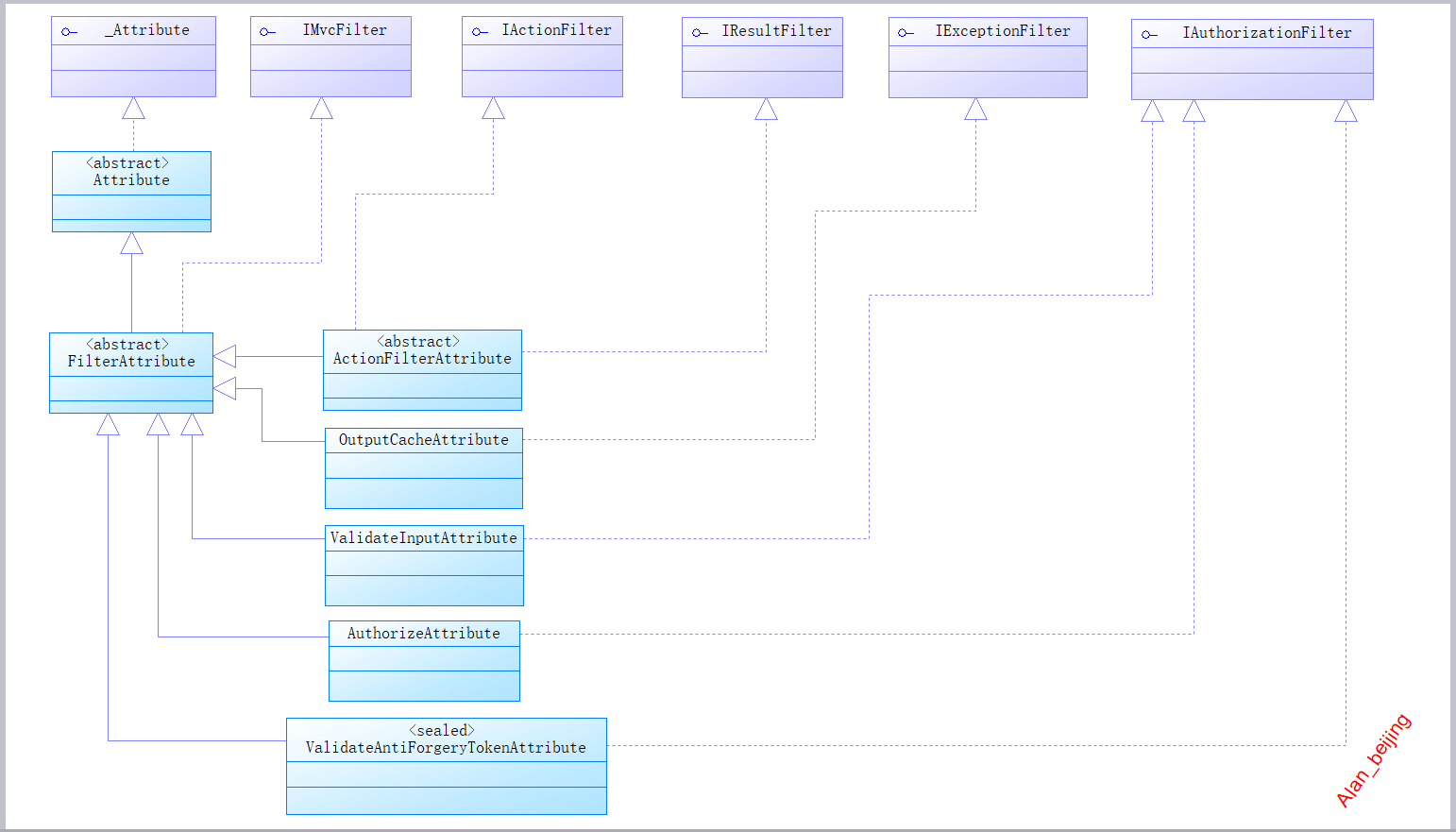
下面,我们根据如上的UML图来简要分析一下。
(一)MVC基架过滤机制根接口
根接口:本文指在继承关系中的根节点,相当于类的祖宗对象Object。
从上图中,很容易看出MVC过滤机制的根接口主要有六大类型接口:_Attribute,IMvcFilter,IActionFilter,IResultFilter,IExceptionFilter和IAuthorizationFilter。
1._Attribute
_Attribute接口主要提供一些非托管服务。

2.IMvcFilter
该接口主要用于定义筛选器顺序和是否允许多个筛选器,如当我们给某个action限定多个特性时的执行顺序问题。
[Filter1(Order = )]

[Filter2(Order = )]

[Filter3(Order = )]

public ActionResult Index()

{

    return View(); ;

}

3.IActionFilter
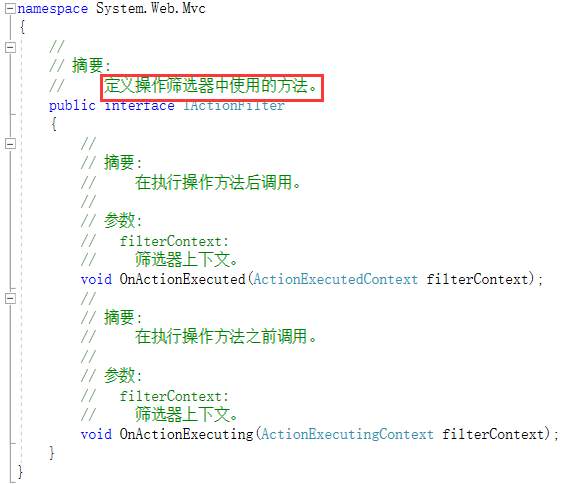
该接口主要定义操作的筛选,在执行操作方法前后,分别调用方法OnActionExecuting(ActionExecutingContext filterContext)和方法OnActionExecuted(ActionExecutedContext filterContext)。IResult也有类似两个方法。
4.IResultFilter
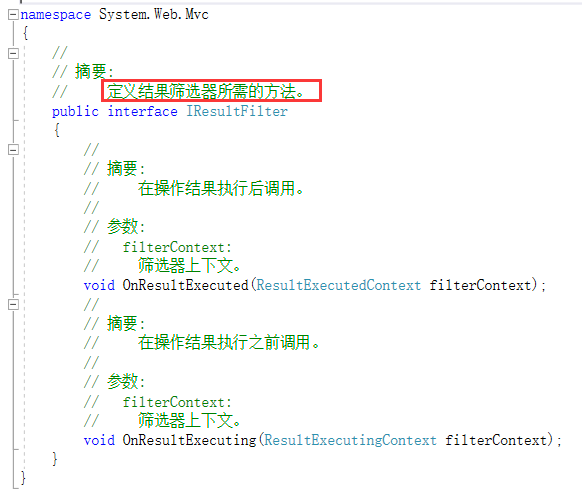
该接口主要用作操作结果的筛选。对于MVC模式开发的程序员来说,ActionResult再熟悉不过了,然而,MVC机制会在操作结果执行前后,分别执行OnResultExecuting(ResultExecutingContext filterContext)方法和OnResultExecuted(ResultExecutedContext filterContext)方法,然后再将最终结果Responce给用户,
5.IExceptionFilter
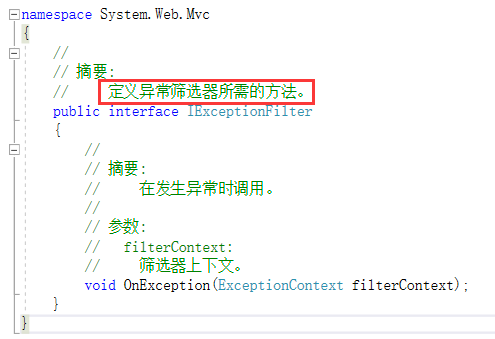
该接口主要是用来处理系统异常问题,如在项目中经常用到的throw new Exception();
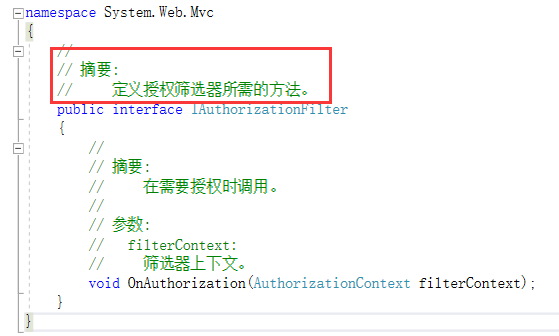
6.IAuthorizationFilter
该接口用来定义资源的筛选和授权,在项目中,主要用做权限管理。
(二) 三个抽象接口
从上图继承图中,不难看出,MVC过滤机制,提供了三个重要的抽象类,分别为:_Attribute,FilterAttribute和ActionFilterAttribute
1.ActionFilterAttribute
从继承图中知道,ActionFilterAttribute继承FilterAttribute抽象类,实现IAcionFilter接口和IResultFilter接口。
反编译代码如下:
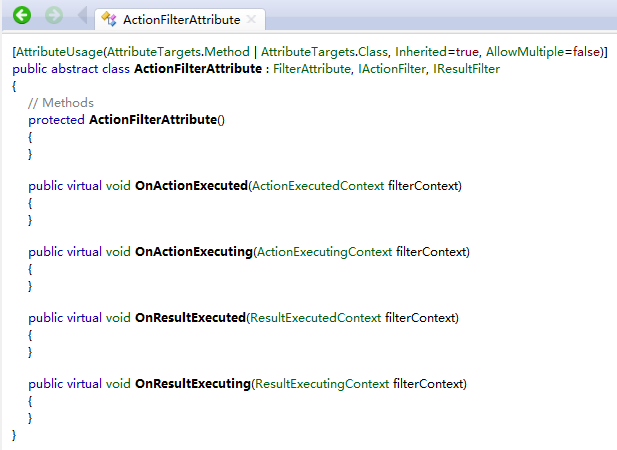
不难看出,ActionFilterAttribute共有四个虚方法和一个可被继承构造函数,而四个虚方法,分别是IAcionFilter接口和IResultFilter方法签名的原型。
四个虚方法,在上面我们已经分析过,这里就不分析了,重点分析一下这四个方法的执行顺序:
=》Request ip=>Route(路由器寻找具体Controller和action)=>执行action上面的特性=》OnActionExecutiong=》执行方法=》OnActionExecuted=》OnResultExecuting=》执行操作结果=》OnResultExecuted=》将执行结果最终Responce给浏览器。
源码:
 public class ExeOrderTestAttribute:ActionFilterAttribute

    {

        public override void OnActionExecuted(ActionExecutedContext filterContext)

        {

            Log("OnActionExecuted", filterContext.RouteData);

            base.OnActionExecuted(filterContext);

        }

        public override void OnActionExecuting(ActionExecutingContext filterContext)

        {

            Log("OnActionExecuting", filterContext.RouteData);

            base.OnActionExecuting(filterContext);

        }

        public override void OnResultExecuted(ResultExecutedContext filterContext)

        {

            Log("OnResultExecuted", filterContext.RouteData);

            base.OnResultExecuted(filterContext);

        }

        public override void OnResultExecuting(ResultExecutingContext filterContext)

        {

            Log("OnResultExecuting", filterContext.RouteData);

            base.OnResultExecuting(filterContext);

        }

        private void Log(string methodName, RouteData routeData)

        {

            var controllerName = routeData.Values["controller"];

            var actionName = routeData.Values["action"];

            var message = String.Format("{0} controller: {1} action: {2}", methodName, controllerName, actionName);

            Debug.WriteLine(message, "ASP.NET MVC Filter ExecuteOrder");

        }

    }
(三)其他类
从上面的继承图中可以看出,ASP.NET MVC过滤机制,处理定义接口,抽象类外,还有一些其他基础类,比较关键的类有:OutputCacheAttribute,ValidateInpuntAttribute,AuthorizeAttribute和ValidateAntiForgeryTokenAttribute。
1.OutputCacheAttribute
该类主要是解决Cache问题,感兴趣的,可以看看浅谈缓存技术在ASP.NET中的运用 ,这里不累述。
2.ValidateInpuntAttribute 和ValidateAntiForgeryTokenAttribute
主要解决表单验证问题,如防止漏洞注入,JS注入等问题。
3.AuthorizeAttribute
该类主要解决资源授权问题,也就是平时大家所说的权限管等问题,是非常重要的一个类,因此将在本篇文章的第二部分单独讲解。
二 MVC框架授权机制
ASP.NET MVC框架通过AuthorizeAttribute类实现资源的权限控制访问。
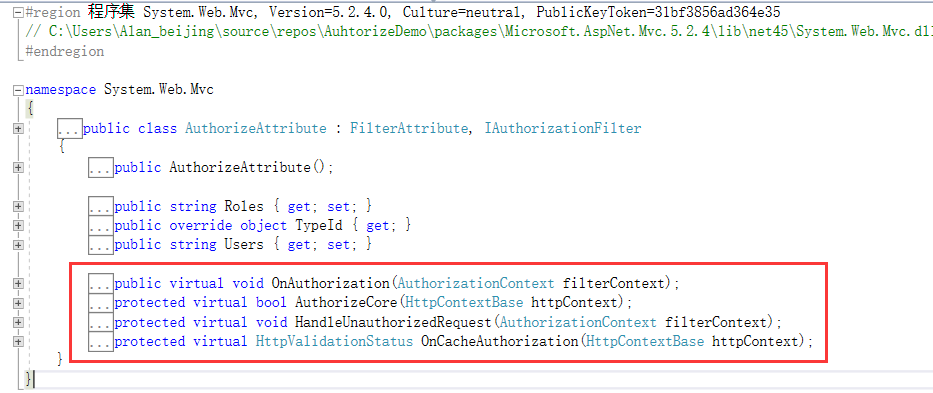
我们先来通过反汇编看看AuthorizeAttribute。
 [AttributeUsage(AttributeTargets.Method | AttributeTargets.Class, Inherited=true, AllowMultiple=true)]

 public class AuthorizeAttribute : FilterAttribute, IAuthorizationFilter

 {

     // Fields

     private string _roles;

     private string[] _rolesSplit = new string[];

     private static readonly char[] _splitParameter = new char[] { ',' };

     private readonly object _typeId = new object();

     private string _users;

     private string[] _usersSplit = new string[];

     // Methods

     protected virtual bool AuthorizeCore(HttpContextBase httpContext)

     {

         if (httpContext == null)

         {

             throw new ArgumentNullException("httpContext");

         }

         IPrincipal user = httpContext.User;

         if (!user.Identity.IsAuthenticated)

         {

             return false;

         }

         if ((this._usersSplit.Length != ) && !this._usersSplit.Contains<string>(user.Identity.Name, StringComparer.OrdinalIgnoreCase))

         {

             return false;

         }

         if ((this._rolesSplit.Length != ) && !this._rolesSplit.Any<string>(new Func<string, bool>(user.IsInRole)))

         {

             return false;

         }

         return true;

     }

     private void CacheValidateHandler(HttpContext context, object data, ref HttpValidationStatus validationStatus)

     {

         validationStatus = this.OnCacheAuthorization(new HttpContextWrapper(context));

     }

     protected virtual void HandleUnauthorizedRequest(AuthorizationContext filterContext)

     {

         filterContext.Result = new HttpUnauthorizedResult();

     }

     public virtual void OnAuthorization(AuthorizationContext filterContext)

     {

         if (filterContext == null)

         {

             throw new ArgumentNullException("filterContext");

         }

         if (OutputCacheAttribute.IsChildActionCacheActive(filterContext))

         {

             throw new InvalidOperationException(MvcResources.AuthorizeAttribute_CannotUseWithinChildActionCache);

         }

         if (!filterContext.ActionDescriptor.IsDefined(typeof(AllowAnonymousAttribute), true) && !filterContext.ActionDescriptor.ControllerDescriptor.IsDefined(typeof(AllowAnonymousAttribute), true))

         {

             if (this.AuthorizeCore(filterContext.HttpContext))

             {

                 HttpCachePolicyBase cache = filterContext.HttpContext.Response.Cache;

                 cache.SetProxyMaxAge(new TimeSpan(0L));

                 cache.AddValidationCallback(new HttpCacheValidateHandler(this.CacheValidateHandler), null);

             }

             else

             {

                 this.HandleUnauthorizedRequest(filterContext);

             }

         }

     }

     protected virtual HttpValidationStatus OnCacheAuthorization(HttpContextBase httpContext)

     {

         if (httpContext == null)

         {

             throw new ArgumentNullException("httpContext");

         }

         if (!this.AuthorizeCore(httpContext))

         {

             return HttpValidationStatus.IgnoreThisRequest;

         }

         return HttpValidationStatus.Valid;

     }

     internal static string[] SplitString(string original)

     {

         if (string.IsNullOrEmpty(original))

         {

             return new string[];

         }

         return original.Split(_splitParameter).Select((<>c.<>9__19_0 ?? (<>c.<>9__19_0 = new Func<string, <>f__AnonymousType1<string, string>>(<>c.<>.<SplitString>b__19_0)))).Where((<>c.<>9__19_1 ?? (<>c.<>9__19_1 = new Func<<>f__AnonymousType1<string, string>, bool>(<>c.<>.<SplitString>b__19_1)))).Select((<>c.<>9__19_2 ?? (<>c.<>9__19_2 = new Func<<>f__AnonymousType1<string, string>, string>(<>c.<>.<SplitString>b__19_2)))).ToArray<string>();

     }

     // Properties

     public string Roles

     {

         get

         {

             return (this._roles ?? string.Empty);

         }

         set

         {

             this._roles = value;

             this._rolesSplit = SplitString(value);

         }

     }

     public override object TypeId

     {

         get

         {

             return this._typeId;

         }

     }

     public string Users

     {

         get

         {

             return (this._users ?? string.Empty);

         }

         set

         {

             this._users = value;

             this._usersSplit = SplitString(value);

         }

     }

     // Nested Types

     [Serializable, CompilerGenerated]

     private sealed class <>c

     {

         // Fields

         public static readonly AuthorizeAttribute.<>c <> = new AuthorizeAttribute.<>c();

         public static Func<string, <>f__AnonymousType1<string, string>> <>9__19_0;

         public static Func<<>f__AnonymousType1<string, string>, bool> <>9__19_1;

         public static Func<<>f__AnonymousType1<string, string>, string> <>9__19_2;

         // Methods

         internal <>f__AnonymousType1<string, string> <SplitString>b__19_0(string piece)

         {

             return new { piece = piece, trimmed = piece.Trim() };

         }

         internal bool <SplitString>b__19_1(<>f__AnonymousType1<string, string> <>h__TransparentIdentifier0)

         {

             return !string.IsNullOrEmpty(<>h__TransparentIdentifier0.trimmed);

         }

         internal string <SplitString>b__19_2(<>f__AnonymousType1<string, string> <>h__TransparentIdentifier0)

         {

             return <>h__TransparentIdentifier0.trimmed;

         }

     }

 }

 Collapse Methods
通过反汇编,得出如下结论:
1.提供四个虚方法OnAuthorization(AuthorizationContext filterContext),AuthorizeCore(HttpContextBase httpContext),HandleUnauthorizedRequest(AuthorizationContext filterContext)和OnCacheAuthorization(HttpContextBase httpContext)。
四个方法作用和关系是怎样的呢
OnAuthorization表示请求过程时身份验证,AuthorizeCore表示支持用户自定义身份验证,HandleUnauthorizeRequest表示当AuthorizeCore方法验证失败时,执行的操作,OnCacheAuthorization表示模块缓存权限。
(一) ASP.NET MVC 基架提供的验证
只需在需要验证的资源生加上[Authorize]特性即可。
   [Authorize]

   public ActionResult Index()

   {

      return View(); ;

   }
(二) 实现自定义验证机制
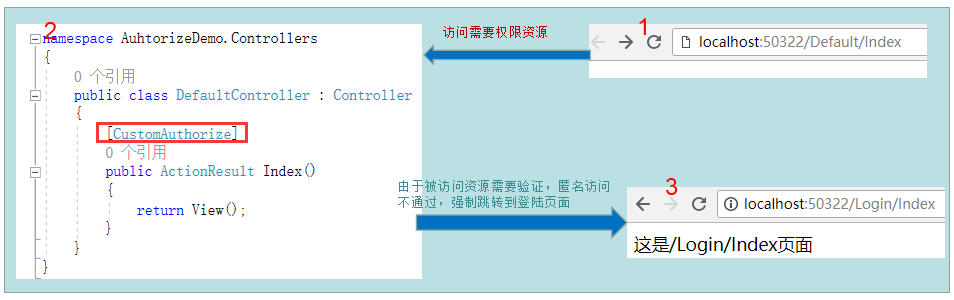
当未给Index() action添加验证限制时,匿名用户名能直接访问 /Default/Index
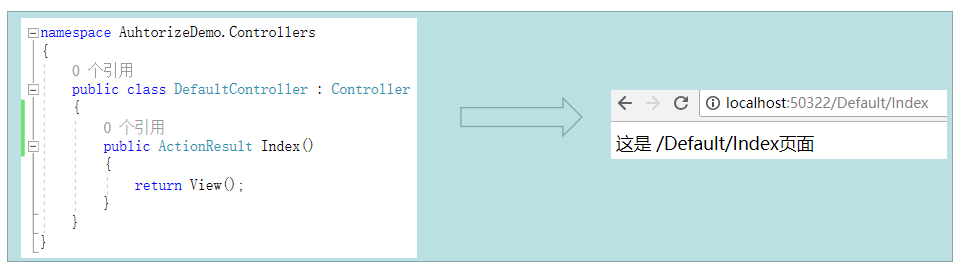
当给Index() action添加验证限制时,匿名用户名不能直接访问 /Default/Index,而被强制重定型到登陆页面,要求用户登陆。
(三) ASP.NET MVC验证级别
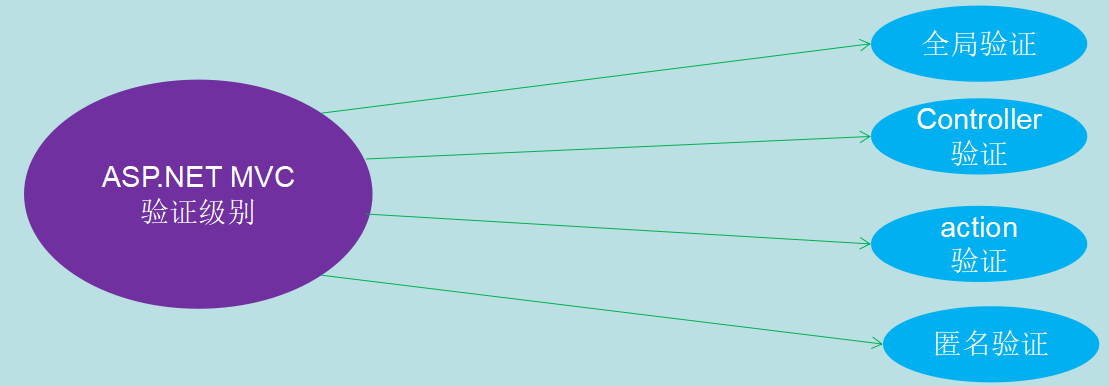
ASP.NET MVC提供了四种基本验证模式:匿名,全局,控制器和Action
1.匿名
 public class DefaultController : Controller

     {

         [AllowAnonymous]

         public ActionResult Index()

         {

             return View();

         }

     }
2.action
 public class DefaultController : Controller

     {

         [CustomAuthorize]

         public ActionResult Index()

         {

             return View();

         }

     }
3.Controller
 [CustomAuthorize]

     public class DefaultController : Controller

     {

         public ActionResult Index()

         {

             return View();

         }

     }
4.全局
 public class FilterConfig

     {

         public static void RegisterGlobalFilters(GlobalFilterCollection filters)

         {

             filters.Add(new CustomAuthorizeAttribute());//给自定义验证注册

             filters.Add(new HandleErrorAttribute());

         }

     }
扩展,当添加多个验证时,程序时如何执行的?通古Order值顺序执行
 [Filter1(Order = )]

 [Filter2(Order = )]

 [Filter3(Order = )]

 public ActionResult Index()

 {

     return View(); ;

 }
三 总结
本篇文章主要从ASP.NET MVC框架设计角度,运用PD工具,通过UML分析ASP.NET MVC是如何实现资源过滤,如何实现权限控制等功能的,更细粒度的技术文章,在后续博文中更新。
【ASP.NET MVC系列】浅谈ASP.NET MVC资源过滤和授权的更多相关文章
- MVC模式浅谈
MVC模式浅谈 一.MVC模式概述 模型-视图-控制器(MVC模式)是一种非常经典的软件架构模式,在UI框架和UI设计思路中扮演着非常重要的角色.从设计模式的角度来看,MVC模式是 一种复合模式,它将 ...
- 【ASP.NET MVC系列】浅谈ASP.NET MVC八大类扩展(上篇)
lASP.NET MVC系列文章 [01]浅谈Google Chrome浏览器(理论篇) [02]浅谈Google Chrome浏览器(操作篇)(上) [03]浅谈Google Chrome浏览器(操 ...
- 【ASP.NET MVC系列】浅谈ASP.NET 页面之间传值的几种方式
ASP.NET MVC系列文章 [01]浅谈Google Chrome浏览器(理论篇) [02]浅谈Google Chrome浏览器(操作篇)(上) [03]浅谈Google Chrome浏览器(操作 ...
- 【ASP.NET MVC系列】浅谈ASP.NET MVC运行过程
ASP.NET MVC系列文章 [01]浅谈Google Chrome浏览器(理论篇) [02]浅谈Google Chrome浏览器(操作篇)(上) [03]浅谈Google Chrome浏览器(操作 ...
- 【ASP.NET MVC系列】浅谈ASP.NET MVC 视图
ASP.NET MVC系列文章 [01]浅谈Google Chrome浏览器(理论篇) [02]浅谈Google Chrome浏览器(操作篇)(上) [03]浅谈Google Chrome浏览器(操作 ...
- 【ASP.NET MVC系列】浅谈ASP.NET MVC 视图与控制器传递数据
ASP.NET MVC系列文章 [01]浅谈Google Chrome浏览器(理论篇) [02]浅谈Google Chrome浏览器(操作篇)(上) [03]浅谈Google Chrome浏览器(操作 ...
- 【ASP.NET MVC系列】浅谈ASP.NET MVC 控制器
ASP.NET MVC系列文章 [01]浅谈Google Chrome浏览器(理论篇) [02]浅谈Google Chrome浏览器(操作篇)(上) [03]浅谈Google Chrome浏览器(操作 ...
- 【ASP.NET MVC系列】浅谈ASP.NET MVC 路由
ASP.NET MVC系列文章 [01]浅谈Google Chrome浏览器(理论篇) [02]浅谈Google Chrome浏览器(操作篇)(上) [03]浅谈Google Chrome浏览器(操作 ...
- 【ASP.NET MVC系列】浅谈ASP.NET 程序发布过程
ASP.NET MVC系列文章 [01]浅谈Google Chrome浏览器(理论篇) [02]浅谈Google Chrome浏览器(操作篇)(上) [03]浅谈Google Chrome浏览器(操作 ...
- 浅谈ASP.NET ---- 系列文章
[01]浅谈Google Chrome浏览器(理论篇) [02]浅谈Google Chrome浏览器(操作篇)(上) [03]浅谈Google Chrome浏览器(操作篇)(下) [04]浅谈ASP. ...
随机推荐
- python 0228
01 cpu 内存 硬盘 操作系统 CPU:中央处理器,相当于人大脑. 飞机 内存:临时存储数据. 8g,16g, 高铁 1,成本高. 2,断电即消失. 硬盘:长期存储大量的数据. 1T 512G等等 ...
- 隐藏Spring Elements
Spring Elements 显示出来很烦,如何隐藏
- Catalog
Java SE EE| Hibernate | Struts2Spring/SpringMVC | MyBatis C# Python PHP C/C++ | STL 汇编语言 ...
- Oracle数据库---用户与角色
Oracle数据库---用户与角色 2019年02月26日 10:56:10 俊杰梓 阅读数:21 标签: 数据库 更多 个人分类: 数据库 版权声明:版权所有,转载请注明出处.谢谢 https: ...
- RabbitMQ 使用主题进行消息分发
在上篇文章RabbitMQ消息队列(五):Routing 消息路由 中,我们实现了一个简单的日志系统.Consumer可以监听不同severity的log.但是,这也是它之所以叫做简单日志系统的原因, ...
- ImportError: No module named MySQLdb</module>
1,遇到说是没有安装某个模块的时候,第一种方法是在官网自己手动下载这个包然后安装 链接:https://pypi.org/project/MySQL-python/ 2,参考https://www.j ...
- Windows 10 IoT Serials 10 – 如何使用OCR引擎进行文字识别
1. 引言 OCR (Optical Character Recognition,光学字符识别)是指电子设备(例如扫描仪或数码相机)检查纸上打印的字符,通过检测暗.亮的模式确定其形状,然后用字符识别方 ...
- win10 系统下无法正常安装 Anaconda3
最近国庆两天,突然心血来潮重装了一遍系统,重装成了win10系统以后毛病百出哇,昨天和今天一直在解决一个问题,那就是安装Anaconda3的时候出现不了快捷方式,如下图这样只有一个快捷方式(在win7 ...
- 110道python面试笔试题汇总,你能答对几道?
数据分析系列教程插播一篇面试题教程,最近公众号新来了不少朋友,这几天不少粉丝留言说问我有没有python面试题,其实之前分享过一些面试题,今天统一再给大家分享一遍,也希望能帮助此时仍在找工作的同学,尽 ...
- [Postman]调试和日志(10)
Postman应用程序在我们发布之前会经过广泛的测试和beta版本.也就是说,可能存在应用程序崩溃或出现意外行为的情况.如果您无法 自行解决问题,可以在GitHub跟踪器中提出问题,或者 如果您希 ...