
【转】RESTful Webservice创建
RESTful Web Services with Java
REST is an architectural style. HTTP is a protocol which contains the set of REST architectural constraints.
REST fundamentals
- Everything in REST is considered as a resource.
- Every resource is identified by an URI.
- Uses uniform interfaces. Resources are handled using POST, GET, PUT, DELETE operations which are similar to Create, Read, update and Delete(CRUD) operations.
- Be stateless. Every request is an independent request. Each request from client to server must contain all the information necessary to understand the request.
- Communications are done via representations. E.g. XML, JSON
RESTful Web Services
RESTful Web Services have embraced by large service providers across the web as an alternative to SOAP based Web Services due to its simplicity. This post will demonstrate how to create a RESTful Web Service and client using Jersey framework which extends JAX-RS API. Examples are done using Eclipse IDE and Java SE 6.
Creating RESTful Web Service
- In Eclipse, create a new dynamic web project called "RESTfulWS"

- Download Jersey zip bundle from here. Jersey version used in these examples is 1.17.1. Once you unzip it you'll have a directory called "jersey-archive-1.17.1". Inside it find the lib directory. Copy following jars from there and paste them inside WEB-INF -> lib folder in your project. Once you've done that, add those jars to your project build path as well.
- asm-3.1.jar
- jersey-client-1.17.1.jar
- jersey-core-1.17.1.jar
- jersey-server-1.17.1.jar
- jersey-servlet-1.17.1.jar
- jsr311-api-1.1.1.jar
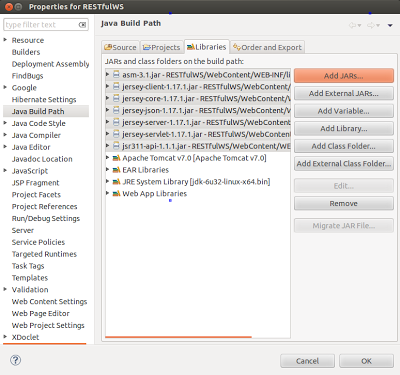
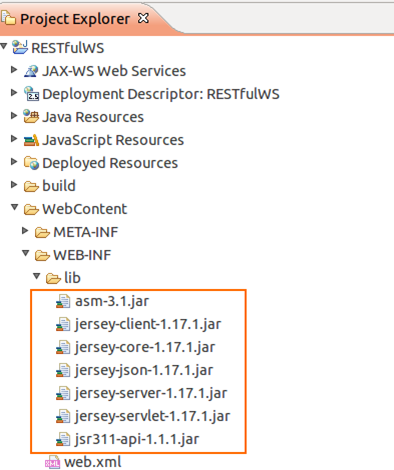
- In your project, inside Java Resources -> src create a new package called "com.eviac.blog.restws". Inside it create a new java class called "UserInfo". Also include the given web.xml file inside WEB-INF folder.
UserInfo.java
- package com.eviac.blog.restws;
- import javax.ws.rs.GET;
- import javax.ws.rs.Path;
- import javax.ws.rs.PathParam;
- import javax.ws.rs.Produces;
- import javax.ws.rs.core.MediaType;
- /**
- *
- * @author pavithra
- *
- */
- // @Path here defines class level path. Identifies the URI path that
- // a resource class will serve requests for.
- @Path("UserInfoService")
- public class UserInfo {
- // @GET here defines, this method will method will process HTTP GET
- // requests.
- @GET
- // @Path here defines method level path. Identifies the URI path that a
- // resource class method will serve requests for.
- @Path("/name/{i}")
- // @Produces here defines the media type(s) that the methods
- // of a resource class can produce.
- @Produces(MediaType.TEXT_XML)
- // @PathParam injects the value of URI parameter that defined in @Path
- // expression, into the method.
- public String userName(@PathParam("i") String i) {
- String name = i;
- return "<User>" + "<Name>" + name + "</Name>" + "</User>";
- }
- @GET
- @Path("/age/{j}")
- @Produces(MediaType.TEXT_XML)
- public String userAge(@PathParam("j") int j) {
- int age = j;
- return "<User>" + "<Age>" + age + "</Age>" + "</User>";
- }
- }
web.xml
- <?xml version="1.0" encoding="UTF-8"?>
- <web-app xmlns:xsi="http://www.w3.org/2001/XMLSchema-instance" xmlns="http://java.sun.com/xml/ns/javaee" xmlns:web="http://java.sun.com/xml/ns/javaee/web-app_2_5.xsd" xsi:schemaLocation="http://java.sun.com/xml/ns/javaee http://java.sun.com/xml/ns/javaee/web-app_2_5.xsd" id="WebApp_ID" version="2.5">
- <display-name>RESTfulWS</display-name>
- <servlet>
- <servlet-name>Jersey REST Service</servlet-name>
- <servlet-class>com.sun.jersey.spi.container.servlet.ServletContainer</servlet-class>
- <init-param>
- <param-name>com.sun.jersey.config.property.packages</param-name>
- <param-value>com.eviac.blog.restws</param-value>
- </init-param>
- <load-on-startup>1</load-on-startup>
- </servlet>
- <servlet-mapping>
- <servlet-name>Jersey REST Service</servlet-name>
- <url-pattern>/rest/*</url-pattern>
- </servlet-mapping>
- </web-app>
- To run the project, right click on it and click on run as ->run on server.
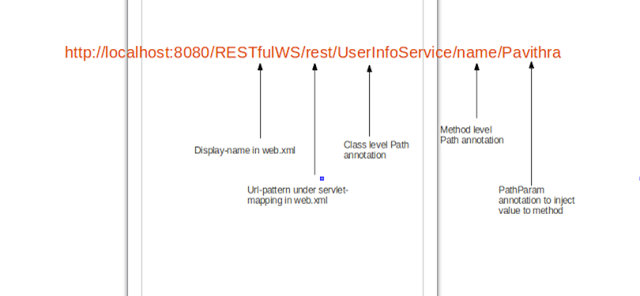
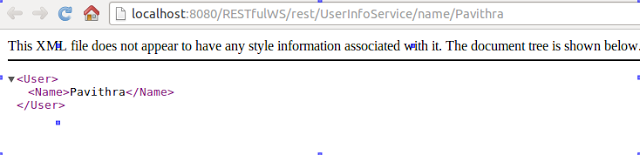
- Execute the following URL in your browser and you'll see the output.
- http://localhost:8080/RESTfulWS/rest/UserInfoService/name/Pavithra
output
Creating Client
- Create a package called "com.eviac.blog.restclient". Inside it create a java class called "UserInfoClient".
UserInfoClient.java
- package com.eviac.blog.restclient;
- import javax.ws.rs.core.MediaType;
- import com.sun.jersey.api.client.Client;
- import com.sun.jersey.api.client.ClientResponse;
- import com.sun.jersey.api.client.WebResource;
- import com.sun.jersey.api.client.config.ClientConfig;
- import com.sun.jersey.api.client.config.DefaultClientConfig;
- /**
- *
- * @author pavithra
- *
- */
- public class UserInfoClient {
- public static final String BASE_URI = "http://localhost:8080/RESTfulWS";
- public static final String PATH_NAME = "/UserInfoService/name/";
- public static final String PATH_AGE = "/UserInfoService/age/";
- public static void main(String[] args) {
- String name = "Pavithra";
- int age = 25;
- ClientConfig config = new DefaultClientConfig();
- Client client = Client.create(config);
- WebResource resource = client.resource(BASE_URI);
- WebResource nameResource = resource.path("rest").path(PATH_NAME + name);
- System.out.println("Client Response \n"
- + getClientResponse(nameResource));
- System.out.println("Response \n" + getResponse(nameResource) + "\n\n");
- WebResource ageResource = resource.path("rest").path(PATH_AGE + age);
- System.out.println("Client Response \n"
- + getClientResponse(ageResource));
- System.out.println("Response \n" + getResponse(ageResource));
- }
- /**
- * Returns client response.
- * e.g :
- * GET http://localhost:8080/RESTfulWS/rest/UserInfoService/name/Pavithra
- * returned a response status of 200 OK
- *
- * @param service
- * @return
- */
- private static String getClientResponse(WebResource resource) {
- return resource.accept(MediaType.TEXT_XML).get(ClientResponse.class)
- .toString();
- }
- /**
- * Returns the response as XML
- * e.g : <User><Name>Pavithra</Name></User>
- *
- * @param service
- * @return
- */
- private static String getResponse(WebResource resource) {
- return resource.accept(MediaType.TEXT_XML).get(String.class);
- }
- }
- Once you run the client program, you'll get following output.
- Client Response
- GET http://localhost:8080/RESTfulWS/rest/UserInfoService/name/Pavithra returned a response status of 200 OK
- Response
- <User><Name>Pavithra</Name></User>
- Client Response
- GET http://localhost:8080/RESTfulWS/rest/UserInfoService/age/25 returned a response status of 200 OK
- Response
- <User><Age>25</Age></User>
From: http://blog.eviac.com/2013/11/restful-web-services-with-java.html
【转】RESTful Webservice创建的更多相关文章
- Eclipse + Jersey 发布RESTful WebService(一)了解Maven和Jersey,创建一个WS项目(成功!)
一.下文中需要的资源地址汇总 Maven Apache Maven网站 http://maven.apache.org/ Maven下载地址: http://maven.apache.org/down ...
- SOAP Webservice和RESTful Webservice
http://blog.sina.com.cn/s/blog_493a845501012566.html REST是一种架构风格,其核心是面向资源,REST专门针对网络应用设计和开发方式,以降低开发的 ...
- RESTful WebService入门(转)
原创作品,允许转载,转载时请务必以超链接形式标明文章 原始出处 .作者信息和本声明.否则将追究法律责任.http://lavasoft.blog.51cto.com/62575/229206 REST ...
- CXF发布restful WebService的入门例子(服务器端)
研究了两天CXF对restful的支持. 现在,想实现一个以 http://localhost:9999/roomservice 为入口, http://localhost:9999/roomse ...
- RESTful Webservice (一) 概念
Representational State Transfer(表述性状态转移) RSET是一种架构风格,其核心是面向资源,REST专门针对网络应用设计和开发方式,以降低开发的复杂性,提高系统的可伸缩 ...
- 使用CXF与Spring集成实现RESTFul WebService
以下引用与网络中!!! 一种软件架构风格,设计风格而不是标准,只是提供了一组设计原则和约束条件.它主要用于客户端和服务器交互类的软件.基于这个风格设计的软件可以更简洁,更有层次,更易于实现缓存 ...
- RESTful WebService入门
RESTful WebService入门 RESTful WebService是比基于SOAP消息的WebService简单的多的一种轻量级Web服务,RESTful WebService是没有状 ...
- Web Service进阶(七)浅谈SOAP Webservice和RESTful Webservice
浅谈SOAP Webservice和RESTful Webservice REST是一种架构风格,其核心是面向资源,REST专门针对网络应用设计和开发方式,以降低开发的复杂性,提高系统的可伸缩性.RE ...
- RESTful WebService入门【转】
ESTful WebService是比基于SOAP消息的WebService简单的多的一种轻量级Web服务,RESTful WebService是没有状态的,发布和调用都非常的轻松容易. 下面写一 ...
随机推荐
- linux 下安装ftp 并远程连接
1.确认是否已安装 ftp 1 pgrep vsftpd #查看ftp 服务进程 无结果如下图所示 2.执行安装 1 yum install vsftpd #安装ftp 服务 3.执行过程 ...
- bootstrap实现checkbox全选、取消全选
<!DOCTYPE html> <html> <head> <meta charset="UTF-8"> <!-- 最新版本的 ...
- Shell编程(三)Shell特性
!$:显示上一条命令最后一个参数 $?: 上个命令的退出状态,或函数的返回值. alias xxx="命令":给命令取别名 xxx 通过 vim ~/.bashrc 里编辑,可以来 ...
- 前端面试题整理—HTTP篇
1.常见的HTTP方法有哪些? GET: 用于请求访问已经被URI(统一资源标识符)识别的资源,可以通过URL传参给服务器 POST:用于传输信息给服务器,主要功能与GET方法类似,但一般推荐使用PO ...
- MySQL中int(m)的含义
2017-12-18 @后厂 int(M): M indicates the maximum display width for integer types. 原来,在 int(M) 中,M 的值跟 ...
- python初认识、基础数据类型以及 if 流程控制
python初认识 CPU.内存.硬盘以及操作系统之间的关系 CPU:中央处理器,计算机的逻辑运算单元 硬盘:长期存储数据的地方,断电不会丢失 内存:位于CPU与硬盘之间,缓解高速CPU与低速硬盘之间 ...
- termux 开启 sshd
众所周知, termux 上的 sshd 不能通过 IP 连接, 只能使用密钥, 对于使用 PuTTY 的 Windows 用户, 怎么办呢? 由于 PuTTY 支持 telnet, 而 termux ...
- Newtonsoft.Json序列化Enum类型
[JsonConverter(typeof(StringEnumConverter))] public StringAlignment TextAlign { get => textAlign; ...
- [译]使用mediatR的notification来扩展的的应用
原文 你不希望在controller里面出现任何领域知识 开发者经常有这样的疑问"这个代码应该放在哪呢?"应该使用仓储还是query类?.... 怎么去实现职责分离和单一职责呢? ...
- 关于MySQL常用的查询语句
一查询数值型数据: SELECT * FROM tb_name WHERE sum > 100; 查询谓词:>,=,<,<>,!=,!>,!<,=>,= ...