
x3D 下载以及如何使用原版NetBeans IDE 来搭建x3d编辑环境
安装前:
Overview
X3D-Edit version 3.3 standalone application and Netbeans plugin are available and ready.
X3D-Edit is written using Java 8 for Netbeans 8 platform. X3D-Edit runs on desktop/laptop/tablet systems and is portable across major operating systems (Windows 7-10, MacOSX, Linux).
As with any application, users may need administrative permissions to fully install or uninstall X3D-Edit on their system.
The X3D-Edit codebase builds and runs using either Java 7 or (preferred) Java 8. If needed, you can verify your installed Java version. (要求安装java7以上版本)
已经配置好X3D的下载地址:
https://savage.nps.edu/X3D-Edit/X3D-Edit3.3.zip
链接:https://pan.baidu.com/s/1cnsbz6K0N_A0Xep2nMOAGg 密码:dt40
注意:解压时路径中必须没有中文,解压完后
runX3dEditWin.baton a Windows machine.runX3dEditMac.sh.commandon a Mac.runX3dEditUnix.shon a Linux/Unix system.
如果是windows系统也可以直接运行..\X3D-Edit3.3\x3dedit33\bin\x3dedit3364.exe(x3dedit33.exe)
到这里你就可以使用X3D了,如果自己配置的话,请继续往下看:
自己配置的话先安装NetBeans IDE
NetBeans IDE 下载:http://www.oracle.com/technetwork/java/javase/downloads/index.html
之后根据以下教程配置:
Netbeans Plugin
Prerequisite: please install the latest NetBeans on your local system.
Netbeans users can connect to the Netbeans Update Center for automatic plugin download and installation using the following procedure. The image links below provide screen snapshots corresponding to each installation step.
Install instructions for Netbeans plugin:
- Select
Tools > Plugins > Settings > Choose "Every Startup" and Select "Add", - Now fill in the Netbeans Update Center Customizer by entering the following grey-background text:
Name: X3D-Edit Update Center


                        URL:

                        http://www.movesinstitute.org/X3D-Edit/netbeans_modules/updates.xml
Then clickOK. - While still in the Plugins Settings tab,
look on left-hand side underConfiguration of Update Centersarea for theX3D Edit Update Centerentry,
and ensure the Active-column checkbox in the lower left is checked. - While on this panel, confirm that you have selected
Check Interval: Every Startup
from the drop-down list. - Switch to the
Available Pluginstab, select the upper-left
Install box for the X3D-Edit plugin,
and then select the lower-leftInstallbutton. - You now see a
Welcome To Netbeans IDE Plugin Installer
panel.
Select theNextbutton. - It is necessary to accept the open-source license and again select the
Installbutton. - A progress panel should then appear.
- If any problems with certificates are encountered, select
Continue.
Here is our
current certificate information.
Current difficulties with Netbeans module signing are documented in
issue 1518. - An installation complete panel indicates when the process is done.
Select theFinishbutton. - For confirmation, X3D-Edit now appears on the Plugins panel Installed tab, and you may now close the
Pluginspanel.
Netbeans is now ready to edit X3D scenes, also checking for weekly (or daily) updates.
- Select


Manual download and install of Netbeans plugin modules
Download and save the
plugin modules
from
http://www.movesinstitute.org/X3D-Edit/netbeans_modules
directory to a temporary directory on local disk.Then select
Tools > Plugins > Downloadedto
load plugin modules from a local disk directory
to install those downloads.

Updates are Automatic
Netbeans indicates when
plugin updates are available
for download and installation.Alternatively you check for an update yourself. Select
Tools > Plugins > Updates
and then
click the update button
to confirm whether a newer version of X3D-Edit is available.
This works identically both for the X3D-Edit standalone application and for the Netbeans plugin.Changelog summaries and date of latest revision
are found in the project
manifest.mf
file.
(Also available:
Xj3dWrapper/ manifest)X3D-Edit automatic updates are accepted by the
Netbeans Plugin Portalsince 2008.


安装完成后,就配置完了
之后新建一个X3D场景:
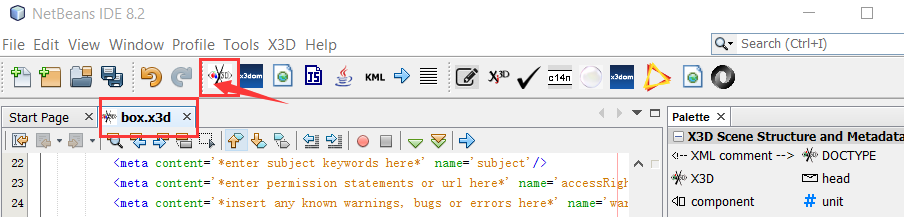
编写后发下它自带的浏览模型的视窗有点闪而且难看,可以使用BS Contact Stereo来进行浏览:
BS Contact Stereo下载地址:
http://www.bitmanagement.de/en/download
下面两个框填上就可以了:
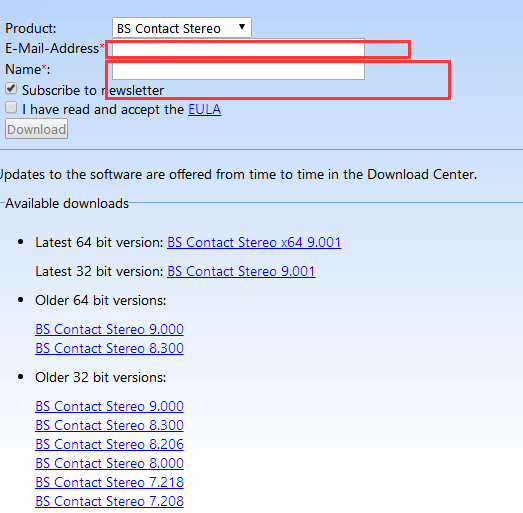
BS Contact Stereo破解方法:http://blog.sina.com.cn/s/blog_59eb15b10100afg6.html
如果你的英文不错请参考网址:
https://savage.nps.edu/X3D-Edit/#Downloads
x3D 下载以及如何使用原版NetBeans IDE 来搭建x3d编辑环境的更多相关文章
- 方案:在Eclipse IDE 中搭建Python开发环境
Eclipse是一款功能强大的IDE,Python是一种功能强大的计算机语言,但是Python的IDE环境确实很缺乏,如果在强大的Eclipse中添加Python开发环境,那样就很完美了. 在这里,我 ...
- Ubuntu 中安装 NetBeans IDE
NetBeans 8.2 刚刚发布,如果你还没有安装的话,这篇简短的教程将会演示如何在 Ubuntu 系统上快速的安装.对安装 NetBeans 需要帮助的开发者来说,这往篇文章会是不错的指导. 给那 ...
- 在 NetBeans IDE 6.0 中分析 Java 应用程序性能
NetBeans IDE 6.0 包含一个强大的性能分析工具,可提供与应用程序运行时行为有关的重要信息.通过 NetBeans 性能分析工具,我们可以方便地在 IDE 中监控应用程序的线程状态.CPU ...
- Netbeans IDE 安装Emmet插件并解决Emmet插件无效果问题
Emmet是许多流行文本编辑器的插件,它极大地改进了HTML和CSS工作流程:在Netbeans IDE 下安装Emmet:1.打开Netbeans IDE编辑器,选择 工具—>插件选项,在 可 ...
- 分别用命令行、NetBeans IDE 8.2实现firstcup 项目部署
准备工作要搞好,对吧!(如下:) firstcup项目代码文件下载链接:click me~ NetBeans IDE 8.2下载链接:点我~(ps:建议下载此版本,再安装过程中,要选择安装GlassF ...
- NetBeans IDE For PHP 简体中文版 8.1安装配置
一.NetBeans IDE For PHP简介 NetBeans IDE 是一个开发环境 - 供程序员编写.编译.调试和部署程序的一个工具. 它是用 Java 编写的 - 但却可以支持任何编程语言. ...
- maven 学习---NetBeans IDE集成Maven
NetBeans6.7更新版本已经内置对Maven支持.如遇以前的版本,Maven插件在插件管理器中可用.我们正在使用NetBeans在这个例子中使用6.9. 在NetBeans一些特点如下 您可以从 ...
- "Hello World!" for the NetBeans IDE
"Hello World!" for the NetBeans IDE It's time to write your first application! These detai ...
- (转) Python in NetBeans IDE 8.0
原地址: https://blogs.oracle.com/geertjan/entry/python_in_netbeans_ide_8 Copy this to the clipboard: ht ...
随机推荐
- Linux编程 17 文件权限(权限设置chmod,改变文件属主属组关系chown,chgrp)
一. 概述 如果创建了一个目录或文件,有时会需要改变它的安全性设置,在linux系统上有一些工具可以完成这任务,包括使用chmod命令改变已有默认权限,分别能对属主,属组,其它用户的权限的控制分别以读 ...
- spring-boot-maven-plugin插件的作用
要记住:spring-boot-maven-plugin插件在打Jar包时会引入依赖包 可以打成直接运行的Jar包 maven项目的pom.xml中,添加了org.springframework.bo ...
- Ansible--Ad-Hoc
什么是Ad-Hoc (这其实是一个概念性的名字,是相对于写Ansible playbook来说的.类似于在命令行敲入shell命令和写shell scripts两者之间的关系)... 如果我们敲入一些 ...
- Java 容器源码分析之 TreeMap
TreeMap 是一种基于红黑树实现的 Key-Value 结构.在使用集合视图在 HashMap 中迭代时,是不能保证迭代顺序的: LinkedHashMap 使用了双向链表,保证按照插入顺序或者访 ...
- spring-boot-2.0.3之quartz集成,数据源问题,源码探究
前言 开心一刻 着火了,他报警说:119吗,我家发生火灾了. 119问:在哪里? 他说:在我家. 119问:具体点. 他说:在我家的厨房里. 119问:我说你现在的位置. 他说:我趴在桌子底下. 11 ...
- SpringBoot系列——快速构建项目
前言 springboot官方参考指南:https://docs.spring.io/spring-boot/docs/2.1.0.RELEASE/reference/htmlsingle/ Spri ...
- flex属性
一.flex属性的归纳 flex-direction flex-wrap flex-flow justify-content align-items align-content 1.1 flex-di ...
- EF C# ToPagedList方法 The method 'Skip' is only supported for sorted input in LINQ to Entities. The method 'OrderBy' must ……
报错信息:The method 'Skip' is only supported for sorted input in LINQ to Entities. The method 'OrderBy' ...
- Android Studio 活动启动模式
启动模式一共分4种 可以再配置文件中设置 <activity android:name=".MainActivity" android:launchMode="si ...
- 29.C++- 异常处理
C++内置了异常处理的语法元素 try catch try语句处理正常代码逻辑 当try语句发现异常时,则通过throw语句抛出异常,并退出try语句 catch语句处理异常情况 当throw语句抛出 ...