
ASP.NET Core如何使用WSFederation身份认证集成ADFS
如果要在ASP.NET Core项目中使用WSFederation身份认证,首先需要在项目中引入NuGet包:
Microsoft.AspNetCore.Authentication.WsFederation
不使用证书验证Issuer,也不使用证书加密ADFS的认证信息
如果你的ASP.NET Core项目,不需要证书来验证ADFS的Issuer信息,也不需要证书来加密ADFS的认证信息,那么只需要在ASP.NET Core的Startup类中设置和启用WsFederation中间件即可,代码如下所示:
// This method gets called by the runtime. Use this method to add services to the container.

public void ConfigureServices(IServiceCollection services)

{

    services.AddAuthentication(sharedOptions =>

    {

        sharedOptions.DefaultScheme = CookieAuthenticationDefaults.AuthenticationScheme;

        sharedOptions.DefaultSignInScheme = CookieAuthenticationDefaults.AuthenticationScheme;

        sharedOptions.DefaultChallengeScheme = WsFederationDefaults.AuthenticationScheme;

    })

    .AddWsFederation(options =>

    {

        // MetadataAddress represents the Active Directory instance used to authenticate users.

        options.MetadataAddress = "https://www.contoso.com/FederationMetadata/2007-06/FederationMetadata.xml";

        // Wtrealm is the app's identifier in the Active Directory instance.

        options.Wtrealm = "https://localhost:44307/";

        //用户在ADFS登录页成功登录后,跳转回ASP.NET Core站点的URL地址

        options.Wreply = "https://localhost:44307/signin";

        //用于解析从ADFS登录页传回ASP.NET Core站点的认证信息的URL地址,ASP.NET Core会使用该URL地址将ADFS认证信息解析为Claim,并存储在Cookie中

        options.CallbackPath = "/signin";

        //设置WsFederation认证中间件与远程ADFS认证服务器的网络通信连接超时时间为1分钟

        options.BackchannelTimeout = TimeSpan.FromMinutes();

        //设置完成整个ADFS认证流程的超时时间为15分钟

        options.RemoteAuthenticationTimeout = TimeSpan.FromMinutes();

    })

    .AddCookie();

    services.AddMvc();

}

// This method gets called by the runtime. Use this method to configure the HTTP request pipeline.

public void Configure(IApplicationBuilder app, IHostingEnvironment env)

{

    if (env.IsDevelopment())

    {

        app.UseBrowserLink();

        app.UseDeveloperExceptionPage();

    }

    else

    {

        app.UseExceptionHandler("/Home/Error");

    }

    app.UseStaticFiles();

    app.UseAuthentication();

    app.UseMvc(routes =>

    {

        routes.MapRoute(

            name: "default",

            template: "{controller=Home}/{action=Index}/{id?}");

    });

}
上面的代码中有两个属性需要注意:
- options.Wreply,是用户在ADFS登录页成功登录后,跳转回ASP.NET Core站点的URL地址
- options.CallbackPath,是用于解析从ADFS登录页传回ASP.NET Core站点的认证信息的URL地址,ASP.NET Core会使用该URL地址将ADFS认证信息解析为Claim,并存储在用户浏览器的Cookie中
因此options.CallbackPath的地址必须要和options.Wreply的地址保持一致,例如上面我们设置了options.Wreply为"https://localhost:44307/signin",那么options.CallbackPath必须是options.Wreply中以"/"开头的绝对路径URL地址,也就是"/signin"(注意options.CallbackPath不能设置为带主机域名的完全URL地址,只能是以"/"开头的绝对路径URL地址)。这样当用户从ADFS登录页成功登录后,跳转回我们的ASP.NET Core站点时,ASP.NET Core才能成功解析ADFS的认证信息。
上面代码中还有两个关于超时的属性:
- options.BackchannelTimeout,是WsFederation认证中间件与远程ADFS认证服务器的网络通信连接超时时间
- options.RemoteAuthenticationTimeout,是完成整个ADFS认证流程的超时时间
这两个超时属性如果时间设置得太小,可能会造成认证超时而抛出异常,实际上这两个属性属于RemoteAuthenticationOptions类,WsFederationOptions类继承于RemoteAuthenticationOptions类,所有继承RemoteAuthenticationOptions的类都可以设置这两个超时属性。
使用证书验证Issuer,并使用证书加密ADFS的认证信息
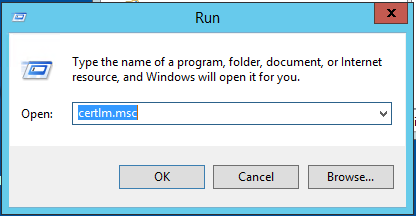
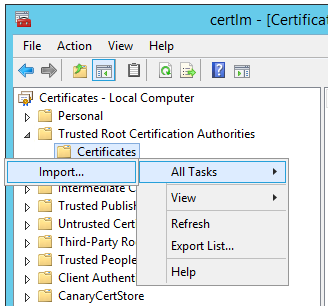
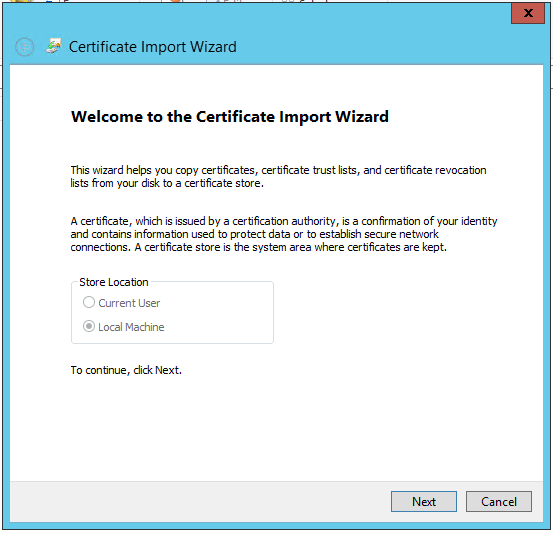
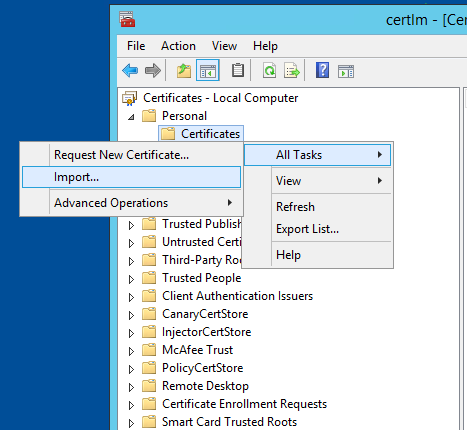
由于接下来本文中我们要在WSFederation认证中用到X509证书,所以你需要先申请一个.pfx证书文件,用于加密和解密ADFS的认证信息,将该.pfx文件使用certlm.msc命令,来导入ASP.NET Core站点服务器certlm中的"Trusted Root Certification Authorities"和"Personal"文件夹中,如下所示:
运行certlm.msc命令:
在左边列表中,找到"Trusted Root Certification Authorities"文件夹,然后在下面的"Certificates"文件夹上点击鼠标右键,通过右键菜单选择"All Tasks",然后点击"Import":
然后通过导入向导,导入你的.pfx证书文件到certlm中"Trusted Root Certification Authorities"文件夹:
再在certlm.msc左边列表中,找到"Personal"文件夹,然后在下面的"Certificates"文件夹上点击鼠标右键,通过右键菜单选择"All Tasks",然后点击"Import":
然后同样通过导入向导,导入你的.pfx证书文件到certlm中"Personal"文件夹:
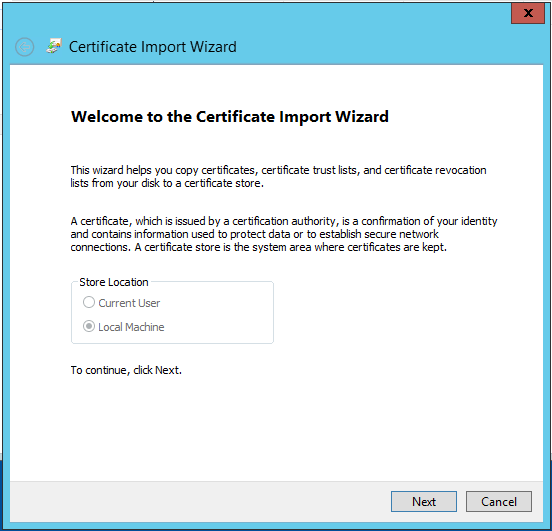
接下来,你还要确保服务器IIS中,已经在ASP.NET Core项目站点使用的应用程序池上,设置了Load User Profile属性为True。
然后按照下面的代码,在ASP.NET Core的Startup类中设置和启用WsFederation中间件:
// This method gets called by the runtime. Use this method to add services to the container.

public void ConfigureServices(IServiceCollection services)

{

    services.AddAuthentication(sharedOptions =>

    {

        sharedOptions.DefaultScheme = CookieAuthenticationDefaults.AuthenticationScheme;

        sharedOptions.DefaultSignInScheme = CookieAuthenticationDefaults.AuthenticationScheme;

        sharedOptions.DefaultChallengeScheme = WsFederationDefaults.AuthenticationScheme;

    })

    .AddWsFederation(options =>

    {

        // MetadataAddress represents the Active Directory instance used to authenticate users.

        options.MetadataAddress = "https://www.contoso.com/FederationMetadata/2007-06/FederationMetadata.xml";

        // Wtrealm is the app's identifier in the Active Directory instance.

        options.Wtrealm = "https://localhost:44307/";

        //用户在ADFS登录页成功登录后,跳转回ASP.NET Core站点的URL地址

        options.Wreply = "https://localhost:44307/signin";

        //用于解析从ADFS登录页传回ASP.NET Core站点的认证信息的URL地址,ASP.NET Core会使用该URL地址将ADFS认证信息解析为Claim,并存储在Cookie中

        options.CallbackPath = "/signin";

        //设置WsFederation认证中间件与远程ADFS认证服务器的网络通信连接超时时间为1分钟

        options.BackchannelTimeout = TimeSpan.FromMinutes();

        //设置完成整个ADFS认证流程的超时时间为15分钟

        options.RemoteAuthenticationTimeout = TimeSpan.FromMinutes();

        //ADFS认证信息的加密和解密证书(.pfx证书文件,既包含公钥,又包含私钥)

        string encryptionCertificatePath = @"C:\Security\encryption.pfx";

        string encryptionCertificatePassword = "";//证书密码

        X509Certificate2 encryptionX509Certificate = new X509Certificate2(encryptionCertificatePath, encryptionCertificatePassword);

        SecurityKey encryptionSecurityKey = new X509SecurityKey(encryptionX509Certificate);

        //验证Issuer的公钥证书(.cer证书文件,只包含公钥,不包含私钥)

        string issuerCertificatePath = @"C:\Security\issuer.cer";

        X509Certificate2 issuerX509Certificate = new X509Certificate2(issuerCertificatePath);

        SecurityKey issuerSecurityKey = new X509SecurityKey(issuerX509Certificate);

        options.TokenValidationParameters = new TokenValidationParameters

        {

            AuthenticationType = CookieAuthenticationDefaults.AuthenticationScheme,

            TokenDecryptionKey = encryptionSecurityKey,//设置解密ADFS认证信息的证书

            IssuerSigningKey = issuerSecurityKey,//设置验证Issuer的公钥证书

            ValidateIssuerSigningKey = true,

            ValidateActor = false,

            ValidateTokenReplay = false,

            ValidateAudience = false,

            ValidateLifetime = false,

            ValidateIssuer = true

        };

    })

    .AddCookie();

    services.AddMvc();

}

// This method gets called by the runtime. Use this method to configure the HTTP request pipeline.

public void Configure(IApplicationBuilder app, IHostingEnvironment env)

{

    if (env.IsDevelopment())

    {

        app.UseBrowserLink();

        app.UseDeveloperExceptionPage();

    }

    else

    {

        app.UseExceptionHandler("/Home/Error");

    }

    app.UseStaticFiles();

    app.UseAuthentication();

    app.UseMvc(routes =>

    {

        routes.MapRoute(

            name: "default",

            template: "{controller=Home}/{action=Index}/{id?}");

    });

}
注意上面代码中:
- encryption.pfx证书文件,既包含公钥,又包含私钥,它用于在ADFS登录页上加密ADFS认证信息,并且在我们的ASP.NET Core站点中解密ADFS认证信息。
- issuer.cer证书文件,只包含公钥,不包含私钥,它用于验证ADFS认证信息的颁发者(Issuer)的身份是否属实。
参考文献:
使用 WS 联合身份验证在 ASP.NET Core 中的用户进行身份验证
ASP.NET Core如何使用WSFederation身份认证集成ADFS的更多相关文章
- ASP.NET CORE中使用Cookie身份认证
大家在使用ASP.NET的时候一定都用过FormsAuthentication做登录用户的身份认证,FormsAuthentication的核心就是Cookie,ASP.NET会将用户名存储在Cook ...
- 关于ASP.Net Core Web及API身份认证的解决方案
6月15日,在端午节前的最后一个工作日,想起有段日子没有写过文章了,倒有些荒疏了.今借夏日蒸蒸之气,偷得浮生半日悠闲.闲话就说到这里吧,提前祝大家端午愉快(屈原听了该不高兴了:))!.NetCore自 ...
- ASP.NET Core编程实现基本身份认证
概览 在HTTP中,基本认证(Basic access authentication,简称BA认证)是一种用来允许网页浏览器或其他客户端程序在请求资源时提供用户名和口令形式的身份凭证的一种登录验证方式 ...
- 理解ASP.NET Core - 基于Cookie的身份认证(Authentication)
注:本文隶属于<理解ASP.NET Core>系列文章,请查看置顶博客或点击此处查看全文目录 概述 通常,身份认证(Authentication)和授权(Authorization)都会放 ...
- ASP.NET Core系列:JWT身份认证
1. JWT概述 JSON Web Token(JWT)是目前流行的跨域身份验证解决方案. JWT的官网地址:https://jwt.io JWT的实现方式是将用户信息存储在客户端,服务端不进行保存. ...
- ASP.NET Core的无状态身份认证框架IdentityServer4
Identity Server 4是IdentityServer的最新版本,它是流行的OpenID Connect和OAuth Framework for .NET,为ASP.NET Core和.NE ...
- 理解ASP.NET Core - 基于JwtBearer的身份认证(Authentication)
注:本文隶属于<理解ASP.NET Core>系列文章,请查看置顶博客或点击此处查看全文目录 在开始之前,如果你还不了解基于Cookie的身份认证,那么建议你先阅读<基于Cookie ...
- ASP.NET Core 3.0 gRPC 身份认证和授权
一.开头聊骚 本文算是对于 ASP.NET Core 3.0 gRPC 研究性学习的最后一篇了,以后在实际使用中,可能会发一些经验之文.本文主要讲 ASP.NET Core 本身的认证授权和gRPC接 ...
- 【ASP.NET Core】运行原理[3]:认证
本节将分析Authentication 源代码参考.NET Core 2.0.0 HttpAbstractions Security 目录 认证 AddAuthentication IAuthenti ...
随机推荐
- 浅谈Kotlin(一):简介及Android Studio中配置
浅谈Kotlin(一):简介及Android Studio中配置 浅谈Kotlin(二):基本类型.基本语法.代码风格 浅谈Kotlin(三):类 浅谈Kotlin(四):控制流 前言: 今日新闻:谷 ...
- 【LeetCode】正则表达式匹配(动态规划)
题目描述 给定一个字符串 (s) 和一个字符模式 (p).实现支持 '.' 和 '*' 的正则表达式匹配. '.' 匹配任意单个字符. '*' 匹配零个或多个前面的元素. 匹配应该覆盖整个字符串 (s ...
- (后台)SQL Server 代理(已禁用代理 XP) 怎么解决(转)
百度知道搜索的答案: 在SQL Server Management Studio中连接到SQL Server实例后,会显示“SQL Server 代理”节点.如果当前该实例的Agent服务没有启动,“ ...
- Android/IOS手机使用Fiddler抓包
对于Android和IOS开发及测试的同事来说抓包是一个很重要的事,有利于排查问题所在,快速定位问题.但长期以来一直没有一款可以快速抓包的工具,直到有了Fiddler2. 使用步骤: 1. Fidd ...
- CentOS6.5内 Oracle 11GR2静默安装
一.修改配置文件 1.1.修改/etc/security/limits.conf文件,修改用户的SHELL的限制. 输入命令:vi /etc/security/limits.conf,将下列内容加入该 ...
- 【底层原理】深入理解Cache (上)
存储器是分层次的,离CPU越近的存储器,速度越快,每字节的成本越高,同时容量也因此越小.寄存器速度最快,离CPU最近,成本最高,所以个数容量有限,其次是高速缓存(缓存也是分级,有L1,L2等缓存),再 ...
- python简单的监控脚本-利用socket、psutil阻止远程主机运行特定程序
python简单的监控脚本-利用socket.psutil阻止远程主机运行特定程序 psutil是一个跨平台的库(http://code.google.com/p/psutil/),能够轻松的实现获取 ...
- JAVA之Math类常用数学运算记录
Math中定义了许多的方法,且这些方法均为static类型,通过Math类就能直接调用. 调用形式:Math.方法名 例如,我要进行e运算,那么我直接调用Math.exp(double 类型 数值); ...
- 联想x3650m5服务器安装windows2008R2系统
服务器型号:联想x3650 M5 2U服务器 硬盘:一块300G硬盘 阵列:raid0 系统:windowsserver2008R2系统 安装开始时间:20180930晚上9点 客户手里有window ...
- 第一次使用Open Live Writer维护BlogJava
换了电脑,又重装了一堆东西,现在才把Open Live Writer整好.顺便记下几个心得: Open Live Writer已经没办法从网站上下载了,介绍个方法,可以把地址直接拷贝到迅雷里面,然后请 ...