
FastDFS + Nginx代理方式访问
FastDFS + Nginx代理方式访问
作者:尹正杰
版权声明:原创作品,谢绝转载!否则将追究法律责任。
一.在storage上安装nginx
1>.下载nginx软件(http://nginx.org/en/download.html)
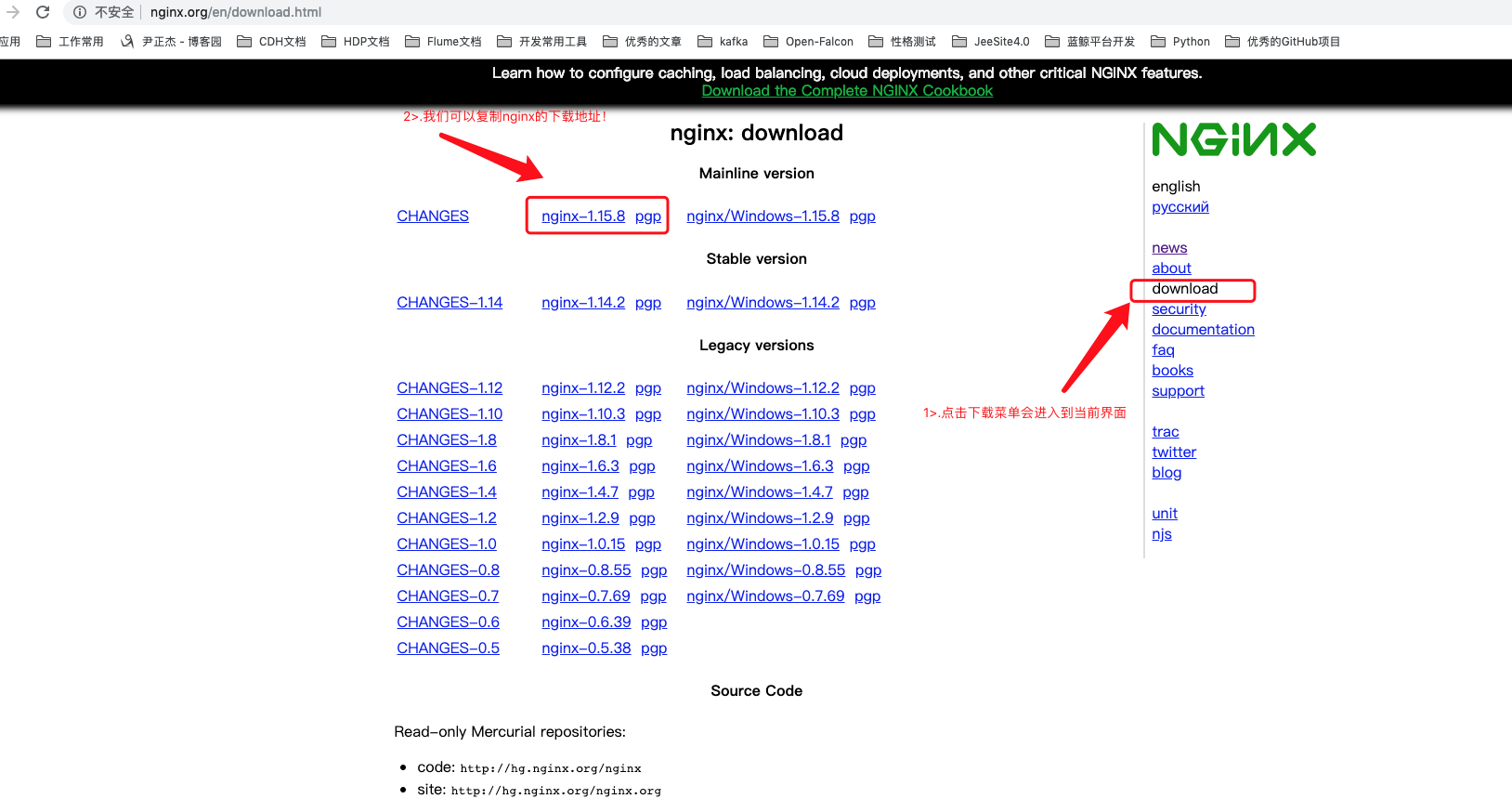
2>.下载fastdfs-nginx-module模块并编译安装nginx
[root@node101 ~]# wget http://nginx.org/download/nginx-1.15.8.tar.gz

---- ::--  http://nginx.org/download/nginx-1.15.8.tar.gz

Resolving nginx.org (nginx.org)... 95.211.80.227, 62.210.92.35, :1af8::a004:::e3

Connecting to nginx.org (nginx.org)|95.211.80.227|:... connected.

HTTP request sent, awaiting response...  OK

Length:  (1004K) [application/octet-stream]

Saving to: ‘nginx-1.15..tar.gz’

%[=========================================================================================================================================================================>] ,,   .0KB/s   in 15s

-- :: (65.0 KB/s) - ‘nginx-1.15..tar.gz’ saved [/]

[root@node101 ~]#
[root@node101 ~]# wget http://nginx.org/download/nginx-1.15.8.tar.gz
[root@node101 ~]# yum -y install git

Loaded plugins: fastestmirror

Loading mirror speeds from cached hostfile

 * base: mirror.jdcloud.com

 * extras: mirror.jdcloud.com

 * updates: mirror.jdcloud.com

base                                                                                                                                                                                        | 3.6 kB  ::

extras                                                                                                                                                                                      | 3.4 kB  ::

myglusterfs                                                                                                                                                                                 | 2.9 kB  ::

mysql-connectors-community                                                                                                                                                                  | 2.5 kB  ::

mysql-tools-community                                                                                                                                                                       | 2.5 kB  ::

mysql80-community                                                                                                                                                                           | 2.5 kB  ::

updates                                                                                                                                                                                     | 3.4 kB  ::

Resolving Dependencies

--> Running transaction check

---> Package git.x86_64 :1.8.3.1-.el7 will be installed

--> Processing Dependency: perl-Git = 1.8.3.1-.el7 for package: git-1.8.3.1-.el7.x86_64

--> Processing Dependency: perl(Term::ReadKey) for package: git-1.8.3.1-.el7.x86_64

--> Processing Dependency: perl(Git) for package: git-1.8.3.1-.el7.x86_64

--> Processing Dependency: perl(Error) for package: git-1.8.3.1-.el7.x86_64

--> Running transaction check

---> Package perl-Error.noarch :0.17020-.el7 will be installed

---> Package perl-Git.noarch :1.8.3.1-.el7 will be installed

---> Package perl-TermReadKey.x86_64 :2.30-.el7 will be installed

--> Finished Dependency Resolution

Dependencies Resolved

===================================================================================================================================================================================================================

 Package                                                 Arch                                          Version                                                Repository                                      Size

===================================================================================================================================================================================================================

Installing:

 git                                                     x86_64                                        1.8.3.1-.el7                                         updates                                        4.4 M

Installing for dependencies:

 perl-Error                                              noarch                                        :0.17020-.el7                                        base                                             k

 perl-Git                                                noarch                                        1.8.3.1-.el7                                         updates                                          k

 perl-TermReadKey                                        x86_64                                        2.30-.el7                                            base                                             k

Transaction Summary

===================================================================================================================================================================================================================

Install   Package (+ Dependent packages)

Total download size: 4.5 M

Installed size:  M

Downloading packages:

(/): perl-Error-0.17020-.el7.noarch.rpm                                                                                                                                                  |   kB  ::

(/): perl-TermReadKey-2.30-.el7.x86_64.rpm                                                                                                                                              |   kB  ::

(/): perl-Git-1.8.3.1-.el7.noarch.rpm                                                                                                                                                   |   kB  ::

(/): git-1.8.3.1-.el7.x86_64.rpm                                                                                                                                                        | 4.4 MB  ::

-------------------------------------------------------------------------------------------------------------------------------------------------------------------------------------------------------------------

Total                                                                                                                                                                               kB/s | 4.5 MB  ::

Running transaction check

Running transaction test

Transaction test succeeded

Running transaction

  Installing : :perl-Error-0.17020-.el7.noarch                                                                                                                                                               /

  Installing : perl-TermReadKey-2.30-.el7.x86_64                                                                                                                                                             /

  Installing : git-1.8.3.1-.el7.x86_64                                                                                                                                                                       /

  Installing : perl-Git-1.8.3.1-.el7.noarch                                                                                                                                                                  /

  Verifying  : perl-Git-1.8.3.1-.el7.noarch                                                                                                                                                                  /

  Verifying  : :perl-Error-0.17020-.el7.noarch                                                                                                                                                               /

  Verifying  : git-1.8.3.1-.el7.x86_64                                                                                                                                                                       /

  Verifying  : perl-TermReadKey-2.30-.el7.x86_64                                                                                                                                                             /

Installed:

  git.x86_64 :1.8.3.1-.el7

Dependency Installed:

  perl-Error.noarch :0.17020-.el7                                    perl-Git.noarch :1.8.3.1-.el7                                    perl-TermReadKey.x86_64 :2.30-.el7

Complete!

[root@node101 ~]#
[root@node101 ~]# yum -y install git
[root@node101 ~]# yum -y install gcc automake autoconf libtool make gcc-c++ openssl

Loaded plugins: fastestmirror

Loading mirror speeds from cached hostfile

 * base: mirror.jdcloud.com

 * extras: mirror.jdcloud.com

 * updates: mirror.jdcloud.com

Package gcc-4.8.-.el7.x86_64 already installed and latest version

Package :make-3.82-.el7.x86_64 already installed and latest version

Package gcc-c++-4.8.-.el7.x86_64 already installed and latest version

Resolving Dependencies

--> Running transaction check

---> Package autoconf.noarch :2.69-.el7 will be installed

--> Processing Dependency: perl(Data::Dumper) for package: autoconf-2.69-.el7.noarch

---> Package automake.noarch :1.13.-.el7 will be installed

--> Processing Dependency: perl(Thread::Queue) for package: automake-1.13.-.el7.noarch

--> Processing Dependency: perl(TAP::Parser) for package: automake-1.13.-.el7.noarch

---> Package libtool.x86_64 :2.4.-.el7_3 will be installed

--> Running transaction check

---> Package perl-Data-Dumper.x86_64 :2.145-.el7 will be installed

---> Package perl-Test-Harness.noarch :3.28-.el7 will be installed

---> Package perl-Thread-Queue.noarch :3.02-.el7 will be installed

--> Finished Dependency Resolution

Dependencies Resolved

===================================================================================================================================================================================================================

 Package                                                  Arch                                          Version                                                  Repository                                   Size

===================================================================================================================================================================================================================

Installing:

 autoconf                                                 noarch                                        2.69-.el7                                              base                                         k

 automake                                                 noarch                                        1.13.-.el7                                             base                                         k

 libtool                                                  x86_64                                        2.4.-.el7_3                                           base                                         k

Installing for dependencies:

 perl-Data-Dumper                                         x86_64                                        2.145-.el7                                              base                                          k

 perl-Test-Harness                                        noarch                                        3.28-.el7                                               base                                         k

 perl-Thread-Queue                                        noarch                                        3.02-.el7                                               base                                          k

Transaction Summary

===================================================================================================================================================================================================================

Install   Packages (+ Dependent packages)

Total download size: 2.3 M

Installed size: 6.8 M

Downloading packages:

(/): autoconf-2.69-.el7.noarch.rpm                                                                                                                                                      |  kB  ::

(/): perl-Thread-Queue-3.02-.el7.noarch.rpm                                                                                                                                              |   kB  ::

(/): perl-Data-Dumper-2.145-.el7.x86_64.rpm                                                                                                                                              |   kB  ::

(/): libtool-2.4.-.el7_3.x86_64.rpm                                                                                                                                                    |  kB  ::

(/): perl-Test-Harness-3.28-.el7.noarch.rpm                                                                                                                                              |  kB  ::

(/): automake-1.13.-.el7.noarch.rpm                                                                                                                                                     |  kB  ::

-------------------------------------------------------------------------------------------------------------------------------------------------------------------------------------------------------------------

Total                                                                                                                                                                               kB/s | 2.3 MB  ::

Running transaction check

Running transaction test

Transaction test succeeded

Running transaction

  Installing : perl-Thread-Queue-3.02-.el7.noarch                                                                                                                                                             /

  Installing : perl-Test-Harness-3.28-.el7.noarch                                                                                                                                                             /

  Installing : perl-Data-Dumper-2.145-.el7.x86_64                                                                                                                                                             /

  Installing : autoconf-2.69-.el7.noarch                                                                                                                                                                     /

  Installing : automake-1.13.-.el7.noarch                                                                                                                                                                    /

  Installing : libtool-2.4.-.el7_3.x86_64                                                                                                                                                                   /

  Verifying  : autoconf-2.69-.el7.noarch                                                                                                                                                                     /

  Verifying  : perl-Data-Dumper-2.145-.el7.x86_64                                                                                                                                                             /

  Verifying  : perl-Test-Harness-3.28-.el7.noarch                                                                                                                                                             /

  Verifying  : perl-Thread-Queue-3.02-.el7.noarch                                                                                                                                                             /

  Verifying  : automake-1.13.-.el7.noarch                                                                                                                                                                    /

  Verifying  : libtool-2.4.-.el7_3.x86_64                                                                                                                                                                   /

Installed:

  autoconf.noarch :2.69-.el7                                        automake.noarch :1.13.-.el7                                        libtool.x86_64 :2.4.-.el7_3

Dependency Installed:

  perl-Data-Dumper.x86_64 :2.145-.el7                                 perl-Test-Harness.noarch :3.28-.el7                                 perl-Thread-Queue.noarch :3.02-.el7

Complete!

[root@node101 ~]#
[root@node101 ~]# yum -y install gcc automake autoconf libtool make gcc-c++ openssl
[root@node101 ~]# tar -zxf nginx-1.15..tar.gz -C /yinzhengjie/softwares/

[root@node101 ~]#

[root@node101 ~]# cd /yinzhengjie/softwares/nginx-1.15./

[root@node101 nginx-1.15.]#

[root@node101 nginx-1.15.]# ll

total

drwxr-xr-x       Feb  : auto

-rw-r--r--     Dec  : CHANGES

-rw-r--r--     Dec  : CHANGES.ru

drwxr-xr-x       Feb  : conf

-rwxr-xr-x       Dec  : configure

drwxr-xr-x       Feb  : contrib

drwxr-xr-x       Feb  : html

-rw-r--r--       Dec  : LICENSE

drwxr-xr-x       Feb  : man

-rw-r--r--         Dec  : README

drwxr-xr-x       Feb  : src

[root@node101 nginx-1.15.]#

[root@node101 nginx-1.15.]# git clone https://github.com/happyfish100/fastdfs-nginx-module

Cloning into 'fastdfs-nginx-module'...

remote: Enumerating objects: , done.

remote: Total  (delta ), reused  (delta ), pack-reused

Unpacking objects: % (/), done.

[root@node101 nginx-1.15.]#

[root@node101 nginx-1.15.]# ll

total

drwxr-xr-x       Feb  : auto

-rw-r--r--     Dec  : CHANGES

-rw-r--r--     Dec  : CHANGES.ru

drwxr-xr-x       Feb  : conf

-rwxr-xr-x       Dec  : configure

drwxr-xr-x       Feb  : contrib

drwxr-xr-x  root root    Feb  : fastdfs-nginx-module                  #这个就是咱们刚刚clone的模块

drwxr-xr-x       Feb  : html

-rw-r--r--       Dec  : LICENSE

drwxr-xr-x       Feb  : man

-rw-r--r--         Dec  : README

drwxr-xr-x       Feb  : src

[root@node101 nginx-1.15.]#

[root@node101 nginx-1.15.]#

[root@node101 nginx-1.15.]# useradd -s /sbin/nologin -M www                    #创建用户用于一会编译时使用,你也可以自定义其他的用户名称

[root@node101 nginx-1.15.]#

[root@node101 nginx-1.15.]# cp fastdfs-nginx-module/src/config fastdfs-nginx-module/      #编译的时候必须有配置文件存在,否则会报错!

[root@node101 nginx-1.15.]#
[root@node101 ~]# whereis openssl

openssl: /usr/bin/openssl /usr/lib64/openssl /usr/share/man/man1/openssl.1ssl.gz

[root@node101 ~]#

[root@node101 ~]# ls /usr/lib64/openssl

engines

[root@node101 ~]#

[root@node101 nginx-1.15.]# ./configure --prefix=/yinzhengjie/softwares/nginx-1.15. --user=www --group=www --with-http_ssl_module --with-http_stub_status_module --add-module=./fastdfs-nginx-module  --with-openssl=/usr/lib64/openssl

checking for OS

 + Linux 3.10.-.el7.x86_64 x86_64

checking for C compiler ... found

 + using GNU C compiler

 + gcc version: 4.8.  (Red Hat 4.8.-) (GCC)

checking for gcc -pipe switch ... found

checking for -Wl,-E switch ... found

checking for gcc builtin atomic operations ... found

checking for C99 variadic macros ... found

checking for gcc variadic macros ... found

checking for gcc builtin  bit byteswap ... found

checking for unistd.h ... found

checking for inttypes.h ... found

checking for limits.h ... found

checking for sys/filio.h ... not found

checking for sys/param.h ... found

checking for sys/mount.h ... found

checking for sys/statvfs.h ... found

checking for crypt.h ... found

checking for Linux specific features

checking for epoll ... found

checking for EPOLLRDHUP ... found

checking for EPOLLEXCLUSIVE ... not found

checking for O_PATH ... found

checking for sendfile() ... found

checking for sendfile64() ... found

checking for sys/prctl.h ... found

checking for prctl(PR_SET_DUMPABLE) ... found

checking for prctl(PR_SET_KEEPCAPS) ... found

checking for capabilities ... found

checking for crypt_r() ... found

checking for sys/vfs.h ... found

checking for poll() ... found

checking for /dev/poll ... not found

checking for kqueue ... not found

checking for crypt() ... not found

checking for crypt() in libcrypt ... found

checking for F_READAHEAD ... not found

checking for posix_fadvise() ... found

checking for O_DIRECT ... found

checking for F_NOCACHE ... not found

checking for directio() ... not found

checking for statfs() ... found

checking for statvfs() ... found

checking for dlopen() ... not found

checking for dlopen() in libdl ... found

checking for sched_yield() ... found

checking for sched_setaffinity() ... found

checking for SO_SETFIB ... not found

checking for SO_REUSEPORT ... found

checking for SO_ACCEPTFILTER ... not found

checking for SO_BINDANY ... not found

checking for IP_TRANSPARENT ... found

checking for IP_BINDANY ... not found

checking for IP_BIND_ADDRESS_NO_PORT ... not found

checking for IP_RECVDSTADDR ... not found

checking for IP_SENDSRCADDR ... not found

checking for IP_PKTINFO ... found

checking for IPV6_RECVPKTINFO ... found

checking for TCP_DEFER_ACCEPT ... found

checking for TCP_KEEPIDLE ... found

checking for TCP_FASTOPEN ... found

checking for TCP_INFO ... found

checking for accept4() ... found

checking for eventfd() ... found

checking for int size ...  bytes

checking for long size ...  bytes

checking for long long size ...  bytes

checking for void * size ...  bytes

checking for uint32_t ... found

checking for uint64_t ... found

checking for sig_atomic_t ... found

checking for sig_atomic_t size ...  bytes

checking for socklen_t ... found

checking for in_addr_t ... found

checking for in_port_t ... found

checking for rlim_t ... found

checking for uintptr_t ... uintptr_t found

checking for system byte ordering ... little endian

checking for size_t size ...  bytes

checking for off_t size ...  bytes

checking for time_t size ...  bytes

checking for AF_INET6 ... found

checking for setproctitle() ... not found

checking for pread() ... found

checking for pwrite() ... found

checking for pwritev() ... found

checking for sys_nerr ... found

checking for localtime_r() ... found

checking for clock_gettime(CLOCK_MONOTONIC) ... found

checking for posix_memalign() ... found

checking for memalign() ... found

checking for mmap(MAP_ANON|MAP_SHARED) ... found

checking for mmap("/dev/zero", MAP_SHARED) ... found

checking for System V shared memory ... found

checking for POSIX semaphores ... not found

checking for POSIX semaphores in libpthread ... found

checking for struct msghdr.msg_control ... found

checking for ioctl(FIONBIO) ... found

checking for struct tm.tm_gmtoff ... found

checking for struct dirent.d_namlen ... not found

checking for struct dirent.d_type ... found

checking for sysconf(_SC_NPROCESSORS_ONLN) ... found

checking for sysconf(_SC_LEVEL1_DCACHE_LINESIZE) ... found

checking for openat(), fstatat() ... found

checking for getaddrinfo() ... found

configuring additional modules

adding module in ./fastdfs-nginx-module

 + ngx_http_fastdfs_module was configured

checking for PCRE library ... found

checking for PCRE JIT support ... found

checking for zlib library ... found

creating objs/Makefile

Configuration summary

  + using system PCRE library

  + using OpenSSL library: /usr/lib64/openssl

  + using system zlib library

  nginx path prefix: "/yinzhengjie/softwares/nginx-1.15.8"

  nginx binary file: "/yinzhengjie/softwares/nginx-1.15.8/sbin/nginx"

  nginx modules path: "/yinzhengjie/softwares/nginx-1.15.8/modules"

  nginx configuration prefix: "/yinzhengjie/softwares/nginx-1.15.8/conf"

  nginx configuration file: "/yinzhengjie/softwares/nginx-1.15.8/conf/nginx.conf"

  nginx pid file: "/yinzhengjie/softwares/nginx-1.15.8/logs/nginx.pid"

  nginx error log file: "/yinzhengjie/softwares/nginx-1.15.8/logs/error.log"

  nginx http access log file: "/yinzhengjie/softwares/nginx-1.15.8/logs/access.log"

  nginx http client request body temporary files: "client_body_temp"

  nginx http proxy temporary files: "proxy_temp"

  nginx http fastcgi temporary files: "fastcgi_temp"

  nginx http uwsgi temporary files: "uwsgi_temp"

  nginx http scgi temporary files: "scgi_temp"

[root@node101 nginx-1.15.]# echo $?

[root@node101 nginx-1.15.]#
[root@node101 nginx-1.15.8]# ./configure --prefix=/yinzhengjie/softwares/nginx-1.15.8 --user=www --group=www --with-http_ssl_module --with-http_stub_status_module --add-module=./fastdfs-nginx-module --with-openssl=/usr/lib64/openssl
编译安装nginx后,可参考连接:https://github.com/happyfish100/fastdfs-nginx-module/blob/master/INSTALL
FastDFS + Nginx代理方式访问的更多相关文章
- nginx代理图片访问
nginx代理图片访问 首先配置nginx的代理物理路径 我的是在E盘下面的image 1 #图片的代理 2 server { 3 listen 80; 4 #配置访问的域名 5 server_nam ...
- https方式nginx 代理tomcat访问不带www的域名301重定向跳转到www的域名帮助seo集中权重
比如我要把 http://gucanhui.com http://www.gucanhui.com 跳转到https://www.gucanhui.com 用F12的network可以看到状态码301 ...
- 小测试 php代理,nginx代理,直接访问对比
#php proxy total sent request num: 507 total handle read times: 506 506 fetches, 2 max parallel, 2.7 ...
- 启动两个tomcat服务,以及使用nginx代理实现访问
1.shoudowm.bat\startup.bat\catalina.bat, 将CATALINA_HOME修改为CATALINA_HOME_2 2.server.xml <Server po ...
- nginx代理图片上传以及访问
nginx代理图片上传 首先需要利用nginx代理图片访问参考 https://www.cnblogs.com/TJ21/p/12609017.html 编写接受文件的controller @Post ...
- nginx代理图片上传以及访问 nginx 图片上传完整版
nginx代理图片上传 首先需要利用nginx代理图片访问参考 https://www.cnblogs.com/TJ21/p/12609017.html 编写接受文件的controller 1 @Po ...
- lamp+nginx代理+discuz+wordpress+phpmyadmin搭建
我们以模拟实际需求的形式来复习.需求如下:1. 准备两台centos 6,其中一台机器跑mysql,另外一台机器跑apache和nginx + php2. 同时安装apache和nginx,其中ngi ...
- IIS tomcat共用80端口解决一个IP多个域名:使用Nginx反向代理方式使两者兼容
环境: windows server 2003,IIS6服务器,Tomcat7服务器 域名有几个: 以下是使用IIS的域名: http://www.formuch.com/ http://www.fo ...
- (转)IIS tomcat共用80端口解决一个IP多个域名:使用Nginx反向代理方式使两者兼容
from :http://www.cnblogs.com/wuyou/p/3455619.html 环境: windows server 2003,IIS6服务器,Tomcat7服务器 域名有几个: ...
随机推荐
- Go For It ,一个灵活的待办事项列表程序
导读 Go For It,是我们开源工具系列中的第十个工具,它将使你在 2019 年更高效,它在 Todo.txt 系统的基础上构建,以帮助你完成更多工作. 每年年初似乎都有疯狂的冲动想提高工作效率. ...
- LVS负载均衡群集
概述 群集的类型:无论是哪种服务器,都至少包括两台节点服务器,而对外表现为一个整体,只提供一个访问入口(域名或IP地址),相当于一台大型计算机.根据群集所针对的目标差异,可以分为以下三个类型: 1.负 ...
- BZOJ4177Mike的农场——最小割
题目描述 Mike有一个农场,这个农场n个牲畜围栏,现在他想在每个牲畜围栏中养一只动物,每只动物可以是牛或羊,并且每个牲畜围栏中的饲养条件都不同,其中第i个牲畜围栏中的动物长大后,每只牛可以卖a[i] ...
- [NOIp2009] $Hankson$ 的趣味题
类型:数论 传送门:>Here< 题意:给出四个数$a_0,a_1,b_0,b_1$,求满足$gcd(x,a_0)=a_1,lcm(x,b_0)=b_1$的$x$的个数 解题思路 显然$a ...
- bzoj 2429: [HAOI2006]聪明的猴子 (最小生成树)
链接:https://www.lydsy.com/JudgeOnline/problem.php?id=2429 思路:就是找最小生成树最大的一条边,最小生成树的性质,最后加入的那条边就是最大的 实现 ...
- pfSense用户界面汉化翻译教程
pfSense用户界面汉化翻译教程 来源 https://blog.51cto.com/fxn2025/2087182 为了记录自己的汉化过程,同时也为了方便网友自己制作汉化版本,我把自己汉化pfSe ...
- 「洛谷5290」「LOJ3052」「十二省联考 2019」春节十二响【启发式合并】
题目链接 [洛谷传送门] [LOJ传送门] 题目大意 给定一棵树,每次选取树上的一个点集,要求点集中的每个点不能是另一个点的祖先,选出点集的代价为点集中权值最大点的权值,问将所有点都选一遍的最小代价为 ...
- [luogu1198][bzoj1012][JSOI2008]最大数【线段树+分块】
题目描述 区间查询最大值,结尾插入,强制在线. 分析 线段树可以做,但是练了一下分块,发现自己打错了两个地方,一个是分块的地方把/打成了%,还有是分块的时候标号要-1. 其他也没什么要多讲的. 代码 ...
- emwin之基于某个事件或标志创建某个界面的一种方法
@2018-12-11 [小记] 例:定时器事件到来后切换至某个界面, 即在原始界面上发生跳转,在新界面上可返回至原始界面,可使用如下方法: a,在定时器事件发生后给原始界面中的自定义消息发送一条该自 ...
- 超详解的LNMP搭建并优化
环境为Centos7 nginx1.14 mysql5.7 php7一,安装Nginx (yum装,快速) yum install nginx二,优化nginx (方便后期工作,如果纯为测试的话,不用 ...