
论Activity的转换
论Activity的互相转换
这次任务是实现
1.在主屏幕输入自己的姓名,单击评估按钮
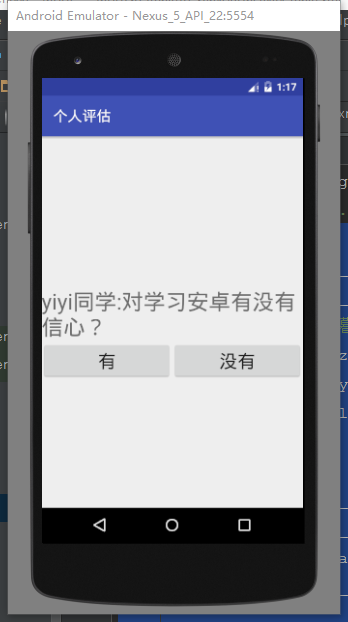
2.进入第二个界面,并将主屏幕输入的姓名传递给第二个界面
3.在第二个界面进行问题回答;
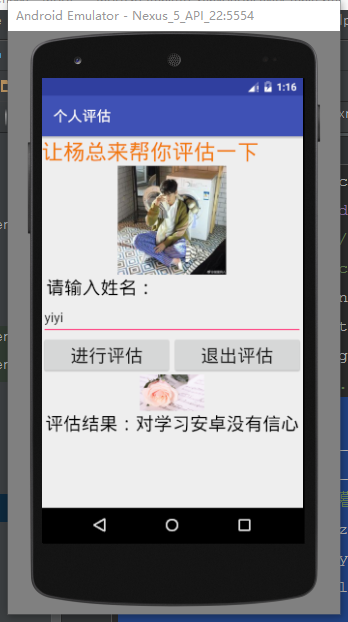
4.第二个界面的回答结果返回第一个界面并显示
布局很简单 不说了 直接上代码
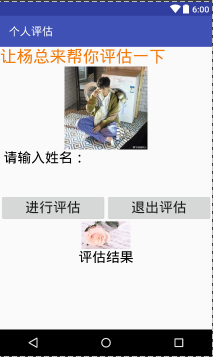
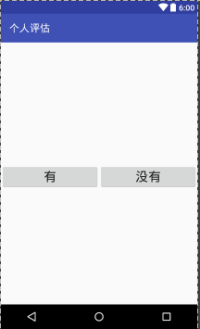
两个界面两个布局
 <TextView

        android:layout_width="wrap_content"

        android:layout_height="wrap_content"

        android:text="@string/yy_pg"

        android:textSize="30sp"

        android:textColor="?android:attr/colorMultiSelectHighlight" />

    <ImageView

        android:layout_width="150sp"

        android:layout_height="150sp"

        android:layout_gravity="center"

        android:src="@drawable/btm1"/>

    <TextView

        android:layout_width="wrap_content"

        android:layout_height="wrap_content"

        android:text=" 请输入姓名:"

        android:textSize="25sp"

        android:textColor="@android:color/background_dark" />

    <EditText

        android:id="@+id/et_name"

        android:layout_width="match_parent"

        android:layout_height="50sp"

        android:ems="12" />

<LinearLayout

    android:layout_width="match_parent"

    android:layout_height="wrap_content"

    android:orientation="horizontal">

    <Button

        android:id="@+id/btn_ing"

        style="@style/Button"

        android:text="@string/yy_ing"

        android:onClick="onClick"

        android:textSize="25sp"/>

    <Button

        android:id="@+id/btn_end"

        style="@style/Button"

        android:text="@string/yy_end"

        android:onClick="onClick"

        android:textSize="25sp"/>

</LinearLayout>

    <ImageView

        android:layout_width="400sp"

        android:layout_height="50sp"

        android:layout_gravity="center"

        android:src="@drawable/btm2"/>

    <TextView

        android:id="@+id/yy_result"

        android:layout_width="wrap_content"

        android:layout_height="wrap_content"

        android:text="评估结果"

        android:layout_gravity="center"

        android:textSize="25sp"

        android:textColor="@android:color/background_dark" />
<TextView

        android:id="@+id/yy_yf"

        android:layout_width="wrap_content"

        android:layout_height="wrap_content"

        android:text=""

        android:textSize="30sp"

        android:textColor="#000000"

        android:layout_alignParentTop="true"

        android:layout_centerHorizontal="true"

        android:layout_marginTop="166dp"/>

    <TextView

        android:id="@+id/yy_st"

        android:layout_width="wrap_content"

        android:layout_height="wrap_content"

        android:textSize="30sp" />

    <LinearLayout

        android:layout_width="match_parent"

        android:layout_height="wrap_content">

        <Button

            android:layout_width="0dp"

            android:layout_weight="1"

            android:layout_height="match_parent"

            android:text="有"

            android:textSize="25sp"

            android:id="@+id/btn_you"

            android:onClick="onClick"/>

        <Button

            android:layout_width="0dp"

            android:layout_weight="1"

            android:layout_height="match_parent"

            android:textSize="25sp"

            android:text="没有"

            android:id="@+id/btn_wu"

            android:onClick="onClick"/>

    </LinearLayout>
然后是Java部分的代码 时间原因就不废话了 再磨叽可能会交不了作业的
public class MainActivity extends AppCompatActivity {

    private EditText etname;

@Override

    protected void onCreate(Bundle savedInstanceState) {

        super.onCreate(savedInstanceState);

        setContentView(R.layout.activity_main);

        etname= (EditText) findViewById(R.id.et_name);

        try{

            Intent intent=getIntent();

            String pgjg=intent.getStringExtra("result");

            TextView yyresult=(TextView)findViewById(R.id.yy_result);

            yyresult.setText(pgjg);

        }catch (Exception e){}

    }

    public void onClick(View view) {

        switch (view.getId()) {

            case R.id.btn_ing:

                ing();

            case R.id.btn_end:

                finish();

                break;

        }

    }

    private void ing() {

        Intent intent = new Intent();

        intent.setClass(MainActivity.this,MainActivity2.class);

        String text = etname.getText().toString();

        intent.putExtra("name",text+"同学:对学习安卓有没有信心?");

        startActivity(intent);

    }
以上第一个布局的Java代码 进行界面的跳转 传递数据
public class MainActivity2 extends AppCompatActivity {

    @Override

    protected void onCreate(Bundle savedInstanceState) {

        super.onCreate(savedInstanceState);

        setContentView(R.layout.activity_main2);

        Intent intent=getIntent();

        String pgjg=intent.getStringExtra("name");

        TextView question=(TextView)findViewById(R.id.yy_st);

        question.setText(pgjg);

    }

    public void onClick(View view) {

        switch (view.getId()) {

            case R.id.btn_you:

                you();

                break;

            case R.id.btn_wu:

                wu();

                break;

        }

    }

    private void you() {

        Intent intent = new Intent();

        intent.setClass(MainActivity2.this,MainActivity.class);

        intent.putExtra("result","评估结果:对学习安卓有信心");

        startActivity(intent);

        finish();

    }

    private void wu() {

        Intent intent = new Intent();

        intent.setClass(MainActivity2.this,MainActivity.class);

        intent.putExtra("result","评估结果:对学习安卓没有信心");

        startActivity(intent);

        finish();

    }
以上是第二个Java的代码 接收数据 进行评估之后返回第一个界面并且显示评估结果
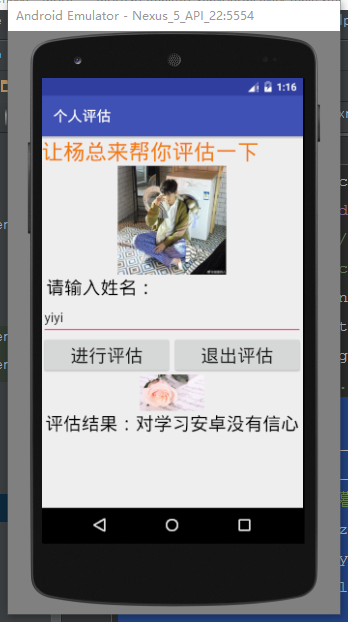

任务到此结束。
论Activity的转换的更多相关文章
- [转]Android之Context和Activity互相转换
1.context转换为activity Activity activity = (Activity) context; 2.从activity得到context 在activity的方法中用cont ...
- Android之Context和Activity互相转换
1.context转换为activity Activity activity = (Activity) context; 2.从activity得到context 在activity的方法中用cont ...
- 使用adb shell dumpsys检测Android的Activity任务栈
谈起Android程序开发,就需要了解其四个主要的部件:Activity.Service.ContentProvider. BroadcastReceiver.而其中Activity是唯一直接控制程序 ...
- Android群英传笔记——第八章:Activity与Activity调用栈分析
Android群英传笔记--第八章:Activity与Activity调用栈分析 开篇,我们陈述一下Activity,Activity是整个应用用户交互的核心组件,了解Activity的工作模式,生命 ...
- Android四大组件之——Activity(一)定义、状态和后退栈(图文详解)
什么是Activity 关键字:应用组件.四大组件.用户界面,交互. An Activity is an application component that provides a screen wi ...
- 1.2 Activity
Activity是个应用组件,它给用户提供了为了完成某些工作而可以进行交互操作的界面,例如,电话详情,打电 话,发邮件,或是浏览地图.每一个Activity都有一个窗口来绘制自已的用户界面.通常来说, ...
- Android学习笔记4——Activity详解
在 Android 开发过程中,与程序员打交道最多的应该就是作为四大组件之一的 Activity 了.接下来我们就一起来揭开 Activity 的神秘面纱吧~ 一.概述 什么是 Activity(活动 ...
- Android组件内核之Activity调用栈分析(一)
阿里P7Android高级架构进阶视频免费学习请点击:https://space.bilibili.com/474380680 导语 我们陈述一下Activity,Activity是整个应用用户交互的 ...
- Android官方文档翻译 十八 4.2Pausing and Resuming an Activity
Pausing and Resuming an Activity 暂停和恢复一个activity This lesson teaches you to 这节课教给你 Pause Your Activi ...
随机推荐
- 2.数据库的基本操作<针对于库层面的操作>
1.查看已有数据库: MySQL [(none)]> show databases; +--------------------+ | Database | +----------------- ...
- logging-----日志模块
import logging #creat logger 第一步,创建一个记录器 logging_name = 'test' logger = logging.getLogger(logging_na ...
- Maven插件maven-shade-plugin打包配置
转载以下两篇文章 https://www.cnblogs.com/fuxinci/p/3356087.html https://chenzhou123520.iteye.com/blog/197132 ...
- Python学习—基础篇之常用模块
常用模块 模块,用一砣代码实现了某个功能的代码集合. 类似于函数式编程和面向过程编程,函数式编程则完成一个功能,其他代码用来调用即可,提供了代码的重用性和代码间的耦合.而对于一个复杂的功能来,可能需要 ...
- Selenium 实现nvsm查询和输出ksql语句
测试环境:http://nvsm.cnki.net/kns/brief/result.aspx?dbprefix=SCDB 程序功能:对各个文献库的高级检索功能,输入检索条件做检索,提取加密的ksql ...
- session的简单应用
session的作用:服务器端保存信息. 用户登陆后,服务器端保存了 自定义的key:value 如下: if username == 'xxx' and password == 'xxxx': re ...
- Heroku登录问题
second_app 这一步还没有完成,登录接口维护.
- 浏览器虚拟过程IP插件
浏览器虚拟过程 这是个插件在调用API时候结合使用,比如调用大量IP去点击http://www.opew.cn和http://www.gtev.cn function QMPlugin.gbip() ...
- 100-days: twenty-three
Title: The surprising connection between single women and gentrification connection n.连接,联系,关系:连接点; ...
- Food Delivery ZOJ - 3469(区间dp)
题目传送门 题目翻译:当我们专注于解决问题时,我们通常宁愿呆在电脑前而不是外出吃午饭.在这个时候,我们可能会要求提供食物. 假设有N个人生活在一条直线的街道上,它只是位于X坐标轴上.第i个人的坐标是X ...