
3dsmax不同版本 pyside qt UI 设置max窗口为父窗口的方法
3dsmax不同版本 pyside qt widget 设置 max 窗口为父窗口的方法
前言:
3dsmax 在 2014 extension 之后开始集成 Python 和 PySide,但是在版本2014 extension - 2015 中,当设置 qt UI 的父窗口为 max 主窗口的时候会报错,3dsmax2016 修复了这个bug,2017 和 2018 对 parenting qt widget to max main window 的方式都有所更新,下面来看看每个版本的具体方式。
3dsmax2014 extension - 2015:
下面是报错的代码:(在MAXScript Listener中运行 python.ExecuteFile @"[Path]\maxPyGui.py",[Path]改为文件的所在路径)
# -*- coding: utf-8 -*-

"""

在MAXScript Listener中运行 python.ExecuteFile @"[Path]\maxPyGui.py"

[Path]改为 maxPyGui.py 所在的路径

"""

from PySide import QtGui

from PySide import shiboken

import MaxPlus

class _GCProtector(object):

    widgets = []

app = QtGui.QApplication.instance()

if not app:

    app = QtGui.QApplication([])

def main():

    MaxPlus.FileManager.Reset(True)

    w = QtGui.QWidget()

    w.resize(250, 100)

    w.setWindowTitle('Window')

    _GCProtector.widgets.append(w)

    main_layout = QtGui.QVBoxLayout()

    label = QtGui.QLineEdit()

    main_layout.addWidget(label)

    cylinder_btn = QtGui.QPushButton("test")

    main_layout.addWidget(cylinder_btn)

    w.setLayout(main_layout)

    # 这是会报错的方式

    maxWinHwd = MaxPlus.Core.GetWindowHandle()

    parent = shiboken.wrapInstance(long(maxWinHwd), QtGui.QWidget)

    w.setParent(parent)#报错在这里,如果你的窗口继承了QtGui.QWidget,parent = parent 也会报错,如果想正常运行,请注释这行

    """Max2016的修正方式

    MaxPlus.AttachQWidgetToMax(w)

    """

    """不太好的方式

    hwnd = w.winId()

    import ctypes

    ctypes.pythonapi.PyCObject_AsVoidPtr.restype = ctypes.c_void_p

    ctypes.pythonapi.PyCObject_AsVoidPtr.argtypes = [ctypes.py_object]

    int_hwnd = ctypes.pythonapi.PyCObject_AsVoidPtr(hwnd)

    MaxPlus.Win32_Set3dsMaxAsParentWindow(int_hwnd)

    """

    w.show()

if __name__ == '__main__':

    main()
maxPyGui.py
注意:如果运行报错SyntaxError: encoding declaration in Unicode string (maxPyGui.py, line 0),请去掉第一行的 # -*- coding: utf-8 -*-,在命令行中运行不需要指定,下面的代码例子也一样。
很多人建议不要 parenting qt widget to max main window ,不过还是有人尝试了很多方法,autodesk 官方 也给出了 pyqt4 的方式,链接:https://area.autodesk.com/blogs/chris/pyqt-ui-in-3ds-max-2014-extension,我使用的是pyside,所以没有验证过,也有人把这种方式改为 pyside ,有兴趣的可以试试。
一种比较理想的代替方式:
下面是在:https://github.com/alfalfasprossen/qtinwin 上找到的代码,下载后有以下文件:

在这里只关注 maxparenting.py 和 maxparenting_example.py,在MAXScript Listener中运行 python.ExecuteFile @"maxparenting_example.py",这是以owner的方式来实现的,具体描述请看代码里面的注释。
下面附上代码:
"""This is a quite well working experiment of setting the **owner**

(not the **parent**) of the qt widget to be the 3dsMax main window.

Effectively the qt widget will behave like a natively spawned window,

with correct z-order behaviour concerning its sibling windows.

"""

import ctypes

from PySide import QtGui

from PySide import QtCore

import MaxPlus

GWL_HWNDPARENT = -8

SetWindowLongPtr = ctypes.windll.user32.SetWindowLongPtrW

class FocusFilter(QtCore.QObject):

    def eventFilter(self, obj, event):

        # TODO: fix focus filter not releasing on defocus

        MaxPlus.CUI.DisableAccelerators()

        return False

class MaxWidget(QtGui.QWidget):

    def __init__(self, title):

        super(MaxWidget, self).__init__(None)

        self.parent_hwnd = MaxPlus.Win32.GetMAXHWnd()

        self.hwnd = self.get_hwnd()

        self._parent_to_main_window()

        self.show()

        app = QtGui.QApplication.instance()

        self._focus_filter = FocusFilter()

        self.event_filter = app.installEventFilter(self._focus_filter)

    def get_hwnd(self):

        """Get the HWND window handle from this QtWidget."""

        ctypes.pythonapi.PyCObject_AsVoidPtr.restype = ctypes.c_void_p

        ctypes.pythonapi.PyCObject_AsVoidPtr.argtypes = [ctypes.py_object]

        wdgt_ptr = ctypes.pythonapi.PyCObject_AsVoidPtr(self.winId())

        return wdgt_ptr

    def _parent_to_main_window(self):

        """ Parent the widget to the 3dsMax main window.

        Technically this is NOT setting the **parent** of the window,

        but the **owner**.

        There is a huge difference, that is hardly documented in the

        win32 API.

        https://msdn.microsoft.com/en-us/library/windows/desktop/ms644898(v=vs.85).aspx  # noqa

        Setting the parent would make this a child or mdi-

        child window. Setting the owner, makes this a top-level,

        overlapped window that is controlled by the main window, but

        not confined to its client area.

        http://stackoverflow.com/questions/133122/

        """

        SetWindowLongPtr(self.hwnd, GWL_HWNDPARENT, self.parent_hwnd)

    def closeEvent(self, event):

        app = QtGui.QApplication.instance()

        app.removeEventFilter(self.event_filter)

        event.accept()
maxparenting.py
from PySide import QtGui

import maxparenting

reload(maxparenting)

class ExampleWidget(maxparenting.MaxWidget):

    """This is a test that ui interaction works correctly with a more

    or less complex ui.

    """

    def __init__(self):

        super(ExampleWidget, self).__init__("Example Widget")

        self.build_ui()

        self.connect_ui()

    def build_ui(self):

        self.setLayout(QtGui.QVBoxLayout())

        self.label = QtGui.QLabel("some label")

        self.btn = QtGui.QPushButton("button")

        self.lineedit = QtGui.QLineEdit()

        self.textedit = QtGui.QTextEdit()

        self.grp = QtGui.QGroupBox("group box grid layout")

        self.grp.setLayout(QtGui.QGridLayout())

        self.chkbx_1 = QtGui.QCheckBox("chkbx_1")

        self.chkbx_2 = QtGui.QCheckBox("chkbx_2l")

        self.chkbx_2.setDisabled(True)

        self.chkbx_3 = QtGui.QCheckBox("chkbx_2r")

        self.chkbx_4 = QtGui.QCheckBox("chkbx_3")

        self.chkbx_5 = QtGui.QCheckBox("chkbx_4")

        self.grp.layout().addWidget(self.chkbx_1, 0, 0)

        self.grp.layout().addWidget(self.chkbx_2, 1, 0)

        self.grp.layout().addWidget(self.chkbx_3, 1, 1)

        self.grp.layout().addWidget(self.chkbx_4, 2, 0)

        self.grp.layout().addWidget(self.chkbx_5, 3, 0)

        self.grp.layout().setColumnStretch(2,1)

        self.lrbox = QtGui.QHBoxLayout()

        self.lrbox.addWidget(self.textedit)

        self.lrbox.addWidget(self.grp)

        self.layout().addWidget(self.label)

        self.layout().addWidget(self.btn)

        self.layout().addWidget(self.lineedit)

        self.layout().addLayout(self.lrbox)

    def connect_ui(self):

        self.btn.clicked.connect(self.on_btn_clicked)

    def on_btn_clicked(self):

        print "btn clicked"

global qtwdgt

qtwdgt = ExampleWidget()
maxparenting_example.py
其它.py文件有兴趣的可以自己尝试。
3dsmax2016:
在2016中,终于做出了修正,在模块 MaxPlus 中增加了AttachQWidgetToMax()(注意,是 max 2016 PS3版本,如果没有安装补丁,是没有这个方法的),不过这只是一种简单的指定方式,我们还是没办法获得 Max main window 的QT对象,没办法以继承 QtGui.QWidget 来指定parent,but, it's not a bid deal。
# -*- coding: utf-8 -*-

"""

在MAXScript Listener中运行 python.ExecuteFile @"[Path]\maxPyGui.py"

[Path]改为 maxPyGui.py 所在的路径

"""

from PySide import QtGui

from PySide import shiboken

import MaxPlus

class _GCProtector(object):

    widgets = []

app = QtGui.QApplication.instance()

if not app:

    app = QtGui.QApplication([])

def main():

    MaxPlus.FileManager.Reset(True)

    w = QtGui.QWidget()

    w.resize(250, 100)

    w.setWindowTitle('Window')

    _GCProtector.widgets.append(w)

    main_layout = QtGui.QVBoxLayout()

    label = QtGui.QLineEdit()

    main_layout.addWidget(label)

    cylinder_btn = QtGui.QPushButton("test")

    main_layout.addWidget(cylinder_btn)

    w.setLayout(main_layout)

    """这是会报错的方式

    maxWinHwd = MaxPlus.Core.GetWindowHandle()

    parent = shiboken.wrapInstance(long(maxWinHwd), QtGui.QWidget)

    w.setParent(parent)#报错在这里,如果你的窗口继承了QtGui.QWidget,parent = parent 也会报错,如果想正常运行,请注释这行

    """

    #Max2016的修正方式

    MaxPlus.AttachQWidgetToMax(w)

    """不太好的方式

    hwnd = w.winId()

    import ctypes

    ctypes.pythonapi.PyCObject_AsVoidPtr.restype = ctypes.c_void_p

    ctypes.pythonapi.PyCObject_AsVoidPtr.argtypes = [ctypes.py_object]

    int_hwnd = ctypes.pythonapi.PyCObject_AsVoidPtr(hwnd)

    MaxPlus.Win32_Set3dsMaxAsParentWindow(int_hwnd)

    """

    w.show()

if __name__ == '__main__':

    main()
maxPyGui.py
3dsmax2017:
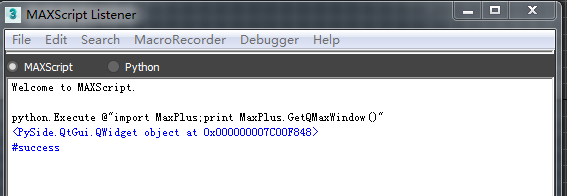
所以,在2017中,为了解决2016的问题,在 MaxPlus 中增加了GetQMaxWindow(),这个方法直接返回 Max main window 的 PySide.QtGui.QWidget object:
"""

在MAXScript Listener中运行 python.ExecuteFile @"[Path]\maxPyGui.py"

[Path]改为 maxPyGui.py 所在的路径

"""

from PySide import QtGui

from PySide import shiboken

import MaxPlus

class _GCProtector(object):

    widgets = []

app = QtGui.QApplication.instance()

if not app:

    app = QtGui.QApplication([])

def main():

    MaxPlus.FileManager.Reset(True)

    w = QtGui.QWidget()

    w.resize(250, 100)

    w.setWindowTitle('Window')

    _GCProtector.widgets.append(w)

    main_layout = QtGui.QVBoxLayout()

    label = QtGui.QLineEdit()

    main_layout.addWidget(label)

    cylinder_btn = QtGui.QPushButton(u"我们")

    main_layout.addWidget(cylinder_btn)

    w.setLayout(main_layout)

    #Max2017的改进方式

    parent = MaxPlus.GetQMaxWindow()

    w.setParent(parent)#上面返回的parent直接是PySide.QtGui.QWidget object,可以不通过wrapping,直接设置为父窗口

    """这是会报错的方式

    maxWinHwd = MaxPlus.Core.GetWindowHandle()

    parent = shiboken.wrapInstance(long(maxWinHwd), QtGui.QWidget)

    w.setParent(parent)#报错在这里,如果你的窗口继承了QtGui.QWidget,parent = parent 也会报错,如果想正常运行,请注释这行

    """

    """Max2016的修正方式

    MaxPlus.AttachQWidgetToMax(w)

    """

    """不太好的方式

    hwnd = w.winId()

    import ctypes

    ctypes.pythonapi.PyCObject_AsVoidPtr.restype = ctypes.c_void_p

    ctypes.pythonapi.PyCObject_AsVoidPtr.argtypes = [ctypes.py_object]

    int_hwnd = ctypes.pythonapi.PyCObject_AsVoidPtr(hwnd)

    MaxPlus.Win32_Set3dsMaxAsParentWindow(int_hwnd)

    """

    w.show()

if __name__ == '__main__':

    main()
maxPyGui.py
3dsmax2018 (PySide2):
在2018中,去掉了 MaxPlus 中的GetQMaxWindow(),所以没办法直接获得 Max main window 的 PySide.QtGui.QWidget object,但是增加了QtHelpers 类,里面有静态方法GetQmaxMainWindow() 获得 maxMainWindow 的指针,然后我们可以通过传统方式来进行转换:
maxWinHwd = MaxPlus.QtHelpers.GetQmaxMainWindow()
parent = shiboken2.wrapInstance(long(maxWinHwd), QtGui.QWidget)
例子代码在这里就不提供了,只是要注意的是2018开始,集成的是PySide2,所以要用shiboken2,而且 shiboken2 是在 PySide2 下的一个模块,所以导入方式为(和Maya的不一样):
from PySide2 import shiboken2
3dsmax不同版本 pyside qt UI 设置max窗口为父窗口的方法的更多相关文章
- Qt 代码: 子窗口调用父窗口(其实就是用指针直接访问)
之前的 Qt 编程大多只涉及简单的多窗口,并未染指窗口间的传值交互,想来还是“涉世未深”,对 Qt 的理解.应用还需殷勤努力. 这次的问题是这样的,我想要实现一个类似QQ.阿里旺旺的聊天客户端,在弹出 ...
- Qt之设置QWidget背景色(QStyleOption->drawPrimitive(QStyle::PE_Widget)方法比较有趣)
QWidget是所有用户界面对象的基类,这意味着可以用同样的方法为其它子类控件改变背景颜色. Qt中窗口背景的设置,下面介绍三种方法. 1.使用QPalette2.使用Style Sheet3.绘图事 ...
- Qt中,当QDockWidget的父窗口是一个不可以拖动的QTabWidget的时候实现拖动的方法
之前在做有关QDockWidget的内容时候遇到了瓶颈,那就是窗口弹出来之后拖动不了,也不可以放大和缩小,若是弹出来之后设置成了window的flags,也不可以拖动,而且也不是需要的效果. 1.弹出 ...
- Qt的子窗口和父窗口阻塞问题
在图形界面中,软件设计者通常需要将活跃窗口限制为一个.在某个窗口活跃时,它的父窗口被它挡住或者挡住一部分,这时候用鼠标去点击父窗口是没有作用的.问题的关键在于将子窗口设置模态: void MainWi ...
- PyQt(Python+Qt)学习随笔:在父窗口中弹出子窗口无法显现的问题
在学习和测试PyQt相关部件功能的时候,老猿经常是不同的窗口新建一个类,再新建一个Application来使用这个窗口类进行测试. 为了减少应用框架代码的重复开发,老猿决定采用主窗口叠加测试窗口的模式 ...
- QT 常用设置
博文都写在了云笔记里面了,见谅,不想维护两个版本. QT 常用设置
- Qt - QDialog,QWidget实现模态及非模态(模态Widget不能有父窗口,如果设置无边框就不能阻塞父窗口,但是可以强行设置指定Qt::Dialog,还可以setAttribute(Qt::WA_ShowModal),很多讲究)good
在Qt中QDialog为“窗口”,而QWidget为“部件”,首先还是了解下<Qt 窗口与部件的概念>. 对于 QDialog 的模态及非模态是直接可以实现的,很多课本中都会提到,此处总结 ...
- Qt::WindowFlags枚举类型(Qt::Widget是独立窗口和子窗口两用的,Qt::Window会有标题栏)
Qt::Widget : QWidget构造函数的默认值,如新的窗口部件没有父窗口部件,则它是一个独立的窗口,否则就是一个子窗口部件. Qt::Window : 无论是否有父窗口部件,新窗口部件都是一 ...
- Inside Qt Series (全集,共十六篇,不同版本的Qt有不同的实现)
Inside Qt 系列 QObject这个 class 是 QT 对象模型的核心,绝大部分的 QT 类都是从这个类继承而来.这个模型的中心特征就是一个叫做信号和槽(signaland slot)的机 ...
随机推荐
- swift 学习- 15 -- 构造过程 01
// 构造过程 是使用类,结构体 或 枚举类型的实例之前的准备过程, // 在新实例可用前必须执行这个过程, 具体操作包括 设置实例中每个存储型属性的初始值 和 执行其他必须的设置 或 初始化工作 / ...
- Oracle数据库的状态查询
本文来源:huang_xw 的<Oracle数据库的状态查询> 1 状态查询 启动状态 SQL语句 结果 nomount select status from v$instance; ST ...
- Confluence 6 配置索引语言
修改你 Confluence 的索引语言将有助于你提高搜索的准确性,如果你网站使用的主要语言是除了英语以外的其他语言. Confluence 可以支持下面语言的的内容索引: Arabic Brazil ...
- Confluence 6 自定义 Decorator 模板的宏和针对高级用户
宏 页面的某些部分使用的是 Velocity 宏进行创建的,包括导航栏.有关宏的创建,你可以参考页面 Working With Decorator Macros 页面中的内容. 针对高级用户 vel ...
- LeetCode(69):x 的平方根
Easy! 题目描述: 实现 int sqrt(int x) 函数. 计算并返回 x 的平方根,其中 x 是非负整数. 由于返回类型是整数,结果只保留整数的部分,小数部分将被舍去. 示例 1: 输入: ...
- HighCharts基本使用
一.简叙 HighCharts是一个非常强大的画图插件,在以后的工作汇报,数字展示,它将是一把利器.既然是插件,那么就有它的使用规则,我们只需要遵循它的使用规则,就可以画出我们想要的展示效果了.期待吗 ...
- MySQL数据库查询中的特殊命令
第一: MySQL的安装 下载MySQL软件,修改安装路径之后 安装数据库MySQL5.7.18 第一步:数据库MySQL5.7.18可以在官网上下载对应的版本,下载地址:http://www.f ...
- hdu5758 思维,树形dp
/*可以推测从叶子结点传送到叶子节点才能使传送次数最少,如果是偶数个叶子结点,那么传送leaf/2次就是答案,如果是奇数个叶子结点,则还有单独一条链需要覆盖dp[u]表示覆盖完u为根的子树需要走的边数 ...
- 优先选择nullptr而不是0和NULL
我们知道:0是一个int,而不是一个指针.如果C++在一个只有指针才能够使用的上下文中发现它只有一个0,那么它会勉强将0解释成空指针,但那时一种倒退行为.C++的主要方针是0就是一个int,而不是指针 ...
- mysql5.7 root用户默认密码
1. 查找密码 Mysql 5.7 在自动初始化数据库的时候,会生成root用户的默认密码. 通过 grep "temporary password" /var/log/mysql ...