
Python学习总结 03 Plotly 学习总结
一 Plotly 简介

Plotly是另一个免费进行数据分析和绘制图表的APP,建立在d3.js上。 Plotly图可下载为SVG,EPS或PNG格式,并简单地导入到Illustrator或者Photoshop中。详细内容可以去官网参考:
https://plot.ly/python/
1 安装
安装Plotly的Python安装包,需要使用pip命令来安装,安装命令如下。
sudo pip install plotly
如果安装成功会下图所示。
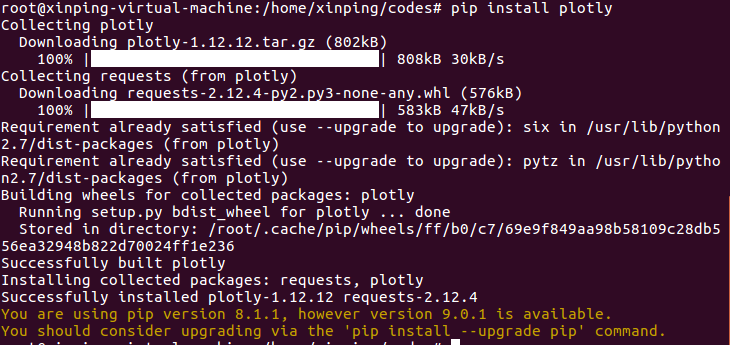
如果要升级Plotly模块,使用以下命令来升级。
pip install plotly --upgrade
2 初始化在线绘图
Plotly提供了在线服务,首先需要去以下的官网去注册一个账号
https://plot.ly/ssu/
然后在线生成一个私钥 API Key, 这里可以使用我已经注册的账户和私钥。
账户: templarz

API Key : PtKMjV9gAzINZqmQRU4T
在python交互环境下运行以下初始化命令,生成认证的安全文件 .plotly/.credentials。
import plotly

plotly.tools.set_credentials_file(username='templarz', api_key='PtKMjV9gAzINZqmQRU4T')
初始化生成的Plotly的安全文件.plotly/.credentials在home目录下,在~/.plotly/.credentials下。在文件中会看到以下内容,就说明初始化命令起作用了。
{

    "username": "templarz",

    "stream_ids": [],

    "api_key": "PtKMjV9gAzINZqmQRU4T",

    "proxy_username": "",

    "proxy_password": ""

}~
注意:
文中使用的开发环境是Ubuntu,如果是在Windows环境生成的安全文件,那么它所在的位置会有所不同。
3 例子1 生成在线折线图
当使用Plotly web服务时,生成的plot和数据会保存到你的云账户中,下面的例子运行后会生成一个独一无二的url地址,通过这个地址可以访问你生成的plot图形。
import plotly.plotly as py

from plotly.graph_objs import *

trace0 = Scatter(

    x=[, , , ],

    y=[, , , ]

)

trace1 = Scatter(

    x=[, , , ],

    y=[, , , ]

)

data = Data([trace0, trace1])

py.plot(data, filename = 'basic-line')
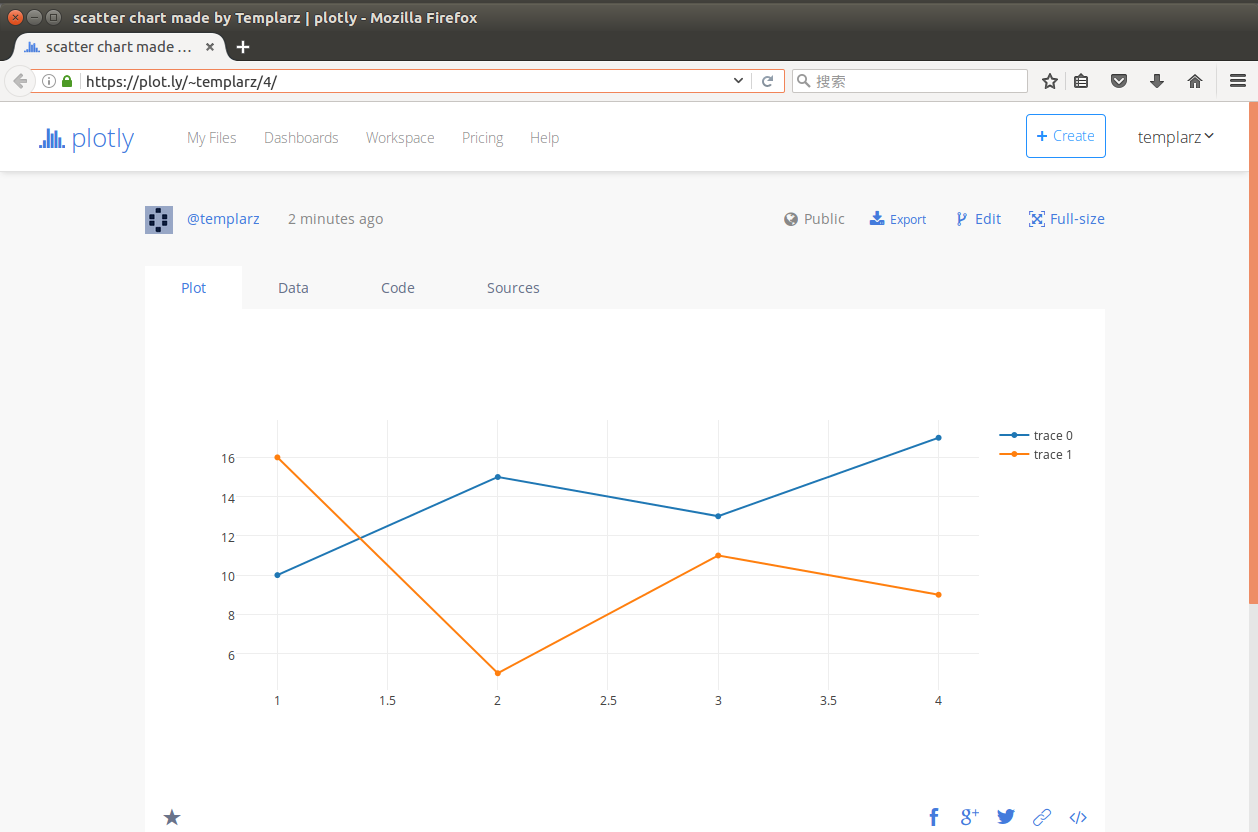
运行以上那段代码后,会生成在浏览器中打开地址https://plot.ly/%7Etemplarz/4/ 地址,在云账户templarz中显示生成的plot图形如下图所示。
使用以下命令查看py.plot的api使用方法。
import plotly.plotly as py

help(py.plot)
输入后得到以下消息提示。
Help on function plot in module plotly.plotly.plotly:

plot(figure_or_data, validate=True, **plot_options)

    Create a unique url for this plot in Plotly and optionally open url.

    plot_options keyword agruments:

    filename (string) -- the name that will be associated with this figure

    fileopt ('new' | 'overwrite' | 'extend' | 'append') -- 'new' creates a

        'new': create a new, unique url for this plot

        'overwrite': overwrite the file associated with `filename` with this

        'extend': add additional numbers (data) to existing traces

        'append': add additional traces to existing data lists

    auto_open (default=True) -- Toggle browser options

        True: open this plot in a new browser tab

        False: do not open plot in the browser, but do return the unique url

    sharing ('public' | 'private' | 'secret') -- Toggle who can view this

                                                  graph

        - 'public': Anyone can view this graph. It will appear in your profile

                    and can appear in search engines. You do not need to be

                    logged in to Plotly to view this chart.

        - 'private': Only you can view this plot. It will not appear in the

                     Plotly feed, your profile, or search engines. You must be

                     logged in to Plotly to view this graph. You can privately

                     share this graph with other Plotly users in your online

                     Plotly account and they will need to be logged in to

                     view this plot.

        - 'secret': Anyone with this secret link can view this chart. It will

                    not appear in the Plotly feed, your profile, or search

                    engines. If it is embedded inside a webpage or an IPython

                    notebook, anybody who is viewing that page will be able to

                    view the graph. You do not need to be logged in to view

                    this plot.

    world_readable (default=True) -- Deprecated: use "sharing".

                                     Make this figure private/public

>>>
资料参考:
https://plot.ly/python/getting-started/
http://www.cnblogs.com/chaosimple/p/4153083.html
Python学习总结 03 Plotly 学习总结的更多相关文章
- JavaWeb学习总结-03 JSP 学习和使用
一 JSP JSP 是Java Server Pages的缩写,在传统的网页HTML文件中加入 Java 程序片段和JSP标签就构成了JSP网页. 1 JSP与Servlet的生成方式 Servlet ...
- 机器学习实战(Machine Learning in Action)学习笔记————03.决策树原理、源码解析及测试
机器学习实战(Machine Learning in Action)学习笔记————03.决策树原理.源码解析及测试 关键字:决策树.python.源码解析.测试作者:米仓山下时间:2018-10-2 ...
- OpenCV 学习笔记03 findContours函数
opencv-python 4.0.1 1 函数释义 词义:发现轮廓! 从二进制图像中查找轮廓(Finds contours in a binary image):轮廓是形状分析和物体检测和识别的 ...
- 编写高质量代码改善python程序91个建议学习01
编写高质量代码改善python程序91个建议学习 第一章 建议1:理解pythonic的相关概念 狭隘的理解:它是高级动态的脚本编程语言,拥有很多强大的库,是解释从上往下执行的 特点: 美胜丑,显胜隐 ...
- [Python 学习]2.5版yield之学习心得 - limodou的学习记录 - limodou是一个程序员,他关心的焦点是Python, DocBook, Open Source …
[Python 学习]2.5版yield之学习心得 - limodou的学习记录 - limodou是一个程序员,他关心的焦点是Python, DocBook, Open Source - [Pyth ...
- 《用Python做HTTP接口测试》学习感悟
机缘巧合之下,报名参加了阿奎老师发布在"好班长"的课程<用Python做HTTP接口测试>,报名费:15rmb,不到一杯咖啡钱,目前为止的状态:坚定不移的跟下去,自学+ ...
- Python自动化培训第一周学习总结
Python自动化培训第一周学习结束,看视频复习,把作业完成了. 总体来说,开卷有益. 首先,工具真是好东西,能够极大提升效率,也是人区别于动物所在.想起前任大领导对工具的不屑,本质也是对效率的不屑, ...
- python实用库:PrettyTable 学习
python实用库:PrettyTable 学习 PrettyTable说明 PrettyTable 是python中的一个第三方库,可用来生成美观的ASCII格式的表格,十分实用. 以下为官方介绍: ...
- OpenCV 学习笔记03 边界框、最小矩形区域和最小闭圆的轮廓
本节代码使用的opencv-python 4.0.1,numpy 1.15.4 + mkl 使用图片为 Mjolnir_Round_Car_Magnet_300x300.jpg 代码如下: impor ...
随机推荐
- Oracle Sales Cloud:报告和分析(BIEE)小细节2——利用变量和过滤器传参(例如,根据提示展示不同部门的数据)
在上一篇随笔中,我们建立了部门和子部门的双提示,并将部门和子部门做了关联.那么,本篇随笔我们重点介绍利用建好的双提示进行传参. 在操作之前,我们来看一个报告和分析的具体需求: [1] 两个有关联的提示 ...
- iOS:frame访问、设置简化
看到一些程序都有这种写法,也不知道原创者是谁了.先在博客保存下. 在.m文件 #import "UIView+MyFrameCategory.h" @implementation ...
- 记录下UIButton的图文妙用和子控件的优先显示
UIButton的用处特别多,这里只记录下把按钮应用在图文显示的场景,和需要把图片作为按钮的背景图片显示场景: 另外记录下在父控件的子控件优先显示方法(控件置于最前面和置于最后面). 先上效果图: 1 ...
- iOS平台UDID方案比较
苹果在iOS6中禁用了[UIDevice uniqueIdentifier],在iOS7中又把mac地址的获取给堵上了.没办法,毕竟人家是老大,说不让你用,你也没办法.在这边总结一下现有的一部分UDI ...
- Android核心组件 Activity组件
1.Activity简介 四大组件之一的Activity组件,在应用中一个Activity可以用来表示一个界面,中文意思也可以理解为"活动",即一个活动开始,代表Activity组 ...
- IOS 网络浅析-(十二 UIWebView简介)
在这篇随笔里,我们只要知道UIWebView是什么就可以了. UIWebView 是苹果提供的用来展示网页的UI控件,它也是最占内存的控件. iOS8.0之后出现了webkit框架,WKWebView ...
- yii2中如何使用modal弹窗之基本使用
作者:白狼 出处:http://www.manks.top/yii2_modal_baseuse.html 本文版权归作者,欢迎转载,但未经作者同意必须保留此段声明,且在文章页面明显位置给出原文连接, ...
- Spring 4 异常处理
异常与HTTP状态码的映射(@ResponseStatus) Spring默认会将自身抛出的异常自动映射到合适的状态码,如下是一些示例: 举个例子,当后端抛出如下异常(TypeMismatchExce ...
- 转载 NPOI.dll 用法。单元格,样式,字体,颜色,行高,宽度。读写excel
我用的版本是1.25的.每个版本用法有一点不同 using System; using System.Collections.Generic; using System.ComponentModel; ...
- MapReduce 常见SQL模型解析
MapReduce应用场景 前一阵子参加炼数成金的MapReduce培训,培训中的作业例子比较有代表性,用于解释问题再好不过了.有一本国外的有关MR的教材,比较实用,点此下载. MR能解决什么问题?一 ...