
JavaEE-Servlet的部署和配置
1、:配置好相应环境和检查tomcat8.5能否运行,详见https://www.cnblogs.com/LJHAHA/p/10461697.html
2、将tomcat8.5下的webapps目录中所有内容备份到另一文件夹(bak)中,再清空webapps目录;
3、进入eclipse,配置好相应环境后,进入Servers,点击下方红色圈处,将tomcat8.5集成到eclipse中;
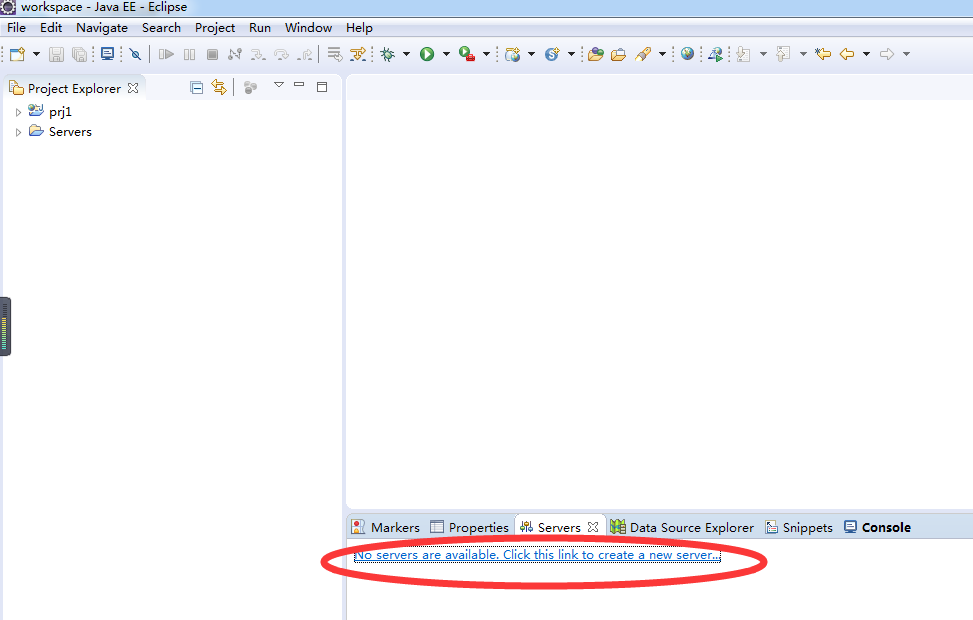
4.选择新建一个Apache下的Tomcat v8.5 Server--->Finish

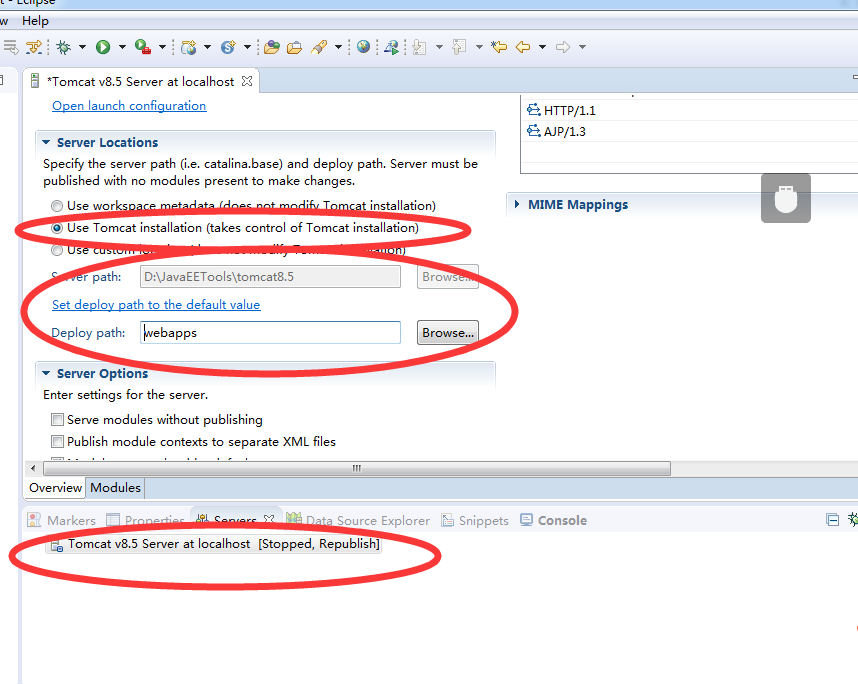
5.双击红色圈出的Tomcat v8.5 Server at localhost,进入上方的设计页面,其余的不做更改,需要将Server Locations改选为第二项Use Tomcat installation,同时检查下方路径是否正确,最好将Deploy path改为tomcat8.5下自带的webapps,最后别忘了点击保存;
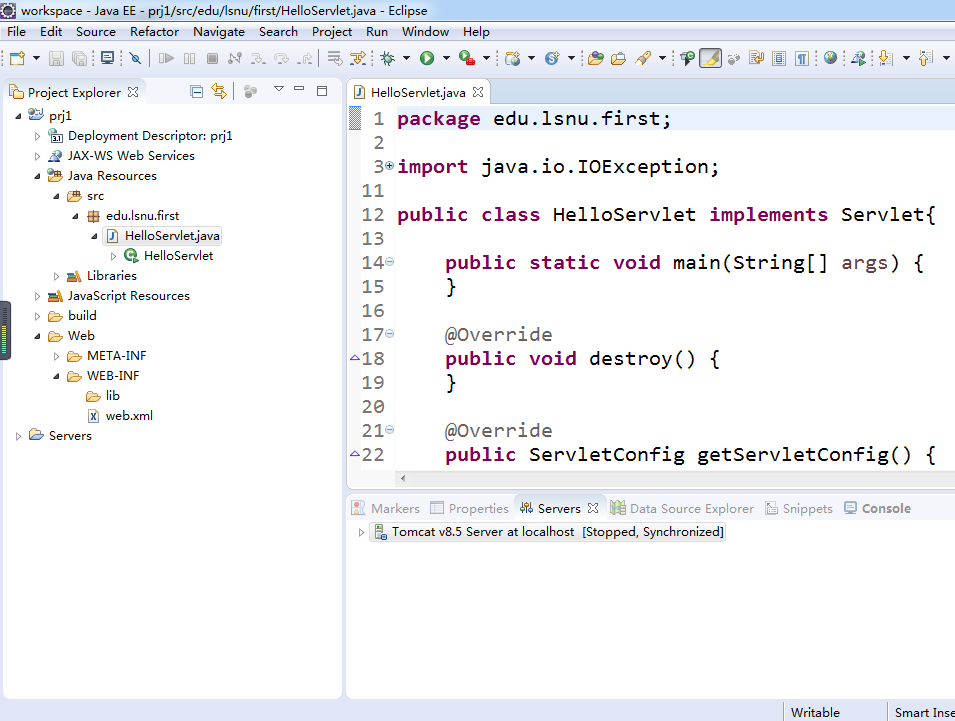
6.新建一个Dynamic Web Project(名为prj1),在Java Resources->src目录下新建一个包,名为edu.lsnu.first,在该包下新建一个HelloServlet类,编辑以下内容;
 package edu.lsnu.first;

 import java.io.IOException;

 import java.io.PrintWriter;

 import javax.servlet.Servlet;

 import javax.servlet.ServletConfig;

 import javax.servlet.ServletException;

 import javax.servlet.ServletRequest;

 import javax.servlet.ServletResponse;

 public class HelloServlet implements Servlet{

     public static void main(String[] args) {

     }

     @Override

     public void destroy() {

     }

     @Override

     public ServletConfig getServletConfig() {

         return null;

     }

     @Override

     public String getServletInfo() {

         return null;

     }

     @Override

     public void init(ServletConfig arg0) throws ServletException {

     }

     @Override

     public void service(ServletRequest request, ServletResponse response) throws ServletException, IOException {

         response.setContentType("text/html;charset=utf-8");

         PrintWriter out = response.getWriter();

         out.print("<h1>欢迎光临</h1>");

         out.close();

     }

 }
7.接下来,再进入web->MEB_INF目录下,点开web.xml文件,编辑以下内容;
 <?xml version="1.0" encoding="UTF-8"?>

 <web-app xmlns:xsi="http://www.w3.org/2001/XMLSchema-instance" xmlns="http://xmlns.jcp.org/xml/ns/javaee" xsi:schemaLocation="http://xmlns.jcp.org/xml/ns/javaee http://xmlns.jcp.org/xml/ns/javaee/web-app_3_1.xsd" id="WebApp_ID" version="3.1">

   <display-name>prj1</display-name>

   <servlet>

         <servlet-name>HelloServlet</servlet-name>

         <servlet-class>edu.lsnu.first.HelloServlet</servlet-class>

   </servlet>

   <servlet-mapping>

         <servlet-name>HelloServlet</servlet-name>

         <url-pattern>/hello</url-pattern>

   </servlet-mapping>

   <welcome-file-list>

     <welcome-file>index.html</welcome-file>

     <welcome-file>index.htm</welcome-file>

     <welcome-file>index.jsp</welcome-file>

   </welcome-file-list>

 </web-app>
编译器的最终布局显示如下:
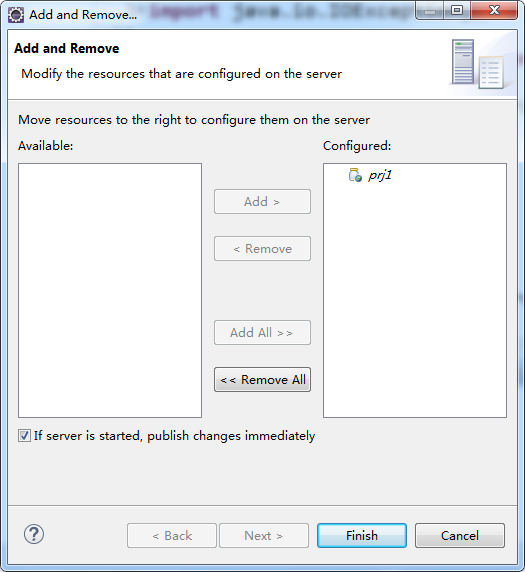
8.点击Tomcat v8.5 Server at localhost,右键选择Add and Remove...,将项目prj1添加到Tomcat中来;
9.启动服务器;

成功后会显示下图情况

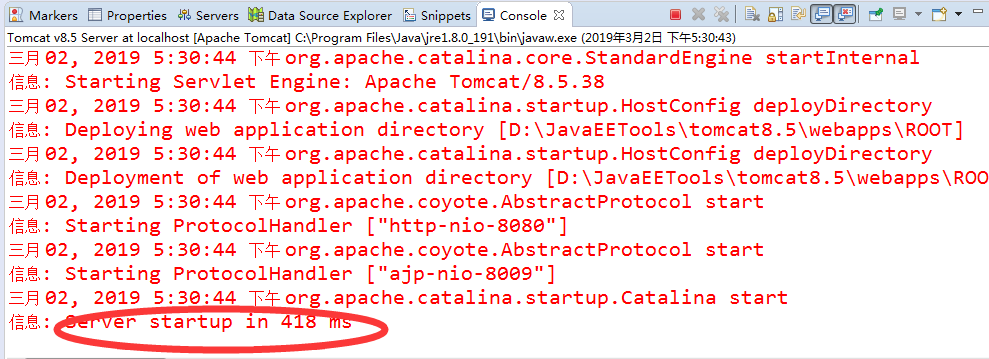
10.最后在浏览器中输入http://127.0.0.1:8080/prj1/hello或http://localhost:8080/prj1/hello,回车即可出现网页

JavaEE-Servlet的部署和配置的更多相关文章
- servlet(二):Servlet的web.xml配置
<?xml version="1.0" encoding="UTF-8"?> <web-app xmlns:xsi="http:// ...
- servlet中web.xml配置
常见的Servlet中url-pattren的配置 1.固定配置, 如:/hi 引入通配符 * 2.以"/XXX"开头,以"*"结尾 3.以"*&qu ...
- Tigase XMPP Server在CentOS部署和配置
Tigase XMPP Server在CentOS部署与配置 作者:chszs,转载需注明.博客主页:http://blog.csdn.net/chszs 以下讲述Tigase XMPP Server ...
- web缓存服务器varnish-4.1.6的部署及配置详解
web缓存服务器varnish-4.1.6的部署及配置详解 1.安装varnish4.1.6安装依赖 yum install -y autoconf automake jemalloc-devel l ...
- 【转】mysql8.0 在window环境下的部署与配置
[转]mysql8.0 在window环境下的部署与配置 今天在阿里云window服务器上配置mysql环境,踩了一些坑,分享出来.需要的朋友可以看看.额,或许有人要吐槽我为什么不在linux上去配置 ...
- Zookeeper集群部署与配置(三)
在上一篇博客中我们讲解了<Zookeeper的单机配置>,此篇博客将继续介绍Zookeeper的集群部署与配置. 环境 集群配置的环境与单机配置的环境相同,唯一不同的就是集群是在多台服务器 ...
- (原创)OpenStack服务如何使用Keystone (二)---部署和配置Keystone中间件
(一)Keystone端的操作 (二)如何在OpenStack服务上部署Keystone中间件 (三)详细配置keystonemiddleware 部署OpenStack时一般先安装Keystone服 ...
- Storm 系列(三)Storm 集群部署和配置
Storm 系列(二)Storm 集群部署和配置 本章中主要介绍了 Storm 的部署过程以及相关的配置信息.通过本章内容,帮助读者从零开始搭建一个 Storm 集群. 一.Storm 的依赖组件 1 ...
- Tomcat6.0下的jsp、servlet和javabean的配置
第一步:下载jdk和tomcat: 第二步:安装和配置你的jdk和tomcat:执行jdk和tomcat的安装程序,然后设置按照路径进行安装即可.1.安装jdk以后,需要配置一下环境变量,在我的电脑- ...
- Office Online Server 2016 部署和配置
Office Online Server 2016 部署和配置https://wenku.baidu.com/view/65faf8de846a561252d380eb6294dd88d1d23d45 ...
随机推荐
- Float与二进制之间的转化(Java实现)
在线转化:http://www.binaryconvert.com import java.text.DecimalFormat; public class SinglePrecision { //浮 ...
- a标签的4种状态及设置CSS
a:link 超链接的默认样式 a:visited 访问过的(已经看过的)链接样式 a:hover 鼠标处于鼠标悬停状态的链接样式 a:active 当鼠标左键按下时,被激活(就是鼠标按下去那一瞬间) ...
- java+appium 自动化环境搭建
1.安装JDK1.7及以上 2.下载解压sdk并且配置环境变量: ANDROID_HOME:...\adt-bundle-windows-x86_64-20140702\sdk PATH:%ANDRO ...
- Nginx(./configure --help)
# ./configure --help --help print this message --prefix=PATH set installation prefix --sbin-path=PAT ...
- Java9 新特性 详解
作者:木九天 < Java9 新特性 详解 > Java9 新特性 详解 摘要: 1.目录结构 2.repl工具 jShell命令 3.模块化 4.多版本兼容jar包 5.接口方 ...
- nginx实践(五)之代理服务(正向代理与反向代理介绍)
正向代理 正向代理代理是为客户端服务,代理负责DNS解析域名到对应ip,并进行访问服务端,返回响应给客户端 反向代理 客户端自己负责请求DNS解析域名到对应ip,服务端通过代理分发流量,进行负载均衡 ...
- html固定表头,表单内容垂直循环滚动
<!DOCTYPE html><html lang="zh-cn"><head> <meta charset="utf-8 ...
- bzoj3276磁力 两种要求下的最大值:分块or线段树+拓扑
进阶指南上的做法是分块的.. 但是线段树搞起来也挺快,将磁石按照距离排序,建立线段树,结点维护区间质量最小值的下标 进行拓扑,每次在可行的范围内在线段树中找到质量最小的下标取出,取出后再将线段树对应的 ...
- meter压力测试 设置一秒发送一次请求,一秒两次请求
使用jmeter进行压力测试 ,测试情况有 1.一秒钟投1次请求(一个线程) 持续30分钟的情况 2.一秒钟发送2次请求(两个线程) 持续30分钟的情况 下面说一下如何使用jmeter 测试这两种情 ...
- 一 time与datetime模块
时间戳(timestamp):通常来说,时间戳表示的是从1970年1月1日00:00:00开始按秒计算的偏移量.我们运行“type(time.time())”,返回的是float类型. 格式化的时间字 ...