
loadrunner跑场景的时候出现:Abnormal termination, caused by mdrv process termination
1.问题
loadrunner跑场景的时候出现:Abnormal termination, caused by mdrv process termination。
备注:我使用的是RTE协议录制的脚本。
2.一些资料
2.1关于mdrv.exe意外终止的可能出现情况说明
Hi, Users facing this mdrv process abnormal termination can try one of these options found from one of the LR articles. The Loadrunner vusers are run by a process called 'mdrv.exe'. Whenever this process encounters errors due to various reasons it may terminate. Some of the possible reasons are as follows
- The Host machine ( Load generator) is running too many Vusers as a result of which it system resources are being maximized. ( i.e. Consistent over 90% CPU and Memory utilization). The mdrv process does not get enough resources to process the request as a result it fails
- If you have Custom C coding, there is a possibility of allocated memory not being freed or memory violation errors which can lead to 'mdrv process termination'.
- Replay the script with think time.
- Turn off extended log when running the script in the controller.
- Do not use the controller itself as the loadgenerator. i.e. have a remote LoadGenerator.
- Introduce iteration pacing, if running more than one iteration each vuser.
- Open the file C:\WinNT\wlrun7.ini in a text editor, modify the entry from: AgentMaxThreadsPerDriver=50 to AgentMaxThreadsPerDriver=20 or 10
- Run Agent as process instead of service Launch command prompt and navigate to C:\Program Files\Mercury\Loadrunner\Launch_service\bin and run the command magentserive -remove. This will remove the agent. Now run the command magentproc -install This will install the agent as a process.
- Run vusers as process instead of threads.Please go to Runtime Settings > Miscellaneous > Multithreading > RunVuser as a process.
原文地址:http://loadrunner.wetpaint.com/page/Abnormal+termination,+caused+by+mdrv+process+termination
2.2 mmdrv和mdrv的异同
在LoadRunner运行脚本过程中,在任务管理器中我们可以看到有一个或多个名为“mmdrv”的进程在运行,与此同时当我们查看 LoadRunner/bin目录下的文件时还会看到一个“mdrv.exe”文件,那么mmdrv.exe和mdrv.exe有什么异同?
其实mmdrv是mdrv的封套,mmdrv通常应用于一些协议(例如 web http/html)中对内存进行优化应用,但实质上mmdrv在优化内存时会启动mdrv。二者都可以按以下命令格式来启动并运行测试脚本: mmdrv/mdrv -usr <script path>
例如在windows的command窗口中首先切换目录至LoadRunner的bin目录下,然后运行以下命令:
>mmdrv -usr D:/qa/product/Space/project/space-3.0.1/performancetest/script/firstpage/script_loadfirstpage/script_loadfirstpage.usr
这样脚本就会在后台运行(不会启动LoadRunner control界面,但可以在任务管理器中看到mmdrv进程运行情况),运行结果可查看脚本目录中的日志文件,如:output.txt,mdrv*.xxx.log(其中“*”是不同的字符标识,如Q6n、R5u;“xxx”是数字代码,如229、505)。
mmdrv和mdrv使用的更多说明可在command窗口中LoadRunner/bin目录下启动mmdrv或mdrv,可看到如下说明(注意到:不论是输入mmdrv还是输入mdrv,显示的帮助窗口都是mdrv的说明内容,这更说明了mmdrv是对mdrv的包装):

2.3 Loadrunn中的多线程与多进程
Loadrunner支持多线程环境,使用多线程的方法能使每台负载生成器运行更多的VU,但是只有支持线程安全的协议,才能使用Loadrunner的VU并发方式。
以下协议不能支持线程并发
Sybase-Dblib,Infomix,Tuxedo,and PeopleSoft-Tuxedo
当使用进程并发是,在任务管理器中有mdrv.exe的进程,比如下图,用10个VU用户并发,就会在任务管理器中出现10个mmdrv进程
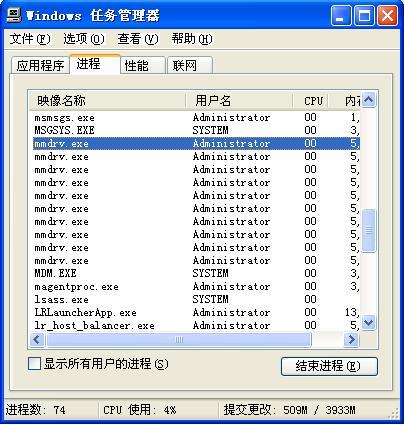
如果以多线程方式并发,只会出现一个mmdrv进程,一个进程可以支持50VU的线程并发。
Loadrunner的参考帮助还说明了,如果采用多线程方式并发,Load Generator将会比多进程支持更多的用户,具体的一个VU占用内存的取值根据Loadrunner的版本不同而不同。
3.解决方案
根据上述的资料,首先关闭了扩展日志,然后加入了思考时间,并且减少了单个压力机上虚拟用户,转而由多个压力机一起运行脚本。此问题解决。
loadrunner跑场景的时候出现:Abnormal termination, caused by mdrv process termination的更多相关文章
- (Loadrunner)Abnormal termination, caused by mdrv process termination.(转)
Load generator跑了太多用户导致CPU和内存爆满,进程无法处理请求 确认自定义的代码是否释放内存 合理调整或增加思考时间 关闭extended log 尽量避免使用Load generat ...
- Loadrunner 在controller中运行socket脚本时报错:Abnormal termination, caused by mdrv process termination 的原因和解决方法
原因: 网上给出的可能的原因大致有两个: 1. 压力负载机器的资源不足(CPU,内存) 2. 分配内存和释放内存的语句不匹配. 并给出了一些解决方案,最开始我以为是加了IP地址的原因,不断尝试增加 ...
- loadrunner跑场景时报错Full MDB file. New error messages will be ignored
这个原因是在controller跑场景时,controller的日志文件占用内存太大 解决办法:先找到controller的日志文件Results——Results Setting——找到日志的路径, ...
- LoadRunner测试场景中添加负载生成器
如何在LoadRunner测试场景中添加负载生成器 本文对如何在LoadRunner的测试场景中添加负载生成器,如何使用负载生成器的方法,总结形成操作指导手册,以指导测试人员指导开展相关工作. 1.什 ...
- Abnormal build process termination IDEA启动报错
报错如下: Error:Abnormal build process termination: "C:Program FilesJavajdk1.11.0_1injava" -Xm ...
- loadrunner多场景的串行执行以及定时执行
方法一: 既然是脚本串行执行,那在场景设计中必然是要用多个脚本,要注意的是需要将Scenario Schedule中的Schedule by设置为Group的模式.然后按实际需要依次设置每个脚本的Sc ...
- LoadRunner 多场景批处理
@echo off echo *********************************echo ****多场景测试*************echo ******************** ...
- Loadrunner:场景运行较长时间后报错:Message id [-17999] was not saved - Auto Log cache is too small to contain the message.
loadrunner运行时间较长后,跑数据过程老是失败,有如下error: Message id [-17999] was not saved - Auto Log cache is too smal ...
- Loadrunner:场景中添加负载生成器
场景中添加负载生成器: (1)远程机子(假设ip为192.168.134.23)开启负载生成器 开始菜单找到:LoadRunner Agent Process 开启后任务栏会显示如下图: (2)场景中 ...
随机推荐
- 自编基于jQuery实现分页插件
$(function(){ }); /** * @params dataUrl:请求数据url地址 * @params countUrl:请求数据总数url地址 * @params pageSize: ...
- 【MPI学习1】简单MPI程序示例
有了apue的基础,再看mpi程序多进程通信就稍微容易了一些,以下几个简单程序来自都志辉老师的那本MPI的书的第七章. 现在ubuntu上配置了一下mpich的环境: http://www.cnblo ...
- Object C学习笔记24-关键字总结
学习Object C也有段时间了,学习的过程中涉及到了很多Object C中的关键字,本文总结一下所涉及到的关键字以及基本语法. 1. #import #import <> 从syste ...
- JavaScript事件---事件对象
发文不易,若转载传播,请亲注明出处,谢谢! 内容提纲: 1.事件对象 2.鼠标事件 3.键盘事件 4.W3C与IE JavaScript事件的一个重要方面是它们拥有一些相对一致的特点,可以给你的开 ...
- EasyUI——实现展示后台数据代码
下面是View显示代码: @{ ViewBag.Title = "Index"; Layout = "~/Views/Shared/_Layout.cshtml" ...
- 完美实现开机启动虚拟WIFI,顺便实现目前的WP8系统使用VPN(7.1修)
众所周知,windows7系统的机器若带有无线网卡(台式机可以买一个USB无线网卡,京东目前39元,TP-Link的),可以虚拟出wifi,供手机等移动设备使用. 虚拟的WIFI的命了和软件在网上都找 ...
- 网络流量监控工具----iftop
文章转自:http://www.vpser.net/manage/iftop.html.再次本人只是作为笔记使用,不做其他用途. 日常工作中用它来监控网卡的实时流量,(可以指定网段),反向解析IP.显 ...
- OC基础--block
block与函数类似:1.可以保存代码 2.又返回值 3.有形参 4.调用方式一样 block的标志:^ 一.定义一个无参无返回值的block void (^myBlock)();--1.void 代 ...
- JAVA中的数组是对象吗?
public class Main{ public static void main(String[] args) { int a[]={1,9}; //Object obj=new int[10]; ...
- jsp学习(三)
<%@page contentType="text/html;charset=gbk"%> <html> <body> <font siz ...