
canvas学习之制作动画
html部分
......
<body>
<canvas id="myCanvas" width="400" height="400" ></canvas>
<!-- 给动画添加控制按钮 -->
<div>
	<button id="startAnimation">Start</button>
	<button id="stopAnimation">Stop</button>
</div>
......
制作动画(引入jquery.js)
1. 创建动画循环
之所以称为循环,是因为它在重复发生。
动画循环三要素:
1)更新需要绘制的对象(如移动对象的位置)
2)清除画布
3)在画布上重新绘制对象
注意:在清除对象之前不要绘制对象,否则看不到任何对象!
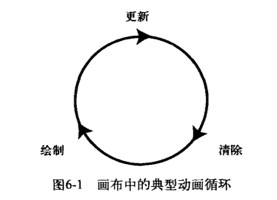
实例:
2.更新、清除、绘制
一个简单的例子:建立一个简单的动画,使一个正方形每帧向右移动1像素,单击stop按钮,该正方形停止移动
<script>
   function draw1(id){
        var myCanvas =$('#myCanvas');
        var context =myCanvas.get(0).getContext("2d");
        var canvasWidth = myCanvas.width();
        var canvasHeight = myCanvas.height();
        // 给动画添加“开始”和“停止”的控制按钮
        var playAnimation = true;
        var startButton = $('#startAnimation');
        var stopButton = $('#stopAnimation');
        startButton.hide();
        startButton.click(function(){
        	$(this).hide();
        	stopButton.show();
        	playAnimation = true;
        	animate();
        })
        stopButton.click(function(){
        	$(this).hide();
        	startButton.show();
        	playAnimation = false;
        })
        var x = 0; // 保存当前正方形的X位置。
        // animate函数 创建循环,在函数外部调用此函数即可启动该循环
        function animate(){
        	// 如果playAnimation变量保存的饿是false,那么动画循环停止运行
        	if(playAnimation){
        		x++;
        		context.clearRect(0,0,canvasWidth,canvasHeight);
        		context.fillRect(x,250,10,10);
        		setTimeout(animate,33);
        	}
        }
        animate();
    }draw1('myCanvas');
</script>
3.记忆要绘制的形状
主要问题:准确记忆要绘制的对象的内容及位置
方法:对象和数组
步骤:
1).不管形状的数量有多少,首先考虑如何存储每个形状的位置值。
解决方法:每个形状所需的位置值:x,y,通过创建JS类来创建形状对象,如下:
var shape = function(x,y){
	this.x = x;
        this.y = y;
};
2).在不复制代码的情况下如何绘制每个形状。
解决办法:向数组中添加形状对象(push:无须知道数组最后一个元素的序号,push自动将对象添加到数组的最末端)
var shapes = new array();
shapes.push(new shape(50,50));
shapes.push(new shape(50,150));
shapes.push(new shape(50,250));
现在,得到了一组形状,每个形状都有各自的x,y值,这些值存在shapes中
3).将这些形状从数组中取出并更新他们的位置(使之产生动画效果),然后绘制这些形状。
解决办法:在动画内部设置一个for循环
    function animate(){
            context.clearRect(0,0,canvasWidth,canvasHeight);
            var shapesLength = shapes.length;
            for(var i=0;i<shapesLength;i++){
                var temshape = shapes[i];
                temshape.x++;   // 每次x方向向右移动1
                context.fillRect(temshape.x,temshape.y,10,10)   // 画矩形
            };
            if(playAnimation){
                setTimeout(animate,33);
             }
     }
4).随机产生形状
更改shape类来定义形状的宽高
    var shape = function(x,y,width,height){
        this.x = x;
        this.y = y;
        this.width = width;
        this.height = height;
    }
然后为每个形状随机选取起始位置和大小
for(var i = 0;i<10;i++){
   var x = Math.random()*250;
   var y = Math.random()*250;
   var width = height = Math.random()*50;
   shapes.push(new shape(x,y,width,height));
}
更改fillrect方法的调用,一边采取新的宽高
context.fillRect(temshape.x,temshape.y,temshape.width,temshape.height);
5).改变方向
思路:增加或减少x,y的值
解决:修改 temshape.x++
比如:temshape.x += 2;
temshape.y++;
这样的话,每次动画循环,都会向右+2,向下+1,从而产生向右对角线方向移动的效果.
或者,动画循环中,将x,y设为随机值,
temshape.x = Math.random()*4-2;
temshape.y = Math.random()*4-2;
这样会让动画运动无规则
-----------------------完整代码-----------------------
以下代码:随机位置,随机尺寸的矩形动画
<script>
    function draw1(id){
        var myCanvas =$('#myCanvas');
        var context =myCanvas.get(0).getContext("2d");
        var canvasWidth = myCanvas.width();
        var canvasHeight = myCanvas.height();
        var playAnimation = true;
        var startButton = $('#startAnimation');
        var stopButton = $('#stopAnimation');
        startButton.hide();
        startButton.click(function(){
          $(this).hide();
          stopButton.show();
          playAnimation = true;
          animate();
        })
        stopButton.click(function(){
          $(this).hide();
          startButton.show();
          playAnimation = false;
        })
        var shape = function(x,y,width,height){
            this.x = x;
            this.y = y;
            this.width = width;
            this.height = height;
        }
        var shapes = new Array();
        for(var i = 0;i<10;i++){
            var x = Math.random()*250;
            var y = Math.random()*250;
            var width = height = Math.random()*50;
            shapes.push(new shape(x,y,width,height));
        }
        function animate(){
            context.clearRect(0,0,canvasWidth,canvasHeight);
            var shapesLength = shapes.length;
            for(var i=0;i<shapesLength;i++){
                var temshape = shapes[i];
                 // 动画循环中,将x,y设为随机值,
                temshape.x = Math.random()*200-2;
                temshape.y = Math.random()*200-2;
                context.fillRect(temshape.x,temshape.y,temshape.width,temshape.height)
            };
            if(playAnimation){
                setTimeout(animate,33);
             }
        }
        animate();
    }draw1('myCanvas');
</script>

---------------------------------------------------------------------------
扩展:随机函数Math.random();
Math.random()是0~1之间的随机函数
Math.round()是四舍五入取整的函数
Math.ceil()向上取整函数
0~1之间的随机整数:Math.round(Math.random());
0~10之间的随机整数:Math.round(Math.random()*10);
5~10之间的随机整数:Math.round(Math.random()*5+5);
10~20之间的随机整数:Math.round(Math.random()*10+10);
20~100之间的随机整数:Math.round(Math.random()*80+20);
由上:
x~y之间的随机整数:
Math.round(Math.random()*(y-x))+x);
0~x之间的随机整数:
Math.round(Math.random()*x);
1~x之间的随机整数:
Math.ceil(Math.random()*x);
以上为学习笔记,如果错误请指出,不甚感激!
资料《 HTML5 CANVAS基础教程 》
-------------
后面全是物理知识啊,我只能哈哈了,此刻心情,五味杂瓶,
canvas学习之制作动画的更多相关文章
- canvas学习之小球动画
项目地址:http://pan.baidu.com/s/1skZGPgL 最近学习使用canvas做动画效果,主要原理就是创建一个小球对象,然后小球对象有一个moveball方法,每次让小球沿着随机路 ...
- canvas学习之树叶动画
项目地址:http://pan.baidu.com/s/1geJgqen 今天用canvas做了一个树叶发芽到凋落的动画,当然还有很多不完善的地方,不过也让我体会到了,做动画技术占2分,算法占8分.这 ...
- canvas学习之粒子动画
项目地址:http://pan.baidu.com/s/1ccTptc 粒子动画意思就是把一个图片粒子画,然后使用粒子作出动画效果,主要两个问题:一个图片如何粒子化,这里面我们使用canvas的get ...
- HTML5标签canvas制作动画
摘要: canvas可以绘制图像,自然而然的就可以制作动画,因为动画的每一帧都是图像.我们可以利用javascript的setInterval函数来实现动画效果. 下面是一个例子,小圆绕着红点圆心不停 ...
- CSS3制作动画的三个属性
CSS3属性中有关于制作动画的三个属性:Transform,Transition,Animation:我们一起学习完了Transform和Transition,让我们对元素实现了一些基本的动画效果,这 ...
- requestAnimationFrame制作动画:旋转风车
在以往,我们在网页上制作动画效果的时候,如果是用javascript实现,一般都是通过定时器和间隔来实现的,出现HTML5之后,我们还可以用CSS3 的transitions和animations很方 ...
- canvas学习笔记,实用知识点总结(上)
本博客是本人日常学习笔记,作为重要知识点的总结记录,随笔风格可能更倾向于个人的学习习惯和方式,若对您有帮助十分荣幸,若存在问题欢迎互相学习探讨,前端小白一枚在此恭候. 一.基本使用规则 1.创建画布 ...
- HTML5 Canvas核心技术:图形、动画与游戏开发 PDF扫描版
HTML5 Canvas核心技术:图形.动画与游戏开发 内容简介: <HTML5 Canvas核心技术:图形.动画与游戏开发>中,畅销书作家David Geary(基瑞)先生以实用的范例程 ...
- 前端制作动画的几种方式(css3,js)
制作动态的网页是是前端工程师必备的技能,很好的实现动画能够极大的提高用户体验,增强交互效果,那么动画有多少实现方式,一直对此有选择恐惧症的我就总结一下,以便在开发的时候选择最好的实现方式. 1.css ...
随机推荐
- Maven问题总结:could not resolve archetype xxxxxxx from any of the configured repositories
错误提示 Eclipse中通过Archetype创建Maven项目时报错:Could not resolve archetype xxxxxxx from any of the configured ...
- NSDate 获取明天、后天的日期
NSDate * senddate=[NSDate date]; NSCalendar *gregorian = [[NSCalendar alloc] initWithCalendarIde ...
- common.js
//检测浏览器 function checkb(){ var Sys = {}; var ua = navigator.userAgent.toLowerCase(); var s; (s = ua. ...
- 使用第三方分页AspNetPager实现真正分页的SQL原理
AspNetPager是一个第三方分页第三方控件,可以和数据绑定控件(GridView等)方便的结合,实现真分页. 真分页:从数据库中获取符合要求的部分数目的记录.性能较高,数据量小,网络负载小,对数 ...
- WGZX:javaScript 学习心得--1
标签: javascriptiframedreamweaver浏览器htmltable 2008-09-11 10:50 1071人阅读 评论(0) 收藏 举报 分类: UI(21) 1,docu ...
- Java实验报告五:Java网络编程及安全
Java实验报告五:Java网络编程及安全 ...
- 逻辑运算符——逻辑与&&、逻辑或||
一直以来,都是认为逻辑运算符返回的是布尔值,却突然发现:并不是这样. 对于||来说,如果条件判断结果为true就返回第一个操作数的值,如果为false就返回第二个操作数的值. &&则相 ...
- php--http与https的区别
在URL前加https://前缀表明是用SSL加密的.你的电脑与服务器之间收发的信息传输将更加安全. Web服务器启用SSL需要获得一个服务器证书并将该证书与要使用SSL的服务器绑定. http和ht ...
- CSS弹性盒布局
<html> <head> <meta charset="utf-8"/> <title></title> <st ...
- 【android学习2】:Eclipse中HttpServlet类找不到
Eclipse中使用的HttpServlet类之所以识别不到的原因是没有导入Servlet-api.jar包,这个包在所安装在的tomcat的lib文件下,所以只需要导入即可. 在需要导入的工程上右键 ...