
css之 斜线
方案一
.x {

            border: solid 1px red;

            width: 100px;

            height: 100px;

            position: relative;

            background-color: transparent;

        }

            .x:before {

                position: absolute;

                top: 0px;

                right:;

                left:;

                bottom:;

                border-bottom: 100px solid red;

                border-left: 100px solid transparent;

                content: "";

            }

            .x:after {

                position: absolute;

                left: 1px;

                right:;

                top: 1px;

                bottom:;

                border-bottom: 99px solid white;

                border-left: 99px solid transparent;

                content: "";

            }

        .f {

            border: solid 1px red;

            width: 100px;

            height: 100px;

            position: relative;

            background-color: transparent;

        }

            .f:before {

                position: absolute;

                top: 0px;

                right:;

                left:;

                bottom:;

                border-bottom: 100px solid red;

                border-right: 100px solid transparent;

                content: "";

            }

            .f:after {

                position: absolute;

                left:;

                right: 1px;

                top: 1px;

                bottom:;

                border-bottom: 99px solid white;

                border-right: 99px solid transparent;

                content: "";

            }
x 是 斜线, f 是反斜线。
图:
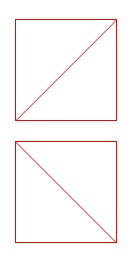
附:CSS 图形:
css3激发想象/css3各种图形 http://www.cnblogs.com/wwcherish/archive/2012/09/18/2690336.html
CSS3机器猫: http://keleyi.com/keleyi/phtml/html5/3.htm
方案二
background-image: url('data:image/svg+xml;utf8,<svg xmlns="http://www.w3.org/2000/svg" width="100%" height="100%"><line x1="0" y1="0" x2="100%" y2="100%" stroke="black" stroke-width="1"/></svg>');
css之 斜线的更多相关文章
- DIV+CSS制作斜线效果记录
DIV+CSS 斜线效果很简单,只需设置一下CSS Border 的边框就能有斜线效果.代码分享给大家,你可以自己变通. 提示要注意两点:1.DIV宽高的定义.2.DIV在 IE6 中默认是有高度的. ...
- css画斜线(用于时间的显示)
- css划斜线
http://stackoverflow.com/questions/18012420/draw-diagonal-lines-in-div-background-with-css
- 谈谈一些有趣的CSS题目(九)-- 巧妙的实现 CSS 斜线
开本系列,谈谈一些有趣的 CSS 题目,题目类型天马行空,想到什么说什么,不仅为了拓宽一下解决问题的思路,更涉及一些容易忽视的 CSS 细节. 解题不考虑兼容性,题目天马行空,想到什么说什么,如果解题 ...
- 巧妙的实现 CSS 斜线(炫酷的小效果)
开本系列,谈谈一些有趣的 CSS 题目,题目类型天马行空,想到什么说什么,不仅为了拓宽一下解决问题的思路,更涉及一些容易忽视的 CSS 细节. 解题不考虑兼容性,题目天马行空,想到什么说什么,如果 ...
- Matplotlib数据可视化(3):文本与轴
在一幅图表中,文本.坐标轴和图像的是信息传递的核心,对着三者的设置是作图这最为关心的内容,在上一篇博客中虽然列举了一些设置方法,但没有进行深入介绍,本文以围绕如何对文本和坐标轴进行设置展开(对图像 ...
- css斜线
斜线 .demo{ display: inline-block; width: 400px; height: 100px; resize: both; overflow: auto; margin-t ...
- CSS练习-导航栏斜线分隔-利用伪元素
开始切第一张图了,第一个遇到的问题是顶部导航栏这里,用斜线分割.想到的思路是用伪类:before或者:after实现 先写html结构. <!-- 导航栏begin --> <div ...
- css实现栏目两边斜线的效果
实现效果: 具体实现代码: <!DOCTYPE html> <html> <head> <meta charset="UTF-8"> ...
随机推荐
- Centos下MySQL使用总结
转载于CentOS中文站:http://www.centoscn.com/CentOS/Intermediate/2013/0817/1334.html 一.MySQL安装 Centos下安装mysq ...
- Java和C++中的static
1.Java类中的static变量和static方法会在类装载的过程中就得到内存分配,然后就会进行初始化工作.最多可能会被初始化3次,静态代码块的执行在main方法之前. static变量不可以在构造 ...
- 使用imap协议接收邮件
之前一直使用PHPMail类进行发送邮件,这个是一个非常强大的类,但是其实底层就是使用mail()函数来进行发送的. 但是现在公司有个需求是 写个程序需要实时的接收邮件,主要是判断邮件发出去了,并且 ...
- ---Ubuntu 14.04 虚拟机器和主机时间同步
先把vmware tool 装好! sudo /usr/bin/vmware-toolbox-cmd timesync enable
- {vlFeat}{Matlab}Linux中matlab的vlFeat配置
1.下载vlFeat编译后的版本binary package 2.解压后将 toolbox/,bin/,data/ 等文件夹复制到matlab新建工具箱目录 /toolbox/vlfeat/ 中 3. ...
- PHP的轻量消息队列php-resque使用说明
日志未经声明,均为AlloVince原创.版权采用『 知识共享署名-非商业性使用 2.5 许可协议』进行许可. 消息队列处理后台任务带来的问题 项目中经常会有后台运行任务的需求,比如发送邮件时,因为要 ...
- jquery实现页面动态切换的方法--toggleClass(className)
$(function() { $(".A").click(function() { $(this).toggleClass("B"); }); }); 当点击带 ...
- 我为什么选择使用Go语言?
谢孟军:EGO会员.GopherChina组织者.<Go Web编程>一书的作者,专注Golang技术架构.本文来自EGO会员群分享,入群方式见文末 在这里我主要想和大家分享一些Go和我个 ...
- android之RadioGroup
radioGroup这控件在开发中也是常用到的 RadioGroup 有时候比较有用.主要特征是给用户提供多选一机制. 用微信举一个例子吧! <?xml version="1.0&qu ...
- php 通过变量 来调用函数
<?php function fun() { echo 'fun'; } $a = 'fun'; $a(); ?> 复制代码 上面的$a变量就是fun()函数,调用$a()和调用fun() ...