
Python单元测试框架之pytest -- 生成测试报告
继续pytest单元测试框架的学习,pytest可以生成多种类型的测试报告。这一节就来学习pytest如何生成测试报告。
创建test_calss.py 测试用例文件,这里以测试该文件为例。
#coding=utf-8

class TestClass:

    def test_one(self):

        x = "this"

        assert "h" in x

    def test_two(self):

        x = "hello"

        assert x == "hi"
生成resultlog文件
创建普通的结果文件:
> py.test test_class.py --resultlog=./log.txt
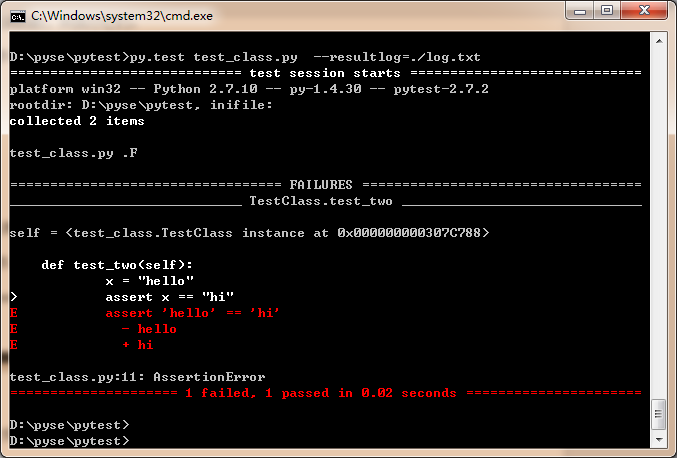
指定当前路径下生成log.txt文件,打开文件,内容如下:
. test_class.py::TestClass::()::test_one

F test_class.py::TestClass::()::test_two

 self = <test_class.TestClass instance at 0x000000000307C788>

     def test_two(self):

             x = "hello"

 >           assert x == "hi"

 E           assert 'hello' == 'hi'

 E             - hello

 E             + hi

 test_class.py:11: AssertionError
生成JunitXML文件
> py.test test_class.py --junitxml=./log.xml
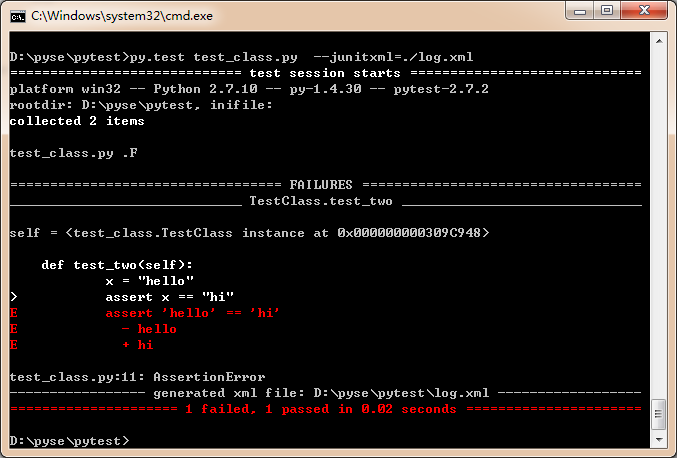
同样指定在当前目录下生成log.xml文件,打开文件内容如下:
<?xml version="1.0" encoding="utf-8"?>
<testsuite errors="0" failures="1" name="pytest" skips="0" tests="2" time="0.015">
<testcase classname="test_class.TestClass" name="test_one" time="0.0"/>
<testcase classname="test_class.TestClass" name="test_two" time="0.00300002098083">
<failure message="assert 'hello' == 'hi'
- hello
+ hi">self = <test_class.TestClass instance at 0x000000000309C948> def test_two(self):
x = "hello"
> assert x == "hi"
E assert 'hello' == 'hi'
E - hello
E + hi test_class.py:11: AssertionError
</failure>
</testcase>
</testsuite>
创建这样的XML文件有有什么用? 主要是为了方便Jenkin或其它的持续集成工具俱读取。
创建测试用例的URL
> py.test test_class.py --pastebin=all
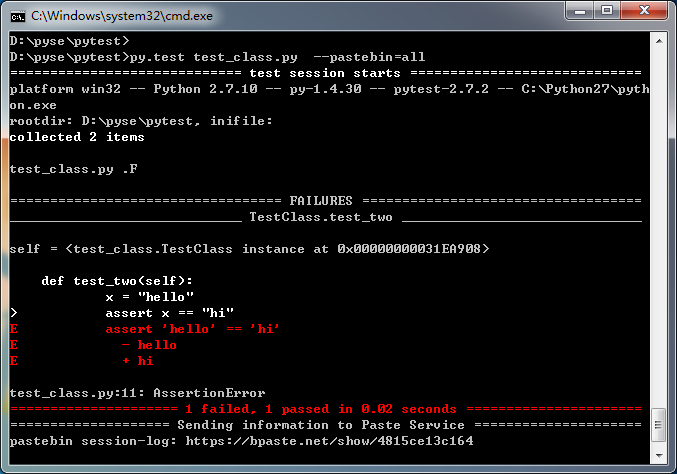
复制打印结果最后生成的session-log测试报告链接到浏览器:
https://bpaste.net/show/4815ce13c164
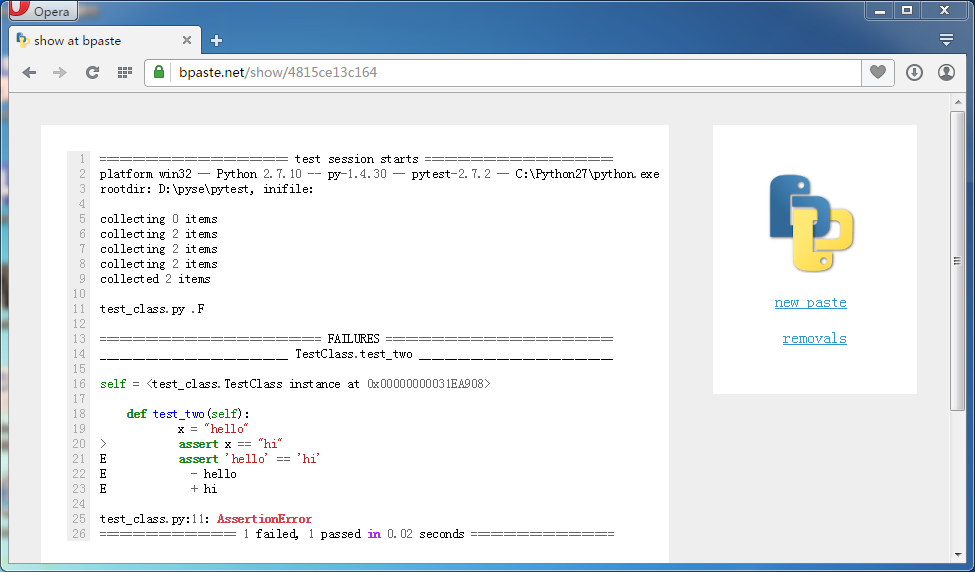
这样的结果展示将非常友好。
当然,你也可以只选择展示faile的测试用例
> py.test test_class.py --pastebin=failed
生成html测试报告
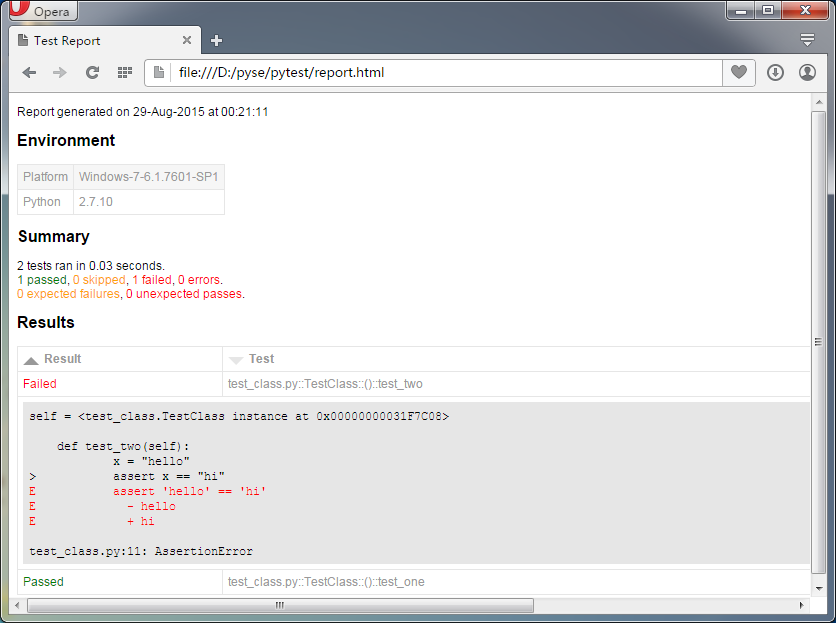
当然,更多时候,我们希望pytest能生成漂亮的测试报告。这需要安装pytest的扩展--pytest-html。
> pip install pytest-html # 通过pip安装pytest-html
cmd命令提示符下执行测试文件:
>py.test test_class.py --html=./report.html
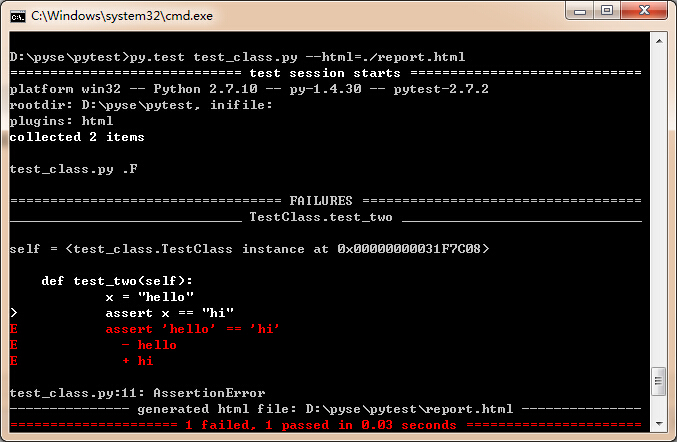
指定在当前目录下生成report.html文件,打开测试文件:
Python单元测试框架之pytest -- 生成测试报告的更多相关文章
- Python单元测试框架unittest之生成测试报告(HTMLTestRunner)
前言 批量执行完用例后,生成的测试报告是文本形式的,不够直观,为了更好的展示测试报告,最好是生成HTML格式的. unittest里面是不能生成html格式报告的,需要导入一个第三方的模块:HTMLT ...
- Python单元测试框架之pytest 2 -- 生成测试报告
From: https://www.cnblogs.com/fnng/p/4768239.html Python单元测试框架之pytest -- 生成测试报告 2015-08-29 00:40 by ...
- Python单元测试框架之pytest 4 -- 断言
From: https://www.cnblogs.com/fnng/p/4774676.html Python单元测试框架之pytest -- 断言 2015-08-31 23:57 by 虫师, ...
- Python单元测试框架之pytest 3 -- fixtures
From: https://www.cnblogs.com/fnng/p/4769020.html Python单元测试框架之pytest -- fixtures 2015-08-29 13:05 b ...
- Python单元测试框架:pytest
(一)介绍 pytest是一个非常成熟的全功能的Python测试框架,主要特点有以下几点: 1.简单灵活,容易上手: 2.支持参数化: 3.能够支持简单的单元测试和复杂的功能测试,还可以用来做sele ...
- Python单元测试框架之pytest -- 断言
对于测试来讲,不管是功能测试,自动化测试,还是单元测试.一般都会预设一个正确的预期结果,而在测试执行的过程中会得到一个实际的结果.测试的成功与否就是拿实际的结果与预期的结果进行比较.这个比的过程实际就 ...
- Python单元测试框架之pytest 1 ---如何执行测试用例
From: https://www.cnblogs.com/fnng/p/4765112.html 介绍 pytest是一个成熟的全功能的Python测试工具,可以帮助你写出更好的程序. 适合从简 ...
- Python单元测试框架之pytest -- fixtures
fixtures不太好翻译,可看作是夹心饼干最外层的两片饼干.通常用setup/teardown来表示.它主要用来包裹测试用例,为什么需要这样的饼干呢?我们以web自动化测试为例,例如,要测试的某系统 ...
- python单元测试框架笔记
目录 单元测试概述 什么是单元测试 单元测试什么进行? 单元测试由谁负责? 单元测试需要注意 单元测试覆盖类型 python 单元测试框架 unittest pytest 测试框架 单元测试概述 什么 ...
随机推荐
- GO語言基礎教程:序章
首先自我介紹一下我自己,我是一個coder,目前主要從事B/S程序開發工作,懂點PHP;ASP;JSP;JS;VB;C;DELPHI;JAVA,另外知道幾個數據庫,除此之外別無所長,那麼我為何會選擇學 ...
- HTML5手机APP开发入门(1)
HTML5手机APP开发入门(1) 开发框架 Ionicframework V2 + Angular 2 具体内容可以参考一下网站 http://ionicframework.net/ http:// ...
- [salesforce] standard button
Use Case In Salesforce, when you click on the standard ‘New’ button on a Related List to create a ne ...
- Huxley 是一个用于Web应用 UI 测试的工具
Huxley 是一个用于Web应用 UI 测试的工具,由 Pete Hunt 和 Maykel Loomans 用 Python 开发. UI 测试比较令人头疼. UI测试不好写,而且很容易失效: ...
- assertThat用法
一般匹配符1.assertThat( testedNumber, allOf( greaterThan(8), lessThan(16) ) ); 注释: allOf匹配符表明如果接下来的所有条件必须 ...
- IOS中的多线程之GCD
在ios中,使用多线程有三种方式,分别是:NSThread.NSOperation和NSOperationQueue.GCD,在本节,主要讲解一下CDD的使用. GCD(Grand Central D ...
- JIRA 6.3.6版本部署
JIRA 6.3.6版本部署 部署环境:Ubuntu Server .JDK1.7 JIRA文件:atlassian-jira-6.3.6.tar.gz 下载地址:百度云网盘地址http://pan. ...
- java项目中读取properties文件
这里的配置文件都放在src下面, System.properties的内容 exceptionMapping=exceptionMapping.properties config=config.pro ...
- nohup启动java命令导致dubbo无法注册
没有任何异常,日志和正常注册日志一模一样,但服务就是没注册成功. 解决办法,screen代替nohup命令. screen screen -ls screen -r pid (ctrl + a)+d
- Xcode报错:“Your build settings specify a provisioning profile with the UUID..... however, no such provisioning profile was found”
运行环境: Xcode5 & 5.0及以上版本 对工程进行Archive打包的时候出现如下错误 问题描述: Code Sign error: No matching provisionin ...