
使用 IntraWeb (39) - THttpRequest、THttpReply
在其它服务器脚本语言中熟悉的 Request、Response(THttpRequest、THttpReply) 在 IntraWeb 中算是幕后英雄了, 用户基本不需要直接操作它们了.
IW 默认 Post 传值(WebApplication.Request.HttpMethod = hmPost, 只读), 但像表单字段之类, 在 IW 中直接根据控件名称读取就是了, 用不着麻烦 Request.
但如果需要, 可以使用 WebApplication.Request.QueryFields.Values['控件名'] 读取.
要读出以 Get 方式传输的 Url 变量, 发现在很多时候 WebApplication.Request.QueryFields.Values['变量名'] 并不好用; 经过尝试, 也不是没有办法:
1、笨办法: 自己解析 WebApplication.Request.Referer;
2、Request 以参数方式出现时往往可以, 譬如 TIWAppForm.OnURLRequest 事件:
{Unit1 中的关键代码}

procedure TIWForm1.IWButton1Click(Sender: TObject);

begin

  WebApplication.GoToURL('Page2.html?AAA=111&BBB=222');

end;

{Unit2 中的关键代码}

procedure TIWForm2.IWAppFormURLRequest(aSender: TIWAppForm; aRequest: THttpRequest); //需 uses IW.HTTP.Request

begin

  IWMemo1.Lines.Add(WebApplication.Request.QueryFields.Values['bbb']);

end;

initialization

  TIWForm2.SetURL('', 'Page2.html');
我想, 按照 IW 的理念, 网页间互相传递的参数应该是用 Session(下篇博客测试下).
有时还要用到运行参数, 输入运行参数有两种方法:
1.从代码(如: WebApplication.RunParams.CommaText := 'AAA=111,BBB=222');
2.从 Server 控制台(如下图);
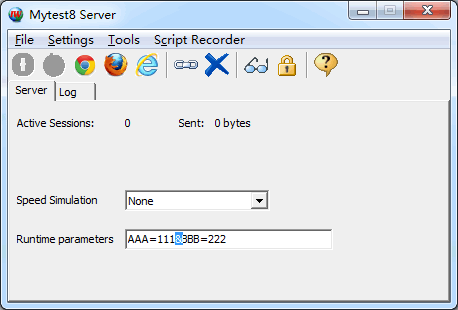
读取运行参数, 如: MyStr := WebApplication.RunParams.Values['AAA'];
THttpRequest 所在单元及继承链:
IW.HTTP.Request.THttpRequest
主要成员(根据测试结果判断吧):
property UserAgent: string       //测试结果: Mozilla/5.0 (Windows NT 6.1; Trident/7.0; rv:11.0) like Gecko

property Referer: string         //测试结果: http://127.0.0.1:8888/$/?aaa=111&bbb=222; 测试时添加了两个运行参数

property ScriptName: string      //

property Host: string            //测试结果: 127.0.0.1

property URL: string             //

property PathInfo: string        //测试结果: /$/callback

property RemoteAddr: string      //测试结果: 127.0.0.1

property ServerPort: integer     //测试结果: 8888

property Query: string           //测试结果: callback=...

property HttpMethod: THttpMethod //测试结果: hmPost(其它: hmNone, hmGet, hmPut, hmPost, hmHead)

property IfModifiedSince: string //

property ForwardedFor: string    //

property HttpClientIP: string    //

property AcceptLanguage: string  //测试结果: zh-CN

property HttpsHeader: string     //

property Authorization: string   //

property AuthorizationHeader: string //

property AuthUser: string        //

property AuthPass: string        //

property ServerVariables: TStrings //

property HasContent: Boolean       //测试结果: True

property Files: THttpFileList      //

property QueryString: string       //测试结果: callback=...

function GetCookieValue(const aName: string): string;

function GetRawHeaderValue(const aName: string): string;

function GetServerVariableValue(const aVariableName: string): string;

function GetContentFieldValue( const aContentFieldName: string): string;

procedure SetRewriteURL(const aUrl: string);

property RawHeaders: TStrings //测试结果:

                              //Accept: */*

                              //Content-Type: application/x-www-form-urlencoded

                              //Referer: http://127.0.0.1:8888/$/

                              //Accept-Language: zh-CN

                              //Accept-Encoding: gzip, deflate

                              //User-Agent: Mozilla/5.0 (Windows NT 6.1; Trident/7.0; rv:11.0) like Gecko

                              //Host: 127.0.0.1:8888

                              //Content-Length: 205

                              //DNT: 1

                              //Connection: Keep-Alive

                              //Cache-Control: no-cache

                              //Cookie: IW_MyApp=rtDemtDbmuncnJHgndGWqueWrKmWodK1otaXrue4mdu_2

property ContentFields: TStrings //测试结果:

                                 //IWBUTTON2=

                                 //IW_Action=IWBUTTON2

                                 //IW_ActionParam=

                                 //IW_FormName=IWForm1

                                 //IW_FormClass=TIWForm1

                                 //IW_LocationHash=

                                 //IW_TrackID_=2

                                 //IW_width=1920

                                 //IW_height=985

                                 //IW_SessionID_=mKrbmdjendG0mZLgndGXoefbn0yWoefbmti2rJngode

                                 //callback=IWBUTTON2.DoOnAsyncClick

                                 //x=48

                                 //y=10

                                 //which=0

                                 //modifiers=

property CookieFields: TStrings  //测试结果: IW_MyApp=ourdmeffmdHgmtK1ndiWodGZoungnKvfmtG5nKiXmue_2

property QueryFields: TStrings //测试结果:

                               //IWBUTTON2=

                               //IW_Action=IWBUTTON2

                               //IW_ActionParam=

                               //IW_FormName=IWForm1

                               //IW_FormClass=TIWForm1

                               //IW_LocationHash=

                               //IW_TrackID_=2

                               //IW_width=1920

                               //IW_height=985

                               //IW_SessionID_=nZKXqtvcrJvbmtiZndjfrKe1nZm3numYmta3ruiXnZG

                               //callback=IWBUTTON2.DoOnAsyncClick

                               //x=52

                               //y=18

                               //which=0

                               //modifiers=

function GetParams: TStrings; //测试结果:

                              //IWBUTTON2=

                              //IW_Action=IWBUTTON2

                              //IW_ActionParam=

                              //IW_FormName=IWForm1

                              //IW_FormClass=TIWForm1

                              //IW_LocationHash=

                              //IW_TrackID_=2

                              //IW_width=1920

                              //IW_height=985

                              //IW_SessionID_=nJDbrdvcrdaZnZiZndm0mJG0mem1ndnerdC1nJaWree

                              //callback=IWBUTTON2.DoOnAsyncClick

                              //x=56

                              //y=15

                              //which=0

                              //modifiers=

                              //IWBUTTON2=

                              //IW_Action=IWBUTTON2

                              //IW_ActionParam=

                              //IW_FormName=IWForm1

                              //IW_FormClass=TIWForm1

                              //IW_LocationHash=

                              //IW_TrackID_=2

                              //IW_width=1920

                              //IW_height=985

                              //IW_SessionID_=nJDbrdvcrdaZnZiZndm0mJG0mem1ndnerdC1nJaWree

                              //callback=IWBUTTON2.DoOnAsyncClick

                              //x=56

                              //y=15

                              //which=0

                              //modifiers=
THttpReply 所在单元及继承链:
IW.HTTP.Reply.THttpReply
主要成员:
property AllowCaching: Boolean //

property AuthRealm: string     //

property CacheTTL: Integer     //

property Code: Word	       //

property CodeText: string      //

property ContentType: string   //

property Cookies: TCookieList //

property LastModified: TDateTime      //

property Headers: TStrings	      //

property Expires: TDateTime	      //

property DataType: THttpReplyType     //

property ServerPort: Integer	      //

property SendingFile: Boolean	      //

property CacheControlEnabled: Boolean //If FALSE, completely disable cache control header fields ("Expires", "Last-Modified", "Pragma: no-cache" and "Cache-Control: no-cache"). Default = TRUE

constructor Create(aBuffer: PByte; const aSize: Integer)

procedure Commit

procedure WriteString(const aValue: string)

procedure SendRenderStream(aStream: TIWRenderStream)

procedure SendStream(aStream: TStream; const aDisableCacheControl: Boolean)

procedure SendHsmStream(aStream: THsmStream)

procedure SendFile(const aPathname: string; aDelete: Boolean; const aDisableCacheControl: Boolean)

procedure SendCacheFile(const aPathname: string)

procedure SendRedirect(const aURL: string)

procedure ResetReplyType
学其他服务器脚本, 都快习惯了先用 Response 输出点什么, 下面测试了在 IW 中通过 Response 做简单的输出:
{新建 MyIndex 单元, 从 TContentBase 继承实现一个 TMyIndex 类}

unit MyIndex;

interface

uses Classes, IW.Content.Base, HTTPApp, IWApplication, IW.HTTP.Request, IW.HTTP.Reply, IWMimeTypes;

type

  TMyIndex = class(TContentBase)

  protected

    function Execute(aRequest: THttpRequest; aReply: THttpReply; const aPathname: string; aSession: TIWApplication; aParams: TStrings): Boolean; override;

  public

    constructor Create; override;

  end;

implementation

{ TMyIndex }

constructor TMyIndex.Create;

begin

  inherited;

  mFileMustExist := False;

end;

function TMyIndex.Execute(aRequest: THttpRequest; aReply: THttpReply; const aPathname: string; aSession: TIWApplication; aParams: TStrings): Boolean;

begin

  aReply.ContentType := MIME_HTML;

  aReply.WriteString('<a href="http://www.cnblogs.com/del//del.cnblogs.com">万一的 Delphi 博客</a>');

  Result := True;

end;

end. //MyIndex.pas End

{在 IWServerControllerBase.OnConfig 中指定为首页, 并命名为 Index.htm}

uses

  IWInit, IWGlobal, IW.Content.Handlers, MyIndex;

procedure TIWServerController.IWServerControllerBaseConfig(Sender: TObject);

begin

  THandlers.AddStartHandler('', 'Index.htm', TMyIndex.Create);

end;
使用 IntraWeb (39) - THttpRequest、THttpReply的更多相关文章
- 使用 IntraWeb (32) - Url 映射与 THandlers
最简单的 Url 映射是使用 TIWAppForm 的 class 方法: SetURL; THandlers 是 IntraWeb XIV 新增的内容处理器, 它能完成的不仅仅是 Url 映射(转发 ...
- 使用delphi+intraweb进行微信开发3—微信消息处理
示例代码已经放出!请移步使用delphi+intraweb进行微信开发1~4代码示例进行下载,虽为示例代码但是是从我项目中移出来的,封装很完备适于自行扩展和修改. 在第二讲使用delphi+intra ...
- 使用 IntraWeb (37) - TIWApplication
每个访问用户都会拥有一个它的实例(WebApplication), 它除了承载 Session(会话)数据, 还要记忆着用户的浏览器信息.登陆信息等等; 另外, 窗体的建立也都依附(Owner)于它, ...
- IntraWeb XIV 类型速查表
tkClass ================== IWUserSessionBase.TIWUserSessionBase < TDataModule < TComponent < ...
- 【转】39个让你受益的HTML5教程
闲话少说,本文作者为大家收集了网上学习HTML5的资源,期望它们可以帮助大家更好地学习HTML5. 好人啊! 不过,作者原来说的40个只有39个,因为第5个和第8个是重复的. 原文在此! 1. 五分钟 ...
- C#开发微信门户及应用(39)--使用微信JSSDK实现签到的功能
随着微信开逐步开放更多JSSDK的接口,我们可以利用自定义网页的方式来调用更多微信的接口,实现我们更加丰富的界面功能和效果,例如我们可以在页面中调用各种手机的硬件来获取信息,如摄像头拍照,GPS信息. ...
- CSharpGL(39)GLSL光照示例:鼠标拖动太阳(光源)观察平行光的漫反射和镜面反射效果
CSharpGL(39)GLSL光照示例:鼠标拖动太阳(光源)观察平行光的漫反射和镜面反射效果 开始 一图抵千言.首先来看鼠标拖动太阳(光源)的情形. 然后是鼠标拖拽旋转模型的情形. 然后我们移动摄像 ...
- 抱歉!15:44-16:39阿里云RDS故障造成全站不能正常访问
非常非常抱歉!2016年3月7日15:44-16:39,由于阿里云RDS(云数据库)故障,造成全站不能正常访问,给您带来了很大很大的麻烦,恳请您的谅解! 故障是在15:44开始出现的,应用日志中出现大 ...
- grep-2.26 sed-4.2.2 awk-4.1.4 wget-1.18 pcregrep-8.39 pcre2grep-10.22 for windows 最新版本静态编译
-------------------------------------------------------------------------------------------- grep (G ...
随机推荐
- [zz] demand ,require ,request用法辨析
http://zhidao.baidu.com/link?url=9Q50HiOF1fWav1nSnREbc_H1jTuAHxAjeVLbZoB5bGO3ZehPxLhQdob4oGO3slMRl0W ...
- SQL Server 2012 创建数据库快照
不是所有的MSSQL数据库版本都支持数据库快照,只有Enterprise版本的才支持. 在其他版本上,以Business Intelligence Edition版本为例,创建快照时,会报如下错误 消 ...
- 黄聪:基于jQuery+JSON的省市区三级地区联动
查看演示:http://www.helloweba.com/demo/cityselect/ 源码下载:http://files.cnblogs.com/files/huangcong/citysel ...
- .Net 一些好工具
1.代码类 ReSharper :代码检查,代码补齐,(收费)(vs插件) MultiEditing: vs多行编译工具 VSCommand : Web Essentials : Css扩展支持,JS ...
- mysql 语法总结
设置SQL语句所用的字符编码:set names UTF8; 判断指定的数据库是否存在:DROP DATABASE IF EXISTS 库; 开始使用指定的数据库:USE 库; 创建数据库CREAT ...
- Ajax (一)
Ajax:即异步的XML和Javascript,在不刷新和提交的情况下,页面局部更新,实现前后端分离. Ajax的核心对象是XMLHttpRequest,服务器通过xhr对象与浏览器异步通信 关于HT ...
- eclipse中如何关闭运行时自动保存?
Eclipse没有提供自动保存的功能,只能自己写脚本每隔多久保存一次,或监听修改即保存.设置方法:1.打开:preferences>run/debug>launching2.选择save ...
- C#加密解密(DES,AES,Base64,md5,SHA256,RSA,RC4)
一:异或^简单加解密(数字类型) 1:原理: 异或用于比较两个二进制数的相应位,在执行按位"异或"运算时,如果两个二进制数的相应位都为1或者都为0,则返回0;如果两个二进制数的相应 ...
- Chap2: question: 1 - 10
1. 赋值运算符函数(或应说复制拷贝函数问题) class A { private: int value; public: A(int n) : value(n) {} A(A O) { value ...
- 37. Binary Tree Zigzag Level Order Traversal && Binary Tree Inorder Traversal
Binary Tree Zigzag Level Order Traversal Given a binary tree, return the zigzag level order traversa ...