
[异常解决] How to build a gcc toolchain for nRF51 on linux (very detailed!!!)
1、Install gcc-arm-none-eabi
https://devzone.nordicsemi.com/tutorials/7/This link shows that development with GCC and Eclipse, As it say we should download 、extract and configure arm-none-eabi-gcc. But I find it's hard to download arm-none-eabi-gcc in China(You can chose XunLei to download). Besides I find a easy way to install it in Ubuntu-16.04 as following:
beautifulzzzz@lpc:~$ arm-none-eabi-gcc --version

The program 'arm-none-eabi-gcc' is currently not installed. You can install it by typing:

sudo apt install gcc-arm-none-eabi

beautifulzzzz@lpc:~$ sudo apt install gcc-arm-none-eabi
2、Download Nordic nRF5x SDK
Download the least nRF5x SDK from http://developer.nordicsemi.com/nRF5_SDK/ (the same to the arm-none-eabi-gcc, you can chose the XunLei to download) ,and then extract it in SDK-DIR(as you wish). The following shows the composition of SDK:
beautifulzzzz@lpc:~/Documents/nRF5_SDK_12..0_f012efa$ tree -L 2
.

├── components

│   ├── ant

│   ├── ble

│   ├── boards

│   ├── device

│   ├── drivers_ext

│   ├── drivers_nrf

│   ├── libraries

│   ├── nfc

│   ├── proprietary_rf

│   ├── sdk_validation.h

│   ├── serialization

│   ├── softdevice

│   └── toolchain

├── documentation

│   ├── index.html

│   ├── license.txt

│   ├── NordicS.jpg

│   ├── nRF5x_series_logo.png

│   └── release_notes.txt

├── examples

│   ├── ant

│   ├── ble_central

│   ├── ble_central_and_peripheral

│   ├── ble_peripheral

│   ├── crypto

│   ├── dfu

│   ├── dtm

│   ├── multiprotocol

│   ├── nfc

│   ├── peripheral

│   ├── proprietary_rf

│   └── readme.txt

├── external

│   ├── cifra_AES128-EAX

│   ├── fatfs

│   ├── freertos

│   ├── licenses_external.txt

│   ├── micro-ecc

│   ├── nano-pb

│   ├── nfc_adafruit_library

│   ├── nrf_cc310

│   ├── protothreads

│   ├── rtx

│   ├── segger_rtt

│   └── tiny-AES128

├── licenses.txt

├── nRF5x_MDK_8_11_1_IAR.msi

├── nRF5x_MDK_8_11_1_Keil4.msi

└── svd

    ├── nrf51.svd

    ├── nrf52840.svd

    └── nrf52.svd
3、Before Use Makefile To Bulid nRF51 Project
To build an example in the SDK you first need to set the toolchain path in makefile.windows or makefile.posix depending on platform you are using. That is, the .posix should be edited if your are working on either Linux or OS X. These files are located in:
<SDK>/components/toolchain/gcc
Open the file in a text editor, and make sure that the GNU_INSTALL_ROOT variable is pointing to your Gnu tools for ARM embedded Processors install directory.
Correct values for my current setup(my arm-none-eabi-gcc install in /usr/bin):
GNU_INSTALL_ROOT :=/usr

GNU_VERSION := 4.9.

GNU_PREFIX := arm-none-eabi
4、Use Makefile To Bulid nRF51 Project
Now you can try to build one of the example projects. Will use the blinky example here to keep it simple:
Open terminal and change directory to:
<SDK>/examples/peripheral/<board name>/blank/armgcc/
Type 'make'. GNU Make should start the build using the Makefile and output the result in the _build directory. If everything works you should get the output shown in the screenshot below.
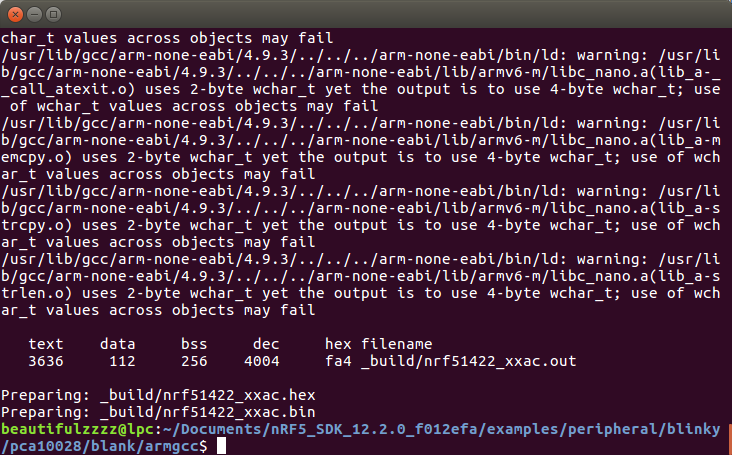
If you instead get an error saying something like "the sysem cannot find the files specified" it typically means that the GNU toolchain path is set incorrectly. Verify the path in makefile.windows/posix if you get this.
5、Install JLink-driver-for-linux
Refer to the blog: [异常解决] ubuntu上安装JLink驱动遇到的坑及给后来者的建议,downloading the corresponding version driver is ok. But I find that the older version driver(older then 5.12) cna't find!!!

Unfortunately my JLink version is 4.80. Finally, I find a Jlink-Linux-v480h-x64 in CSDN: http://download.csdn.net/download/u013903297/6990853 and I also upload it in: https://pan.baidu.com/s/1qXN2uOc. This file is not *.deb file, so we should install it as following:
beautifulzzzz@lpc:~/Downloads$ sudo cp JLink_Linux_V480h_x86_64.tgz /dev/bus

...

beautifulzzzz@lpc:/dev/bus$ sudo tar zxvf JLink_Linux_V480h_x86_64.tgz

beautifulzzzz@lpc:/dev/bus$ sudo rm JLink_Linux_V480h_x86_64.tgz
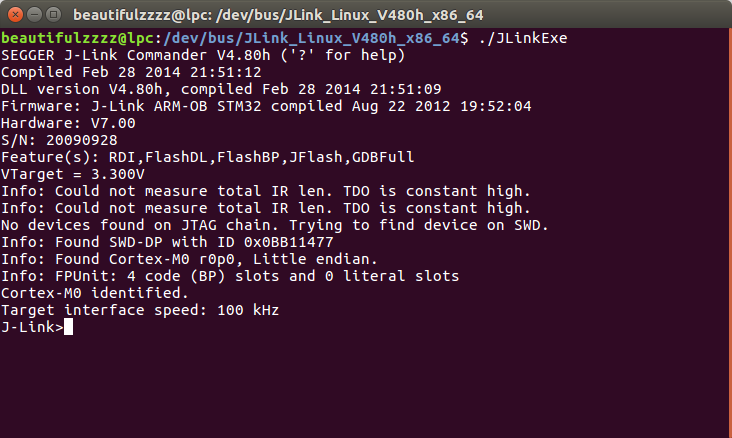
Now plug the JLink device into the USB and then goto the install-path(here is /dev/bus/JLink_Linux_V480h_x86_64), type ./JLinkExe command, you will see(as following screenshot) a Contex-M0 device was fond and the target interface speed is 100khz. If could not find a device, please check whether the JLink device is inserted or the JLink driver version is correct.
6、Loadfile into nRf5x
Now you can use some JLink commands to erase、load、run、quit...
/* Open Jlink Commander from terminal in _build directory */

JLinkExe  -device <nRF51/nRF52>

> erase // Optional: erase target if not already blank

> loadfile <name>.hex // loads FW

> r // Reset and halt

> g // Run

> q //  Exit
If you get an error (Error: Programming failed @ address 0x00000000 (block verification error)) when tpye erase\loadfile command, you should write one and two to the memory at 4001E50C and 4001E504:(get this from: Getting started with nRF51 development on Mac OS X)
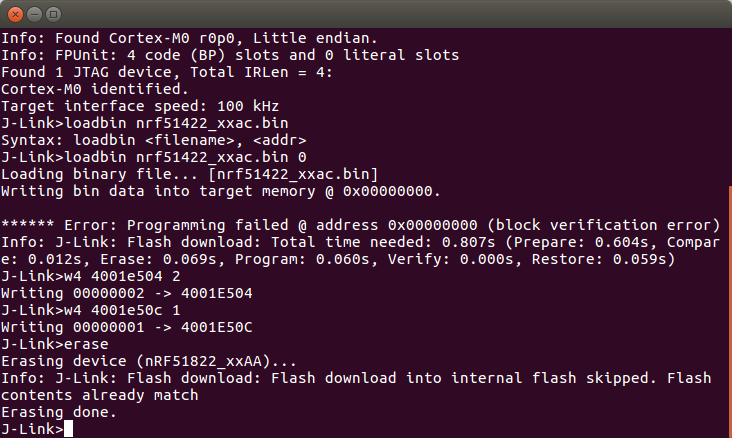
Afer erase whole chip, loading the file into nRF51 is simple—— For simplicity in this tutorial copy the softdevice (S110) .hex file to the _build folder of the Heart Rate Monitor example. The programming is performed from the _build folder:
_build em$ JLinkExe -device nrf51822_xxaa -if swd -speed

[...]

J-Link>loadbin s110_nrf51822_7..0_softdevice.bin

J-Link>loadbin ble_app_hrs_s110_xxaa.hex 0x16000

J-Link>r

J-Link>g

J-Link>exit
Setting the correct device is crucial, and the speed setting is needed to make the programming fast enough. The softdevice is first programmed in the beginning (location 0) and the application is programmed immediately after (0x16000 for S110 v7.0). After the programming a reset is needed ('r' + 'g').
Next I will write use MakeFile to achieve automating tasks~
@beautifulzzzz

智能硬件、物联网,热爱技术,关注产品

博客:http://blog.beautifulzzzz.com

sina:http://weibo.com/beautifulzzzz?is_all=1
[异常解决] How to build a gcc toolchain for nRF51 on linux (very detailed!!!)的更多相关文章
- Ant运行build.xml执行服务器scp,异常解决jsch.jar
公司ant打包上线 一直出现这个问题. Ant运行build.xml执行服务器scp,异常解决jsch.jar BUILD FAILEDD:\eclipse\eclipse-jee-luna-SR2- ...
- 【tips】编译epic异常解决
目标:编译 epic 异常信息一: No CMAKE_C_COMPILER could be found. No CMAKE_CXX_COMPILER could be found. 解决方法: ...
- Android HttpURLConnection.connect找不到源 HttpURLConnection连接失败 HttpURLConnection.connect IO异常 解决办法
Android HttpURLConnection.connect找不到源 HttpURLConnection连接失败 HttpURLConnection.connect IO异常 解决办法 以下代 ...
- Java与SQL Server, MySql, Oracle, Access的连接方法以及一些异常解决
Java与SQL Server, MySql, Oracle, Access的连接方法以及一些异常解决 I. 概述 1.1 JDBC概念 JDBC(Java Database Connectivity ...
- orcal 数据库 maven架构 ssh框架 的全xml环境模版 及常见异常解决
创建maven项目后,毫不犹豫,超简单傻瓜式搞定dependencies(pom.xml 就是maven的依赖管理),这样你就有了所有你要的包 <project xmlns="http ...
- Android 异常解决方法【汇总】
(1)异常:Android中引入第三方Jar包的方法(Java.lang.NoClassDefFoundError解决办法) 1.在工程下新建lib文件夹,将需要的第三方包拷贝进来.2.将引用的第三方 ...
- [异常解决] 初玩SAE遇到的小问题——注册&创建项目+MyEclipse装插件直接部署+一个简单的JSP部署实现
① 新浪SAE快速上手教程:http://jingyan.baidu.com/season/43090 上面一个链接是针对PHP的相关介绍,如果用java还有点不一样,具体请看新浪SAE官网:http ...
- redis 异常解决办法
redis 异常解决办法 26069:M 08 Aug 17:06:58.858 # WARNING: The TCP backlog setting of 511 cannot be enforce ...
- ClientAbortException 异常解决办法
http://blog.sina.com.cn/s/blog_43eb83b90102ds8w.html ClientAbortException 异常解决办法 当我们用Servlet导出图片,或用J ...
随机推荐
- salesforce 零基础学习(六十二)获取sObject中类型为Picklist的field values(含record type)
本篇引用以下三个链接: http://www.tgerm.com/2012/01/recordtype-specific-picklist-values.html?m=1 https://github ...
- JavaScript var关键字、变量的状态、异常处理、命名规范等介绍
本篇主要介绍var关键字.变量的undefined和null状态.异常处理.命名规范. 目录 1. var 关键字:介绍var关键字的使用. 2. 变量的状态:介绍变量的未定义.已定义未赋值.已定义已 ...
- Android Ormlite 学习笔记2 -- 主外键关系
以上一篇为例子,进行主外键的查询 定义Users.java 和 Role.java Users -- Role 关系为:1对1 即父表关系 Role -- Users 关系为:1对多 即子表关系 下面 ...
- Vue-Router 页面正在加载特效
Vue-Router 页面正在加载特效 如果你在使用 Vue.js 和 Vue-Router 开发单页面应用.因为每个页面都是一个 Vue 组件,你需要从服务器端请求数据,然后再让 Vue 引擎来渲染 ...
- 初探Vue
Vue.js(读音/vju:/,类似于view),是近来比较火的前端框架,但一直没有怎么具体了解.实现过,就知道个啥的MVVM啦,数据驱动啦,等这些关于Vue的虚概念. 由于最近,小生在公司中,负责开 ...
- angular2系列教程(十)两种启动方法、两个路由服务、引用类型和单例模式的妙用
今天我们要讲的是ng2的路由系统. 例子
- await and async
Most people have already heard about the new “async” and “await” functionality coming in Visual Stud ...
- 似懂非懂的localStorage和sessionStorage
一.区别 相信很多人都见过这两个关于HTML5的新名词!HTML5种的web storage包含两种存储方式:localStorage和sessionStorage,这两种方式存储的数据不会自动发给服 ...
- 热修复-Nuwa学习篇
nuwa热修复是基于qq空间团队的思路,最近的热度话题了,很多种方案,自己先研究几种方案,基本上都各有优势,学习肯定得先挑个软柿子捏了,自己对比了一下,发现nuwa代码量少点,所以就决定了,先研究nu ...
- SQL中字符串拼接
1. 概述 在SQL语句中经常需要进行字符串拼接,以sqlserver,oracle,mysql三种数据库为例,因为这三种数据库具有代表性. sqlserver: select '123'+'456' ...