
Docker实践(6)—CentOS7上部署Kubernetes
Kubernetes架构
Kubernetes的整体架构如下:
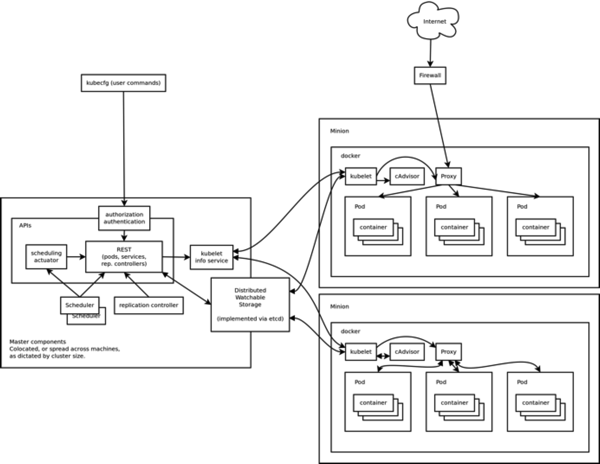
Master为主控节点,上面运行apiserver,scheduler,controller-manager等组件。Minion相当于工作节点,上面运行kubelet,proxy,cAdvisor以及最重要的docker等组件。下面来实际部署一下这套集群管理工具。
环境
yy1 10.193.6.35
yy2 10.193.6.36
yy1作为master,yy2作为minion。
# cat /etc/centos-release
CentOS Linux release 7.0.1406 (Core)
安装kubernetes
# curl https://copr.fedoraproject.org/coprs/eparis/kubernetes-epel-7/repo/epel-7/eparis-kubernetes-epel-7-epel-7.repo -o /etc/yum.repos.d/eparis-kubernetes-epel-7-epel-7.repo

# yum install kubernetes -y
配置yy1
# cat /etc/kubernetes/apiserver

###

# kubernetes system config

#

# The following values are used to configure the kubernetes-apiserver

#

# The address on the local server to listen to.

KUBE_API_ADDRESS="10.193.6.35"

# The port on the local server to listen on.

KUBE_API_PORT=""

# How the replication controller and scheduler find the apiserver

KUBE_MASTER="10.193.6.35:8080"

# Comma seperated list of minions

MINION_ADDRESSES="10.193.6.36"

# Port minions listen on

MINION_PORT=""

# cat /etc/kubernetes/config

###

# kubernetes system config

#

# The following values are used to configure various aspects of all

# kubernetes services, including

#

#   kubernetes-apiserver.service

#   kubernetes-controller-manager.service

#   kubernetes-kubelet.service

#   kubernetes-proxy.service

# Comma seperated list of nodes in the etcd cluster

KUBE_ETCD_SERVERS="http://10.193.6.35:4001"

# logging to stderr means we get it in the systemd journal

KUBE_LOGTOSTDERR="true"

# journal message level,  is debug

KUBE_LOG_LEVEL=

# Should this cluster be allowed to run privleged docker containers

KUBE_ALLOW_PRIV="true"
启动yy1上相关服务
master上需要运行etcd,kube-apiserver,kube-controller-manager,kube-scheduler这4个进程。
for SERVICES in etcd kube-apiserver kube-controller-manager kube-scheduler; do

    systemctl restart $SERVICES

    systemctl enable $SERVICES

    systemctl status $SERVICES

done
配置yy2
 # cat /etc/kubernetes/kubelet

 ###

 # kubernetes kublet (minion) config

 # The address for the info server to serve on

 MINION_ADDRESS="10.193.6.36"

 # The port for the info server to serve on

 MINION_PORT=""

 # You may leave this blank to use the actual hostname

 MINION_HOSTNAME="10.193.6.36"

 # cat /etc/kubernetes/config

 ###

 # kubernetes system config

 #

 # The following values are used to configure various aspects of all

 # kubernetes services, including

 #

 #   kubernetes-apiserver.service

 #   kubernetes-controller-manager.service

 #   kubernetes-kubelet.service

 #   kubernetes-proxy.service

 # Comma seperated list of nodes in the etcd cluster

 KUBE_ETCD_SERVERS="http://10.193.6.35:4001"

 # logging to stderr means we get it in the systemd journal

 KUBE_LOGTOSTDERR="true"

 # journal message level,  is debug

 KUBE_LOG_LEVEL=

 # Should this cluster be allowed to run privleged docker containers

 KUBE_ALLOW_PRIV="true"
修改yy2 kubelet的配置
CentOS7上没有docker.socket服务,注释掉kubelet中对docker.socket的依赖。
/usr/lib/systemd/system/kubelet.service
  [Unit]

 Description=Kubernetes Kubelet

 #After=docker.socket cadvisor.service

 After=cadvisor.service

 #Requires=docker.socket cadvisor.service

 Requires=cadvisor.service
启动yy2上的相关服务
minion上需要运行kube-proxy,kubelet以及docker。
for SERVICES in kube-proxy kubelet docker; do

    systemctl restart $SERVICES

    systemctl enable $SERVICES

    systemctl status $SERVICES

done
创建pod描述文件
创建一个apache的pod描述文件。
# cat apache.json

{

  "id": "apache",

  "desiredState": {

    "manifest": {

      "version": "v1beta1",

      "id": "apache-1",

      "containers": [{

        "name": "master",

        "image": "fedora/apache",

        "ports": [{

          "containerPort": ,

          "hostPort":

        }]

      }]

    }

  },

  "labels": {

    "name": "apache"

  }

}
创建pod
通过客户端工具kubecfg提交任务给apiserver,由scheduler选择一个minion部署容。
[root@yy1 ~]# kubecfg -c apache.json create pods

I0925 ::26.768122  request.go:] Waiting for completion of /operations/

ID                  Image(s)            Host                Labels              Status

----------          ----------          ----------          ----------          ----------

apache              fedora/apache       /                   name=apache         Waiting

[root@yy1 ~]# kubecfg list pods

ID                  Image(s)            Host                Labels              Status

----------          ----------          ----------          ----------          ----------

apache              fedora/apache       10.193.6.36/        name=apache         Waiting
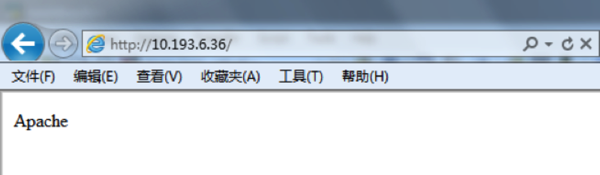
apache服务会自动部署到机器yy2,yy2上的docker会自动下载image,然后启动apache服务。顺利的话,过一会儿,apache服务就会在yy2上起来。
[root@yy1 ~]# kubecfg list pods

ID                  Image(s)            Host                Labels              Status

----------          ----------          ----------          ----------          ----------

apache              fedora/apache       10.193.6.36/        name=apache         Running

可以尝试访问一下,
主要参考
https://github.com/GoogleCloudPlatform/kubernetes/blob/master/docs/getting-started-guides/fedora/fedora_manual_config.md
作者:YY哥
出处:http://www.cnblogs.com/hustcat/
本文版权归作者和博客园共有,欢迎转载,但未经作者同意必须保留此段声明,且在文章页面明显位置给出原文连接,否则保留追究法律责任的权利。
Docker实践(6)—CentOS7上部署Kubernetes的更多相关文章
- 在CentOS7上部署Kubernetes集群
在CentOS7上部署Kubernetes集群 文/FCBusquest 2015-12-22 18:36:00 简介 Kubernetes(k8s)是Google开源的大规模容器集群管理系统, 本文 ...
- 在CentOS7上部署 Kubernetes集群
yum -y install etcd docker flannel kubenetes 一般会遇到没有k8s源的问题,先 yum update -y 看是否有效,如果还是没用就创建yum 源,再 ...
- 【docker】centOS7上部署的mysql和spring boot服务,要求,mysql的时间、java程序服务的时间和宿主机的时间完全保持一致【修改mysql时区,临时和永久】【修改spring boot配置文件时区】【修改docker启动spring boot实例程序时区】
要求:centOS7上部署的mysql和spring boot服务,要求,mysql的时间.java程序服务的时间和宿主机的时间完全保持一致: ============================ ...
- 在阿里云ECS CentOS7上部署基于MongoDB+Node.js的博客
前言:这是一篇教你如何在阿里云的ECS CentOS 7服务器上搭建一个个人博客的教程,教程比较基础,笔者尽可能比较详细的把每一步都罗列下来,包括所需软件的下载安装和域名的绑定,笔者在此之前对Linu ...
- 在 CentOS7 上部署 MySQL 主从
在 CentOS7 上部署 MySQL 主从 通过 SecureCRT 连接至 MySQL 主服务器: 找到 my.cnf 文件所在的目录: mysql --help | grep my.cnf 一般 ...
- 在 CentOS7 上部署 zookeeper 服务
在 CentOS7 上部署 zookeeper 服务 1 用 SecureCRT 或 XShell 等 Linux 客户端工具连接至 CentOS7 服务器: 2 进入到 /usr/local/too ...
- CentOS7上部署ASP.Net Core 2.2应用
前言 在CentOS7上部署ASP.Net Core应用是我的技术路线验证的一部分,下一个产品计划采用ASP.Net Boilerplate Framework开发.因此需要求提前进行一下技术验证,在 ...
- (转)Centos7上部署openstack ocata配置详解
原文:http://www.cnblogs.com/yaohong/p/7601470.html 随笔-124 文章-2 评论-82 Centos7上部署openstack ocata配置详解 ...
- centos7上部署dubbo管理控制台dubbo-admin
centos7上部署dubbo管理控制台dubbo-admin 1 准备工作 服务器:系统centos7, 内存4G, 存储60G, ip 192.168.159.128 软件环境: 安装有jdk1. ...
随机推荐
- 7.5 [bx+idata] 书中错误
这节中的问题 7.1 有错误 题目和我自己的注释为: 用 Debug 查看内存,结果如下: 2000:1000 BE 00 06 00 00 00 ... 写出下面程序执行后,ax,bx,cx中的内容 ...
- SQL多行转多列
--★转换结果如上图 1.首先创建表: CREATE TABLE [成绩表]( ,) NOT NULL, )NULL, , )NULL, , )NULL, , )NULL ) ON [PRIMARY] ...
- 数论(poj 1401)
题目:Factorial 题意:求N!末尾的0 的数量. 思路:10 = 2 * 5:N!中的2 的数量肯定比 5多:只需寻找5 的数量,暴力寻找TLE: 快点的方法:f(N) = N/5 + f( ...
- web cookie and session
一.什么是会话? 打开一个浏览器,访问多个网址后,再关掉浏览器,这一整个过程就是会话. 二.cookie技术 这是客户端保存临时数据的技术,主要用于保存用户的登录信息及其它需要保存的数据,如购买与结帐 ...
- 斯坦福第十八课:应用实例:图片文字识别(Application Example: Photo OCR)
18.1 问题描述和流程图 18.2 滑动窗口 18.3 获取大量数据和人工数据 18.4 上限分析:哪部分管道的接下去做 18.1 问题描述和流程图
- SpringMVC中使用DWR
SpringMVC中使用DWR重点在其配置当中. 1. web.xml文件的配置 在DispatcherServlet中增加dwr的拦截来取代DwrServlet. 更改配置如下: <serv ...
- jQuery in action 3rd - Selecting elements
jQuery(selector) / $(selector) selector 选择器有多种形式,下面是 #ID,.class,element jQuery 支持的 CSS 层级关系选择器 jQuer ...
- (01背包 当容量特别大的时候) Knapsack problem (fzu 2214)
http://acm.fzu.edu.cn/problem.php?pid=2214 Problem Description Given a set of n items, each with a ...
- delphi 十进制十六进制转换
delphi有提供十进制转换成十六进制的函数: IntToStr(); 返回值为String // 十进制转十六进制 var i: integer; str: string; begin i := ...
- Druid的使用步骤
一.关于Druid Druid是一个JDBC组件,它包括三部分: DruidDriver 代理Driver,能够提供基于Filter-Chain模式的插件体系. DruidDataSource 高效可 ...