
WangEditor+thinkphp5【真实可用+原创】
今天公司要编辑文章,一开始准备用ueditor,但是到了linux环境下一直不行,所以最终放弃。改用另外一个编辑器WangEditor。更加轻量级。
遇到最大的问题是 一个是图片上传,一个是div中的选择器editor没有value和name,那么post过去的值就不会有这个属性。
解决问题和过程如下:
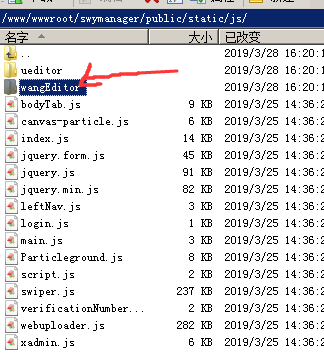
1.先把wangeditor放在public/static/js下面
2.然后再进入到编辑页面。
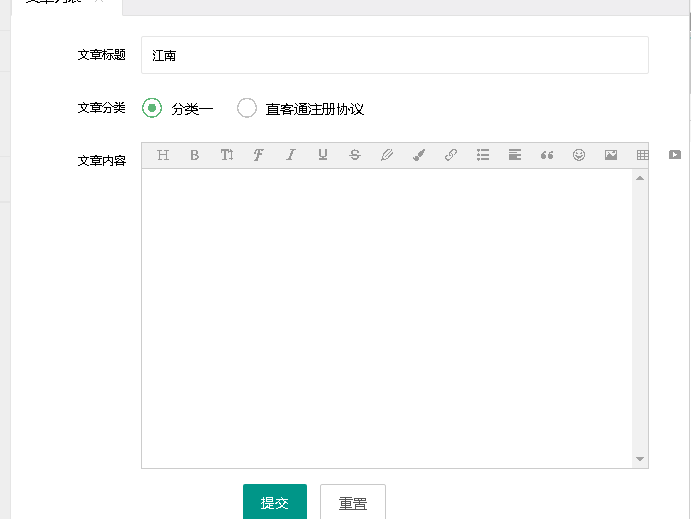
edit.html
{include file='public/head'}

<body>

    <style media="screen" type="text/css">

        header {

            color: black;

        }

    </style>

    <div class="x-body">

        <form action="edit" class="layui-form" id="mainForm" method="post" style="margin-right: 20px;" enctype="multipart/form-data">

            <input type="hidden" name='id' value="{$data.id}">

            <div class="layui-form-item">

                <label class="layui-form-label">文章标题</label>

                <div class="layui-input-block">

                    <input type="text" name="title" required  lay-verify="required" placeholder="请输入标题" value="{$data['title']}" autocomplete="off" class="layui-input">

                </div>

            </div>

            <div class="layui-form-item">

                <label class="layui-form-label">文章分类</label>

                <div class="layui-input-block layui-btn-xs">

                    {foreach $category as $key=>$vo}

                    <input type="radio" name="cid" value="{$vo.id}" title="{$vo.name}" {if $data['cid'] eq $vo.id} checked{/if}>

                    {/foreach}

                </div>

            </div>

            <div class="layui-form-item">

                <label class="layui-form-label">文章内容</label>

                <div class="layui-input-block">

                    <script src="__static__/js/wangEditor/wangEditor.min.js" type="text/javascript"></script>

                    <div id="editor">

                        {$data.content}

                    </div>

                    <textarea id="editor_content" name="content_x" style="display:none;"></textarea>

                    <script type="text/javascript">

                        var E = window.wangEditor

                        var editor = new E('#editor');

                        var editor_content = $('#editor_content');

                        // 或者 var editor = new E( document.getElementById('editor') )

                        editor.customConfig.uploadFileName = 'uploadfile';

                        editor.customConfig.uploadImgServer = '/index.php/admin/wangeditor/upload';  // 上传图片到服务器

                        editor.customConfig.onchange = function (html) {

                            // 监控变化,同步更新到 textarea

                            editor_content.val(html);

                         };

                        editor.create();

                    </script>

                </div>

            </div>

            <div class="layui-form-item">

                <div class="layui-input-block">

                    <button style="margin-left: 20%" class="layui-btn" lay-submit="" lay-filter="toSubmit">提交</button>

                    <button id="reset" type="reset" class="layui-btn layui-btn-primary">重置</button>

                </div>

            </div>

        </form>

    </div>

</body>

<script type="text/javascript">

    // $("#status").val(0);

    var form = layui.form;

    var layer = layui.layer;

              //自定义验证规则

              form.verify({

                password: function(value){

                  if(value.length < 3){

                    return '标题至少得2个字符啊';

                  }

                }

              });

        //监听提交

        form.on('submit(demo1)', function(data){

              layer.alert(JSON.stringify(data.field), {

              title: '最终的提交信息'

            })

            return false;

        });

    $(document).ready(function(){

        //var editorHtml = $('#editor').val();

               var options = {

              type:'post',           //post提交

              // url:'http://ask.tongzhuo100.com/server/****.php?='+Math.random(),   //url

              dataType:"json",        //json格式

              data:{},    //如果需要提交附加参数,视情况添加

              clearForm: false,        //成功提交后,清除所有表单元素的值

              resetForm: false,        //成功提交后,重置所有表单元素的值

              cache:false,

              async:false,          //同步返回

              success:function(data){

                  console.log(data);

                  if(data.code==0){

                      layer.msg(data.msg);

                  }else{

                      layer.msg(data.msg,{icon:1,time:500},function(){

                          $("#reset").click();

                          x_admin_close();

                          parent.location.reload();

                      });

                  }

                //服务器端返回处理逻辑

              },

              error:function(XmlHttpRequest,textStatus,errorThrown){

                layer.msg('操作失败:服务器处理失败');

              }

            };

        // bind form using 'ajaxForm'

        $('#mainForm').ajaxForm(options).submit(function(data){

            location.href="/index.php/admin/article/getArticleList";

        });

    });

</script>

{include file='public/foot'}
核心代码区块:
            <div class="layui-form-item">

                <label class="layui-form-label">文章内容</label>

                <div class="layui-input-block">

                    <script src="__static__/js/wangEditor/wangEditor.min.js" type="text/javascript"></script>

                    <div id="editor">

                        {$data.content}

                    </div>

                    <textarea id="editor_content" name="content_x" style="display:none;"></textarea>

                    <script type="text/javascript">

                        var E = window.wangEditor

                        var editor = new E('#editor');

                        var editor_content = $('#editor_content');

                        // 或者 var editor = new E( document.getElementById('editor') )

                        editor.customConfig.uploadFileName = 'uploadfile';

                        editor.customConfig.uploadImgServer = '/index.php/admin/wangeditor/upload';  // 上传图片到服务器

                        editor.customConfig.onchange = function (html) {

                            // 监控变化,同步更新到 textarea

                            editor_content.val(html);

                         };

                        editor.create();

                    </script>

                </div>

            </div>
然后请求的控制:
一个是图片的上传:Wangeditor
<?php

namespace app\admin\controller;

use think\Controller;

/**

 * wangEditor

 */

class Wangeditor extends Controller

{

    public function upload()

    {

        $file = request()->file('uploadfile');

        // 移动到框架应用根目录/public/uploads/ 目录下

        $data = [];

        if ($file) {

            $info = $file->move(ROOT_PATH . 'public' . DS . 'uploads');

            if ($info) {

                $imgp = str_replace('\\','/',$info->getSaveName());

                $data = [

                    'errno' => 0,

                    'data' => !empty($info) ? ['/public/uploads/'.$imgp] : []

                ];

            } else {

                $data = [

                    'errno' => $file->getError(),

                    'data' => []

                ];

            }

        }

        return json_encode($data);

    }

}
一个是文章的编辑 Article.php
<?php

namespace app\admin\controller;

use think\Controller;

use think\Db;

/**

 * 文章管理

 */

class Article extends Controller

{

    // 文章列表

    public function getArticleList()

    {

        $article = Db::name('article')

            ->alias('a')

            ->join('category c','c.id=a.cid')

            ->field('a.id as aid, a.*,c.*')

            ->order('a.id asc')

            ->paginate('15');

        $page = $article->render();

        $total = $article->total();

        $this->assign('article', $article);

        $this->assign('page', $page);

        $this->assign('count', $total);

        return $this->fetch('article_list');

    }

    // 編輯文章

    public function editArticle()

    {

        $id = (int)$this->request->get('id');

        $data = Db::name('article')->where('id', $id)->find();

        $category = Db::name('category')->select();

        return $this->fetch('edit', ['data' => $data, 'category' => $category]);

    }

    // 保存编辑之后的文章数据

    public function edit()

    {

        $post = $this->request->post();

        $post['content'] = $post['content_x'];

        unset($post['content_x']);

        $id = (int)$post['id'];

        unset($post['id']);

        Db::name('article')->where('id', $id)->update($post);

        $this->success('保存成功');

    }

}
这样就完美的实现了。
WangEditor+thinkphp5【真实可用+原创】的更多相关文章
- webloader上传图片详细教程/使用thinkphp5.0(原创)
这个插件对后端程序员相当友好,无论是JAVA还是PHP,抑或python,基本只需要一句代码就能完成上传并且预览的效果,先上效果图,让你们眼馋一下 废话不说,直接撸代码,前端代码如下: <htm ...
- Centos7 搭建openldap完整详细教程(真实可用)
最近,由于公司需求,需要搭建openldap来统一用户名和密码,目前市面上几乎所有的工具都支持ldap协议,具体ldap的介绍这里就不详细说明了,这里主要记录一下如果部署openldap来实现Ldap ...
- linux 访问tomcat 管理页面时 You are not authorized to view this page 403(真实可用)
ava代码 收藏代码 You are not authorized to view this page. If you have not changed any configuration files ...
- 排序算法系列:快速排序算法JAVA版(靠谱、清晰、真实、可用、不罗嗦版)
在网上搜索算法的博客,发现一个比较悲剧的现象非常普遍: 原理讲不清,混乱 啰嗦 图和文对不上 不可用,甚至代码还出错 为了不误人子弟耽误时间,推荐看一些靠谱的资源,如[啊哈!算法]系列: https: ...
- 【原创】node+express+socket搭建一个实时推送应用
技术背景 Web领域的实时推送技术,也被称作Realtime技术.这种技术要达到的目的是让用户不需要刷新浏览器就可以获得实时更新. 应用场景: 监控系统:后台硬件热插拔.LED.温度.电压发生变化 即 ...
- (原创) 使用pymongo 3.6.0连接MongoDB的正确姿势
0.疑惑 前两天使用pymongo连接MongoDB的时候发现了一个奇怪的现象:我本机MongoDB并没有打开,但是使用pymong.MongoClient()进行连接时,并没有异常,我的服务端也正常 ...
- Windowserver2012服务器激活方法(亲测可用)---转载
Windowserver2012服务器激活方法(亲测可用)原创꧁刘向洋꧂ 最后发布于2019-03-12 14:46:45 阅读数 5124 收藏展开激活方式 slmgr /ipk D2N9P-3P ...
- Keepalived实现Nginx负载均衡高可用
第一章:keepalived介绍 VRRP协议 目的就是为了解决静态路由单点故障问题的 第二章: keepalived工作原理 2.1 作为系统网络服务的高可用功能(failover) keepali ...
- win10快速开机
百度经验:jingyan.baidu.com 在win8系统出现以后的win系统中,都有一个特点,那就是快速启动,可是,相信大家都有这样一个问题,就是,自己明明用的是win8(或者win10)系统,可 ...
随机推荐
- 安装anaconda和python3.7环境
安装anaconda和python3.7 安装matplotlib报错(参考https://github.com/conda/conda/issues/6007)# 设置源为清华conda confi ...
- 快速搭建一个Spring Boot + MyBatis的开发框架
前言:Spring Boot的自动化配置确实非常强大,为了方便大家把项目迁移到Spring Boot,特意总结了一下如何快速搭建一个Spring Boot + MyBatis的简易文档,下面是简单的步 ...
- 使用 ThreeSixty 创建可拖动的 360 度全景图片预览效果
ThreeSixty 是生成可拖动的360度预览图像序列的 jQuery 插件.只需要在你的 HTML 页面包引入最新的 jQuery 和 threesixty.js 文件就可以使用了,支持键盘上的箭 ...
- Vuforia的图像识别之后的服务器下载与ARKit的兼容性解决
2017.12.12 遇到的问题: Could not produce class with ID 75 直接关闭unity里面的Strip engine code,解决下载ab时的崩溃问题 *Str ...
- C#+EntityFramework编程方式详细之Model First
Model First Model First模式即“模型优先”,这里的模型指的是“ADO.NET Entity Framework Data Model”,此时你的应用并没有设计相关数据库,在VS中 ...
- 做GUI的随笔
用的SDL库 官方网站是:https://littlevgl.com/ 改网站需要FQ 字库制作网站: https://debugdump.com/t_771.html
- element ui table单选框点击全选问题
<template slot-scope="scope"> <el-radio-group v-model="scope.row.HandleState ...
- .net OADate 转javascript的Datetime js 5位 日期 转换
以下是将.net的OADate转成javascript的DateTime函数. 其中参数oadate是.net那里传过来的UTC时间的double.记得 一定是UTC时间. .net Double o ...
- Excel 转为 MySQL 语句
一.方法 一.假设你的表格有A.B.C三列数据,希望导入到你的数据库中表格table,对应的字段分别是col1.col2.col3 二.在你的表格中增加一列,利用excel的公式自动生成sql语句,具 ...
- 在使用EF时,想要比较字符串类型的日期时
原文地址(https://blog.csdn.net/yangxinyue315/article/details/44960895) 在使用EF时,想要比较字符串类型的日期时 在使用EF时,想要比较字 ...