
SpringBoot+POI报表批量导出
由于servletResponse 获取的输出流对象在一次请求中只能输出一次,所以要想实现批量导出报表,需要将excel文件打包成zip格式然后输出。
好了,废话不多说,上代码。
1. 首先,需要导入引用的包。pom文件如下所示(点击“+”号展开)
<project xmlns="http://maven.apache.org/POM/4.0.0"

    xmlns:xsi="http://www.w3.org/2001/XMLSchema-instance"

    xsi:schemaLocation="http://maven.apache.org/POM/4.0.0 http://maven.apache.org/xsd/maven-4.0.0.xsd">

    <modelVersion>4.0.0</modelVersion>

    <groupId>com.alan.demo</groupId>

    <artifactId>office2007-export</artifactId>

    <version>0.0.1-SNAPSHOT</version>

    <parent>

        <groupId>org.springframework.boot</groupId>

        <artifactId>spring-boot-starter-parent</artifactId>

        <version>1.5.1.RELEASE</version>

    </parent>

    <properties>

        <project.build.sourceEncoding>UTF-8</project.build.sourceEncoding>

        <project.reporting.outputEncoding>UTF-8</project.reporting.outputEncoding>

        <java.version>1.8</java.version>

    </properties>

    <dependencies>

        <!-- Web 依赖 -->

        <dependency>

            <groupId>org.springframework.boot</groupId>

            <artifactId>spring-boot-starter-web</artifactId>

        </dependency>

        <!-- 测试依赖 -->

        <dependency>

            <groupId>org.springframework.boot</groupId>

            <artifactId>spring-boot-starter-test</artifactId>

            <scope>test</scope>

        </dependency>

        <dependency>

            <groupId>org.apache.poi</groupId>

            <artifactId>poi</artifactId>

            <version>3.15</version>

        </dependency>

        <dependency>

            <groupId>org.apache.poi</groupId>

            <artifactId>poi-ooxml</artifactId>

            <version>3.15</version>

        </dependency>

        <!-- https://mvnrepository.com/artifact/org.apache.ant/ant -->

        <dependency>

            <groupId>org.apache.ant</groupId>

            <artifactId>ant</artifactId>

            <version>1.8.2</version>

        </dependency>

    </dependencies>

    <build>

        <plugins>

            <!-- Spring Boot Maven 插件 -->

            <plugin>

                <groupId>org.springframework.boot</groupId>

                <artifactId>spring-boot-maven-plugin</artifactId>

            </plugin>

        </plugins>

    </build>

    <repositories>

        <repository>

            <id>spring-snapshots</id>

            <name>Spring Snapshots</name>

            <url>https://repo.spring.io/libs-snapshot</url>

            <snapshots>

                <enabled>true</enabled>

            </snapshots>

        </repository>

    </repositories>

</project>
2. Controller 实现
package com.alan.demo.controller;

import java.io.BufferedInputStream;

import java.io.File;

import java.io.FileInputStream;

import java.io.FileOutputStream;

import java.io.IOException;

import java.io.InputStream;

import java.io.OutputStream;

import java.util.ArrayList;

import java.util.List;

import java.util.UUID;

import javax.servlet.http.HttpServletRequest;

import javax.servlet.http.HttpServletResponse;

import org.apache.poi.ss.usermodel.Cell;

import org.apache.poi.ss.usermodel.Row;

import org.apache.poi.ss.usermodel.Workbook;

import org.apache.poi.xssf.usermodel.XSSFWorkbook;

import org.apache.tools.zip.ZipOutputStream;

import org.springframework.web.bind.annotation.RequestMapping;

import org.springframework.web.bind.annotation.RequestMethod;

import org.springframework.web.bind.annotation.RestController;

import com.alan.demo.util.FileUtil;

/**

 * export batch Excel files.

 *

 * */

@RestController

public class DataExportController {

    private static final String BASE_PATH = System.getProperty("java.io.tmpdir") + "Resource" + File.separator;

    @RequestMapping(value = "/export",method = RequestMethod.GET)

    public void export(HttpServletRequest request,  HttpServletResponse response) {

        ZipOutputStream out = null;

        BufferedInputStream bis =  null;

        InputStream in = null;

        String tip = UUID.randomUUID().toString() + File.separator;

        try {

            createAllWorkbooks(tip);

            response.setHeader("content-type", "application/octet-stream");

            response.setContentType("application/octet-stream;charset=utf-8");

            response.setHeader("Content-Disposition", "attachment;filename=" + "EXCEL2016.zip");

            File tempZip = new File(BASE_PATH + tip + "temp.zip");

            FileUtil.createZipFile(new File(BASE_PATH+ tip), new ZipOutputStream(tempZip));

            System.out.println("Created ZIP File");

            OutputStream os = response.getOutputStream();

            in = new FileInputStream(tempZip);

            bis = new BufferedInputStream(in);

            byte buff[] = new byte[1024];

            int i = bis.read(buff);

            while (i != -1) {

              os.write(buff, 0, buff.length);

              os.flush();

              i = bis.read(buff);

            }

        } catch (IOException e) {

            e.printStackTrace();

        } finally {

            if (out != null) {

                try {

                    out.close();

                } catch (IOException e) {

                    e.printStackTrace();

                }

            }

            if (bis != null) {

                try {

                    bis.close();

                } catch (IOException e) {

                    e.printStackTrace();

                }

            }

            if (in != null) {

                try {

                    in.close();

                } catch (IOException e) {

                    e.printStackTrace();

                }

            }

            FileUtil.deleteDir(BASE_PATH);

        }

    }

    /**

     * create mock data

     *

     * */

    public List<Workbook> createAllWorkbooks(String tip) {

        List<Workbook> workbooks = new ArrayList<>();

        OutputStream out = null;

        try {

            for (int i=0;i<100;i++) {

                File tempFile = new File(BASE_PATH + tip + i + ".xlsx");

                tempFile.getParentFile().mkdirs();

                tempFile.createNewFile();

                out = new FileOutputStream(tempFile);

                Workbook workbook = new XSSFWorkbook();

                workbook.createSheet("summary");

                workbook.getSheetAt(0).createRow(0);

                Row row = workbook.getSheetAt(0).getRow(0);

                Cell cell = row.createCell(0);

                cell.setCellValue("Hello Spring Boot.");

                workbooks.add(workbook);

                workbook.write(out);

                out.flush();

            }

        } catch (IOException e) {

            e.printStackTrace();

        } finally {

            try {

                if (out!= null) {

                    out.close();

                }

            } catch (IOException e) {

                e.printStackTrace();

            }

        }

        return workbooks;

    }

}
3. FileUtil 工具类
package com.alan.demo.util;

import java.io.ByteArrayOutputStream;

import java.io.File;

import java.io.FileInputStream;

import java.io.FileNotFoundException;

import java.io.IOException;

import java.io.InputStream;

import org.apache.tools.zip.ZipEntry;

import org.apache.tools.zip.ZipOutputStream;

public class FileUtil {

    /**

     * Compress all .xlsx Files under original path.

     *

     * */

    public static void compress(File original, ZipOutputStream out) {

        try {

            if (original == null) {

                System.err.println("Null original file is not allowed.");

            }

            if (!original.isFile()) {

                File[] files = original.listFiles();

                for (File file : files) {

                    compress(file, out);

                }

            } else if (original.isFile() && original.getName().endsWith(".xlsx")) {

                FileInputStream fis = new FileInputStream(original);

                int j = 0;

                byte[] buffer = new byte[1024];

                out.putNextEntry(new ZipEntry(original.getName()));

                while ((j = fis.read(buffer)) > 0) {

                    out.write(buffer, 0, j);

                }

                fis.close();

                out.flush();

            }

        } catch (FileNotFoundException e) {

            e.printStackTrace();

        } catch (IOException e) {

            e.printStackTrace();

        }

    }

    /**

     * Delete all files under path.

     *

     * */

    public static boolean deleteDir(String path){

        File file = new File(path);

        if(!file.exists()){

            System.err.println("The dir are not exists!");

            return false;

        }

        String[] content = file.list();

        for(String name : content){

            File temp = new File(path, name);

            if(temp.isDirectory()){

                deleteDir(temp.getAbsolutePath());

                temp.delete();

            }else{

                if(!temp.delete()){

                    System.err.println("Failed to delete " + name);

                }

            }

        }

        return true;

    }

    /**

     * Create zip file

     * @param originalFile : the directory contains all files prepared to compress.

     * @param ZipOutputStream : ZIP file out put stream

     * */

    public static void createZipFile(File originalFile, ZipOutputStream out) {

        FileUtil.compress(originalFile, out);

        if (out != null) {

            try {

                out.close();

            } catch (IOException e) {

                e.printStackTrace();

            }

        }

    }

    /**

     * clone input stream

     *

     * */

    public static ByteArrayOutputStream cloneInputStream(InputStream in) {

        try {

            ByteArrayOutputStream out = new ByteArrayOutputStream();

            byte[] buffer = new byte[1024];

            int len = 0;

            while((len=in.read(buffer)) >0) {

                out.write(buffer, 0, len);

            }

            out.flush();

            return out;

        } catch (IOException e) {

            e.printStackTrace();

            return null;

        }

    }

    /*public static void main(String[] args) {

        deleteDir("C:\\Users\\mh\\Desktop\\TEMP");

    }*/

}
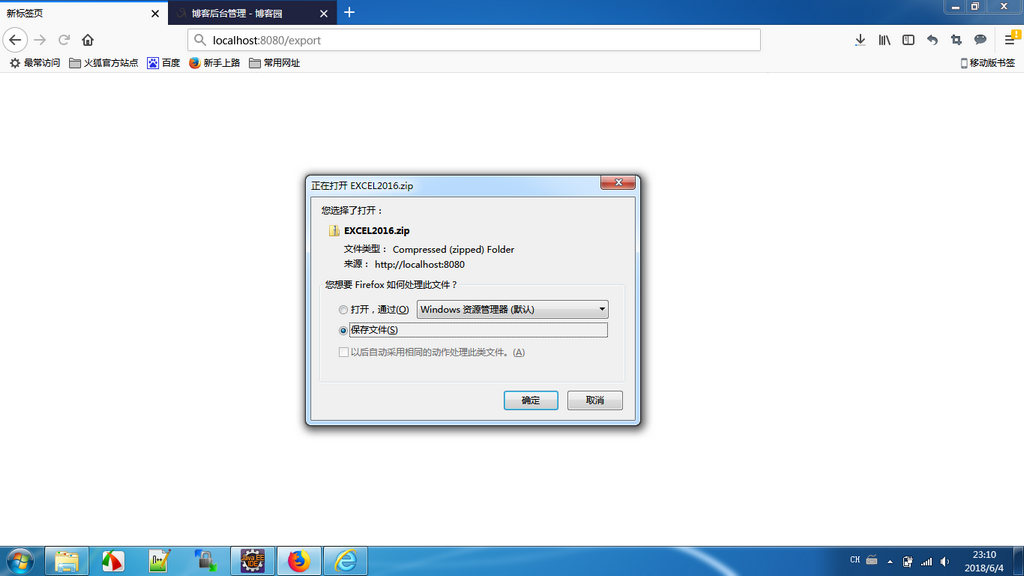
测试结果:
SpringBoot+POI报表批量导出的更多相关文章
- 多表批量导出txt及打压缩包下载
在一些特殊的业务系统中,有些客户查看报表数据时不需要在浏览器上逐一查看,需要在页面端选择要查看的报表名称(可多选),选择条件,然后将所选中的报表批量导出到txt文件中并且要把批量导出的结果文件打 ...
- Java使用POI实现数据导出excel报表
Java使用POI实现数据导出excel报表 在上篇文章中,我们简单介绍了java读取word,excel和pdf文档内容 ,但在实际开发中,我们用到最多的是把数据库中数据导出excel报表形式.不仅 ...
- java操作Excel之POI(5)利用POI实现使用模板批量导出数据
后台导出方法: 在源文件夹src下面放个准备好的模板:/com/cy/template/userExportTemplate.xls,这个模板有头部一行: /** * 后台导出方法 * 利用POI实现 ...
- java操作Excel之POI(4)利用POI实现数据的批量导出
后台导出方法: /** * 后台导出方法 * 利用POI实现数据的批量导出 */ public String export() throws Exception{ Connection con = n ...
- java使用POI操作excel文件,实现批量导出,和导入
一.POI的定义 JAVA中操作Excel的有两种比较主流的工具包: JXL 和 POI .jxl 只能操作Excel 95, 97, 2000也即以.xls为后缀的excel.而poi可以操作Exc ...
- POI操作Excel(批量导出数据/下载excel)
目录 1.第一个demo:创建工作簿,创建sheet页,创建单元格 2.创建一个时间格式的单元格 3.遍历工作簿的行和列并获取单元格内容 4.文本提取 5.单元格对齐方式 ...
- Java中使用poi导入、导出Excel
一.介绍 当前B/S模式已成为应用开发的主流,而在企业办公系统中,常常有客户这样子要求:你要把我们的报表直接用Excel打开(电信系统.银行系统).或者是:我们已经习惯用Excel打印.这样在我们实际 ...
- POI报表打印
一.Excel报表(POI) 1.需求说明 在企业级应用开发中,Excel报表是一种最常见的报表需求.Excel报表开发一般分为两种形式: 1.为了方便操作,基于Excel的报表批量上传数据 2.通过 ...
- 使用VUE+SpringBoot+EasyExcel 整合导入导出数据
使用VUE+SpringBoot+EasyExcel 整合导入导出数据 创建一个普通的maven项目即可 项目目录结构 1 前端 存放在resources/static 下 index.html &l ...
随机推荐
- Envoy 源码分析--network
目录 Envoy 源码分析--network address Instance DNS cidr socket Option Socket ListenSocket ConnectionSocket ...
- 【javascript】数据类型中的一些小知识点
1. undefined 和 null undefined是一个变量而不是一个关键字,所以可以被重新赋值.为了避免歧义,一般推荐用void 0 来获取undefined: null是一个关键字,所以可 ...
- CDI Features(EL(SPEL),Decorator,Interceptor,Producer)
一.EL(SPEL) EL 1.概述:EL是JSP内置的表达式语言,用以访问页面的上下文以及不同作用域中的对象 ,取得对象属性的值,或执行简单的运算或判断操作.EL在得到某个数据时,会自动进行数据类型 ...
- 【分享】谈CSS3中display属性的flex布局
最近在学习微信小程序(重新学习微信小程序),在设计首页布局的时候,新认识了一种布局方式display:flex .guide-top{ height: 36%; display: flex; /*fl ...
- awk 中的难懂符号解释
awk中NF和NR的意义,其实你已经知道NF和NR的意义了,NF代表的是一个文本文件中一行(一条记录)中的字段个数,NR代表的是这个文本文件的行数(记录数). 看个例子: cal 9 2003 Sep ...
- dubbo服务暴露
想熟悉dubbo源码,首先要知道dubbo extensionLoader,而dubbo的这种扩展机制,是根据java spi衍生而来. 这是基础,但是我放在后面说明. 一:dubbo demo pr ...
- Java多线程之synchronized及其优化
Synchronized和同步阻塞synchronized是jvm提供的同步和锁机制,与之对应的是jdk层面的J.U.C提供的基于AbstractQueuedSynchronizer的并发组件.syn ...
- Vue混入
Vue 混入 混入 (mixins) 是一种分发 Vue 组件中可复用功能的非常灵活的方式.混入对象可以包含任意组件选项.当组件使用混入对象时,所有混入对象的选项将被混入该组件本身的选项. 数据对象合 ...
- Ubuntu安装之python开发
Ubuntu安装之python开发 什么??公司要用Ubuntu(乌班图)?不会用??怎么进行python开发??? 乌班图操作系统下载地址:http://releases.ubuntu.com/ ...
- github同一账户+多个库
目标 我的情况是,既要向自己的public库提交代码,又要向别人的private库提交代码 网上搜到的情况一:github上有多个账号,都要向自己的库提交代码 网上搜到的情况二:多个git托管源(比如 ...