
springboot入门1
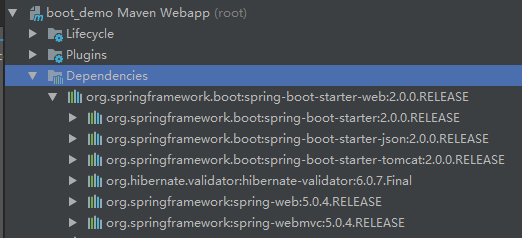
1引入springboot父依赖,和 spring-boot-starter-web的启动器

依赖引入后jar包展示依赖的情况
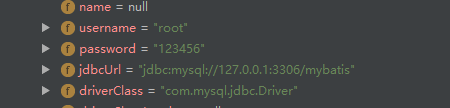
入门工程 配置数据源
package com.boot.web.config;

import lombok.Data;
import org.springframework.boot.context.properties.ConfigurationProperties;

//配置属性注解
@ConfigurationProperties(prefix = "jdbc")
@Data//get set
public class JdbcProperties {

    private String driverClassName;
    private String url;
    private String username;
    private String password;

}
package com.boot.web.config;

import com.alibaba.druid.pool.DruidDataSource;
import org.springframework.boot.context.properties.EnableConfigurationProperties;
import org.springframework.context.annotation.Bean;
import org.springframework.context.annotation.Configuration;

import javax.sql.DataSource;

@EnableConfigurationProperties(JdbcProperties.class)//使用配置属性
@Configuration
//@PropertySource(value = "classpath:jdbc.properties.bak")//注释掉spring的属性注入方式
public class JdbcConfig {

    //spring配置文件属性注入  封装  spring注入方式
    //@Value("${jdbc.driverClassName}")
    //private String driverClassName;
    //@Value("${jdbc.url}")
    //private String url;
    //@Value("${jdbc.username}")
    //private String username;
    //@Value("${jdbc.password}")
    //private String password;

    @Bean(value = "dataSource")//默认bean名称为方法名
    public DataSource getDataSource(JdbcProperties properties){
        DruidDataSource dataSource = new DruidDataSource();
        //属性配置  注入
        dataSource.setUrl(properties.getUrl());
        dataSource.setDriverClassName(properties.getDriverClassName());
        dataSource.setUsername(properties.getUsername());
        dataSource.setPassword(properties.getPassword());
        return dataSource;
    }

    //@Bean
    //@ConfigurationProperties(prefix = "jdbc")
    //public DataSource getDataSource(){
    //    DataSource dataSource = new DruidDataSource();
    //    return dataSource;
    //}

}
jdbc:
  driverClassName: com.mysql.jdbc.Driver
  url: jdbc:mysql://127.0.0.1:3306/mybatis
  username: root
  password:
spring:
  mvc:
    view:
      suffix: .jsp
      prefix: /WEB-INF/views/
server:
  port:
application.yml
package com.boot;

import org.springframework.boot.SpringApplication;
import org.springframework.boot.autoconfigure.SpringBootApplication;
//1声明配置 2自动配置 3扫描包
@SpringBootApplication
public class BootDemoApplication {

    public static void main(String[] args) {
        SpringApplication.run(BootDemoApplication.class);
    }

}
package com.boot.web.controller;

import org.springframework.beans.factory.annotation.Autowired;
import org.springframework.web.bind.annotation.GetMapping;
import org.springframework.web.bind.annotation.RestController;

import javax.sql.DataSource;

@RestController
public class HelloController {

    @Autowired
    private DataSource dataSource;

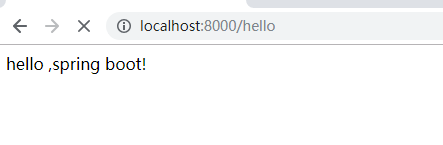
    @GetMapping("hello")
    public String hello() {
        return "hello ,spring boot!";
    }

}
controller
简单总结:引依赖 加注解 加配置 三部曲!
1.maven工程(war)
2引入boot父依赖,引入web启动器,引入数据库连接池依赖
3书写springconfig配置类(加注解),application.yml配置文件(数据路连接池配置 4大参数)
4controller测试,同时测试di注入连接池对象是否有值注入成功。
springboot入门1的更多相关文章
- SpringBoot入门教程(二)CentOS部署SpringBoot项目从0到1
在之前的博文<详解intellij idea搭建SpringBoot>介绍了idea搭建SpringBoot的详细过程, 并在<CentOS安装Tomcat>中介绍了Tomca ...
- SpringBoot入门基础
目录 SpringBoot入门 (一) HelloWorld. 2 一 什么是springboot 1 二 入门实例... 1 SpringBoot入门 (二) 属性文件读取... 16 一 自定义属 ...
- SpringBoot入门示例
SpringBoot入门Demo SpringBoot可以说是Spring的简化版.配置简单.使用方便.主要有以下几种特点: 创建独立的Spring应用程序 嵌入的Tomcat,无需部署WAR文件 简 ...
- Spring全家桶系列–[SpringBoot入门到跑路]
//本文作者:cuifuan Spring全家桶————[SpringBoot入门到跑路] 对于之前的Spring框架的使用,各种配置文件XML.properties一旦出错之后错误难寻,这也是为什么 ...
- springboot入门之一:环境搭建(续)
在上篇博客中从springboot的入门到运行一个springboot项目进行了简单讲述,详情请查看“springboot入门之一”.下面继续对springboot做讲述. 开发springboot测 ...
- 【Java】SpringBoot入门学习及基本使用
SpringBoot入门及基本使用 SpringBoot的介绍我就不多说了,核心的就是"约定大于配置",接下来直接上干货吧! 本文的实例: github-LPCloud,欢迎sta ...
- SpringBoot入门(三)——入口类解析
本文来自网易云社区 上一篇介绍了起步依赖,这篇我们先来看下SpringBoot项目是如何启动的. 入口类 再次观察工程的Maven配置文件,可以看到工程的默认打包方式是jar格式的. <pack ...
- SpringBoot入门(五)——自定义配置
本文来自网易云社区 大部分比萨店也提供某种形式的自动配置.你可以点荤比萨.素比萨.香辣意大利比萨,或者是自动配置比萨中的极品--至尊比萨.在下单时,你并没有指定具体的辅料,你所点的比萨种类决定了所用的 ...
- SpringBoot入门(四)——自动配置
本文来自网易云社区 SpringBoot之所以能够快速构建项目,得益于它的2个新特性,一个是起步依赖前面已经介绍过,另外一个则是自动配置.起步依赖用于降低项目依赖的复杂度,自动配置负责减少人工配置的工 ...
- SpringBoot入门(二)——起步依赖
本文来自网易云社区 在前一篇我们通过简单几步操作就生成了一个可以直接运行的Web程序,这是因为SpringBoot代替我们做了许多工作,概括来讲可以分为起步依赖和自动配置.这一篇先来看看起步依赖. 项 ...
随机推荐
- day13笔记
1:StringBuffer(掌握) (1)用字符串做拼接,比较耗时并且也耗内存,而这种拼接操作又是比较常见的,为了解决这个问题,Java就提供了 一个字符串缓冲区类.StringBuffer供我们使 ...
- [git]入门-创建版本库
转载整理自:https://www.liaoxuefeng.com/wiki/0013739516305929606dd18361248578c67b8067c8c017b000/0013743256 ...
- 自定义Hook
在 class RegForm(form.Form) 中 1.验证两次密码是否相同 from django.core.exceptions import ValidationError def cle ...
- Adversarial Examples for Semantic Segmentation and Object Detection 阅读笔记
Adversarial Examples for Semantic Segmentation and Object Detection (语义分割和目标检测中的对抗样本) 作者:Cihang Xie, ...
- shiro的单机版 和 集群版
在我们的开发当中 我们一般权限都是个 比较繁琐 但又必不可少的 一部分 [不管我们的 数据库设计 还是我们采用何种技术 我们的权限库表 大多都是大同小异 业务逻辑也是如此] 在我们不使用任何框架 ...
- linux 清理缓存buff/cache
清理缓存 echo 1 > /proc/sys/vm/drop_cachesecho 2 > /proc/sys/vm/drop_cachesecho 3 > /proc/sys/v ...
- Codeforces Round #552 (Div. 3) F. Shovels Shop (前缀和预处理+贪心+dp)
题目:http://codeforces.com/contest/1154/problem/F 题意:给你n个商品,然后还有m个特价活动,你买满x件就把你当前的x件中最便宜的y件价格免费,问你买k件花 ...
- find命令配合sed命令使用
1.查找当前目录下所有以txt文件中包含123的数字都替换成5678 find ./ -name "*.txt" -exec grep "123" {} \; ...
- mysql事件调用存储过程总结
第一次写事件调用存储过程,在网上找了一些资料,特此做下总结,巩固一下: 事件调用存储过程主要有三种: (1)创建事件马上执行,调用存储过程 CREATE EVENT if not exists Eve ...
- python基础13_zip_import
继续内置函数,zip函数被比喻成拉链,将两边的齿对应起来. #!/usr/bin/env python # coding:utf-8 ## 比喻像个拉链,将两边对应起来. # 多出来的部分,不作处理. ...