
Entity Framework入门教程(17)---记录和拦截数据库命令
记录和拦截数据库命令
这一节介绍EF6怎么记录和拦截发送给数据库的查询和操作命令。
1.记录EF发送给数据库命令(DbContext.Database.Log)
以前给了查看EF发送给数据库的命令我们需要借助数据库的追踪工具或者第三方追踪工具,现在EF6中提供了DbContext.Database.Log属性(Action<string>类型),使用这个属性我们可以很方便地记录EF发送给数据库的命令。
下边是一个栗子:
        static void Main(string[] args)

        {

            using (EFDbContext context=new EFDbContext())

            {

                context.Database.Log = Console.WriteLine;

                var std1 = context.Students.Find();

                std1.Name = "newName";

                context.SaveChanges();

                Console.ReadKey();

            }

        }
输出如下:
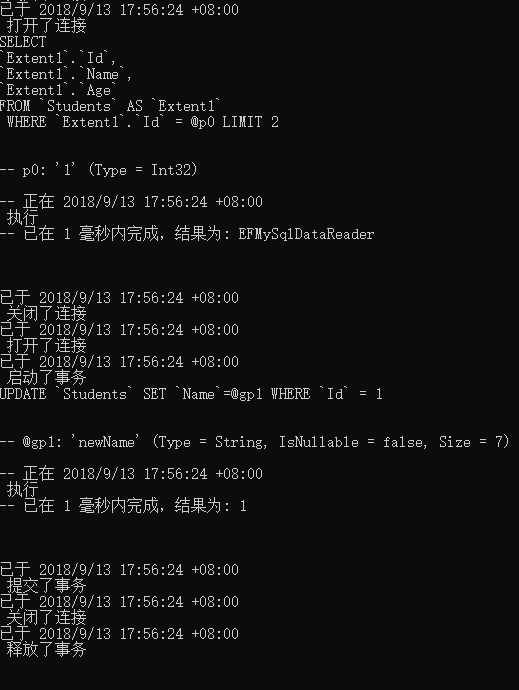
在上边的栗子中,Console.Write()方法属于Action<string>类型,所以可以赋值给Log属性。可以看到EF打开和关闭数据库,执行查询,和使用事务进行CUD都会被记录下来。
我们也可以自定义一个Action<string>委托的实例赋值给Log属性:
public class Logger

{

    public static void Log(string message)

    {

        Console.WriteLine("EF Message: {0} ", message);

    }

}

class EF6Demo

{

    public static void DBCommandLogging()

    {

        using (var context = new SchoolDBEntities())

        {

            context.Database.Log =  Logger.Log;

            var std1 = context.Students.Find();

            std1.Name = "newName";

            context.SaveChanges();

            Console.ReadKey();

        }

    }

}
2.拦截EF生成的数据库命令(IDbCommandIntercepter)
EF6提供了拦截数据库的接口IDbCommandIntercepter,这个接口提供了拦截EF发送给数据库的命令的方法,我们也可以使用这个接口实现在context的操作执行前或执行后去做一些自定义的操作(类似mvc/api中的filter)。因为DbContext执行操作的底层实现是利用ADO.NET进行ExecuteNonQuery, ExecuteScalar, 和ExecuteReader,所以我们可以通过如NonQueryExecuted、NonQueryExecuting等方法进行拦截。
为了实现SQL命令拦截我们首先要定义一个实现IDbCommandIntercepter接口的类:
    class EFCommandInterceptor : IDbCommandInterceptor

    {

        public void NonQueryExecuted(System.Data.Common.DbCommand command, DbCommandInterceptionContext<int> interceptionContext)

        {

            LogInfo("NonQueryExecuted", String.Format(" IsAsync: {0}, Command Text: {1}", interceptionContext.IsAsync, command.CommandText));

        }

        public void NonQueryExecuting(System.Data.Common.DbCommand command, DbCommandInterceptionContext<int> interceptionContext)

        {

            LogInfo("NonQueryExecuting", String.Format(" IsAsync: {0}, Command Text: {1}", interceptionContext.IsAsync, command.CommandText));

        }

        public void ReaderExecuted(System.Data.Common.DbCommand command, DbCommandInterceptionContext<System.Data.Common.DbDataReader> interceptionContext)

        {

            LogInfo("ReaderExecuted", String.Format(" IsAsync: {0}, Command Text: {1}", interceptionContext.IsAsync, command.CommandText));

        }

        public void ReaderExecuting(System.Data.Common.DbCommand command, DbCommandInterceptionContext<System.Data.Common.DbDataReader> interceptionContext)

        {

            LogInfo("ReaderExecuting", String.Format(" IsAsync: {0}, Command Text: {1}", interceptionContext.IsAsync, command.CommandText));

        }

        public void ScalarExecuted(System.Data.Common.DbCommand command, DbCommandInterceptionContext<object> interceptionContext)

        {

            LogInfo("ScalarExecuted", String.Format(" IsAsync: {0}, Command Text: {1}", interceptionContext.IsAsync, command.CommandText));

        }

        public void ScalarExecuting(System.Data.Common.DbCommand command, DbCommandInterceptionContext<object> interceptionContext)

        {

            LogInfo("ScalarExecuting", String.Format(" IsAsync: {0}, Command Text: {1}", interceptionContext.IsAsync, command.CommandText));

        }

        private void LogInfo(string command, string commandText)

        {

            Console.WriteLine("Intercepted on: {0} :- {1} ", command, commandText);

        }

    }
可以看出,IDbCommandInterceptor 接口提供了6个方法,分别用于在ADO.NET执行ExecuteNonQuery(),ExcuteReader(),ExcuteScalar()方法的执行前/后拦截命令。这个栗子目的是:记录context的操作是否是异步和发送到数据库的命令。我们也可以使用这些方法来实现自定义逻辑(和filter简直一模一样有木有)。
接下来把拦截器添加到配置中去,两种实现方式:
① 通过配置文件,在app.config或web.config中添加如下节点
<entityFramework>

    <interceptors>

        <interceptor type="EF6DBFirstTutorials.EFCommandInterceptor, EF6DBFirstTutorials">

        </interceptor>

    </interceptors>

</entityFramework>
②代码配置
public class FE6CodeConfig : DbConfiguration

{

    public FE6CodeConfig()

    {

        this.AddInterceptor(new EFCommandInterceptor());

    }

}
配置完成我们就可以记录EF发送给数据库的命令了,一个栗子:
var newStudent =  new Student() { FirstName = "Bill" };

using (var context = new SchoolDBEntities())

{

    context.Students.Add(newStudent);

    context.SaveChanges();

}
栗子输出为:
Intercepted on: ReaderExecuting :- IsAsync: False, Command Text: INSERT [dbo].[Student]([FirstName], [StandardId], [LastName])

VALUES (@0, NULL, NULL)

SELECT [StudentID], [RowVersion] FROM [dbo].[Student]

WHERE @@ROWCOUNT > 0 AND [StudentID] = scope_identity()

Intercepted on: ReaderExecuted :- IsAsync: False, Command Text: INSERT [dbo].[Student]([FirstName], [StandardId], [LastName])

VALUES (@0, NULL, NULL)

SELECT [StudentID], [RowVersion] FROM [dbo].[Student]

WHERE @@ROWCOUNT > 0 AND [StudentID] = scope_identity()
EF系列目录链接:Entity Franmework系列教程汇总
Entity Framework入门教程(17)---记录和拦截数据库命令的更多相关文章
- Entity Framework入门教程(1)---Entity Framework简介
什么是Entity Framework 学习EF的前提:熟练使用Linq和Ado.net,因为在使用EF框架进行开发时,我们大多数情况使用Linq进行查询和操作,而EF的底层实现用的是Ado.net. ...
- Entity Framework入门教程(3)---EF中的上下文简介
1.DbContext(上下文类) 在DbFirst模式中,我们添加一个EDM(Entity Data Model)后会自动生成一个.edmx文件,这个文件中包含一个继承DbContext类的上下文实 ...
- Entity Framework入门教程(6)--- 在线场景中保存数据
在线场景中保存数据 在线场景中保存实体数据是一项相当容易的任务,因为使用的是同一个context,这个context会自动跟踪所有实体发生的更改. 下图说明了在线场景中的CUD(创建,更新,删除)操作 ...
- Entity Framework入门教程(9)---离线场景附加实体图集到上下文
附加离线实体图集到上下文 这节主要内容是通过不同的方法将离线实体附加到上下文中. 在离线场景中,保存一个实体要略微困难一些.当我们保存一个离线的实体图集或一个单独的离线实体时,我们需要做两件事.首先, ...
- Entity Framework入门教程(10)---离线场景保存和删除实体/实体图集
离线场景保存和删除实体/实体图集 这一节的内容是在离线场景中保存实体和实体图集 在离线场景中,当我们保存一个离线的实体图集或一个单独的离线实体时,我们需要做两件事.首先,我们要把实体附加到新的上下文中 ...
- Entity Framework入门教程(14)---DbFirst下的存储过程
EF6中DbFirst模式下使用存储过程 我们已经知道EF可以将L2E或Entity SQL的查询语句自动转换成SQL命令,也可以根据实体的状态自动生成Insert/update/delete的Sql ...
- ASP .NET MVC 之Entity Framework入门教程及源码
本文主要的目的是 1. 说明Entity Framework Power Tools如何使用. 2. Entity Framework 快速门 实验环境: OS: Windows Server 20 ...
- Entity Framework入门教程:SQLite数据源访问
[环境安装] 可以通过NuGet直接搜索安装SQLite需要用到的组件 或者直接使用程序包管理器控制台 > Install-Package System.Data.SQLite 通过ADO.NE ...
- Entity Framework入门教程: Entity Framework支持的查询方式
Entity Framework支持的查询方式有三种 LINQ to Entities Entity SQL Native SQL [LINQ to Entities] LINQ(语言集成查询)是从V ...
随机推荐
- Unity ECS 视频笔记
视频摘要 本文视频资料:使用Entity Component System开发<快乐的Minecraft>游戏 使用Unity2018及以上版本才有ECS功能. 本文是看视频的一些摘要. ...
- Asp.Net Core 实现服务的批量注册注入
- day4-python基础-编码相关
目录 1.编码的历史 2.python 3.x中的bytes与str 3.编码的转换 正文开始 1.编码的历史与发展 1.1编码历史变更 编码可以理解为谍战片中电报的密码本,如果要想让电脑识别要输入的 ...
- AI AutoML
AutoML 参考链接: https://arxiv.org/pdf/1810.13306.pdf http://nooverfit.com/wp/7%E4%B8%AA%E4%BD%A0%E5%8F% ...
- 我用Python实现了一个小说网站雏形
前言 前段时间做了一个爬取妹子套图的小功能,小伙伴们似乎很有兴趣,为了还特意组建了一个Python兴趣学习小组,来一起学习.十个python九个爬,在大家的印象中好像Python只能做爬虫.然而并非如 ...
- Linux下修改MySQL数据表中字段属性
一.修改某个表的字段类型及指定为空或非空 alter table 表名称 change 字段名称 字段名称 字段类型 [是否允许非空]; alter table 表名称 modify 字段名称 字段类 ...
- 通过JS获取URL链接带的参数
1 /** 2 * 获取URL参数的方法 3 */ 4 $.extend({ //以便于通过$引用该方法 5 getUrlVars : function() { //获取多个参数数组 6 var va ...
- chattr文件锁
chattr文件锁 chattr 和lsattr [root@1 ~]# whereis chattr #---查看chattr命令 chattr: /usr/bin/chattr /usr/shar ...
- mysql int(19) float(7,2) decimal(7,2)对比
nt(19):指定数字的显示宽度为19,与实际存储数值的范围无关 float(7,2): 7是显示宽度指示器,指定显示的浮点数为7位数字(与float实际存储值的范围无关),2代表小数点后只有两位小 ...
- centos7之vsftp安装和使用
日常用作中,我们常用的是windows的共享,但是我们都知道windows运行不稳定.原来我们用的是centos6.5上的vsftpd,最近决定把centos6.*上的服务都移植到centos7上,好 ...