
python反反爬,爬取猫眼评分
python反反爬,爬取猫眼评分.
解决网站爬取时,内容类似:$#x12E0;样式,且每次字体文件变化。
下载FontCreator
.
用FontCreator打开base.woff.查看对应字体关系
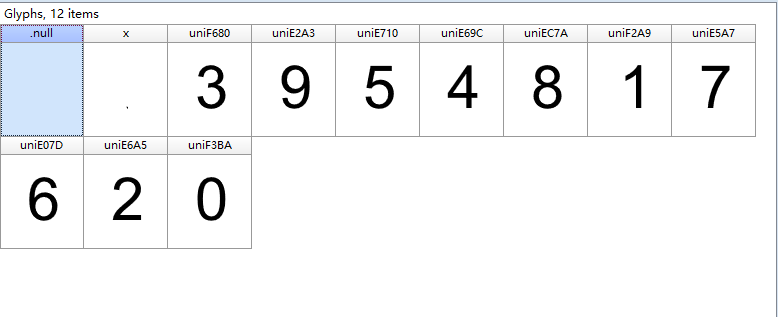
初始化时将对应关系写入字典中。
 #!/usr/bin/env python

 # coding:utf-8

 # __author__ = "南楼"

 import requests

 import re

 import os

 from fontTools.ttLib import TTFont

 #下载字体

 class MaoYan(object):

     def __init__(self):

         self.url = 'http://maoyan.com/films/1198214'

         self.headers = {

             "User-Agent": "Mozilla/5.0 (Windows NT 10.0; Win64; x64) AppleWebKit/537.36 (KHTML, like Gecko) Chrome/59.0.3071.115 Safari/537.36"

         }

         self.base_num = {}  # 编号—数字

         self.base_obj = {}  # 编号—对象

         # base.woff 为当前网站下载的一个字体

         self.base_font_file = TTFont('./fonts/base.woff')

         # 需要先下载字体编辑软件(FontCreator),以便查看对应关系

         self.base_num["uniF3BA"] = ""

         self.base_num["uniF2A9"] = ""

         self.base_num["uniE6A5"] = ""

         self.base_num["uniF680"] = ""

         self.base_num["uniE69C"] = ""

         self.base_num["uniE710"] = ""

         self.base_num["uniE07D"] = ""

         self.base_num["uniE5A7"] = ""

         self.base_num["uniEC7A"] = ""

         self.base_num["uniE2A3"] = ""

         for key in self.base_num:

             self.base_obj[key] =self.base_font_file['glyf'][key]

     def baseobj(self):

         for key in self.base_num:

             self.base_obj[key] =self.base_font_file['glyf'][key]  # 获得woff内编号对应的字体对象

             return self.base_obj

     # 发送请求获得响应

     def get_html(self, url):

         response = requests.get(url, headers=self.headers)

         return response.content

     def create_font(self, re_font_file):

         # 列出已下载文件

         file_list = os.listdir('./fonts')

         # 判断是否已下载

         if re_font_file not in file_list:

             print('不在字体库中, 下载:', re_font_file)

             url = 'http://vfile.meituan.net/colorstone/' + re_font_file

             new_file = self.get_html(url)

             with open('./fonts/' + re_font_file, 'wb') as f:

                 f.write(new_file)

         # 打开字体文件,创建 self.font_file属性

         self.font_file = TTFont('./fonts/' + re_font_file)

     def get_num_from_font_file(self, re_star):

         newstar = re_star.upper().replace("&#X", "uni")

         realnum = newstar.replace(";", "")

         numlist = realnum.split(".")

         # gly_list = self.font_file.getGlyphOrder() #uni列表['glyph00000', 'x', 'uniF680', 'uniE2A3', 'uniE710', 'uniE69C', 'uniEC7A', 'uniF2A9', 'uniE5A7', 'uniE07D', 'uniE6A5', 'uniF3BA']

         star_rating = []

         for hax_num in numlist:

             font_file_num = self.font_file['glyf'][hax_num]

             for key in self.baseobj():

                 if font_file_num == self.base_obj[key]:

                     star_rating.append(self.base_num[key])

         # 星级评分待优化,暂不支持10.0,

         star_rating = star_rating[0]+"."+star_rating[1]

         return star_rating

     def start_crawl(self):

         html = self.get_html(self.url).decode('utf-8')

         # 正则匹配字体文件

         re_font_file = re.findall(r'vfile\.meituan\.net\/colorstone\/(\w+\.woff)', html)[0]

         self.create_font(re_font_file)

         # 正则匹配星级评分

         re_star_rating = re.findall(r'<span class="index-left info-num ">\s+<span class="stonefont">(.*?)</span>\s+</span>', html)[0]

         star_rating = self.get_num_from_font_file(re_star_rating)

         print("星级评分:", star_rating)

 if __name__ == '__main__':

     m = MaoYan()

     m.start_crawl()
python反反爬,爬取猫眼评分的更多相关文章
- python+requests+re匹配抓取猫眼上映电影信息
python+requests抓取猫眼中上映电影,re正则匹配获取对应电影的排名,图片地址,片名,主演及上映时间和评分 import requests import re, json def get_ ...
- Python爬虫实例:爬取猫眼电影——破解字体反爬
字体反爬 字体反爬也就是自定义字体反爬,通过调用自定义的字体文件来渲染网页中的文字,而网页中的文字不再是文字,而是相应的字体编码,通过复制或者简单的采集是无法采集到编码后的文字内容的. 现在貌似不少网 ...
- 爬虫系列(1)-----python爬取猫眼电影top100榜
对于Python初学者来说,爬虫技能是应该是最好入门,也是最能够有让自己有成就感的,今天在整理代码时,整理了一下之前自己学习爬虫的一些代码,今天先上一个简单的例子,手把手教你入门Python爬虫,爬取 ...
- python 爬取猫眼电影top100数据
最近有爬虫相关的需求,所以上B站找了个视频(链接在文末)看了一下,做了一个小程序出来,大体上没有修改,只是在最后的存储上,由txt换成了excel. 简要需求:爬虫爬取 猫眼电影TOP100榜单 数据 ...
- 【Python必学】Python爬虫反爬策略你肯定不会吧?
前言 本文的文字及图片来源于网络,仅供学习.交流使用,不具有任何商业用途,版权归原作者所有,如有问题请及时联系我们以作处理. 正文 Python爬虫反爬策略三部曲,拥有这三步曲就可以在爬虫界立足了: ...
- python爬虫---详解爬虫分类,HTTP和HTTPS的区别,证书加密,反爬机制和反反爬策略,requests模块的使用,常见的问题
python爬虫---详解爬虫分类,HTTP和HTTPS的区别,证书加密,反爬机制和反反爬策略,requests模块的使用,常见的问题 一丶爬虫概述 通过编写程序'模拟浏览器'上网,然后通 ...
- 票房和口碑称霸国庆档,用 Python 爬取猫眼评论区看看电影《我和我的家乡》到底有多牛
今年的国庆档电影市场的表现还是比较强势的,两名主力<我和我的家乡>和<姜子牙>起到了很好的带头作用. <姜子牙>首日破 2 亿,一举刷新由<哪吒之魔童降世&g ...
- python应用-爬取猫眼电影top100
import requests import re import json import time from requests.exceptions import RequestException d ...
- Python 爬取 猫眼 top100 电影例子
一个Python 爬取猫眼top100的小栗子 import json import requests import re from multiprocessing import Pool #//进程 ...
随机推荐
- C++调用C语言的库函数
在项目中,使用C语言编写了一个socket后台程序tkcofferd,并且为方便客户端的使用,提供了动态库,其中包含socket接口. 现在的需求是使用qt做一个前端界面,用来展示tkcofferd的 ...
- python 格式化向sql语句输出元组
想要往执行的sql语句里传入元组怎么办?尤其像insert 数据等操作,其实 利用"{}".format(tuple)固定格式传值即可 results = ((,,),(,,)) ...
- css display:flex 属性
一:display:flex 布局 display:flex 是一种布局方式.它即可以应用于容器中,也可以应用于行内元素.是W3C提出的一种新的方案,可以简便.完整.响应式地实现各种页面布局.目前,它 ...
- CentOS7 Nginx安装及配置反向代理
背景: Mono (Mono JIT compiler version 5.4.0.201 ) jexus-5.8.2-x64(<CentOS7 安装 jexus-5.8.2-x64>) ...
- EF Oracle TNS 连接
<oracle.manageddataaccess.client> <version number="*"> <settings> <se ...
- Spring的核心模块解析
Spring框架是一个轻量级的集成式开发框架,可以和任何一种框架集成在一起使用,可以说是一个大的全家桶.Spring从1.x发展到现在的5.x可以说是越来越强大,下面来看看Spring都包含哪些核心的 ...
- 记一次mariadb升级故障
由于做mariadb集群,将版本从自带的5.5升级到10.0.3,升级成功后发现起不来 查journal log,只有一行warning can’t create test file /var/lib ...
- 42028: Assignment 1 – Autumn 2019
42028: Assignment 1 – Autumn 2019 Page 1 of 4Faculty of Engineering and Information TechnologySchool ...
- HDU 1754 线段树入门解题报告
---恢复内容开始--- 题意:给定区间,每个人的成绩, Q次询问,求每次询问区间中的最大值 思路:构造线段树 代码: #include<stdio.h> #include<algo ...
- SpringBoot打包不同配置profile
1.application.properties添加变量 spring.profiles.active=@activatedProperties@ 2.pom中添加变量配置 <profiles& ...