
微信小程序支付开发之申请退款
微信小程序支付跟微信公众号支付类似,这里不另做记录,如果没有开发过支付,可以查看我关于微信支付的文章
重点记录微信小程序申请退款开发过程中遇到一些坑。
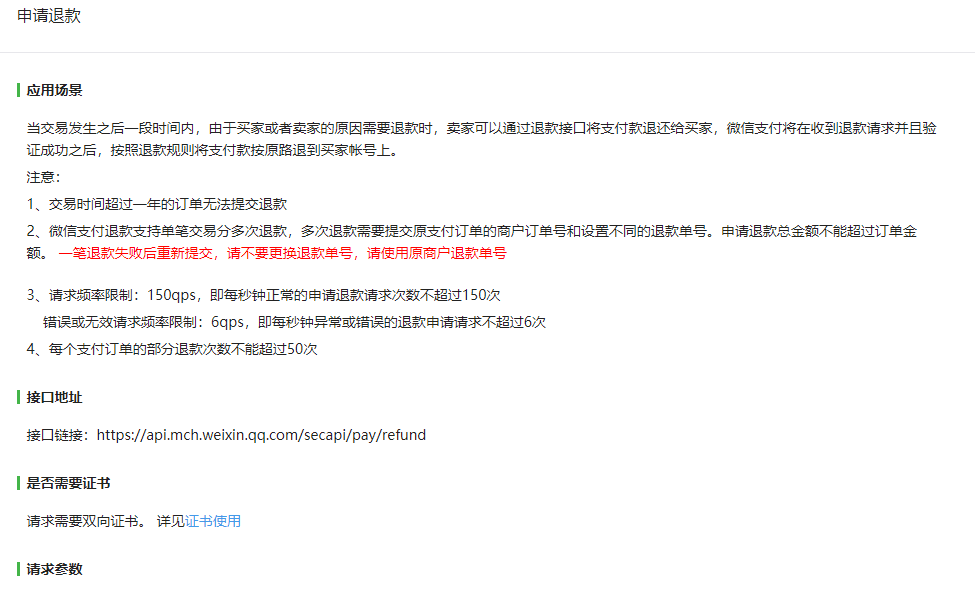
退款接口比支付接口接口多了一个 双向证书
证书介绍:https://pay.weixin.qq.com/wiki/doc/api/jsapi.php?chapter=4_3
由于这里是Java开发,所有下载apiclient_cert.p12文件,下面是官方给的demo
/*

 * ====================================================================

 * Licensed to the Apache Software Foundation (ASF) under one

 * or more contributor license agreements.  See the NOTICE file

 * distributed with this work for additional information

 * regarding copyright ownership.  The ASF licenses this file

 * to you under the Apache License, Version 2.0 (the

 * "License"); you may not use this file except in compliance

 * with the License.  You may obtain a copy of the License at

 *

 *   http://www.apache.org/licenses/LICENSE-2.0

 *

 * Unless required by applicable law or agreed to in writing,

 * software distributed under the License is distributed on an

 * "AS IS" BASIS, WITHOUT WARRANTIES OR CONDITIONS OF ANY

 * KIND, either express or implied.  See the License for the

 * specific language governing permissions and limitations

 * under the License.

 * ====================================================================

 *

 * This software consists of voluntary contributions made by many

 * individuals on behalf of the Apache Software Foundation.  For more

 * information on the Apache Software Foundation, please see

 * <http://www.apache.org/>.

 *

 */

package httpstest;

import java.io.BufferedReader;

import java.io.File;

import java.io.FileInputStream;

import java.io.InputStreamReader;

import java.security.KeyStore;

import javax.net.ssl.SSLContext;

import org.apache.http.HttpEntity;

import org.apache.http.client.methods.CloseableHttpResponse;

import org.apache.http.client.methods.HttpGet;

import org.apache.http.conn.ssl.SSLContexts;

import org.apache.http.conn.ssl.SSLConnectionSocketFactory;

import org.apache.http.impl.client.CloseableHttpClient;

import org.apache.http.impl.client.HttpClients;

import org.apache.http.util.EntityUtils;

/**

 * This example demonstrates how to create secure connections with a custom SSL

 * context.

 */

public class ClientCustomSSL {

    public final static void main(String[] args) throws Exception {

        KeyStore keyStore  = KeyStore.getInstance("PKCS12");

        FileInputStream instream = new FileInputStream(new File("D:/10016225.p12"));

        try {

            keyStore.load(instream, "10016225".toCharArray());

        } finally {

            instream.close();

        }

        // Trust own CA and all self-signed certs

        SSLContext sslcontext = SSLContexts.custom()

                .loadKeyMaterial(keyStore, "10016225".toCharArray())

                .build();

        // Allow TLSv1 protocol only

        SSLConnectionSocketFactory sslsf = new SSLConnectionSocketFactory(

                sslcontext,

                new String[] { "TLSv1" },

                null,

                SSLConnectionSocketFactory.BROWSER_COMPATIBLE_HOSTNAME_VERIFIER);

        CloseableHttpClient httpclient = HttpClients.custom()

                .setSSLSocketFactory(sslsf)

                .build();

        try {

            HttpGet httpget = new HttpGet("https://api.mch.weixin.qq.com/secapi/pay/refund");

            System.out.println("executing request" + httpget.getRequestLine());

            CloseableHttpResponse response = httpclient.execute(httpget);

            try {

                HttpEntity entity = response.getEntity();

                System.out.println("----------------------------------------");

                System.out.println(response.getStatusLine());

                if (entity != null) {

                    System.out.println("Response content length: " + entity.getContentLength());

                    BufferedReader bufferedReader = new BufferedReader(new InputStreamReader(entity.getContent()));

                    String text;

                    while ((text = bufferedReader.readLine()) != null) {

                        System.out.println(text);

                    }

                }

                EntityUtils.consume(entity);

            } finally {

                response.close();

            }

        } finally {

            httpclient.close();

        }

    }

}
在上面代码进行微调
private static void ClientCustomSSL(String xmlStr) throws  Exception{

        KeyStore keyStore  = KeyStore.getInstance("PKCS12");

        FileInputStream instream = new FileInputStream(new File("D:/apiclient_cert.p12"));

        try {

            keyStore.load(instream, WxPayConfig.MCH_ID.toCharArray());

        } finally {

            instream.close();

        }

        // Trust own CA and all self-signed certs

        SSLContext sslcontext = SSLContexts.custom()

                .loadKeyMaterial(keyStore, WxPayConfig.MCH_ID.toCharArray())

                .build();

        // Allow TLSv1 protocol only

        SSLConnectionSocketFactory sslsf = new SSLConnectionSocketFactory(

                sslcontext,

                new String[] { "TLSv1" },

                null,

                SSLConnectionSocketFactory.BROWSER_COMPATIBLE_HOSTNAME_VERIFIER);

        CloseableHttpClient httpclient = HttpClients.custom()

                .setSSLSocketFactory(sslsf)

                .build();

        try {

            HttpPost httpPost = new HttpPost("https://api.mch.weixin.qq.com/secapi/pay/refund");

            StringEntity entityStr = new StringEntity(xmlStr);

            entityStr.setContentType("text/xml");

            System.out.println("entityStr--------------"+entityStr);

            httpPost.setEntity(entityStr);

            CloseableHttpResponse response = httpclient.execute(httpPost);

            try {

                HttpEntity entity = response.getEntity();

                System.out.println("----------------------------------------");

                System.out.println(response.getStatusLine());

                if (entity != null) {

                    System.out.println("Response content length: " + entity.getContentLength());

                    BufferedReader bufferedReader = new BufferedReader(new InputStreamReader(entity.getContent()));

                    String text;

                    while ((text = bufferedReader.readLine()) != null) {

                        System.out.println(text);

                    }

                }

                EntityUtils.consume(entity);

            } finally {

                response.close();

            }

        } finally {

            httpclient.close();

            return null;

        }

    }
参数 String xmlStr 是传入的封装好的xml字符串(封装方法在我微信支付开发的文章里面有)
然后测试结果
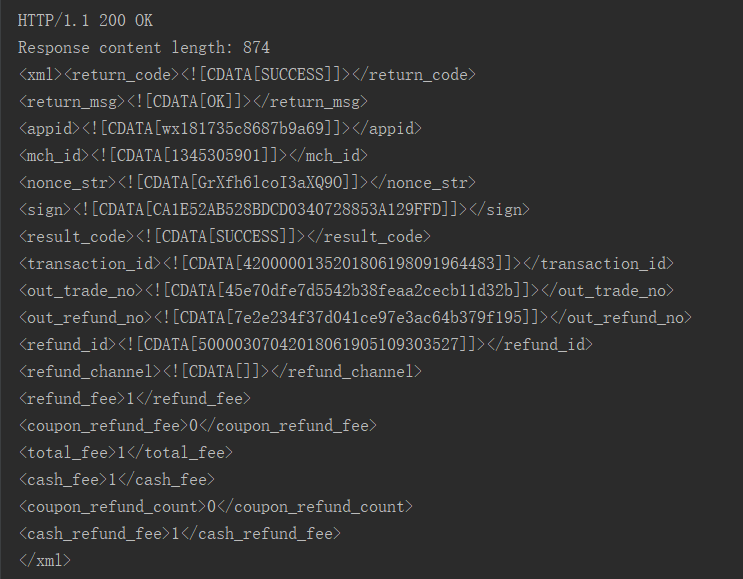
这里面签名有个隐藏的坑,就是请求字段,和mic_id都正确,微信签名验证也正确,请求就是报签名错误
原因是我的退款原因(refund_desc)参数是中文的,把它调成英文的

不得不说微信支付开发文档很坑
微信小程序支付开发之申请退款的更多相关文章
- 实战:微信小程序支付开发具体流程
来源:授权地址作者:会编码的熊 该文章纪录了我在开发小程序支付过程中的具体流程 1. 申请微信支付 小程序认证后进入微信支付申请小程序的微信支付 填写企业信息对公账户并上传凭证后,微信支付会打一笔随机 ...
- 微信小程序支付及退款流程详解
微信小程序的支付和退款流程 近期在做微信小程序时,涉及到了小程序的支付和退款流程,所以也大概的将这方面的东西看了一个遍,就在这篇博客里总结一下. 首先说明一下,微信小程序支付的主要逻辑集中在后端,前端 ...
- 微信小程序支付功能 C# .NET开发
微信小程序支付功能的开发的时候坑比较多,不过对于钱的事谨慎也是好事.网上关于小程序支付的实例很多,但是大多多少有些问题,C#开发的更少.此篇文档的目的是讲开发过程中遇到的问题做一个备注,也方便其他开发 ...
- php对接微信小程序支付
前言:这里我就假装你已经注册了微信小程序,并且基本的配置都已经好了.注: 个人注册小程序不支持微信支付,所以我还是假装你是企业或者个体工商户的微信小程序,其他的商户号注册,二者绑定,授权,支付开通,就 ...
- Java实现微信小程序支付(准备)
Java语言开发微信小程序支付功能: 1.通过https://pay.weixin.qq.com/wiki/doc/api/jsapi.php?chapter=11_1路径到官方下载Java的支付SD ...
- .NET Core 微信小程序支付——(统一下单)
最近公司研发了几个电商小程序,还有一个核心的电商直播,只要是电商一般都会涉及到交易信息,离不开支付系统,这里我们统一实现小程序的支付流程(与服务号实现步骤一样). 目录1.开通小程序的支付能力2.商户 ...
- 微信小程序支付(PHP后端)
1.申请开通小程序支付,我们正式开通的微信支付是在微信公众平台上,我们需要绑定之前的微信商户平台即可,这一点不过多强调 2.小程序支付开发步骤 (1).统一下单 大家看到微信的统一下单接口密密麻麻的一 ...
- 微信小程序红包开发思路 微信红包小程序开发思路讲解
之前公司开发小程序红包,将自己在开发的过程中遇到的一些坑分享到了博客里.不少人看了以后,还是不明白怎么开发.也加了我微信咨询.所以今天,我就特意再写一篇文章,这次就不谈我开发中遇到的坑了.就主要给大家 ...
- 微信小程序红包开发 小程序发红包 开发过程中遇到的坑 微信小程序红包接口的
微信小程序红包开发 小程序发红包 开发过程中遇到的坑 微信小程序红包接口的 最近公司在开发一个小程序红包系统,客户抢到红包需要提现.也就是通过小程序来给用户发红包. 小程序如何来发红包呢?于是我想 ...
随机推荐
- java valueOf()函数
valueOf() 方法用于返回给定参数的原生 Number 对象值,参数可以是原生数据类型, String等. 该方法是静态方法.该方法可以接收两个参数一个是字符串,一个是基数. 语法 该方法有以下 ...
- saltstack运维软件
一.saltstack介绍 1.介绍 SaltStack管理工具允许管理员对多个操作系统创建一个一致的管理系统,包括VMware vSphere环境. SaltStack是一个服务器基础架构集中化管理 ...
- unity游戏热更新
链接:https://pan.baidu.com/s/1ggWP0OF 第 1 章 : 热更新技术学习介绍 课时1:101-热更新技术学习介绍 11:55 什么是热更新? 举例来说 游戏上线后,玩家下 ...
- GateOne Web SSH 环境搭建
环境配置安装python及tornadoyum -y install python-pippip install tornado GateOne安装下载源码:git clone https://git ...
- <Android基础>(三) UI开发 Part 2 ListView
ListView 1)ListView的简单用法 2)定制ListView界面 3)提升ListView的运行效率 4)ListView的点击事件 3.5 ListView 3.5.1 ListVie ...
- C++ Under the Hood
The original article is taken from http://msdn.microsoft.com/archive/en-us/dnarvc/html/jangrayhood.a ...
- [SDOI2011]消耗战(虚树)
洛古题面 题意:给定一棵树,割断每一条边都有代价,每次询问会给定一些点,求用最少的代价使所有给定点都和1号节点不连通 暴力\(DP\) 我们先考虑暴力怎么做 设\(dp[u]\)为以\(u\)为根的子 ...
- Codeforces Beta Round #51 D. Beautiful numbers(数位dp)
题目链接:https://codeforces.com/contest/55/problem/D 题目大意:给你一段区间[l,r],要求这段区间中可以整除自己每一位(除0意外)上的数字的整数个数,例如 ...
- Tensor是神马?为什么还会Flow?
https://baijiahao.baidu.com/s?id=1568147583188426&wfr=spider&for=pc 也许你已经下载了TensorFlow,而且准备开 ...
- GWAS: 曼哈顿图,QQ plot 图,膨胀系数( manhattan、Genomic Inflation Factor)
画曼哈顿图和QQ plot 首推R包“qqman”,简约方便.下面具体介绍以下. 一.画曼哈顿图 install.packages("qqman") library(qqman) ...