
docker 搭建以太坊私有链搭建
最近区块链,火得不行,身边也有朋友准备玩这个,说是搭了一个星期,没有把环境搭建起来,叫我帮忙看看环境怎么搭建
于是我找到了官方的地址 https://github.com/ethereum/go-ethereum
发现官方是支持docker 的
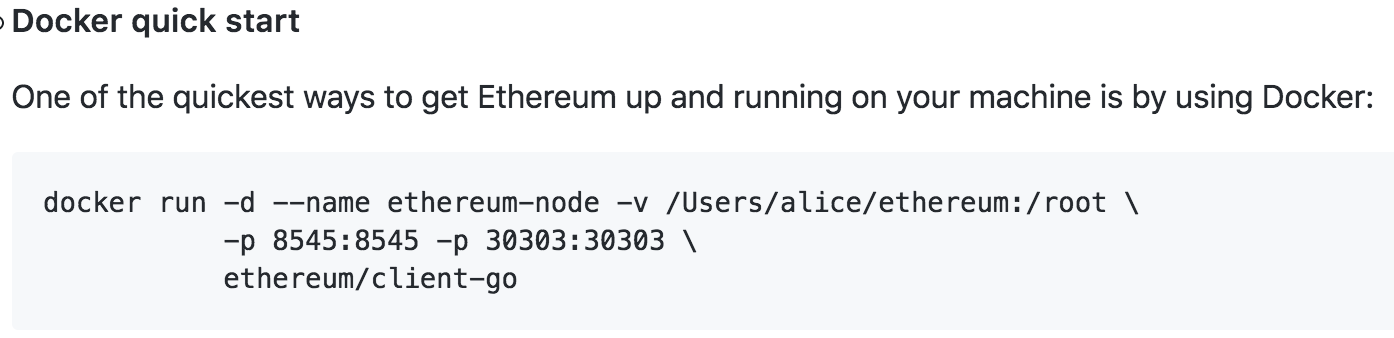
于是我创建了如下目录
➜  block-chain pwd

/Users/jackluo/Works/block-chain

➜  block-chain ls

ethereum          start-ethereum.sh
start-ethereum.sh的内容如下
docker stop ethereum-node

docker rm ethereum-node

docker run -d --name ethereum-node -v /Users/jackluo/Works/block-chain/ethereum:/root \

           -p : -p : \

           ethereum/client-go

docker exec -it ethereum-node /bin/sh
我们把当前的 ethereum目录,挂到了docker 的/root下
我们接下来创建私有链
➜ block-chain cd ethereum
➜ ethereum ls
genesis.json privatechain
我们根据官方的文档 创建 genesis.json文件里面写入
{

  "config": {

        "chainId": 0,

        "homesteadBlock": 0,

        "eip155Block": 0,

        "eip158Block": 0

    },

  "alloc"      : {},

  "coinbase"   : "0x0000000000000000000000000000000000000000",

  "difficulty" : "0x20000",

  "extraData"  : "",

  "gasLimit"   : "0x2fefd8",

  "nonce"      : "0x0000000000000042",

  "mixhash"    : "0x0000000000000000000000000000000000000000000000000000000000000000",

  "parentHash" : "0x0000000000000000000000000000000000000000000000000000000000000000",

  "timestamp"  : "0x00"

}
参数的话,具体看文件档
接下来,我们启动以太坊的docker 容器
➜  block-chain ./start-ethereum.sh

Error response from daemon: No such container: ethereum-node

Error response from daemon: No such container: ethereum-node

d421da09e63900d1cc9481529ab2a5868515fb821520b548f10e0bd2f3608c0c

/ #

/ #

/ # ls

bin    dev    etc    home   lib    media  mnt    proc   root   run    sbin   srv    sys    tmp    usr    var

/ # cd /root/

~ # ls

genesis.json  privatechain

~ # cd privatechain/

~/privatechain # ls

data0         genesis.json

~/privatechain # pwd

/root/privatechain

~/privatechain #
接下来初始化他
~/privatechain # geth --datadir data0 init genesis.json

INFO [03-06|05:21:40] Maximum peer count                       ETH=25 LES=0 total=25

INFO [03-06|05:21:40] Allocated cache and file handles         database=/root/privatechain/data0/geth/chaindata cache=16 handles=16

INFO [03-06|05:21:40] Persisted trie from memory database      nodes=0 size=0.00B time=41.5µs gcnodes=0 gcsize=0.00B gctime=0s livenodes=1 livesize=0.00B

INFO [03-06|05:21:40] Successfully wrote genesis state         database=chaindata                               hash=ed1fb6…1760ca

INFO [03-06|05:21:40] Allocated cache and file handles         database=/root/privatechain/data0/geth/lightchaindata cache=16 handles=16

INFO [03-06|05:21:40] Persisted trie from memory database      nodes=0 size=0.00B time=10.5µs gcnodes=0 gcsize=0.00B gctime=0s livenodes=1 livesize=0.00B

INFO [03-06|05:21:40] Successfully wrote genesis state         database=lightchaindata                               hash=ed1fb6…1760ca
接下来,启动私有链
~/privatechain # geth --identity "TestNode" --rpc --rpcport "8545" --datadir data0 --port "3033" --nodiscover console

INFO [03-06|05:26:44] Maximum peer count                       ETH=25 LES=0 total=25

INFO [03-06|05:26:44] Starting peer-to-peer node               instance=Geth/TestNode/v1.8.2-unstable-0b814d32/linux-amd64/go1.9.4

INFO [03-06|05:26:44] Allocated cache and file handles         database=/root/privatechain/data0/geth/chaindata cache=768 handles=1024

INFO [03-06|05:26:44] Initialised chain configuration          config="{ChainID: 1024 Homestead: 0 DAO: <nil> DAOSupport: false EIP150: <nil> EIP155: 0 EIP158: 0 Byzantium: <nil> Constantinople: <nil> Engine: unknown}"

INFO [03-06|05:26:44] Disk storage enabled for ethash caches   dir=/root/privatechain/data0/geth/ethash count=3

INFO [03-06|05:26:44] Disk storage enabled for ethash DAGs     dir=/root/.ethash                        count=2

INFO [03-06|05:26:44] Initialising Ethereum protocol           versions="[63 62]" network=1

INFO [03-06|05:26:44] Loaded most recent local header          number=0 hash=ed1fb6…1760ca td=1024

INFO [03-06|05:26:44] Loaded most recent local full block      number=0 hash=ed1fb6…1760ca td=1024

INFO [03-06|05:26:44] Loaded most recent local fast block      number=0 hash=ed1fb6…1760ca td=1024

INFO [03-06|05:26:44] Loaded local transaction journal         transactions=0 dropped=0

INFO [03-06|05:26:44] Regenerated local transaction journal    transactions=0 accounts=0

INFO [03-06|05:26:44] Starting P2P networking

INFO [03-06|05:26:44] RLPx listener up                         self="enode://3264cbba213bc88c407c55576f148d5c2b6afa5013a7c204085e01c5e4dc24a9235bd9abf86681d0d36349fa8031367c31adb534a469f4ea1e156047bf96befb@[::]:3033?discport=0"

INFO [03-06|05:26:44] IPC endpoint opened                      url=/root/privatechain/data0/geth.ipc

INFO [03-06|05:26:44] HTTP endpoint opened                     url=http://127.0.0.1:8545             cors= vhosts=localhost

Welcome to the Geth JavaScript console!

instance: Geth/TestNode/v1.8.2-unstable-0b814d32/linux-amd64/go1.9.4

INFO [03-06|05:26:44] Etherbase automatically configured       address=0xFc2D11A7A4408b77d95202c0A455cfd44F2A4cFD

coinbase: 0xfc2d11a7a4408b77d95202c0a455cfd44f2a4cfd

at block: 0 (Thu, 01 Jan 1970 00:00:00 UTC)

 datadir: /root/privatechain/data0

 modules: admin:1.0 debug:1.0 eth:1.0 miner:1.0 net:1.0 personal:1.0 rpc:1.0 txpool:1.0 web3:1.0
基本上已经启起来了
其它,参考了下 https://g2ex.github.io/2017/09/12/ethereum-guidance/ 这个
docker 搭建以太坊私有链搭建的更多相关文章
- 转:使用 Go-Ethereum 1.7.2搭建以太坊私有链
使用 Go-Ethereum 1.7.2搭建以太坊私有链 目录 [toc] 1.什么是Ethereum(以太坊) 以太坊(Ethereum)并不是一个机构,而是一款能够在区块链上实现智能合约.开源的底 ...
- Mac环境搭建以太坊私有链
原文地址: 石匠的blog 为了测试以太坊智能合约,最方便的是在本地搭建一个以太坊私有链.在mac上搭建环境主要需要以下步骤. geth安装 geth是go-ethereum的简写,是一个用go语言编 ...
- 使用 Go-Ethereum 1.7.2搭建以太坊私有链
目录 [toc] 1.什么是Ethereum(以太坊) 以太坊(Ethereum)并不是一个机构,而是一款能够在区块链上实现智能合约.开源的底层系统,以太坊从诞生到2017年5月,短短3年半时间,全球 ...
- 区块链--Ubuntu上搭建以太坊私有链
1.搭建私链所需环境 操作系统:ubuntu16.04,开虚拟机的话要至少4G,否则会影响测试挖矿时的速度 软件: geth客户端 Mist和Ethereum Wallet:https://githu ...
- 区块链入门(2):搭建以太坊私有链(private network of ethereum),以及挖矿的操作..
在做一些测试工作的时候, 为了方便控制以及更快的进入真正的测试工作,可能需要搭建一个私有的以太坊网络. 而以太坊节点之间能够互相链接需要满足1)相同的协议版本2)相同的networkid,所以搭建私有 ...
- CentOS7搭建以太坊私有链
1. 环境准备:Win10 64位安装 VM VirtualBox,操作系统版本: CentOS-7-x86_64-Everything-1611.iso(7.71G). 切换root账号,方便安装程 ...
- Mac搭建以太坊私有链
记录过程与问题 一.安装 以go版本的ethereum进行安装 brew tap ethereum/ethereum brew install ethereum # 如果希望基于ethereum的de ...
- ubuntu系统搭建以太坊私有链
1.安装curl.git apt-get update apt-get install git apt-get install curl 2.安装go curl -O https://storage. ...
- 区块链学习:Windows下搭建以太坊私有链环境
一:安装geth客户端 Windows要求必须是64位系统,从官方网站下载编译好的win64客户端,下载解压后只有一个Geth.exe问价,运行安装即可,下载地址如下: https://github. ...
随机推荐
- Excel Foundation Install
安装Excel API 函数库 1. 通过下载工具下载函数库 下载 ExcelAPI函数库更新工具 下载 ExcelAPI函数库离线包 ExcelAPI(WPS)函数库离线包 Exc ...
- Python量化交易
资料整理: 1.python量化的一个github 代码 2.原理 + python基础 讲解 3.目前发现不错的两个量化交易 学习平台: 聚宽和优矿在量化交易都是在15年线上布局的,聚宽是15年的新 ...
- Bugku 杂项 啊哒
有趣的表情包来源:第七届山东省大学生网络安全技能大赛 下载下来安装包后可以得到一张图片,010发现jpg后面还夹带着一些东西,用binwalk提取后得到一个压缩包,但是需要密码. 我卡在这里了,尝试了 ...
- 【C/C++】任意进制转换
进制转换:R进制->10进制:10进制->R进制. #include<bits/stdc++.h> using namespace std; /*函数:r进制转换成10进制*/ ...
- Python Installing Jupyter
Jupyter说明jupyter notebook是一款网页版的Python编辑器组件,便于学习Python Jupyer安装yum -y install gcc gcc-c++ kernel-dev ...
- 「CF1154F」Shovels Shop【背包DP】
题目链接 [洛谷传送门] 题解 非常简单的背包. \(f[i]\)表示购买\(i\)个物品所需要最少的花费. 不考虑免费的限制条件,那么一定是选择前\(k\)个双鞋子. 那么加入免费的条件,那么还是要 ...
- Windows下Redis的安装和部署
Redis 简介 Redis 是完全开源免费的,遵守BSD协议,是一个高性能的key-value数据库. Redis 与其他 key - value 缓存产品有以下三个特点: Redis支持数据的持久 ...
- 记录一次有意思的XSS过滤绕过
我的朋友赵一天今晚给我发了一个站,跟我说他xss绕不过去,让我试试.我正好无事,就帮她看看咯. 通过赵一天发我的站点,说实话,我自己学到了很多东西,感谢大佬的教诲.今天分享出来: 站点:xxx.com ...
- pyspider框架学习
一.crawl()方法学习: 1.url:爬去是的url,可以定义单个,可以定义为url列表. 2.callback:回调函数,指定该url使用哪个方法来解析. 3.age:任务的有效时间. 4.pr ...
- python中的__metaclass__
什么是元类: python中类也是一种对象, 可以称为类对象. 元类就是用来创建类对象的"东西". 你创建类就是为了创建类的实例对象, 不是吗? 但是我们已经学习了python中的 ...