
python中关于turtle库的学习笔记
一、基础概念
1、画布:画布就是turtle为我们展开用于绘图区域, 我们可以设置它的大小和初始位置。常用的画布方法有两个:screensize()和setup()。
(1)turtle.screensize(canvwidth, canvheight, bg):参数分别为画布的宽(单位像素), 高, 背景颜色
如:
turtle.screensize(500,1000,'green')
(2)turtle.setup(width, height, startx, starty):width, height: 输入宽和高为整数时, 表示像素; 为小数时, 表示占据电脑屏幕的比例。(startx, starty): 这一坐标表示 矩形窗口左上角顶点的位置, 如果为空,则窗口位于屏幕中心。
2、画笔:在画布上,默认有一个坐标原点为画布中心的坐标轴, 坐标原点上有一只面朝x轴正方向小乌龟。这里我们描述小乌龟时使用了两个词语:标原点(位置),面朝x轴正方向(方向),turtle绘图中, 就是使用位置方向描述小乌龟(画笔)的状态。
(1)画笔属性:
1) turtle.pensize():设置画笔的宽度;
2) turtle.pencolor():没有参数传入,返回当前画笔颜色,传入参数设置画笔颜色,可以是字符串如"green", "red",也可以是RGB 3元组。
3) turtle.speed(speed):设置画笔移动速度,画笔绘制的速度范围[0,10]整数,数字越大越快。
(2)绘制命令:
1)turtle.forward(distance)(别名:turtle.fd):向当前画笔方向移动distance像素长度。
2)turtle.backward(distance):向当前画笔相反方向移动distance像素长度。
3)turtle.right(degree):顺时针移动degree°。
4)turtle.left(degree):逆时针移动degree°。
5)turtle.pendown()(别名:turtle.pd(),turtle.down()):移动时绘制图形,缺省时也为绘制。
6)turtle.goto(x,y):将画笔移动到坐标为x,y的位置。
7)turtle.penup()(别名:turtle.pu(),turtle.up()):提起笔移动,不绘制图形,用于另起一个地方绘制。
8)turtle.circle():画圆,半径为正(负),表示圆心在画笔的左边(右边)画圆。
9)setx( ):将当前x轴移动到指定位置。
10)sety( ):将当前y轴移动到指定位置。
11)setheading(angle):设置当前朝向为angle角度。
12)home():设置当前画笔位置为原点,朝向东。
13)dot(r):绘制一个指定直径和颜色的圆点。
14)turtle.fillcolor(colorstring):绘制图形的填充颜色。
15)turtle.color(color1, color2):同时设置pencolor=color1, fillcolor=color2。
16)turtle.filling():返回当前是否在填充状态。
17)turtle.begin_fill():准备开始填充图形。
18)turtle.end_fill():填充完成。
19)turtle.hideturtle():隐藏画笔的turtle形状。
20)turtle.showturtle():显示画笔的turtle形状。
21)turtle.seth(to_angle)(别名:turtle.setheading(to_angle)):设置小海龟当前前进方向为to_angle,该角度是绝对方向的角度值。
3、实例:
(1)太阳花:
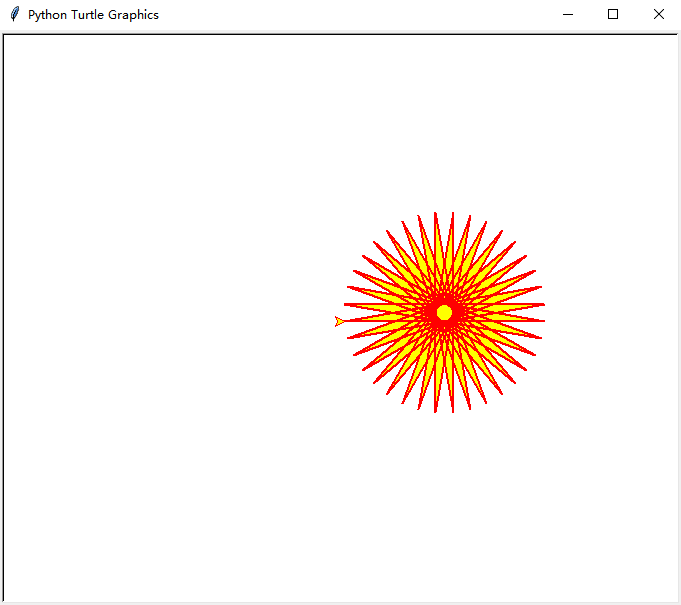
from turtle import *

begin_fill()  #准备开始填充图形

pensize(2) #设置画笔的宽度

color('red','yellow') #设置画笔颜色为蓝色,填充颜色为绿色

while True:

    forward(200) #画笔移动200个像素长度

    left(170)  #逆时针移动170°

    if abs(pos())<1: #判断画笔是否回到起点

        break

end_fill()  #结束填充图形

done()
(2)玫瑰花:
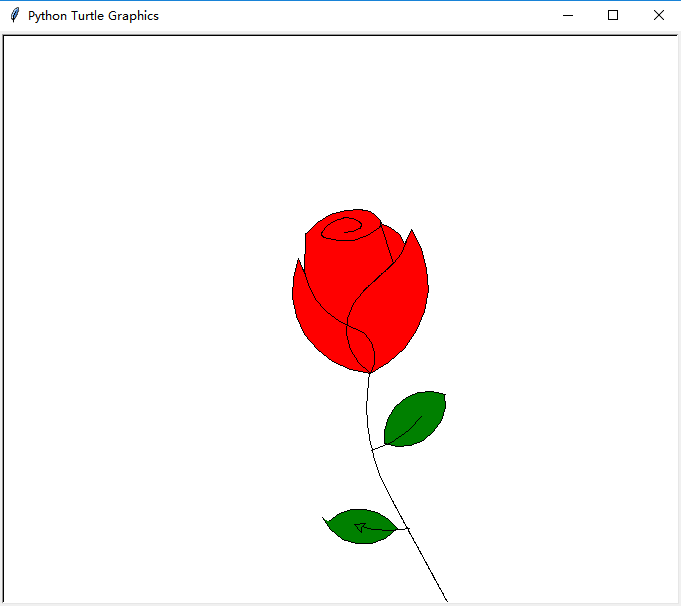
from turtle import *

#global pen and speed

pencolor("black")

fillcolor("red")

speed(50)

s=0.15

#init poistion

penup()

goto(0,600*s)

pendown()

begin_fill()

circle(200*s,30)

for i in range(60):

    lt(1)

    circle(50*s,1)

circle(200*s,30)

for i in range(4):

    lt(1)

    circle(100*s,1)

circle(200*s,50)

for i in range(50):

    lt(1)

    circle(50*s,1)

circle(350*s,65)

for i in range(40):

    lt(1)

    circle(70*s,1)

circle(150*s,50)

for i in range(20):

    rt(1)

    circle(50*s,1)

circle(400*s,60)

for i in range(18):

    lt(1)

    circle(50*s,1)

fd(250*s)

rt(150)

circle(-500*s,12)

lt(140)

circle(550*s,110)

lt(27)

circle(650*s,100)

lt(130)

circle(-300*s,20)

rt(123)

circle(220*s,57)

end_fill()

lt(120)

fd(280*s)

lt(115)

circle(300*s,33)

lt(180)

circle(-300*s,33)

for i in range(70):

    rt(1)

    circle(225*s,1)

circle(350*s,104)

lt(90)

circle(200*s,105)

circle(-500*s,63)

penup()

goto(170*s,-330*s)

pendown()

lt(160)

for i in range(20):

    lt(1)

    circle(2500*s,1)

for i in range(220):

    rt(1)

    circle(250*s,1)

fillcolor('green')

penup()

goto(670*s,-480*s)

pendown()

rt(140)

begin_fill()

circle(300*s,120)

lt(60)

circle(300*s,120)

end_fill()

penup()

goto(180*s,-850*s)

pendown()

rt(85)

circle(600*s,40)

penup()

goto(-150*s,-1300*s)

pendown()

begin_fill()

rt(120)

circle(300*s,115)

lt(75)

circle(300*s,100)

end_fill()

penup()

goto(430*s,-1370*s)

pendown()

rt(30)

circle(-600*s,35)

done()
(3)正多边形渐变为圆:
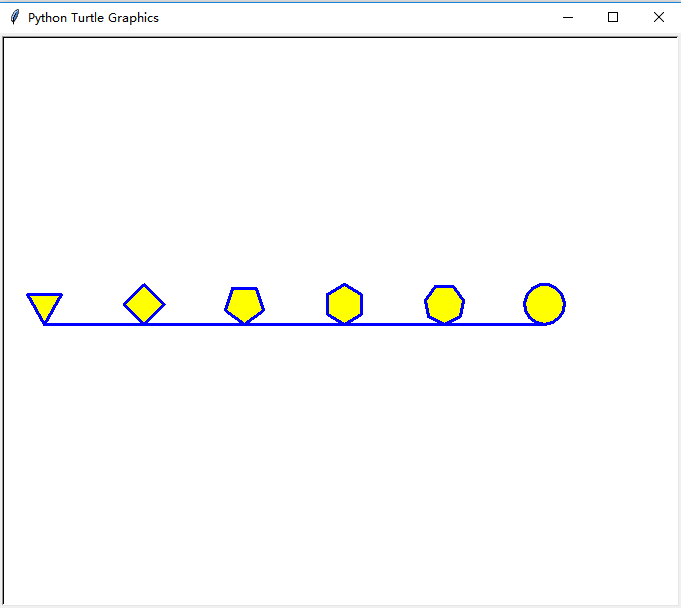
import turtle

turtle.screensize(600,500,'white')

turtle.pensize(3)           #设置画笔宽度为3

turtle.pencolor('blue')    #设置画笔颜色为黑色

turtle.fillcolor('yellow')  #设置填充颜色为黄色

turtle.begin_fill()         #开始填充

turtle.forward(-300)

for i in range(3,8):

    turtle.circle(20, steps=i)

    turtle.forward(100)

turtle.circle(20)

turtle.end_fill()

turtle.hideturtle()         #隐藏海龟

turtle.done()
4)五角星:
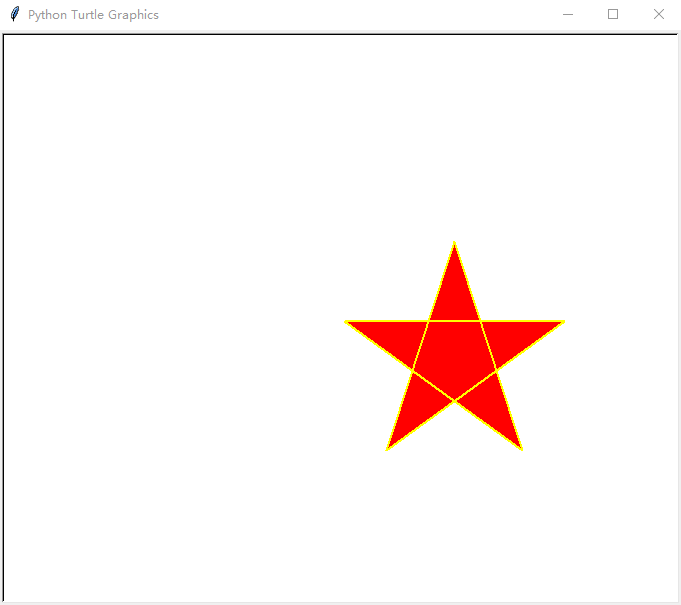
from turtle import *

pensize(2)

color('yellow','red')

begin_fill()

while True:

    forward(220)

    right(144)

    if abs(pos()) < 1:

            break

end_fill()

hideturtle()

done()
python中关于turtle库的学习笔记的更多相关文章
- [Python ]小波变化库——Pywalvets 学习笔记
[Python ]小波变化库——Pywalvets 学习笔记 2017年03月20日 14:04:35 SNII_629 阅读数:24776 标签: python库pywavelets小波变换 更多 ...
- Python 中的map和reduce学习笔记
map和reduce都是Python中的内置函数 map函数接受两个参数,第一个参数是函数,第二个参数是列表,将函数依次作用于列表中的元素,并返回一个元素 reduce同样以函数和列表作为参数,区别在 ...
- python中的迭代器和生成器学习笔记总结
生成器就是一个在行为上和迭代器非常类似的对象. 是个对象! 迭代,顾名思意就是不停的代换的意思,迭代是重复反馈过程的活动,其目的通常是为了逼近所需目标或结果.每一次对过程的重复称为一次“迭代”,而 ...
- python中的turtle库绘制图形
1. 前奏: 在用turtle绘制图形时,需要安装对应python的解释器以及IDE,我安装的是pycharm,在安装完pycharm后,在pycharm安装相应库的模块,绘图可以引入turtle模块 ...
- python中的turtle库(图形绘画库)
turtle绘图的基础知识:1. 画布(canvas) 画布就是turtle为我们展开用于绘图区域,我们可以设置它的大小和初始位置. 设置画布大小 turtle.screensize(canvwidt ...
- turtle库的学习笔记
(1)turtle使用pen来绘制图形 pendown() 放下画笔,移动到指定点后继续绘制 penup() 提起画笔,用于另起一个地方绘制时使用 pensize(width) 设置画笔线条 ...
- Python的dict字典结构操作方法学习笔记
Python的dict字典结构操作方法学习笔记 这篇文章主要介绍了Python的dict字典结构操作方法学习笔记本,字典的操作是Python入门学习中的基础知识,需要的朋友可以参考下 一.字典的基本方 ...
- Python中使用第三方库xlrd来写入Excel文件示例
Python中使用第三方库xlrd来写入Excel文件示例 这一篇文章就来介绍下,如何来写Excel,写Excel我们需要使用第三方库xlwt,和xlrd一样,xlrd表示read xls,xlwt表 ...
- 【归纳】正则表达式及Python中的正则库
正则表达式 正则表达式30分钟入门教程 runoob正则式教程 正则表达式练习题集(附答案) 元字符\b代表单词的分界处,在英文中指空格,标点符号或换行 例子:\bhi\b可以用来匹配hi这个单词,且 ...
随机推荐
- spring事务源码分析结合mybatis源码(三)
下面将结合mybatis源码来分析下,这种持久化框架是如何对connection使用,来达到spring事务的控制. 想要在把mybatis跟spring整合都需要这样一个jar包:mybatis-s ...
- unity发布的WebGL部署到IIS
一.创建WebGL代码 在win7下,Unity3D中发布WebGL,然后部署到IIS,只要代码是对,关键是添加mime类型 二.为网站添加mime类型 .json text/json .unity3 ...
- Linux shell 脚本总结
在中括号中,判断变量的值, 加不加双引号的问题? -z 判断 变量的值,是否为空: zero = 0 - 变量的值,为空,返回0,为true - 变量的值,非空,返回1,为false -n 判断变量的 ...
- [PHP]获取静态方法调用者的类名和运用call_user_func_array代入对象作用域
一.获取静态方法调用者的类名 方法一: class foo { static public function test() { var_dump(get_called_class()); } } cl ...
- SSH总结
远程服务介绍说明 SSH是一个安全协议,在进行数据传输时,会对数据包进行加密处理,加密后在进行数据传输.确保了数据传输安全.那SSH服务主要功能有哪些呢?1.提供远程连接服务器的服务2.对传输的数据进 ...
- sublime自动保存设置
首选项——用户设置 (Preferences:Settings - User) 行末添加"save_on_focus_lost": true 注意用逗号分隔 保存即可 save_o ...
- linux服务安装与配置(二):安装xinetd服务
linux服务安装与配置(二):安装xinetd服务 xinetd即extended internet daemon,xinetd是新一代的网络守护进程服务程序,又叫超级Internet服务器.经常用 ...
- 倒影问题(reflect:below)
这个例子灵感来源于实现一个登录框下方的倒影: .box { width: 300px; height: 200px; border: 1px solid #1f637b; -webkit-box-re ...
- java图片缩放与裁剪
import java.awt.Graphics; import java.awt.Image; import java.awt.image.BufferedImage; import java.io ...
- Python——文件读取
我们经常需要从文件中读取数据,因此学会文件的读取很重要,下面来介绍一下文件的读取工作: 1.读取整个文件 pi_digits.text 3.1415926535 8979323846 ...