
iOS学习——输入验证码界面封装
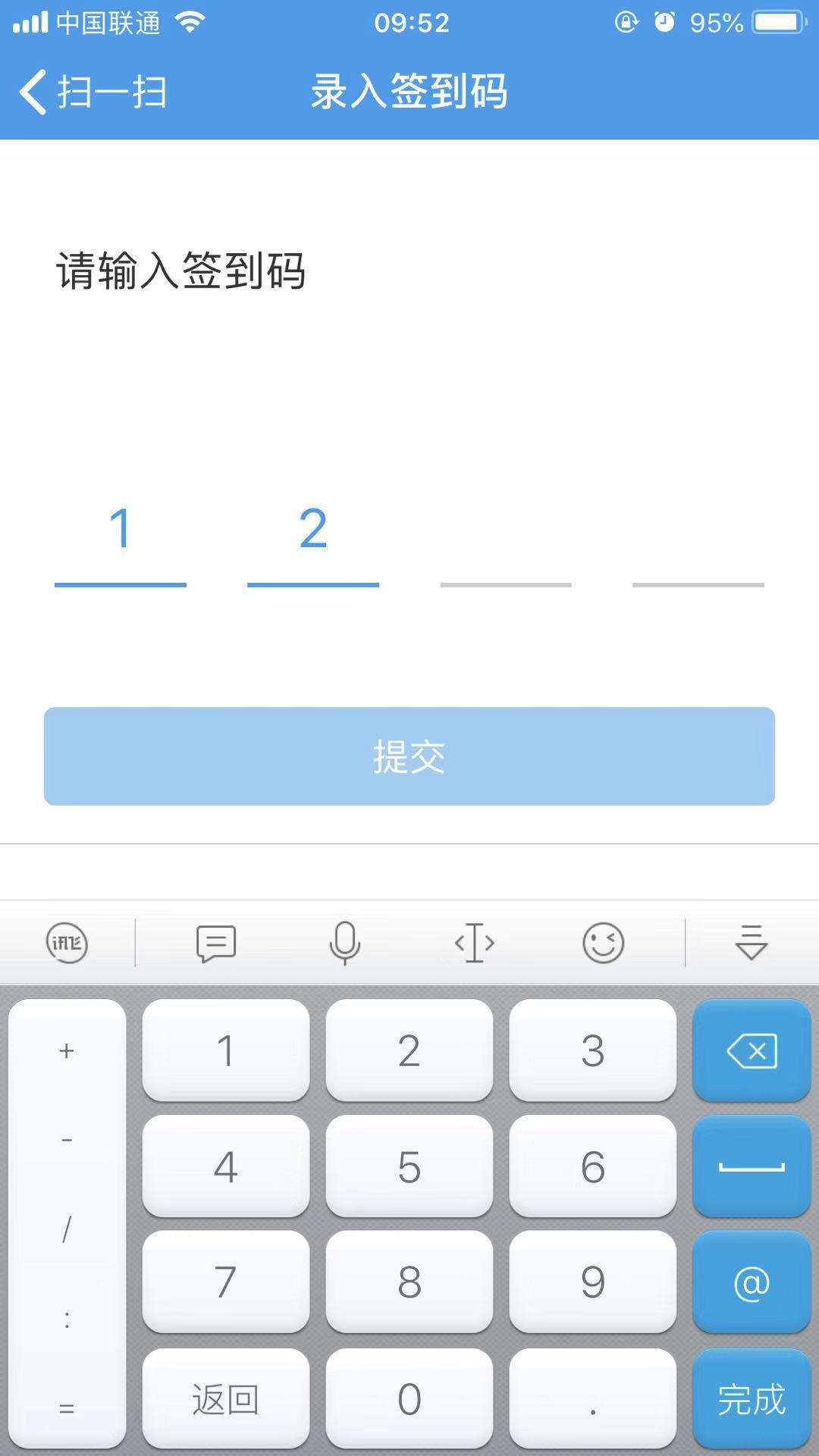
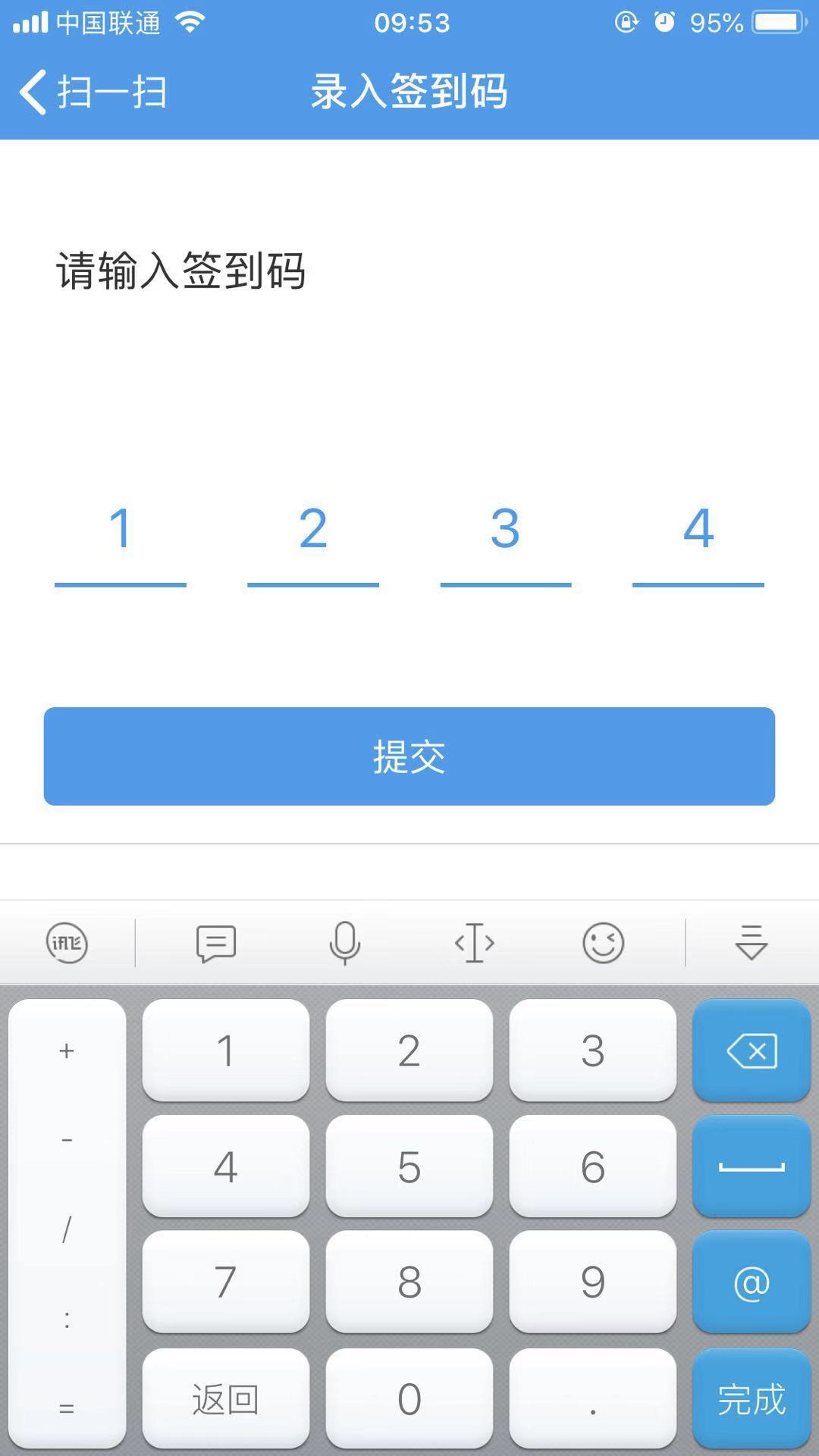
在很多App中都有输入验证码的功能需求,最近项目需要也有这个功能。做完之后简单整理了一下,将实现的基本思路做下记录。实现后的效果大致如下图所示,当四位签到码全部输入时,提交按钮是可以提交的,否则提交按钮失效,不允许提交。
1 整体布局
上图整个界面的布局很简单,就不多说了,重点就是中间这一块的验证码输入功能,我把它单独封装拿出来封装在一个自定义View(KLCodeResignView)里了,下图是KLCodeResignView布局的层次结构。
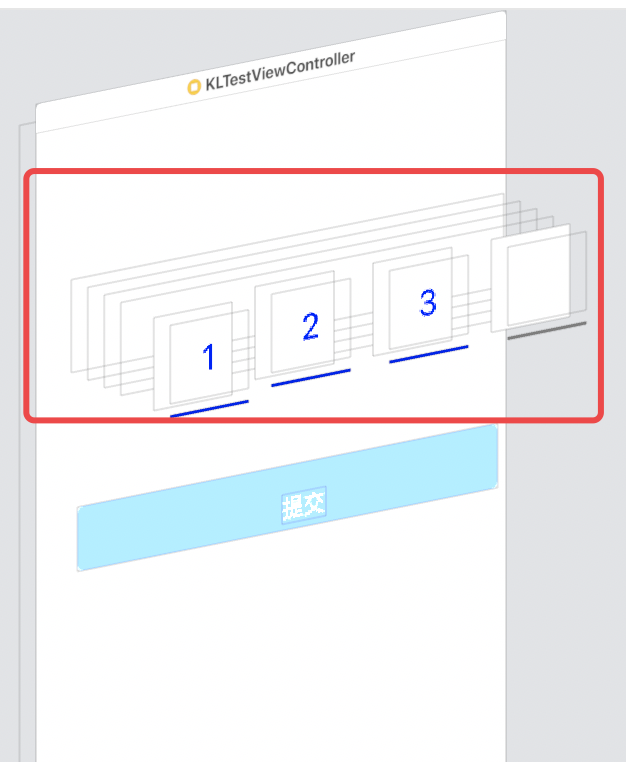
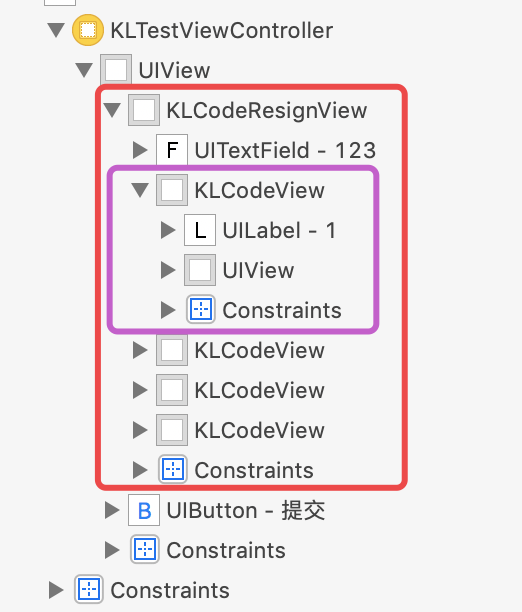
验证码输入视图(KLCodeResignView)的最底层用一个透明的UITextField来接收键盘的输入信息,上面则用4个展示视图(KLCodeView)来分别展示输入的验证码信息,所有的展示视图(KLCodeView)都放在一个数组中,方便后续的访问和调用。所以,KLCodeResignView应该向外提供两个处理入口,验证码输入完成和输入未完成时的操作入口,并在完成时提供输入验证码信息,这里我们采用block的方式进行向外提供操作入口。此外,我们还提供了一个可以修改验证码位数的入口,调用 initWithCodeBits: 即可设置验证码的位数。KLCodeResignView.h以及KLCodeResignView分类的代码如下:
#import <UIKit/UIKit.h>

NS_ASSUME_NONNULL_BEGIN

typedef void (^CodeResignCompleted)(NSString *content);

typedef void (^CodeResignUnCompleted)(NSString *content);

@interface KLCodeResignView : UIView

@property (copy, nonatomic) CodeResignCompleted codeResignCompleted;

@property (copy, nonatomic) CodeResignUnCompleted codeResignUnCompleted;

- (instancetype) initWithCodeBits:(NSInteger)codeBits;

@end
@interface KLCodeResignView () <UITextFieldDelegate>

@property (strong, nonatomic) UITextField *contentF; //监听内容输入

@property (strong, nonatomic) NSArray<KLCodeView *> *codeViewsArr;//展示验证码内容的codeView数组

@property (assign, nonatomic) NSInteger currIndex;//当前待输入的codeView的下标

@property (assign, nonatomic) NSInteger codeBits;//位数

@end
2 注意点
2.1 信息输入框UITextField
信息输入框UITextField是最重要的一部分,布局在KLCodeResignView的最底层,主要作用是用于接收验证码的输入,但是对应的光标肯定是不能显示出来的,而且该UITextField不能进行复制、粘贴、选择等操作。所以信息输入框contentF的配置如下:
- (UITextField *)contentF {

    if (!_contentF) {

        _contentF = [[UITextField alloc] init];

        //背景颜色和字体颜色都设置为透明的,这样在界面上就看不到

        _contentF.backgroundColor = [UIColor clearColor];

        _contentF.textColor = [UIColor clearColor];

        _contentF.keyboardType = UIKeyboardTypeNumberPad;//数字键盘

        _contentF.returnKeyType = UIReturnKeyDone;//完成

        _contentF.tintColor = [UIColor clearColor];//设置光标的颜色

        _contentF.delegate = self;

    }

    return _contentF;

}
最后,我们通过添加UITextField的分类来实现屏蔽复制、粘贴、选择等操作,其实这些都是在UITextField的 - (BOOL)canPerformAction:(SEL)action withSender:(id)sender 进行控制的,返回YES则允许,否则不允许,所以这里我们不管什么操作,全部返回NO,这就屏蔽了所有的操作。
@implementation UITextField (ForbiddenSelect)

/*

 该函数控制是否允许 选择 全选 剪切 f粘贴等功能,可以针对不同功能进行限制

 返回YES表示允许对应的功能,返回NO则表示不允许对应的功能

 直接返回NO则表示不允许任何编辑

 */

- (BOOL)canPerformAction:(SEL)action withSender:(id)sender {

    return NO;

}

@end
2.2 展示视图(KLCodeView)
展示视图(KLCodeView)就很简单了,布局就是一个UILabel在上面,最下面一个UIView的下划线,唯一需要考虑的点就是下划线的颜色问题,如何根据是否有内容进行颜色变化。这个问题的解决也很简单,因为这个 UILabel的内容是通过一个属性text来进行设置的,所以我们重写text的设置方法就OK了,当设置的text内容不为空时,我们就设置对应的颜色为需要的颜色(蓝色),否则设置为灰色。
- (void)setText:(NSString *)text {

    if (text.length > ) {//有数据时设置为蓝色

        self.codeLabel.text = [text substringToIndex:];//只取一位数

        self.lineView.backgroundColor = [UIColor blueColor];

    } else {

        self.codeLabel.text = @"";

        self.lineView.backgroundColor = [UIColor grayColor];

    }

}
2.3 输入逻辑处理
输入处理逻辑就是在输入和删除时进内容进行判断,并将对应的内容显示到对应的展示视图(KLCodeView)中,内容的输入就都在UITextField的代理UITextFieldDelegate中的 - (BOOL)textField: shouldChangeCharactersInRange: replacementString: 方法中。
- 我们用属性currIndex来表示当前待输入的展示视图KLCodeView的下标,所以,当输入一个合法的验证码时,currIndex要加1,当删除一个验证码时,currIndex要减1,并且当currIndex == 0时,删除按钮不起作用,currIndex不再减1了。
- 如果在验证码输入完成和未完成时做不同的处理,通过我们前面提供的两个block codeResignCompleted 和 codeResignUnCompleted 就可以了,我们再这里通过判断currIndex 是否等于 self.codeBits,相等则完成,否则没有完成,并且调用对应的block进行处理。
- 对输入内容进行判断是否是纯数字,这个很简单,判断方法网上有很多方案,这里也简单地贴在下面的代码中。
- 对输入的字符串的长度进行判断,如果超过当前位数,则输入无效。
- 完成、删除操作的判断一定要在是否是纯数字以及位数过长判断之前,否则可能会导致完成、删除操作失效。
#pragma mark --- UITextField delegate

- (BOOL)textField:(UITextField *)textField shouldChangeCharactersInRange:(NSRange)range replacementString:(NSString *)string {

    //完成 则收回键盘

    if ([string isEqualToString:@"\n"]) {

        [textField resignFirstResponder];

        return NO;

    }

    //删除 操作

    if ([string isEqualToString:@""]) {

        if (self.currIndex == ) {//待输入的下标为0时 删除时下标不变化,否则下标减1

            self.codeViewsArr[self.currIndex].text = string;

        } else {

            self.codeViewsArr[--self.currIndex].text = string;

            if (self.codeResignUnCompleted) {

                NSString *content = [textField.text substringToIndex:self.currIndex];

                self.codeResignUnCompleted(content);

            }

        }

        return YES;

    }

    //判断 输入的是否是纯数字,不是纯数字 输入无效

    if (![self judgePureInt:string]) {

        return NO;

    }

    //如果输入的内容超过了验证码的长度 则输入无效

    if ((textField.text.length + string.length) > self.codeBits) {

        return NO;

    }

    //输入的数字,则当前待输入的下标对应的 view中添加输入的数字,并且下标加1

    self.codeViewsArr[self.currIndex++].text = string;

    //当当前待输入的下标为codebits时表示已经输入了对应位数的验证码,执行完成操作

    if (self.currIndex == self.codeBits && self.codeResignCompleted) {

        NSString *content = [NSString stringWithFormat:@"%@%@", textField.text, string];

        self.codeResignCompleted(content);

    } else {

        if (self.codeResignUnCompleted) {

            NSString *content = [NSString stringWithFormat:@"%@%@", textField.text, string];

            self.codeResignUnCompleted(content);

        }

    }

    return YES;

}
//判断一个字符串是都是纯数字

- (BOOL)judgePureInt:(NSString *)content {

    NSScanner *scan = [NSScanner scannerWithString:content];

    int val;

    return [scan scanInt:&val] && [scan isAtEnd];

}
3 使用
使用时只需要创建对应的View进行布局就OK了,然后设置验证码输入完成和验证码输入未完成对应的处理方案。
- (void)viewDidLoad {

    [super viewDidLoad];

    self.view.backgroundColor = [UIColor whiteColor];

    WEAKSELF

    KLCodeResignView *codeView = [[KLCodeResignView alloc] initWithCodeBits:];

    codeView.codeResignCompleted = ^(NSString * _Nonnull content) {

        //对应位数输入完成时 允许提交按钮有效 允许提交

        NSLog(@"%@", content);

        weakSelf.submitBtn.enabled = YES;

        weakSelf.submitBtn.alpha = 1.0f;

    };

    codeView.codeResignUnCompleted = ^(NSString * _Nonnull content) {

        //对应位数未输入完成时 提交按钮失效 不允许提交

        weakSelf.submitBtn.enabled = NO;

        weakSelf.submitBtn.alpha = 0.5f;

    };

    [self.view addSubview:codeView];

    [codeView mas_makeConstraints:^(MASConstraintMaker *make) {

        make.left.mas_equalTo(weakSelf.view).mas_offset(15.0f);

        make.right.mas_equalTo(weakSelf.view).mas_offset(-15.0f);

        make.top.mas_equalTo(weakSelf.view).mas_offset(100.0f);

        make.height.mas_equalTo(40.0f);

    }];

    _submitBtn = [UIButton buttonWithType:UIButtonTypeCustom];

    _submitBtn.titleLabel.font = FONT(17.0f);

    [_submitBtn setTitle:@"提交" forState:UIControlStateNormal];

    [_submitBtn setTitleColor:[UIColor whiteColor] forState:UIControlStateNormal];

    [_submitBtn setBackgroundColor:XRGB(3d,9a,e8)];

    _submitBtn.enabled = NO;

    _submitBtn.alpha = 0.5f;

    _submitBtn.layer.cornerRadius = 5.0f;

//    [submitBtn addTarget:self action:@selector(submitBtnClicked:) forControlEvents:UIControlEventTouchUpInside];

    [self.view addSubview:_submitBtn];

    [_submitBtn mas_makeConstraints:^(MASConstraintMaker *make) {

        make.left.mas_equalTo(weakSelf.view).mas_offset(20.0f);

        make.right.mas_equalTo(weakSelf.view).mas_offset(-20.0f);

        make.top.mas_equalTo(weakSelf.view).mas_offset(260.0f);

        make.height.mas_equalTo(45.0f);

    }];

}
所有的代码如下,主要分为两个文件,一个 KLCodeResignView.h,一个KLCodeResignView.m,如下:
#import <UIKit/UIKit.h>

NS_ASSUME_NONNULL_BEGIN

typedef void (^CodeResignCompleted)(NSString *content);

typedef void (^CodeResignUnCompleted)(NSString *content);

@interface KLCodeResignView : UIView

@property (copy, nonatomic) CodeResignCompleted codeResignCompleted;

@property (copy, nonatomic) CodeResignUnCompleted codeResignUnCompleted;

- (instancetype) initWithCodeBits:(NSInteger)codeBits;

@end
KLCodeResignView.h
#import "KLCodeResignView.h"

#define WEAKSELF typeof(self) __weak weakSelf = self;

//自定义 验证码展示视图 view,由一个label和一个下划线组成

@interface KLCodeView : UIView

@property (strong, nonatomic) NSString *text;

@property (strong, nonatomic) UILabel *codeLabel;

@property (strong, nonatomic) UIView *lineView;

@end

@interface KLCodeResignView () <UITextFieldDelegate>

@property (strong, nonatomic) UITextField *contentF; //监听内容输入

@property (strong, nonatomic) NSArray<KLCodeView *> *codeViewsArr;//显示输入内容的codeView数组

@property (assign, nonatomic) NSInteger currIndex;//当前待输入的codeView的下标

@property (assign, nonatomic) NSInteger codeBits;//位数

@end

@implementation KLCodeResignView

- (instancetype)initWithCodeBits:(NSInteger)codeBits {

    self = [super init];

    self.backgroundColor = [UIColor whiteColor];

    self.codeBits = codeBits;

    if (self) {

        //验证码默认是4位

        if (self.codeBits < ) {

            self.codeBits = ;

        }

        WEAKSELF

        [self addSubview:self.contentF];

        [self.contentF mas_makeConstraints:^(MASConstraintMaker *make) {

            make.top.bottom.right.left.mas_equalTo(weakSelf).mas_offset(0.0f);

        }];

        for(NSInteger i = ; i < self.codeBits; i++) {

            KLCodeView *codeView = self.codeViewsArr[i];

            [self addSubview:codeView];

        }

    }

    return self;

}

- (void)layoutSubviews {

    [super layoutSubviews];

    WEAKSELF

    //设定每个数字之间的间距为数字view宽度的一半 总宽度就是 bits + (bits - 1)* 0.5

    CGFloat codeViewWidth = self.bounds.size.width/(self.codeBits * 1.5 - 0.5);

    for(NSInteger i = ; i < self.codeBits; i++) {

        KLCodeView *codeView = self.codeViewsArr[i];

        [codeView mas_updateConstraints:^(MASConstraintMaker *make) {

            CGFloat left = codeViewWidth * 1.5 * i;

            make.left.mas_equalTo(weakSelf).mas_offset(left);

            make.top.bottom.mas_equalTo(weakSelf).mas_offset(0.0f);

            make.width.mas_equalTo(codeViewWidth);

        }];

    }

}

#pragma mark --- UITextField delegate

- (BOOL)textField:(UITextField *)textField shouldChangeCharactersInRange:(NSRange)range replacementString:(NSString *)string {

    //完成 则收回键盘

    if ([string isEqualToString:@"\n"]) {

        [textField resignFirstResponder];

        return NO;

    }

    //删除 操作

    if ([string isEqualToString:@""]) {

        if (self.currIndex == ) {//待输入的下标为0时 删除时下标不变化,否则下标减1

            self.codeViewsArr[self.currIndex].text = string;

        } else {

            self.codeViewsArr[--self.currIndex].text = string;

            if (self.codeResignUnCompleted) {

                NSString *content = [textField.text substringToIndex:self.currIndex];

                self.codeResignUnCompleted(content);

            }

        }

        return YES;

    }

    //判断 输入的是否是纯数字,不是纯数字 输入无效

    if (![self judgePureInt:string]) {

        return NO;

    }

    //如果输入的内容超过了验证码的长度 则输入无效

    if ((textField.text.length + string.length) > self.codeBits) {

        return NO;

    }

    //输入的数字,则当前待输入的下标对应的 view中添加输入的数字,并且下标加1

    self.codeViewsArr[self.currIndex++].text = string;

    //当当前待输入的下标为codebits时表示已经输入了对应位数的验证码,执行完成操作

    if (self.currIndex == self.codeBits && self.codeResignCompleted) {

        NSString *content = [NSString stringWithFormat:@"%@%@", textField.text, string];

        self.codeResignCompleted(content);

    } else {

        if (self.codeResignUnCompleted) {

            NSString *content = [NSString stringWithFormat:@"%@%@", textField.text, string];

            self.codeResignUnCompleted(content);

        }

    }

    return YES;

}

- (UITextField *)contentF {

    if (!_contentF) {

        _contentF = [[UITextField alloc] init];

        //背景颜色和字体颜色都设置为透明的,这样在界面上就看不到

        _contentF.backgroundColor = [UIColor clearColor];

        _contentF.textColor = [UIColor clearColor];

        _contentF.keyboardType = UIKeyboardTypeNumberPad;//数字键盘

        _contentF.returnKeyType = UIReturnKeyDone;//完成

        _contentF.tintColor = [UIColor clearColor];//设置光标的颜色

        _contentF.delegate = self;

    }

    return _contentF;

}

- (NSArray<KLCodeView *> *)codeViewsArr {

    if (!_codeViewsArr) {

        NSMutableArray *arr = [NSMutableArray array];

        for (NSInteger i = ; i < self.codeBits; i++) {

            KLCodeView *codeView = [[KLCodeView alloc] init];

            [arr addObject:codeView];

        }

        _codeViewsArr = [NSArray arrayWithArray:arr];

    }

    return _codeViewsArr;

}

//判断一个字符串是都是纯数字

- (BOOL)judgePureInt:(NSString *)content {

    NSScanner *scan = [NSScanner scannerWithString:content];

    int val;

    return [scan scanInt:&val] && [scan isAtEnd];

}

@end

@implementation UITextField (ForbiddenSelect)

/*

 该函数控制是否允许 选择 全选 剪切 f粘贴等功能,可以针对不同功能进行限制

 返回YES表示允许对应的功能,返回NO则表示不允许对应的功能

 直接返回NO则表示不允许任何编辑

 */

- (BOOL)canPerformAction:(SEL)action withSender:(id)sender {

    return NO;

}

@end

//验证码展示视图 的实现

@implementation KLCodeView

- (instancetype)initWithFrame:(CGRect)frame {

    self = [super initWithFrame:frame];

    if (self) {

        WEAKSELF

        self.backgroundColor = [UIColor whiteColor];

        self.userInteractionEnabled = NO;

        //数字编码 label

        _codeLabel = [[UILabel alloc] init];

        _codeLabel.textColor = [UIColor blueColor];

        _codeLabel.font = FONT(25.0f);

        _codeLabel.textAlignment = NSTextAlignmentCenter;

        [self addSubview:_codeLabel];

        [_codeLabel mas_makeConstraints:^(MASConstraintMaker *make) {

            make.top.left.right.mas_equalTo(weakSelf).mas_offset(0.0f);

            make.bottom.mas_equalTo(weakSelf).mas_offset(-10.0f);

        }];

        _lineView = [[UIView alloc] init];

        _lineView.backgroundColor = [UIColor grayColor];

        [self addSubview:_lineView];

        [_lineView mas_makeConstraints:^(MASConstraintMaker *make) {

            make.bottom.left.right.mas_equalTo(weakSelf).mas_offset(0.0f);

            make.height.mas_equalTo(2.0f);

        }];

    }

    return self;

}

- (void)setText:(NSString *)text {

    if (text.length > ) {

        self.codeLabel.text = [text substringToIndex:];

        self.lineView.backgroundColor = [UIColor blueColor];

    } else {

        self.codeLabel.text = @"";

        self.lineView.backgroundColor = [UIColor grayColor];

    }

}

@end
KLCodeResignView.m
iOS学习——输入验证码界面封装的更多相关文章
- iOS学习路线图
一.iOS学习路线图 二.iOS学习路线图--视频篇 阶 段 学完后目标 知识点 配套学习资源(笔记+源码+PPT) 密码 基础阶段 学习周期:24天 学习后目标: ...
- iOS学习笔记-精华整理
iOS学习笔记总结整理 一.内存管理情况 1- autorelease,当用户的代码在持续运行时,自动释放池是不会被销毁的,这段时间内用户可以安全地使用自动释放的对象.当用户的代码运行告一段 落,开始 ...
- iOS学习笔记总结整理
来源:http://mobile.51cto.com/iphone-386851_all.htm 学习IOS开发这对于一个初学者来说,是一件非常挠头的事情.其实学习IOS开发无外乎平时的积累与总结.下 ...
- iOS本地动态验证码生成-b
用于ios本地动态生成验证码,效果如下: demo.gif 导入CoreGraphics.framework用于绘制图形 封装UIView,便捷使用,代码如下: AuthcodeView.h #imp ...
- 黑苹果-IOS学习的开始
深知安装黑苹果的不易,在这里写一下关于我的Thinkpad E430c安装黑苹果教程(Mac版本:Yosemite 10.10.4),希望能够帮助有需要的朋友. 首先贴上我的电脑配置报表: ----- ...
- 【原】iOS学习之SQLite和CoreData数据库的比较
1. SQLite数据库 sqlite数据库操作的基本流程是, 创建数据库, 再通过定义一些字段来定义表格结构, 可以利用sql语句向表格中插入记录, 删除记录, 修改记录, 表格之间也可以建立联系. ...
- IOS学习笔记25—HTTP操作之ASIHTTPRequest
IOS学习笔记25—HTTP操作之ASIHTTPRequest 分类: iOS2012-08-12 10:04 7734人阅读 评论(3) 收藏 举报 iosios5网络wrapper框架新浪微博 A ...
- iOS 生成本地验证码
在应用程序注册.登陆或者有关支付确认的界面,经常会用到验证码,验证码有的是通过手机发送获取的,有的是在本地点击获取的,通过手机发送获取的动态验证码可以使用第三方类库实现,本地点击获取的是在本地自己绘制 ...
- ios学习-delegate、传值、跳转页面
ios学习-delegate.传值.跳转页面 1.打开xcode,然后选择ios--Application--Empty Application一个空项目. 项目目录: 2.输入项目名称以及选 ...
随机推荐
- [原创]全新IFPGA-Cable----支持Xilinx/Altera/Lattice JTAG和UART
Xilinx 平台:ISE 14.7/Vivado 2014.4+: Lattice 平台:Diamond软件自动识别,免驱动: Altera 平台:安装相关插件,支持: 串 ...
- Flink on yarn的配置及执行
1. 写在前面 Flink被誉为第四代大数据计算引擎组件,即可以用作基于离线分布式计算,也可以应用于实时计算.Flink可以自己搭建集群模式已提供为庞大数据的计算.但在实际应用中.都是计算hdfs上的 ...
- Java新手问题集锦
Java是目前最流行的编程语言之一——它可以用来编写Windows程序或者是Web应用,移动应用,网络程序,消费电子产品,机顶盒设备,它无处不在. 有超过30亿的设备是运行在Java之上的.根据Ora ...
- Liunx系统下的进程与线程
1. 进程.线程的概念 a. 进程是操作系统进行资源分配的单位. b. 线程(Thread)是程序中独立的指令流,是CPU调度和分派的基本单位. c. 多进程是指同时运行多种 ...
- pyzmq学习笔记
前言 使用过简单的python的ZMQ:server开启3个线程,client发送心跳包,如果服务端超过n秒没应答,则重新连接. 网上找的案例,server使用的zmq.device,但是一直不明白什 ...
- Android- APP 秒开
Android- APP 秒开 1. 启动APP 时白屏或者黑屏 现象:当启动APP 时,会有一个白屏或者黑屏一闪而过,然后才会显示出主界面. 这是因为,我们新打开一个应用,系统会为这个应用创建一个进 ...
- Codechef April Challenge 2019 游记
Codechef April Challenge 2019 游记 Subtree Removal 题目大意: 一棵\(n(n\le10^5)\)个结点的有根树,每个结点有一个权值\(w_i(|w_i\ ...
- Unity-批量修改Prefab上的属性
问题描述:今天发现工程中有些prefab上的脚本丢失了一些引用,本以为手动拖拽上去搞定,后来查看其它prefab,也有类似的问题,于是写了一个小工具,批量修改下. 上代码: [ExecuteInEdi ...
- margin相关属性值
1.图片与文字对齐问题 图片与文字默认是居底对齐.一般img标签打头的小图标与文字对齐的话,通过 img{margin:0 3px -3px 0;} 这个的东西,能实现效果和兼容性俱佳的对齐效果: d ...
- 创建多线程的方式:继承Thread类和实现Runnable接口
1.通过继承Thread类的方式创建多线程(这里只是简单的代码演示创建多线程的方法) package com.baozi.exer; public class ThreadDemo { public ...